Function to export list of entires that contains a compromised passwords
Function to export list of entires that contains a compromised passwords
0 vote

Hello,
The Entry Security Analyzer function got a great function to show entries with a password that is compromised(PWNED).
However that function is very slow when you have a large number of entries and there is no way to sort the list and resize the window.
A great feature would be to in priority order:
A) Have a function to export the list (without the current password offcource)
B) Have a widget in the dashboard like there is now for expired entries
C) Have a way to automate the export, like sent the list by mail each week or so ( maybe by schedule a powershell script).
All Comments (3)
Hello,
For your first point, in the Entry Security Analyzer you should be able to right click and export to a few different formats. Did you try this feature? If this doesn't work for you, could you tell us what is missing? Similarly to that, for your third point, we have a way to export reports by command line, so you could schedule a powershell script as you mention, and it could export this regularly. Here's our help topic on the subject: https://docs.devolutions.net/rdm/windows/commands/administration/reports/export/
Regards,
Hubert Mireault
Hello,
For your first point, in the Entry Security Analyzer you should be able to right click and export to a few different formats. Did you try this feature? If this doesn't work for you, could you tell us what is missing?
Didn't knew about this option, however i just tried but it a csv with not all the information. Get a lot of empty lines and only shows some data from what it looks like it had in buffer. If this works i am already very happy. Don;t know why support pointed me into this direction, they suggested a feature request.
Similarly to that, for your third point, we have a way to export reports by command line, so you could schedule a powershell script as you mention, and it could export this regularly. Here's our help topic on the subject: https://docs.devolutions.net/rdm/windows/commands/administration/reports/export/
I don't see information about compromised passwords in the documentation.
Regards,
Hello,
From testing on my end, here is what I get in the Entry Security Analyzer in my test vault: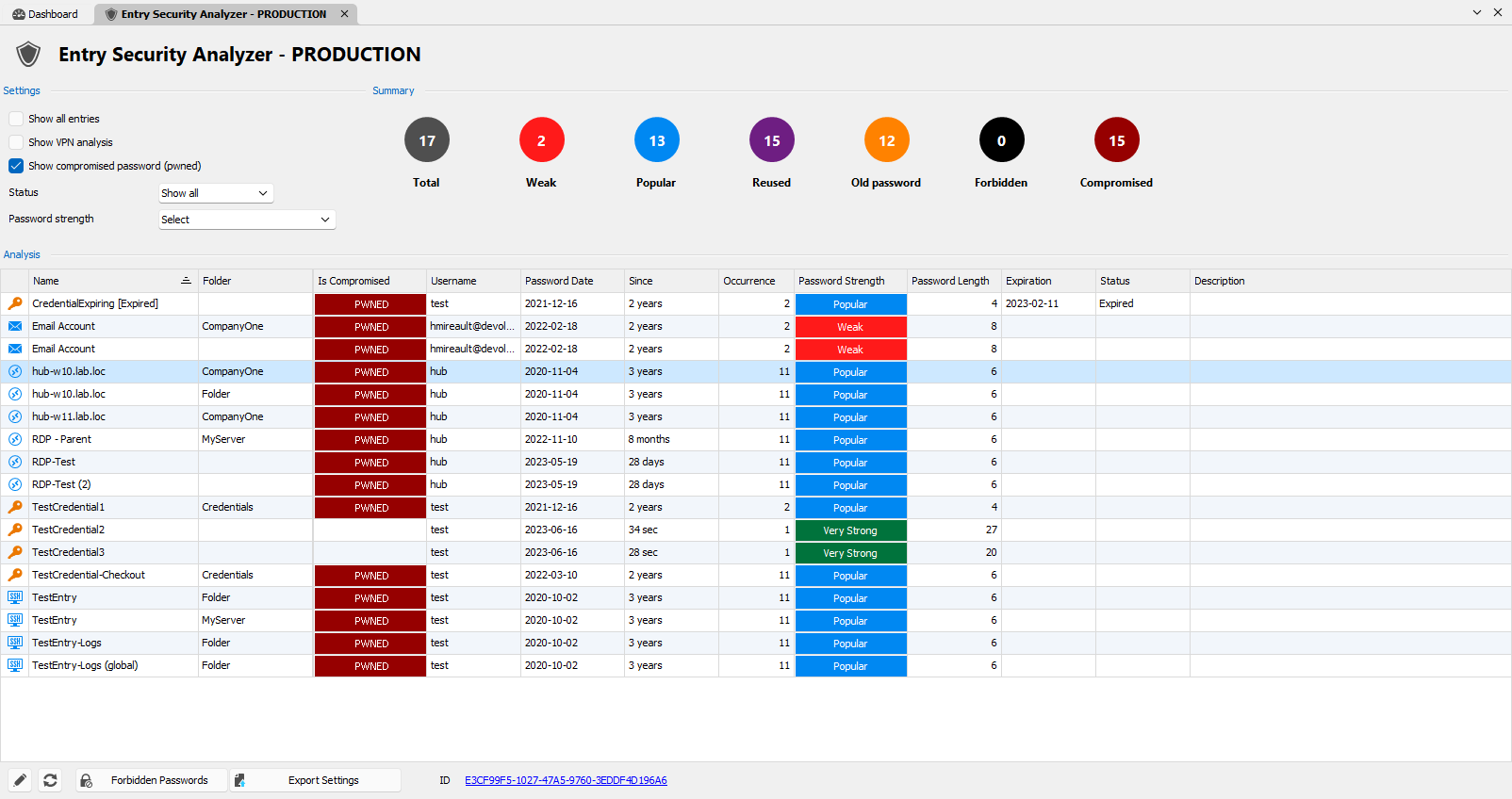
Then here is what the resulting CSV is, viewed within Excel: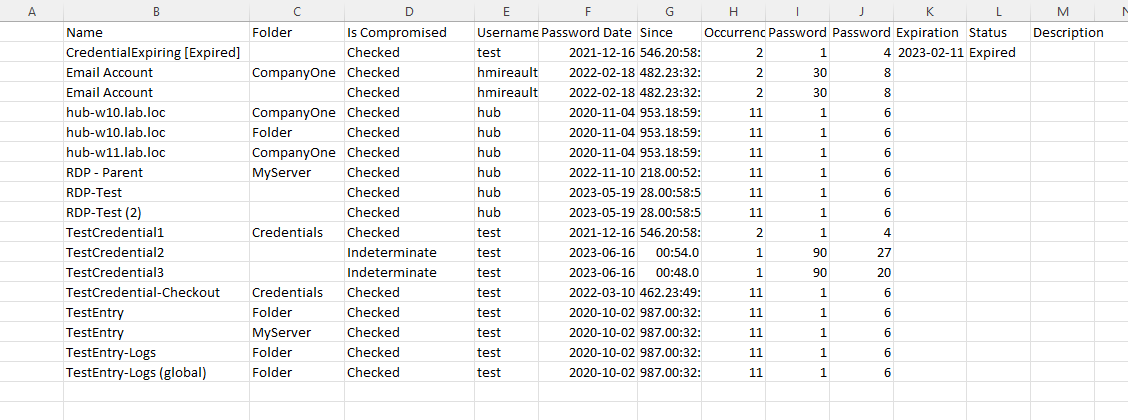
The two things I notice immediately is:
- The Is Compromised column isn't very clear. "Checked" and "Indeterminate" in this case are "PWNED" and <Blank> respectively.
- The Password Strength column only shows numbers, and not words like "Weak", "Strong", etc.
These two points should definitely be improved and we will open a ticket for that.
Do you see the same thing on your end, or do you see something different?
For the export through the command line, the help topic shows how to do it but here are the steps specifically for the Entry Security Analyzer:
- In RDM, open the Entry Security Analyzer with the settings you want. For example, make sure to check the "show compromised passwords" checkbox
- Click "Export settings" at the bottom, and select the export method you want. Then, save the file, which will be a .RDR file, on your computer
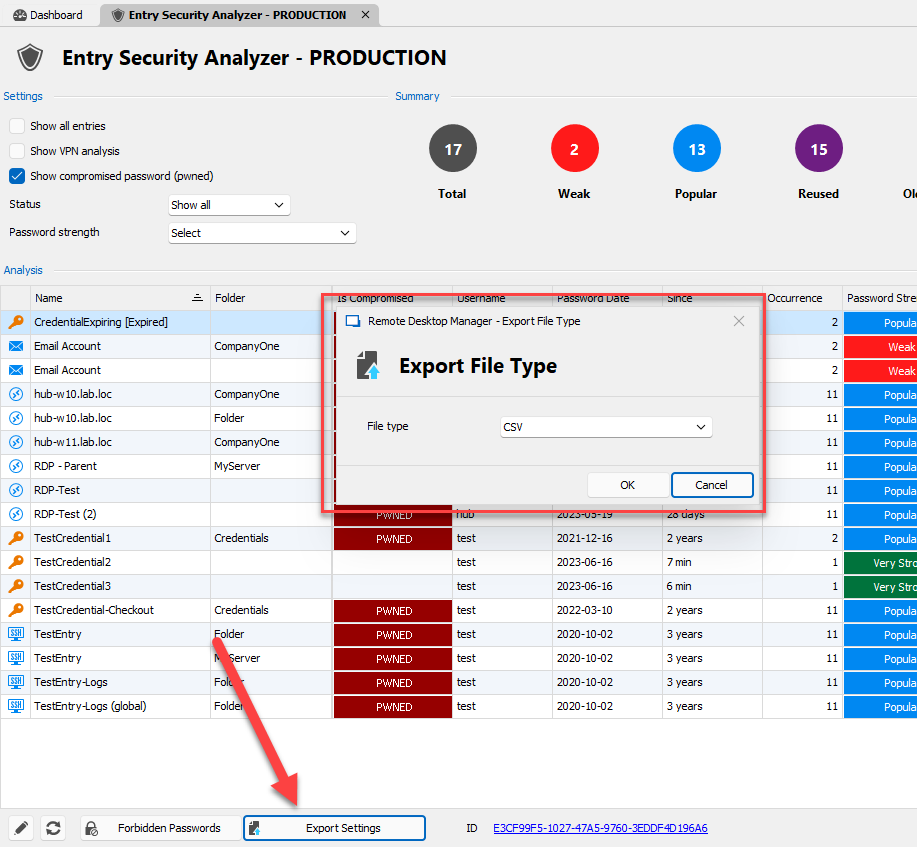
The RDR file's content should look something like this: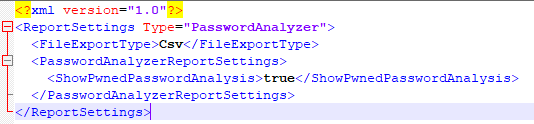
3. Close RDM
4. Like mentionned on the help topic, run the following command line, replacing the parameters with the ones you need:
C:\*** /DataSource:*** /report:***/reportoutput:"***" /reportsettings:"***.rdr"
In your case it would be something like this
<PATH TO RemoteDesktopManager.exe> /DataSource:<YOUR DATASOURCE ID> /report:e3cf99f5-1027-47a5-9760-3eddf4d196a6 /reportoutput:"<OUTPUT FILE PATH>" /reportsettings:"<RDR FILE COMPLETE PATH>"
The result of running this command line will be that RDM will open, open the entry security analyzer, and export its contents to the output file. If you add the "/close" switch at the end of the command, RDM should also close automatically after the export.
Let me know if that helps!
Regards,
Hubert Mireault
27a9c2e2-ccbf-4784-a73a-29e62e3f3a6a.png
44438f61-a950-406d-8dd8-f5e5130a0aec.png
0c57fa54-dfa1-400e-977c-1f9d7c09f2b3.png
1bc65536-29cf-4bbe-a9fb-206bc9c07a94.png