LB Kemp autofill not working

Hello,
I'm trying to configure autofill on a Kemp LoadMaster LTSF load balancer, but the entry is not filling in the login fields as expected.
The device is a Kemp LoadMaster LTSF, and below is the relevant HTML code from the login page:
<table class="tab tabtab">
<tbody><tr><td class="lefttd">User</td>
<td class="righttd"><input class="Focus" id="xuser" type="text" name="user" maxlength="64" tabindex="1" autocomplete="off"
<input type="submit" id="xsub" name="logsub" value="Login" tabindex="3"></td>
</tr>
<tr><td class="lefttd">Password</td>
<td class="righttd"><input type="password" autocomplete="off" id="xpass" name="pass" maxlength="64" tabindex="2"
</tr>
</tbody></table>
Below are the settings I have configured in the entry.
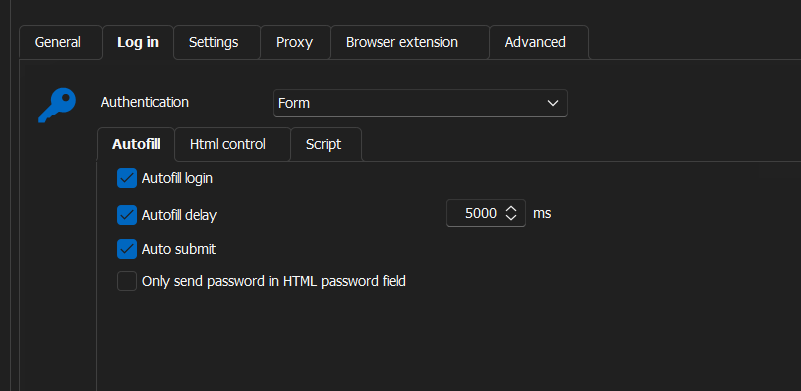
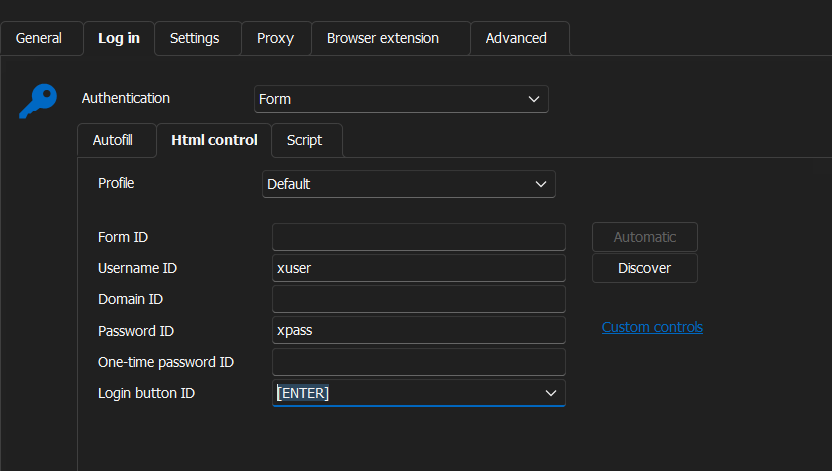
Can you help?
All Comments (5)
Hello,
Thank you for reaching out regarding this matter.
I recommend trying the Discover button located under Log in > Autofill, as it may help identify the issue.
Please note that for the best results, the web entry should remain active while using the Discover button.
Let me know if this helps!
Best regards,
Jacob Lafrenière