Export of the result from the password analyser

Hi.
We have been looking for a way to do an export of the results form the password analyser in a way so that our security team can analyse it.
I have tried to do it following the instructions in this thread: https://forum.devolutions.net/topics/39639/function-to-export-list-of-entires-that-contains-a-compromised-passwords but in the report exported, the information that the password was compromised doesn´t appear.
Can you suggest another way to do it?
Thanks
All Comments (3)
Hello,
Are you exporting this report through the command line? If that is the case, did you make sure to point to an RDR file containing the necessary information for your report? Without the RDR file, RDM will not be able to know whether to show the "is compromised" column or not. What does your output look like?
Regards,
Hubert Mireault
Hello.
Yes, we exported the RDR file and referenced it on the command.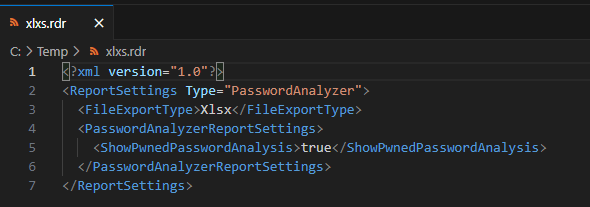
The command:
"C:\Program Files\Devolutions\Remote Desktop Manager\RemoteDesktopManager.exe" /DataSource:********** /report:************ /reportoutput:"C:\Temp\report" /reportsettings:"C:\Temp\xlxs.rdr"
ba75e063-4b94-440e-8a90-b685fa8a68ca.png
Thank you for the additional information. We will investigate and look for a fix. I have opened a ticket.
Regards,
Hubert Mireault