
Yannick Leblanc
Shareable RDM Database
Hello aguzzi1,
That's something that is already possible with our products, we got 2 options for workspaces: Cloud and Server.
Both offer a way to share the entries and data used by RDM, but both need a Remote Desktop Management & IT Operation licence assigned to your user. Our prices are available here: https://store.devolutions.net/package
If you're curious and you would like to see a demo of the team features this enables, let me know and I'll open a case on your behalf so a specialist can showcase this for you.
Best regards,
Prompt with list of PAM vault entries
Hi rderousseau.
Thank you for your addition to this discussion.
I've noted in the internal ticket that you also wanted that feature.
Best regards,
Prompt with list of PAM vault entries
hi bwright,
Sorry, I missed that part.
Thank you for making the feature request! We've opened a ticket internally and we'll report back here when we have news.
Best regards,
Prompt with list of PAM vault entries
Hi bwright,
Thank you for reaching out!
I assume you use Devolutions Server as the data source, right? If you do, it is already possible, here's the method I use:
Create a "DVLS privileged account"
Give it a name
Add the server url to be your DVLS URL
(optionally) check either "Use 'My account settings'" or "Use Windows Authentication".
If you use the "My account settings" and all your users are using this entry, it'll always refer to their own setting configured in there.
If you don't use "My account settings", configure your Username
Finally, check "Always prompt with list"
Once the entry is created, you can link it to your session; when you launch it, it will result in RDM showing you all the PAM vaults and credentials you have access to.
Let me know if it works for you!
Knocking port
Hi Fabrice,
Glad it works!
don't hesitate if you have anything else!
I'll also move this thread to the RDM section!
Best regards,
Knocking port
Hi Fabrice,
Thank you for reaching out!
It is indeed possible to run script before/after open/close of a session.
But there is also a Port knocking function to do exactly that. To do so, go in the properties of an entry > Events
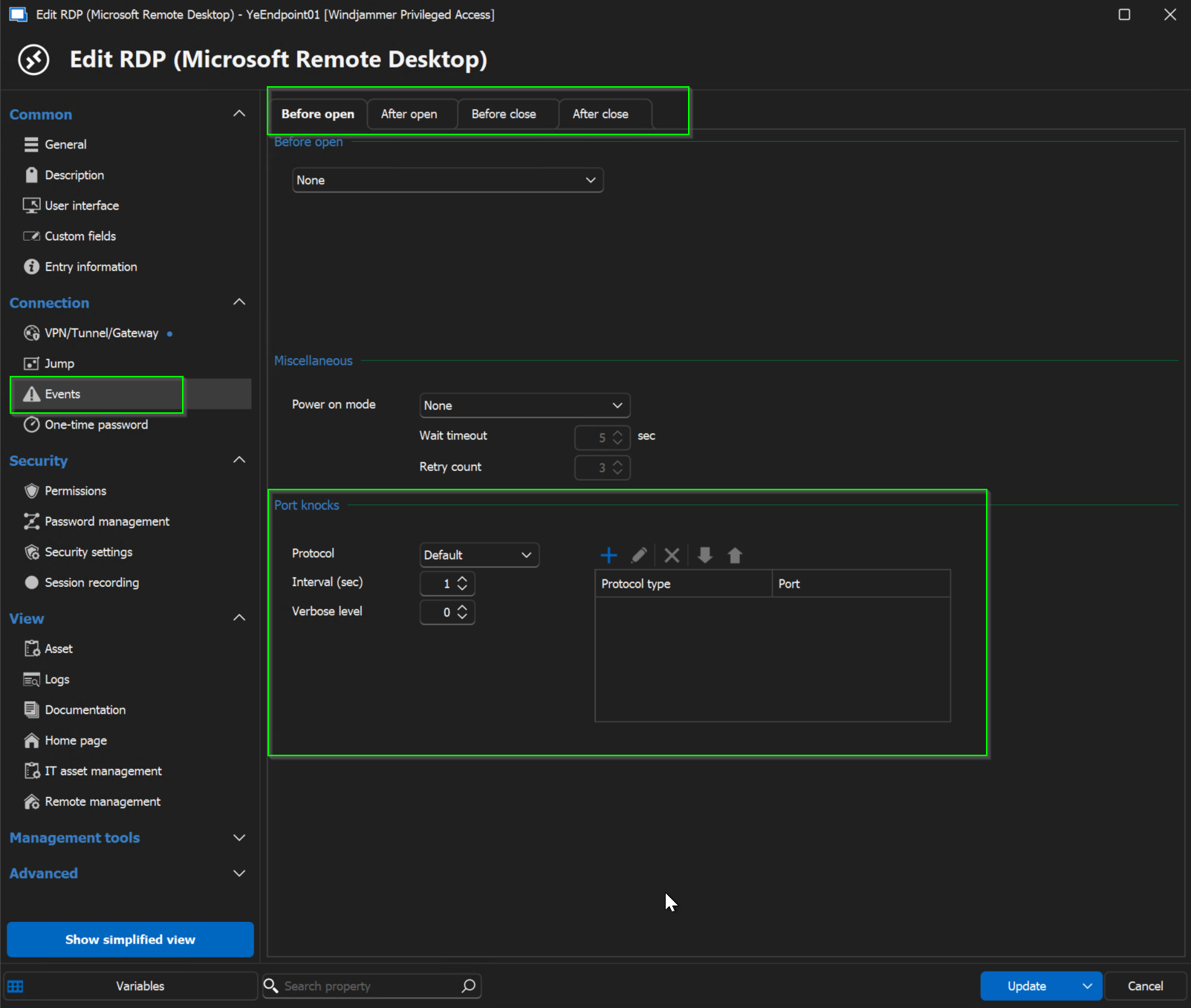
Let me know if it answers your question!
Best regards,
Yannick Leblanc
Devolutions Academy webcast
Hi Scott,
The webinar around the Devolutions Force and the Devolutions Academy was made available yesterday on our YouTube channel and can be found here: https://www.youtube.com/watch?v=LYE4ZorwOFU
Let us know if you have other questions about this!
Best regards,
Devolutions Academy webcast
Hi Scott!
Thanks for reaching out about this!
It will eventually be available and be shared on our blog, but I'll also make sure that I report back here when the recording is available!
I hope this answers your question and thank you for your interest in the Devolutions Academy!
Comparison between self-hosted based solution vs cloud based solution and recommendation.
Hello,
Also, to add to Maxime's post, keep in mind that we do offer product demos and live calls if you want to do a deeper dive.
Let us know if you're interested and we'll send you the informations to schedule a call.
Purpose of the Infrastructure Vault?
Hi Cazi,
Thank you for reaching out!
The Infrastructure Vault is meant to store the accounts used to run the Devolutions Server, if the Devolutions Server is set with SQL accounts.
It is used mainly to automatically rotate the password of the password on these accounts.
I'll get in touch with our Documentation team so that we create a documentation page.
I hope it answers your questions.
Best regards,
after upgrade to devolution server to 2023.3.4.0 en devolution gateway to 2023.3.0 i get a error on the devolution gateway
Hi Srdan,
You can upgrade the console without upgrading the instance, if you simply test and see if fixes the edit button.
Let us know if it works afterwards.
Best regards,
Link to PAM Account list
Hello,
Here's a workaround that could work for what you're trying to do:
Configure your account to login against the DVLS in File > My account settings > DVLS Privileged Account

Create a DVLS Privilege account credential with the URL of your DVLS and "Use "My Account Settings"" and "Always Prompt with list" checked

Link this credential to the entry using the "Linked (Vault)" credential type.

This will result in a prompt with all the PAM credentials that you can use.
Let us know if it works as a workaround.
Best regards,
Yannick Leblanc
Hint in RDM/web vault if an RDP Connection Entry was created by LDAPs Synchronizer
Hi Andreas,
Thank you for reaching out to us!
Something you could do that would be an easier fix would be to do the synchronizer based on a template. If you go in the settings of the LDAP sync, you do have the option to link it to a template.

If that template has a specific description, or informations in a custom field, it could help you to differentiate the two.
Let me know if it helps!
Best regards,
Devolutions Web Login Autofill OTP's
Hello,
It's already possible to autofill OTP with Devolutions Web Login. Please see the following article.
https://kb.devolutions.net/kb_rdm_dwl_otp.html
Let us know if that helps.
Best regards,
RDM 2022.3.x freezes (stuck at loading connections) when connecting or disconnecting from VPN
To follow up on this case with Sebastian, he managed to fix his issue by updating to the latest version of RDM Mac.
Best regards,
Yannick Leblanc
RDM 2022.3.x freezes (stuck at loading connections) when connecting or disconnecting from VPN
Hi Sebastian,
I notice from your screenshot that you are using 2022.3.9. Would it be possible for you to update to 2022.3.11 and see if it fixes it?
If it doesn't fix it, like my colleague said, we can take a look over a remote session and dig a bit deeper.
Best regards,
RDM Export/Import not working with master password
Hi Peter,
Glad you got it working! thanks for letting me know.
Have a great one!
Best regards,
Yannick Leblanc
RDM Export/Import not working with master password
Hello Peter,
Thank you for contacting us regarding this issue.
Which version of RDM are you using? Is it the same on both installations?
I tried to do it on my own RDM instance and was able to do it. The message seems to suggest it might just be a password problem (or keyboard entry method), especially if it works when you don't enter any.
Best regards,
Yannick Leblanc