Comparison between self-hosted based solution vs cloud based solution and recommendation.
Comparison between self-hosted based solution vs cloud based solution and recommendation.
0 vote

Could you please provide some genuine comparison between a self-hosted solution vs a cloud-based solution in PAM?
ChatGPT can
All Comments (31)
Hello Marthas,
Would you like a comparison between Hub Business's PAM module (cloud-based, immature; currently working on core features) and DVLS's PAM module (self-hosted, mature; currently working on advance features)? Or just in general?
Here's what ChatGPT had to say about your question:
The choice between self-hosted and cloud-based solutions depends primarily on your specific business needs, compliance requirements, and resources.
Self-hosted solutions are usually favored for their enhanced control over the data and the environment. They can be more customizable and may provide a higher level of security control, which is suitable for businesses with stringent regulatory and compliance requirements. However, they might involve significant upfront and ongoing maintenance costs.
On the other hand, cloud-based solutions offer flexibility and scalability without the need for substantial initial capital outlay. These solutions can provide excellent disaster recovery and rapid deployment capabilities. But, some organizations might have concerns about data sovereignty and evolving cloud security protocols.
In summary, if your organization has the capabilities to manage infrastructure and requires tight control over data, a self-hosted solution could be the way to go. But if you prefer a solution that scales easily and reduces the burden of managing complex IT infrastructure, then a cloud-based solution might be more appropriate.
Have a good day!
Maxime Morin
Thanks Maxime! I understand that GPT's response was pretty obvious and not what I was looking for. What I meant to ask was for the advantages and disadvantages of having a self-hosted solution versus a cloud-based one. Which option is most recommended when considering their features?
What is core features and advance features?
Also, In comparison to devolution severer, Does Devolutions Hub Business a built-in PAM module for monitoring and controlling privileged accounts? If not how does this feature work in Devolution Hub?
Hello Marthas,
As it stands, I would recommend using DVLS instead of Hub Business. With the current version of Hub Business (2024.1), you can only do password resets on Azure AD; no other providers are supported. Hub Business is missing core features such as discovery and propagation. DVLS has all those features and more such as session recordings, just-in-time privilege elevation, etc.
Have you checked our PAM product page? Devolutions PAM - Devolutions
To answer your last question, yes, Hub Business has a PAM module, it has to be self-hosted due to our zero knowledge on sensitive data.
Have a good day!
Maxime Morin
Hello,
Also, to add to Maxime's post, keep in mind that we do offer product demos and live calls if you want to do a deeper dive.
Let us know if you're interested and we'll send you the informations to schedule a call.
Thanks Guys! This is helpful
Hi Maxime, Can you be more specific on this line ", Hub Business has a PAM module, it has to be self-hosted due to our zero knowledge on sensitive data.?
Hi Marthas,
With Hub Business, Devolutions do not have access to your senstive data. Sensitive data such as passwords are encrypted with a key that is only on the client's side. For our PAM module to be able to reset passwords, the module needs to have access to the sensitive data. For that, the module has to be installed on a client's machine. (Self-hosted) That way, we still don't have access to your key on our servers, the module can reset passwords and save changes into your Hub Business database.
Have a good day!
Maxime Morin
Hi Maxime, One more question
In comparison I noticed Devolutions Server does support authentication via Active Directory where as in Devolutions Hub Business does not support this option. What else then we have option here?
Furthermore, in the cloud, what support is provided for remote access technologies like RDP, SSH, and the Active Directory web console? do we need to have a devolution gateway?
Hub Business supports Azure AD (Entra ID) and Okta for SSO authentication.
For remote access, you need to have RDM or Devolutions Launcher. Those two will allow you to start sessions locally on your computer. If you wish to start them via our web client, you also need a Devolutions Gateway. As it stands, we support RDP, SSH, Telnet and PowerShell via the browser.
Have a good day!
Maxime Morin
I have a couple more questions that might sound silly but just need to get a clear understanding
What if we have enterprise license for devolution server, RDM and PAM module. And we're at a crossroads between deploying devolution server platform between on-premises or in the cloud.
1. Can we deploy on cloud with above setup? if yes what is requirement?
2. Is there any specific difference? if can, you name few? (On premises or cloud)
3. who would be the cloud service provider Azure or AWS? And is it provided by your service provider, or do we need our own?
2. Is the devolution hub business (cloud) a separate service from what we currently have, requiring a separate license?
At the moment not looking to buy additional license if hub separate service.
Hello,
I am seeing in our ticketing system that you have an internal case opened with my team, in fact, it's with William and that a session is scheduled in a few days regarding Devolutions Server.
William will also handle the questions posted here during the session.
Best regards,
Jeff Dagenais
Thank you for responding! I've opened a ticket with those questions since I noticed his calendar is only open for next week. I'm seeking answers promptly. Any assistance in clearing these doubts would be greatly appreciated
Any updates?
Hello,
My team is looking at your questions and should be able to get back to you today regarding them.
Best regards,
Jeff Dagenais
Hello,
Here are the answers to the above questions:
1. Can we deploy on cloud with above setup? if yes what is requirement?
Yes you can deploy DVLS on an Azure or AWS cloud environment. The requirements are the same as those for deploying this on-premise.
2. Is there any specific difference? if can, you name few? (On premises or cloud)
The main difference would be the SQL database service available on a cloud service. When deployed internally, you need to have a SQL Server to host the SQL database.
3. who would be the cloud service provider Azure or AWS? And is it provided by your service provider, or do we need our own?
Both are supported. The SQL database can be hosted in Azure or AWS RDS. We do not provide any service on that end; it's your own subscription to those cloud services.
4. Is the devolution hub business (cloud) a separate service from what we currently have, requiring a separate license?
It's a separate service that requires a separate license.
Let us know if you have any more questions.
Best regards,
Érica Poirier
Thanks Erica, I appreciate your response.
I have some additional questions based on the above response:
- If we deploy DVLS server in cloud, Won't we need SQL server? If yes, can you be more specific?
- How would "compliance & regulatory" and "maintenance & update" requirement be look like?
- What about the data sharing1? Would there be any change? How would it share if DLVS deployed in the cloud versus internally?
- Would any other features affected such as authentication?
- Regarding RDM, along with end users, do we need to install it on DVLS server Cloud?
- What would be the setup for remote access technologies like RDP, SSH, and Active Directory web console in the cloud? If a devolution gateway is needed, would this pose a drawback for the cloud in comparison to an internal setup? Because Remote Desktop Manager can initiate various sessions using remote access technologies. (PLEASE CORRECT IF I AM WRONG HERE)
Is there anything else I should consider in the setup involving the DVLS server, RDM, and PAM module? I'm trying to grasp the differences between deploying DVLS on the cloud versus an internal setup (Would you consider referring to the internal setup as "Self Hosted" or "on-premises"?)
Waiting for your reply, Thanks!
Hello,
Here are the answers to the above questions:
- If we deploy DVLS server in cloud, Won't we need SQL server? If yes, can you be more specific?
- Yes, Devolutions Server is always based on a SQL database. All entries and Devolutions Server settings are saved in the DB. The rest is only a web server running under IIS.
- How would "compliance & regulatory" and "maintenance & update" requirement be look like?
- I'm not sure that I understand the question. You can find the upgrade process here: https://docs.devolutions.net/server/getting-started/installation/upgrade-server/
- What about the data sharing1? Would there be any change? How would it share if DLVS deployed in the cloud versus internally?
- As long as you have an HTTPS access to the Devolutions Server, all data will be available.
- Would any other features affected, such as authentication?
- Nothing should change between an Azure/AWS installation and an on premise installation.
- Regarding RDM, along with end users, do we need to install it on DVLS server Cloud?
- RDM should be installed locally on the user's PC, unless you are planning to use a terminal service. For more information, you can refer to this page: https://docs.devolutions.net/rdm/installation/client/terminal-services/
- What would be the setup for remote access technologies like RDP, SSH, and Active Directory web console in the cloud? If a devolution gateway is needed, would this pose a drawback for the cloud in comparison to an internal setup? Because Remote Desktop Manager can initiate various sessions using remote access technologies. (PLEASE CORRECT IF I AM WRONG HERE)
- The remote access is always launched from the Remote Desktop Manager client to the remote host. Unless it is launched from the web interface, but this is only possible if the connection goes through a Devolutions Gateway. As long as you have access to the remote host, the connection will succeed. If you are trying to connect to a remote network, you might consider using the Devolutions Gateway. Here is a topology using the Devolutions Gateways that I find usefull:
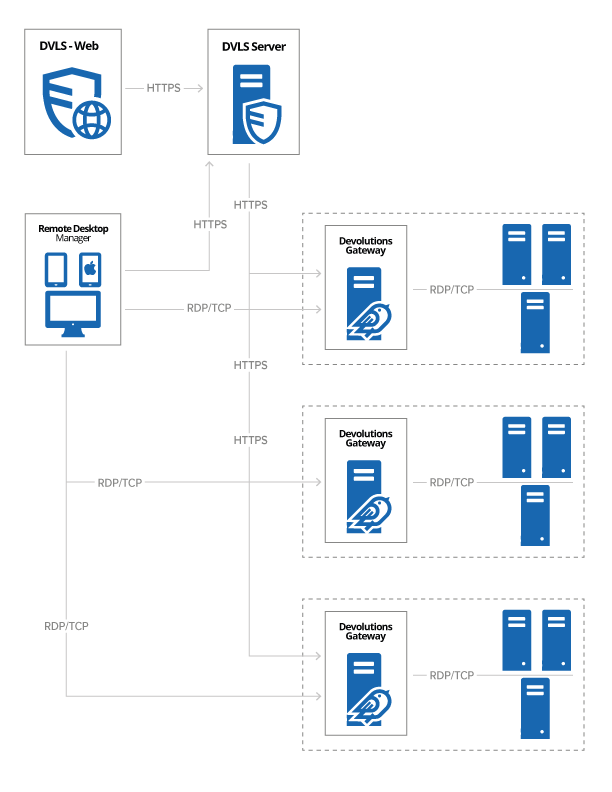
Please let me know if you have any questions.
Best regards,
thank you!
One more question:
If we installed DVLS sever in the cloud (Azure or AWS RDS), do we have full control over data? And can implement custom security configurations to meet specific compliance requirements?
Any updates?
Hello,
Installing DVLS on premise and in the cloud gives you the same access to the data. What type of custom security configuration did you have in mind?
Best regards,
I'm a bit unclear. I'm looking for both visibility and control over the data. Martin mentioned above that Self-hosted solutions are usually favored for their enhanced full control over the data and the environment. Would this feature apply to both whether deployed locally or in the cloud DVLS self-hosted solutions? or any other difference?
Hello,
The visibility and control Martin was referring to was probably that when installing Devolutions Server on premise, you are not dependent on a 3rd party service to access the data. For example, if the Azure service fails, and you are not able to access your SQL DB you will not be able to use your Devolutions Server until the Azure service is restored.
Best regards,
Question below aspects? highlighted Iin bold
When should we consider each of these factors?
Server Sizing: Following aspects must be considered:
•Number of entries stored in your instance (server details, credentials, etc.). (How do we determine this)
•Churn of these entries; do you create entries daily or are they quite static? (Which entries are we referring to? What does it mean for them to be "relatively static"?)
•Number of concurrent users that connect to the Devolutions Server instance during peak times.
•User behavior:
•Are they launching 10 sessions at a time, doing a batch operation that takes a few
minutes and then repeating the cycle; or
•Are they opening only a few sessions but working within them all day long?
•This results in write operations to our logs; therefore, the former case is more intensive than the latter. - Could you clarify what this refers to?
Any updates?
Hello,
When should we consider each of these factors?
- Server Sizing: Following aspects must be considered:
- Number of entries stored in your instance (server details, credentials, etc.). (How do we determine this)
- This can vary a lot, but you could get a rough number with the number of account and servers you would like to manage
- Churn of these entries; do you create entries daily or are they quite static? (Which entries are we referring to? What does it mean for them to be "relatively static"?)
- Will this number (of servers and account) change regularly or stay pretty static
- Number of concurrent users that connect to the Devolutions Server instance during peak times.
- Number of entries stored in your instance (server details, credentials, etc.). (How do we determine this)
- User behavior:
- Are they launching 10 sessions at a time, doing a batch operation that takes a few minutes and then repeating the cycle; or
- Are they opening only a few sessions but working within them all day long?
- This results in write operations to our logs; therefore, the former case is more intensive than the latter.
- When users are launching entries from RDM or even modifying entries from the web interface of the Devolutions Server this results in some logs that can affect the performance of the Devolutions Server.
The Server sizing can change along the way, it is not that important to get every number correctly since with a virtual machine the performance of the server can be changed. We would recommend deploying the Devolutions Server by stage (by groups of users) over time. This way, we can properly see how the server performs with each new user groups being added.
Best regards,
Thank you! This is helpful!
Based on the earlier comments about unavailability of the DVLS Server,
- Could you please shed some light on how does offline mode benefits on both platform DVLS on locally vs cloud?
- Can we still have access to the data or session and perform tasks, if yes how?
No one seemed to address this aspect. Being on cloud DVLS specifically, ensuring access to data during cloud service failures or internet downtime is crucial. Are there any other points I should consider?
And this OFFLINE feature is not available for all data sources.
- Can you please name few that support to DB, this feature?
- How does the backup look like in DVLS, on locally vs Cloud?
Hello,
- Could you please shed some light on how does offline mode benefits on both platform DVLS on locally vs cloud?
- The offline mode stays the same in both cases. Remote Desktop Manager will create a cache file on the computer where it is installed and if its data source is unavailable it will ask the user to go in offline mode. Once in offline mode, the user will have access to the entries that were cached during the previous usage of Remote Desktop Manager. Note the only RDM has an offline mode.
- Can we still have access to the data or session and perform tasks, if yes how?
- Yes, while we do recommend keeping users in a Read-Only mode when offline, they will still have access to entries, and they will still be able to open sessions.
And this OFFLINE feature is not available for all data sources.
- Can you please name few that support to DB, this feature?
- Devolutions Server, Microsoft SQL
- How does the backup look like in DVLS, on locally vs Cloud?
- Both are work in the same way if the backup is managed inside the Devolutions Server. If done on a schedule the scheduler service will take a backup of the web interface and the DB and store the files in a path where it has access.
Best regards,