Knocking port

Hello,
For some security reason... I have to close the ssh port from all managment network and only allow from 2 jump host. But if something goes wrong with this host, I will be in the mess. Is possible to add a custom script before the connection ?
The idea behind (cisco solution, rotary ssh and log deny) :
[script before ssh]
telnet port 2268
telnet port 2269
telnet port 2277
[On Cisco]
I detect this sequence with deny log
Open ssh from everywhere for 5 seconds [change the access-class]
Can you help me ?
Fabrice
Recommended Answer
Hi Fabrice,
Thank you for reaching out!
It is indeed possible to run script before/after open/close of a session.
But there is also a Port knocking function to do exactly that. To do so, go in the properties of an entry > Events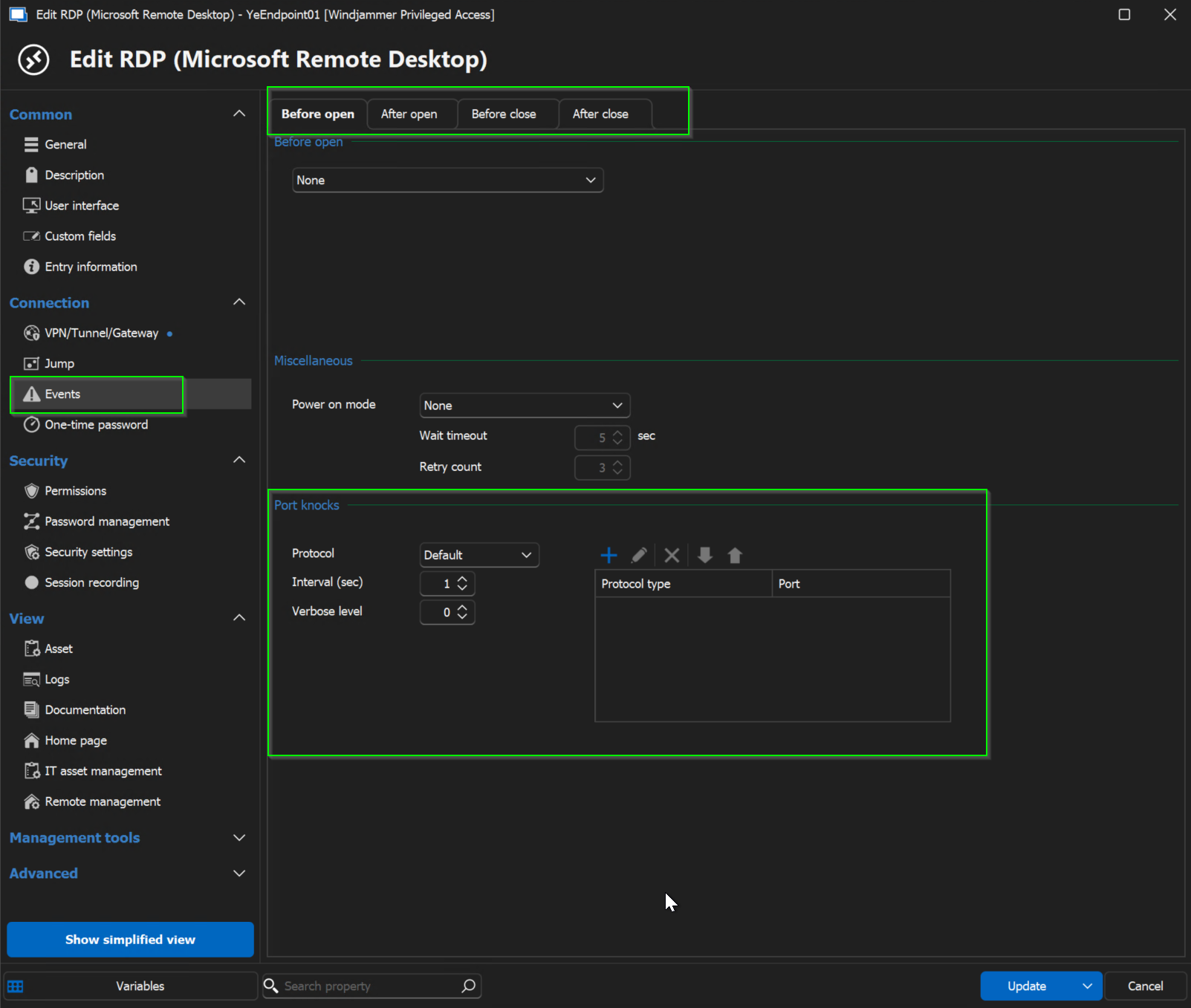 Let me know if it answers your question!
Best regards,
Yannick Leblanc
6ed2092d-65d4-4afb-ac38-dc0bcd2febd7.png
All Comments (16)
Hi Fabrice,
Thank you for reaching out!
It is indeed possible to run script before/after open/close of a session.
But there is also a Port knocking function to do exactly that. To do so, go in the properties of an entry > EventsLet me know if it answers your question!
Best regards,
Yannick Leblanc
6ed2092d-65d4-4afb-ac38-dc0bcd2febd7.png
Hi Fabrice,
Thank you for reaching out!
It is indeed possible to run script before/after open/close of a session.
But there is also a Port knocking function to do exactly that. To do so, go in the properties of an entry > EventsLet me know if it answers your question!
Best regards,
Yannick Leblanc
Hi Yannick,
Thanks a lot !!!! That works like a charm :)
Have a nice day
Fabrice
Hi Fabrice,
Glad it works!
don't hesitate if you have anything else!
I'll also move this thread to the RDM section!
Best regards,
Hi
Would it be possible to set the interval to less than a second? At the moment you cannot input 0.2 for example.
No major issue but the seconds stack up and I think it would be an easy fix to allow decimals in the input field or change it to milliseconds
Hello,
I have created a feature request for that. It's a good idea.
Regards
David Hervieux
Hi
There seem to have been a change in the behaviour after upgrading to RDM 2025.2.20 (previously had 2025.1.x) though I cannot find anything specific about it in the changelog.
Using TCP port knock now seems to have a longer timeout and retries the port 5 times if the tcp port is not responding. The "Sending port knock sequence" progress bar is up for ~20 seconds even if I only have one port set up with 1 second interval.
On previous version it only took 1 second per port knock and RDM did not retry with the same port.
Changing to UDP it works as expected.
Also still cannot set interval lower than 1 second.
Hello TN,
Thank you for this feedback.
After some tests, the sequence interval works for 2025.2.20.0.
Are you using fwknop or knockd?
Could you share any screenshots without sensitive information?
Best regards,
Patrick Ouimet
Hi
I am using the built in port knock function in RDM. I cannot find any setting to change between fwknop or knockd.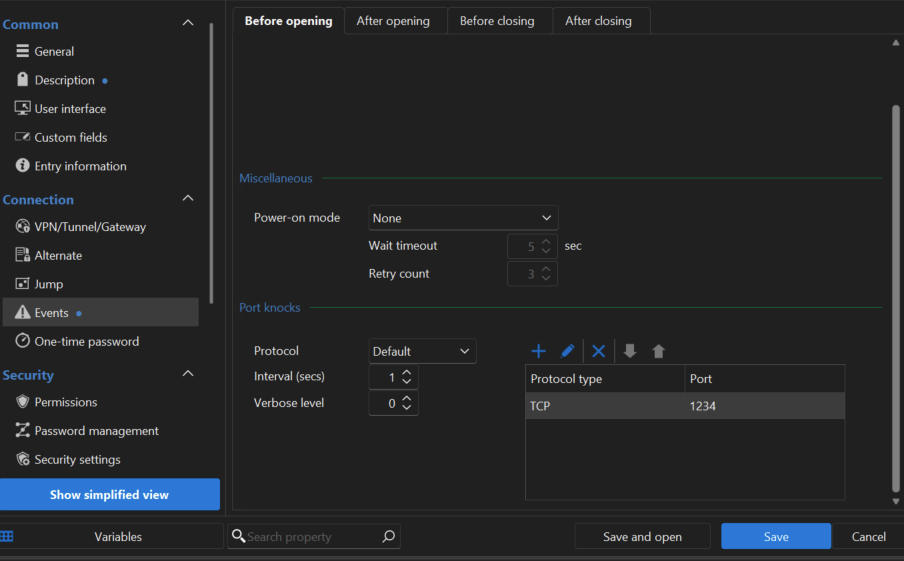
With above setup the knock progress takes around 20 seconds instead of 1 second.
The log on the device I connect to shows that RDM have tried the port 10 times instead of just once during the knock progress.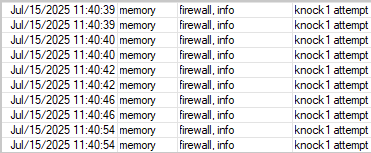
7ba02e5d-20bd-473f-a45b-c8c033d509bb.png
a0f67838-9ea1-4dca-9935-89b0c8648eb5.png
Hello TN,
The fwknop or knockd is configured on the server,
In RDM, could you provide us with the Verbose level 2?
https://docs.devolutions.net/rdm/kb/how-to-articles/send-ssh-logs-verbose/
Also, I'll need the one from knockd by this command:
sudo knockd -v -v
Best regards,
Patrick Ouimet
Hello TN,
I appreciate your patience on this case.
This issue is now fixed in version 2025.3.23.0.
Best regards,
Patrick Ouimet
Hello,
I have created a feature request for that. It's a good idea.
Regards
@David Hervieux
Any update on this?
Hello,
I have raised the priority. It's not assigned yet, but I hope this will be available in RDM 2025.3.
Regards
David Hervieux
Hello,
We've changed the delay to be saved as milliseconds instead, and this should carry over your precedent settings. You will be able to experience this change with the upcoming 2025.3.6 version
Regards,
Jafran Majeau
Hello,
Thank you for being so patient!
This issue has been resolved, and the fix is available in the latest release of RDM (2025.3.17.0).
Please note that a database upgrade is required if you are using SQL Server as your datasource.
Please consult this article prior to perform the upgrade
https://docs.devolutions.net/rdm/windows/installation/database-upgrade/
Please let us know if this works or if you are still encountering any issues.
Best regards,
Maxim Robert
Hi
I just upgraded devolution server and RDM (allthough I had to download MSI form devolutions website as internal updater did not upgrade past 2025.2.30.0) and now it is ms instead of s in the port knock settings.
But another issue that came up in some previous update that I have not reported yet. After the port knocks has been sent the progress window stays loading for infinity and I have to click cancel for it to actually continue and open the entry.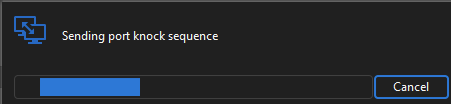
The port knocks are sent and in the correct order but the issue having to cancel the progress window till exists after the upgrade. TCP and UDP both have the issue.
It worked sometime before version Devolution Server 2025.2.12.0 and RDM 2025.2.29.0. Issue persists on latest Devolutions Server 2025.3.3.0 and RDM 2025.3.17.0
1757f038-52f4-43ff-8b1f-93f19f90a38c.png
Hello TN,
Thank you for this feedback.
We have reported this cancellation and infinite loading issue to the dev team.
We will keep you updated when it is fixed.
Best regards,
Patrick Ouimet