
Jean-Sébastien Simard
License server URL missing
Hello Marcel,
Thank you for the feedback.
Last week, we migrated our documentation platform to GitBook. One of the benefits of this new platform is an AI assistant that can search across the entire documentation set and provide answers based on all available content.
I tested it by asking for the license server URL, and it was able to provide the correct answer (see screenshot below).
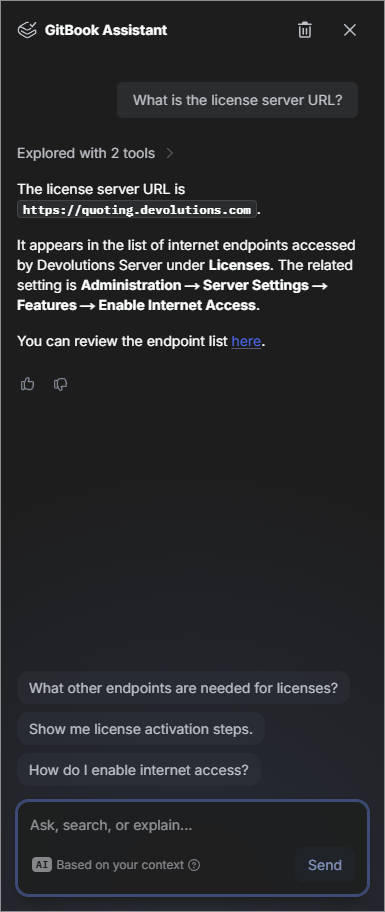
I recommend trying the AI assistant, as it currently has access to the full documentation and may be more effective than the traditional search function for specific queries like this one.
Best regards,
Website (legacy) conversion
Hello again,
We have updated the documentation page according to your input.
Thank you,
Website (legacy) conversion
Hello Daniel,
Thank you for taking the time to point this out, you’ve identified two valid issues in the documentation.
You are correct: the Website (legacy) connection type does not currently appear in the multi vault search. This is expected behavior at the moment, although we agree it is not ideal and differs from the single-vault experience. As a workaround, you can search using the broader Information connection type in multi vault search. This will include Website (legacy) entries, but it will also return other entries of that type, so additional filtering may be required. We will update the documentation to clarify this limitation.
You are also correct here. The option to convert a Website entry back to Website (legacy) is no longer available. The documentation is outdated on this point and will be corrected accordingly.
We appreciate you bringing this to our attention, as it helps us improve both the product documentation and the overall user experience.
Best regards,
Improve startup performance in Remote Desktop Manager: Editing configuration files
Hello again,
My pleasure, glad we could help clarifying things. The changes I mentioned are now live: Improve Remote Desktop Manager startup performance.
Thanks again for your contribution!
Best regards,
Improve startup performance in Remote Desktop Manager: Editing configuration files
Hi Daniel,
Thank you for the feedback!
You're right that <DisableSendingAnalytics> is the tag that maps directly to the Disable telemetry option found in File – Settings in the UI. However, both <DisableAnalytics> and <DisableSendingAnalytics> ultimately disable telemetry. They are two different ways of achieving the same result, so the doc isn't technically wrong, just potentially confusing.
That said, we agree that referencing <DisableSendingAnalytics> in the article would be more consistent with what users see in the application settings. We'll look into updating the documentation accordingly very shortly. We'll also add a note about directly toggling the option in File – Settings to make the article more helpful for users who prefer not to edit files directly.
Thanks again for taking the time to report this.
Best regards,
RDM installation documentation for Fedora is wron
Hello,
Thank you for bringing this to our attention. We’ve updated all the code blocks in the RedHat and RedHat-based systems section.
Best regards,
Quick Access Toolbar Refuses to Show Up
Hello,
Thank you for pointing this out. We have updated our Top pane and Quick access toolbar documentation pages.
Best regards,
"App_Folder" should be "App_Data folder"
Hi Daniel,
Thank you for pointing this error out. We have corrected the KB article accordingly. We have also asked our developers to correct the Devolutions Server dialog where the error appears.
While reviewing the article, we also took the opportunity to update it more broadly to ensure everything is accurate and up to date.
Thanks again for taking the time to report this and for fixing the German translation on your side as well. We really appreciate it!
Best regards,
New Quick Tip: Learn about the MCP server feature
Our Quick Tips video series is growing, and so is your toolbox!
We’ve just added a fresh batch of short, practical videos to help you tackle everyday challenges, explore new features, and get even more value out of our tools, without taking up too much of your time :
Learn about the MCP server feature
Whether you're looking for a faster way to get things done or a clever trick you didn’t know existed, there’s something new waiting for you.
👉 Dive into the Quick Tips section now and find your next time-saving tip!
Got an idea for a Quick Tip or a question you'd love to see answered?
Drop it in the comments, we're listening and building this series with you in mind.
Best regards,
The Training Team
New documentation!
Hey everyone,
We’ve just added new documentation, you can check it out here:
Remote Desktop Manager
Security and confidentiality disclaimer for MCP server usage
SSH port forward entry settings
Devolutions PAM
Quickly deploy AD PAM in your environment
Devolutions Hub Business
Backup and recovery steps for Devolutions Hub Business entries
Devolutions Portal
As always, we’d love your feedback, let us know what you think or if there’s anything you'd like to see covered next !
Thanks,
The Documentation Team
New Quick Tip: Recover your Devolutions Account
Our Quick Tips video series is growing, and so is your toolbox!
We’ve just added a fresh batch of short, practical videos to help you tackle everyday challenges, explore new features, and get even more value out of our tools, without taking up too much of your time :
Recover your Devolutions Account
Whether you're looking for a faster way to get things done or a clever trick you didn’t know existed, there’s something new waiting for you.
👉 Dive into the Quick Tips section now and find your next time-saving tip!
Got an idea for a Quick Tip or a question you'd love to see answered?
Drop it in the comments, we're listening and building this series with you in mind.
Best regards,
The Training Team
Scheduled reports filter pattern
Hello Marcel,
Thank you for your question! Let me clarify:
Wildcards are not supported. The filter is a text field, not a custom filter. It searches for specified text. You can only enter exact values in the filter fields. Partial matches or symbols such as * or ? are not available.
The field or text that gets searched depends on the specific report you are working with. For example, a configuration report may allow filtering by entry name, type, or other attributes depending on what data it displays.
Because of this, there isn’t a universal way to filter by folder name; it depends entirely on whether the folder is part of the data shown in the chosen report.
The recommended approach is to test your filter directly in the report before scheduling it. This ensures that the results match your expectations, since each type of report can behave a little differently with respect to its filters.
If you can provide us with more details about which report you’d like to configure, we’ll be glad to guide you more precisely on which data the filter will apply to, and explain in detail what each option does.
Hope this helps!
Best regards,
New Quick Tip: Privileged access management vs. Password management
Our Quick Tips video series is growing, and so is your toolbox!
We’ve just added a fresh practical video to help you tackle everyday challenges, explore new features, and get even more value out of our tools, without taking up too much of your time:
Understand privileged access management (PAM)
Whether you're looking for a faster way to get things done or a clever trick you didn’t know existed, there’s something new waiting for you.
👉 Dive into the Quick Tips section now and find your next time-saving tip!
Got an idea for a Quick Tip or a question you'd love to see answered?
Drop it in the comments, we're listening and building this series with you in mind.
Best regards,
The Training Team
Update / reorder of "Devolutions Gateway configuration on Linux"
Hi,
Thank you for sharing your experience and suggestion. We understand how this could be confusing, and we will take a look at the documentation to consider adjusting the order of the steps and adding a note about these error messages.
Again, we really appreciate your feedback.
Best regards,
error in command for gateway install on linux
Hello again,
The documentation has been updated and the command is now fixed. Thanks again for letting us know!
Best regards,
error in command for gateway install on linux
Hi,
Thanks for catching this! You are absolutely right, the last line should read sudo update-ca-certificates with an s at the end. We will update the documentation shortly to correct this.
Best regards,
New Quick Tip: Privileged access management in Remote Desktop Manager
Our Quick Tips video series is growing, and so is your toolbox!
We’ve just added a fresh practical video to help you tackle everyday challenges, explore new features, and get even more value out of our tools, without taking up too much of your time:
Use PAM in Remote Desktop Manager
Whether you're looking for a faster way to get things done or a clever trick you didn’t know existed, there’s something new waiting for you.
👉 Dive into the Quick Tips section now and find your next time-saving tip!
Got an idea for a Quick Tip or a question you'd love to see answered?
Drop it in the comments, we're listening and building this series with you in mind.
Best regards,
The Training Team
New Quick Tips: Comparing inheritance, batch edit, and batch operations using templates
Our Quick Tips video series is growing, and so is your toolbox!
We’ve just added a fresh practical video to help you tackle everyday challenges, explore new features, and get even more value out of our tools, without taking up too much of your time :
Comparing inheritance, batch edit, and batch operations using templates
Whether you're looking for a faster way to get things done or a clever trick you didn’t know existed, there’s something new waiting for you.
👉 Dive into the Quick Tips section now and find your next time-saving tip!
Got an idea for a Quick Tip or a question you'd love to see answered?
Drop it in the comments, we're listening and building this series with you in mind.
Best regards,
The Training Team
KB - Move the Devolutions Server website at the default website root
Hello,
We’re glad to hear the article was helpful! Thank you for pointing out the need to restart the server or IIS service, this can indeed be required in some cases to resolve unexpected errors. We’ll make sure to include this detail in the documentation so future readers benefit from your input.
Best regards,
New Quick Tips: Importing users in Devolutions Server and configuring advanced SSH terminals in Remote Desktop Manager
Our Quick Tips video series is growing, and so is your toolbox!
We’ve just added a fresh batch of short, practical videos to help you tackle everyday challenges, explore new features, and get even more value out of our tools, without taking up too much of your time :
Importing users in Devolutions Server
Use advanced configuration for SSH terminal
Whether you're looking for a faster way to get things done or a clever trick you didn’t know existed, there’s something new waiting for you.
👉 Dive into the Quick Tips section now and find your next time-saving tip!
Got an idea for a Quick Tip or a question you'd love to see answered?
Drop it in the comments, we're listening and building this series with you in mind.
Best regards,
The Training Team
New documentation!
Hey everyone,
We’ve just added new documentation, you can check it out here:
Remote Desktop Manager
Show PAM dashboard button in Remote Desktop Manager's user interface
Devolutions PAM
Create temporary accounts with JIT provisioning
As always, we’d love your feedback. Let us know what you think or if there’s anything you'd like to see covered next!
Thanks,
The Documentation Team
PowerShell Synchronizer documentation
Hello,
Thank you for your interest in this new feature! We're currently in the process of documenting this brand-new entry type to ensure everything is clearly explained and easy to follow.
As soon as the documentation is available, we'll update this thread to let you know.
Best regards,
The Devolutions Documentation and Training Team
Missing usage information - browser extension with RDM
Hi Marcel,
Thank you very much for your detailed feedback, it's greatly appreciated.
You've raised two very important points:
Access to shared vaults – When the Workspace browser extension is connected to Remote Desktop Manager, it can only retrieve entries from the currently opened vault in RDM. This limitation should definitely be clarified in the documentation, and we'll make sure to update the article as soon as possible. In the meantime, if you encounter any other issues while linking the Workspace browser extension to Remote Desktop Manager, we recommend posting in the Devolutions Workspace support forum.
Use cases in our documentaiton – You've touched on something very important. While our documentation often focuses on configuration and how-to steps, we understand the value of also explaining why and when to use a feature, to help users better understand how a feature can solve specific problems. We're currently working on improving this aspect of our documentation, and your comment reinforces that we’re heading in the right direction. Thank you for helping us validate this focus!
Thanks again for taking the time to share your thoughts with us.
Best regards,
Updated "Bootstrap portable Remote Desktop Manager version" ;-)
Hello,
Thank you for taking the time to share this update with us. We truly appreciate your contribution and will review the documentation article based on the sample you provided.
Best regards,
Classic interface lacks access to File -> My Account settings on MacOS
Hello,
Thank you for pointing this out. We will update the documentation page according to the information you provided.
Best regards,