Quick Access Toolbar Refuses to Show Up

Hello - I am trying to make the Quick Access Toolbar visible so that I can use the Quick Connect feature more easily.
I have read many, many previous threads regarding this matter - however NONE of the typical recommended solutions have worked for me. To be clear, I have already tried these fix actions to no success:
- Settings > User Interface > Hide quick connect label (check box is unchecked)
- Settings > Ribbon > Disable ribbon quick access toolbar (check box is unchecked)
- Window > Layout > Reset Layout... I have done this multiple times with restart.
- Manually deleted .lyt files in Windows AppData folder... I have done this multiple times with restart.
Please suggest something I have not already tried countless times. For reference I am running this version of the RDM application: 2025.3.30.0 64-bit (PreJIT)
Thank you in advance.
Recommended Answer
Hello,
I know my question might sound strange, but are you in menu mode? The quick access toolbar is not supported in this mode.
Regards
David Hervieux
All Comments (6)
Hello,
I know my question might sound strange, but are you in menu mode? The quick access toolbar is not supported in this mode.
Regards
David Hervieux
Ok yes you are correct, that was the problem. I switched from "Menu mode" to "ribbon mode" and now I can see the Quick Access Toolbar.
I appreciate your assistance, but seriously can you guys update your documentation to make mention of this? I spent a lot of time digging through your product documentation and did not see this limitation/requirement mentioned anywhere. Frankly the sections pertaining to the Quick Access Toolbar and the Quick Connect features are quite lacking in any useful information for how to enable and/or troubleshoot. But I digress... thank you for pointing out the unobvious solution.
Hello,
I will make sure to update the documentation.
Regards
David Hervieux
Hello,
Thank you for pointing this out. We have updated our Top pane and Quick access toolbar documentation pages.
Best regards,
Jean-Sébastien Simard
Learning experience team leader
Cheers Jean-Sébastien, thank you for going the extra kilometer.
Hello,
Good news, the next major update should no longer have this issue. I've found a way to support the quick action toolbar with the menu mode.
Yeah!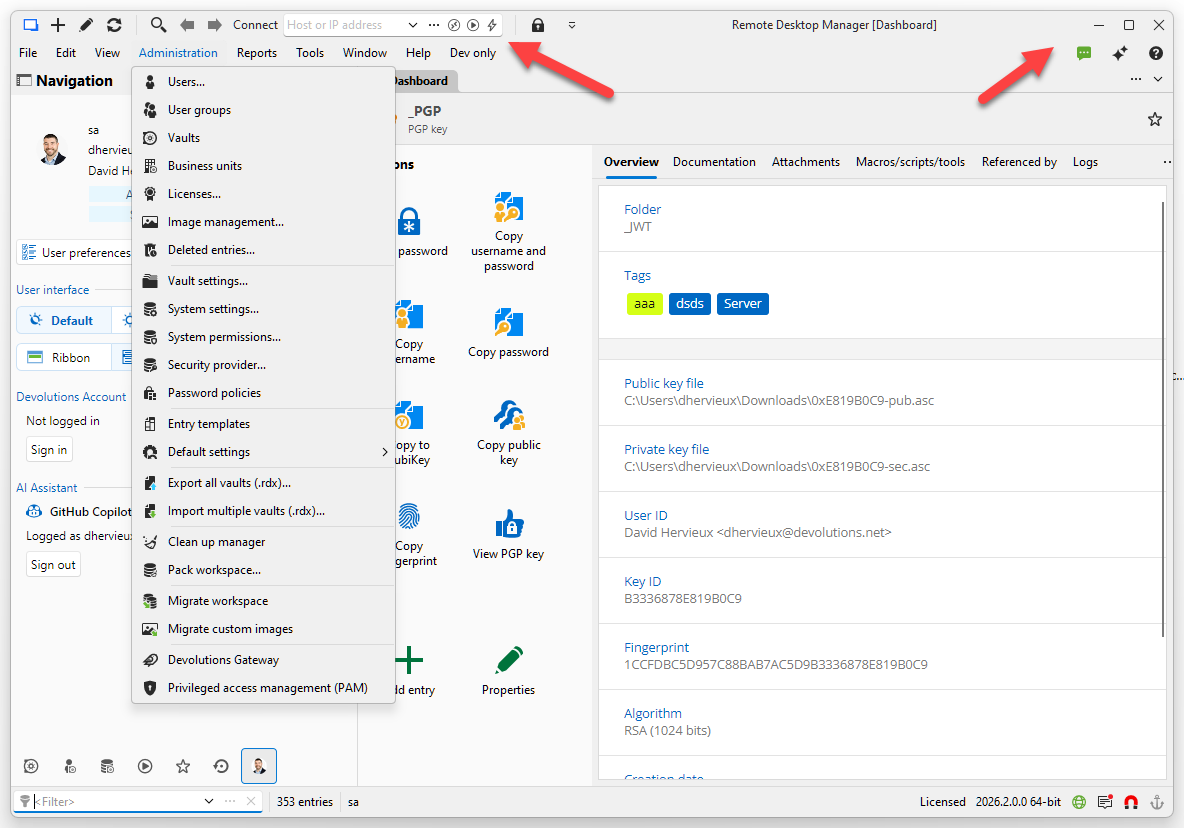
Regards
David Hervieux
b66fe95c-f9c8-4ae0-8d5e-91010920d57f.png