
andaluspc
string commands for SSH
Hello team. It's been a while :)
Below are screenshots that explains the idea.
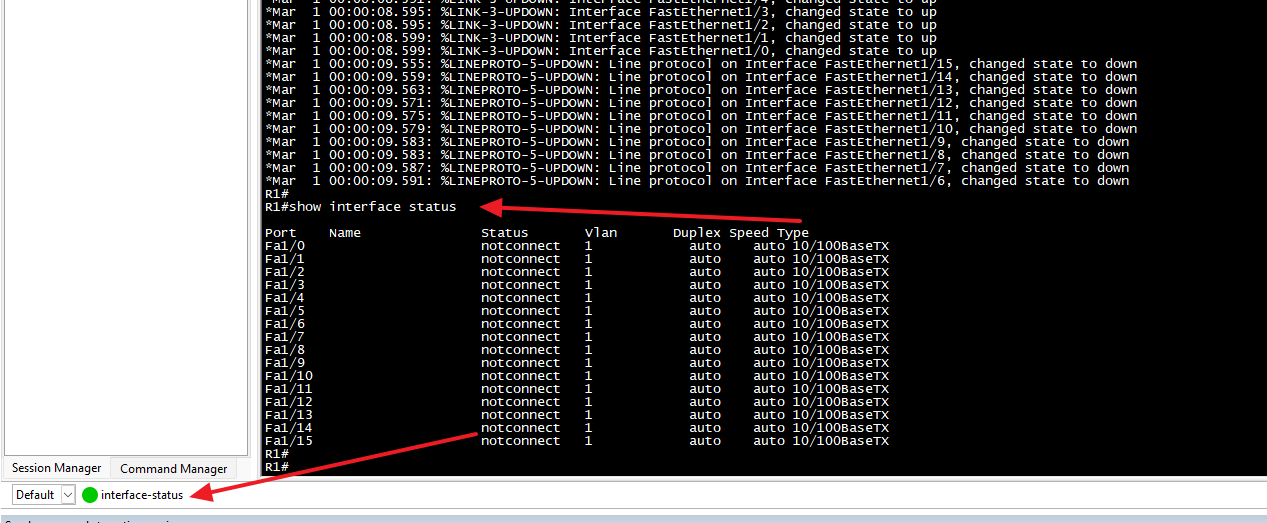
in this screenshot I click on the button "interface-status" and it then pastes "show interface status" on the CLI session. This location is called "command bar" which is located below the CLI session when visible.
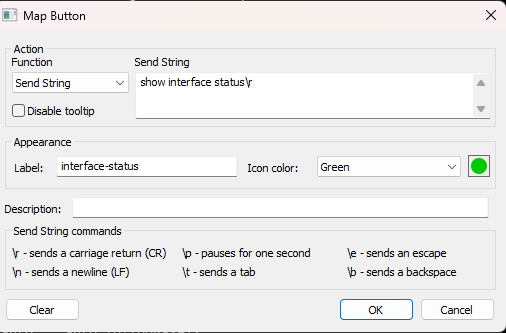
Below is the configuration of the button. the label is "interface-status" which is the button present name on the bar. The "Send string" is the field to fill the command to be sent. I added "\r" at the end to send a carriage return character after my command.
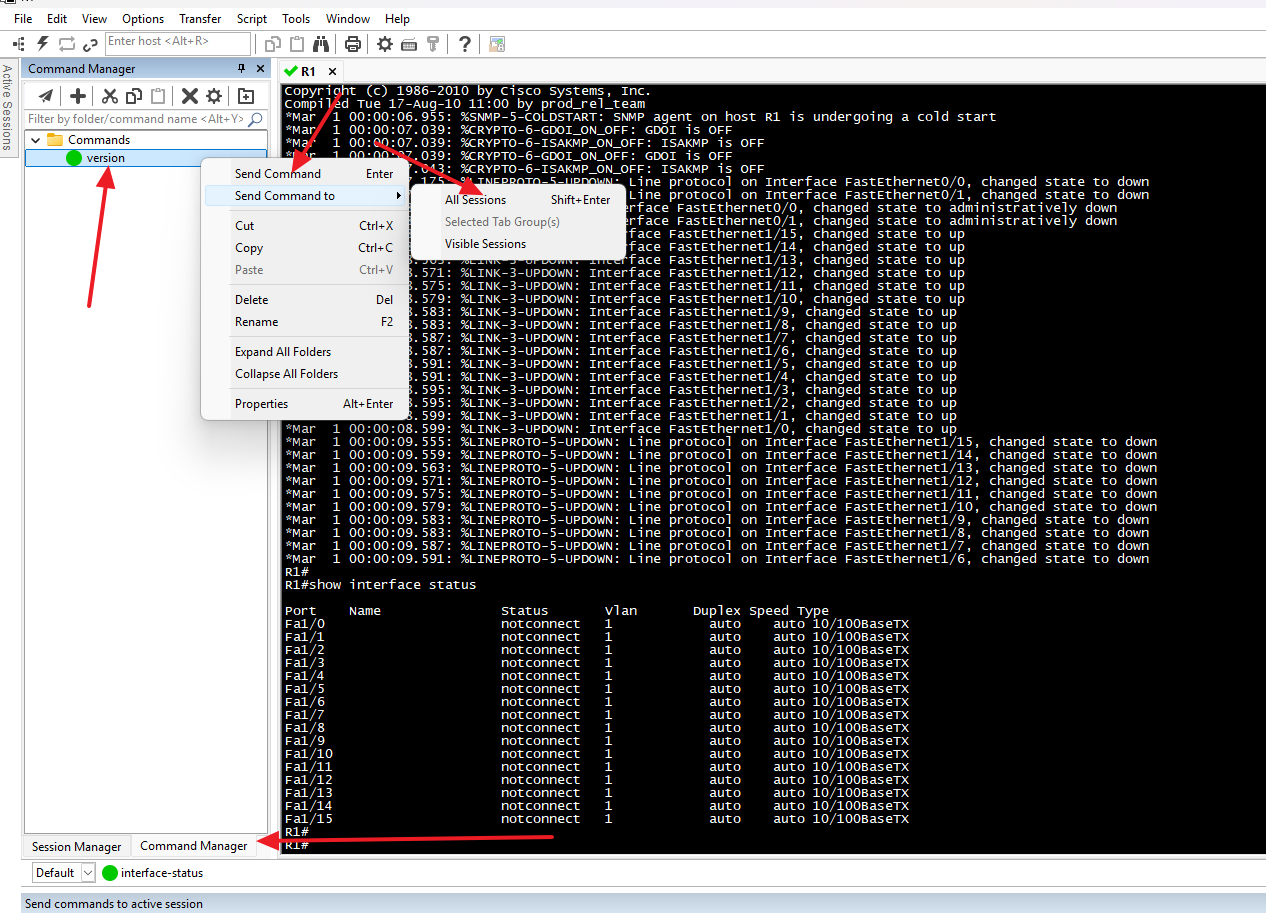
There is also a "command Manager" where command buttons of same concept can be created. in command Manager there is an option to send the command to multiple opened CLI sessions at once.
Hope this helps :)
Issue with logging sessions of Cisco ACI
Hello.
I sent the recording in a direct message to you @Maxim Robert .
The version I used in my recording was 2025.2.26.0 64-bit (JIT)
Best,
Amjad
Issue with logging sessions of Cisco ACI
Hello,
Thank you for your response!
Could you please provide us with a recording showing the steps that led to the issue? This will allow us to investigate and try to reproduce the issue. I sent you all the information in a direct message to provide us with the recording.
If you have any other questions, feel free to let us know.
Best regards,
Hello Max. I'll try the soonest. I don't have access to respective device from RDM meanwhile, but I'll try to provide something when I can.
Though, I am not sure how would recording help. All what I do is to setup the logging (which I do the same way for all other devices). But For this specific device (Cisco APIC) the output results is regularly shifted as described above.
Issue with logging sessions of Cisco ACI
Thank you for getting in touch with us. To better assist you, could you kindly provide us with the following information:
Your current RDM version.
A>>: 2024.3.22.0 (personal)
The operating system you are using and its version.
A>>: Windows 11
The data source you are utilizing.
A>>: Devolutions Hub personal
Have you changed any specific configuration on your SSH entry or in your RDM settings?
A>>: No. I've been experiencing this issue with multiple sessions on different machines even with local data sources.
Any additional information and screenshots you believe might be relevant.
A>>: The problem seems to be related to ZSH shell in Linux. When I manually switch to BASH shell and run same command I see it in log file correct without the line-shift problem. I can't permanently use BASH for my work as not all scripts/commands that APIC product supports run from BASH.
Once we have this information, we will be better equipped to diagnose and resolve the issue.
Best regards,
Hello, and thank you for your response. Kindly find my answers inline in blue above.
Issue with logging sessions of Cisco ACI
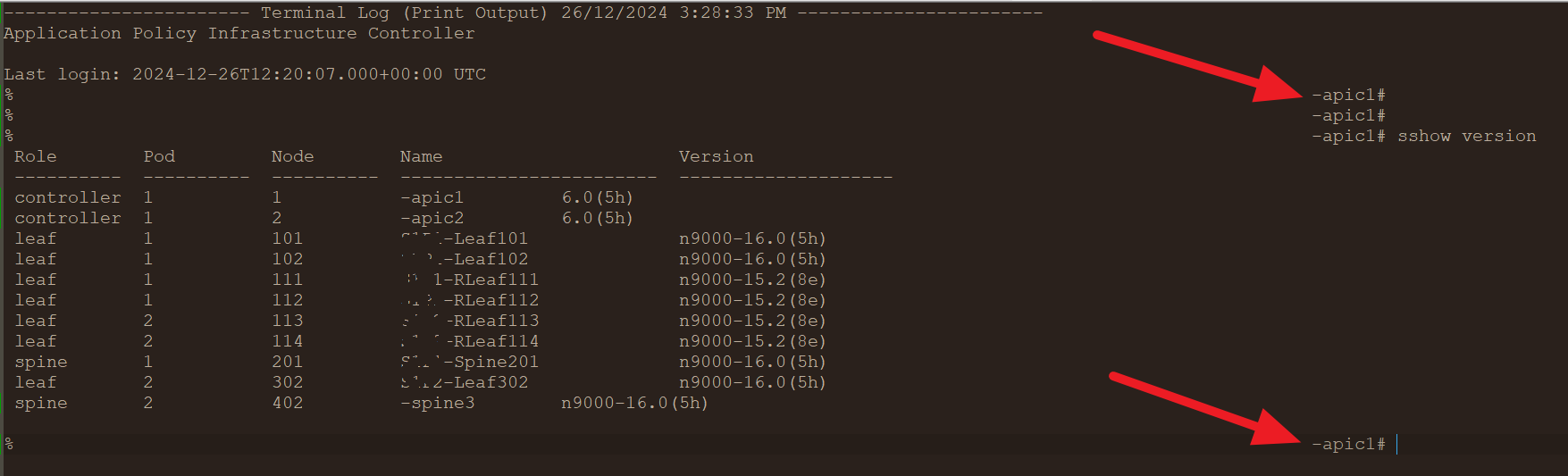
Hello team. when I SSH to Cisco ACI APIC and log the session, I notice that the session file is malformed. certain lines appear to the far right. I couldn't find the reason of this.
I tried multiple terminal emulators to save log session for same devices and I didn't notice this problem. Only RDM shows this problem when I save the session.
I couldn't reproduce the problem with other than Cisco ACI APIC. Seems that there is a specific hidden character that interpreted differently by RDM which shifts the whole line to the right.
I noticed that Cisco ACI APIC uses ZSH shell. When I manually go to bash from same session and run command from bash, log file appears fine. The problem seems to be only related to ZSH shell.
I hope you can identify the issue and solve it.
make default terminal logging file to match session name
Hi. In secureCRT, terminal logging files can include certain special parameters to customize logging file name. For example, I can use session name, hostname, date/time ...etc in log file without having to specify exact names/date.
For example, the parameters %S would refer to session name, %H would refer to hostname. so, If I choose log file name as sessoin-%S, it will log file with name session-<ssh session name>.txt
What helps me here is that I can set same exact log file name (with those special parameters) to all sessions I have, then log files get eventually saved with different names based on terminal session name (or host name.. or whatever parameter I use).
For SecureCRT, This is documented in the following link. I hope this feature can be implemented for RDM:
https://www.vandyke.com/support/tips/configure-automated-logging-in-securecrt.html
string commands for SSH
Hello team and happy holiday season.
I've been working with secureCRT for a few months now (as it is a customer's requirements). I can see the feature of "terminal command pallet" feature isn't as easygoing as command buttons in secureCRT.
Although both of them achieve same goal, but in secureCRT I have a palette where I can simply click a button to get its command written on SSH session/s or I can choose that command to be sent to specific set of opened tabs.
RDM terminal command pallet features needs you to go to the button and search for specific command/script. In secureCRT It lists all available buttons in a visible pane and I can double click that one to execute its script. Those scripts can be categorized in folders in their own commands button palette.
As RDM advocate, I'd like RDM to have as smoother feature as secureCRT. If you can implement this one I am sure I can pitch RDM to more colleagues of mine.
string commands for SSH
Hello and thank you for your feedback.
This feature seems available only for newer releases. right?
I am using 2023 release. I use portable because I don't have privilege on my machine to install software. When I tried to download latest portable version it asks to install .Net framework (which I don't have enough privilege to install).
Do we have a workaround for this issue? can .net framework be installed in a portable way for RDM, for example?
Hello,
You could leverage the terminal command palette feature. This is a feature that lists the Terminal Command entries and you can execute them in your terminal. The shortcut for this is Ctrl-Shift-P. You can find a little demo about it on our version 2024.1 blog here: https://blog.devolutions.net/2024/03/whats-new-in-remote-desktop-manager-20241/#new-terminal-command-palette
Let me know if that helps.
Regards,
default session color for syntax-highlighting
Thank you, Nathan. appreciated. looking forward to seeing it.
string commands for SSH
Hello team.
In a CLI session (usually, SSH), SecureCRT offers commnds that I can press into and it will paste that text I save in that command line.
I believe typing macro is something similar in RDM. However, it doesn't give same flexibility I could find with command manager on secureCRT.
secureCRT command is more like a multi-content clipboard. I can press on a command and it will send whatever saved in that command to command prompt. This is usually used to save long commands or, for some people I see, save password and send it to CLI session by pressing the button than filling it every time.
Is there something similar in RDM?
If I use typing macro, I have to change the tab to use the macro and click on it. If I click on the macro on navigation pane it would also change the view than the CLI session I am opening.
I would expect a button that I click on then it sends whatever it holds to CLI line
It would be great if there is something similar. Otherwise, I hope you consider adding it.
My RDM is my favorite tool. My employer uses SecureCRT. But I still prefer to use RDM.
Importing sessions from SecureCRT
Hello Hubert and thank you. Sorry for my late response.
I tried both options. Only externally option worked.
When the session tries to run embedded (not with mstsc) it doesn't seem to distinguish the password imported from original session. It prompts for password and even if I provide correct password it doesn't work! strange.
I don't currently have access to the machine itself to double check. But I'll be happy to collect any info you want in upcoming days when I get the access back.
Importing sessions from SecureCRT
Hello Hubert.
I also noticed that when I import .rdp files (remote desktop sessions) to RDM, they also reflect the same behavior. The session is imported to RDM but when I click it it opens on windows RDM client instead, and not on RDM. Would you please include this in the improvement request as well?
Best,
Hello,
At the moment this is the expected behavior. I will move your thread to the feature request forum and we will open a ticket to allow importing as SSH Shell entries instead of SecureCRT entries.
Regards,
Importing sessions from SecureCRT
Thank you Hubert. Appreciated.
Tab Colouring
Yesss. Same for syntax highlight. If I do add or modify syntax highlight, open tabs adopt older syntax highlight config until I restart them. The change applies only to the tabs that got opened after the configuration. The tabs that are opened during the config are not impacted.
Hello,
If the tab is already opened and that you are changing the colour in the properties of the session, you would need to restart the session to apply the new colour to the tab.
Best regards,
Importing sessions from SecureCRT
Hello team.
I am trying to import SSH sessions from SecureCRT to RDM. I import it successfully. However, when I try to open the session, it opens in SecureCRT instead of RDM!
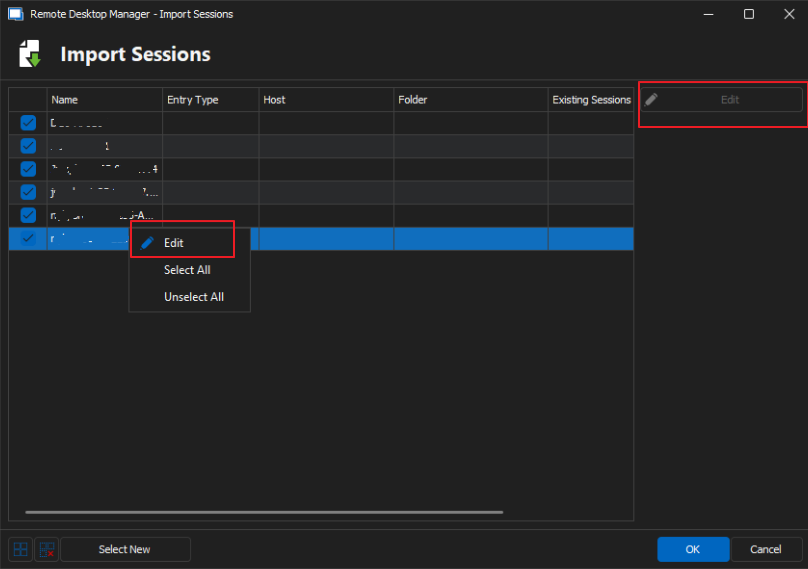
During the import process, I have a list of sessions to import, but I can't edit them. Edit button is faded out. If I right click on a session and choose "Edit", nothing happens.
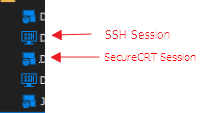
The sessions are getting obviously imported as "SecureCRT sessoins" and not as "SSH Shell" sessions. below I am including a photo of how SSH sessions and SecureCRT sessions look like in Navigation pane.
Is there a way to fix the issue so I import the session from SecureCRT and got it opened on RDM when I click on it? (I assume if we import them as SSH Shell, not as SecureCRT sessions, that'll fix the issue. But there can probably be other ways to do it as well).
No broadcast input in Telnet sessions
Thank you Hubert.
Hello,
Thank you for the request, we will open a ticket to add this.
Regards,
No broadcast input in Telnet sessions
Hello.
Why there is no broadcast input in telnet session? I can find it only in SSH session!!
I have certain obsolete devices that only use telnet and I am not able to use broadcast with them!
Would it be possible to add broadcast input feature to telnet sessions as well?
Thanks.
opening ad-hoc telnet/ssh session with RDM
Amazing!! Thank you.
That's working just fine. I had to add "/Title" parameters to distinguish different sessions. and now it is working as I wanted.
Many thanks for your support Erica.
opening ad-hoc telnet/ssh session with RDM
Thank you Erica.
Quick connect is a useful feature. What I need is actually the command line that allows me to run quick connect session.
The tool I am using is invoking a command to open the session. For other tools there is a command line option. For RDM, I am not sure if this is available.
I can read the following document (but it doesn't show how to run quick connect session from CLI): https://docs.devolutions.net/kb/remote-desktop-manager/how-to-articles/command-line-arguments/
Hello,
The Quick Connect feature combined with a Telnet Template should fulfill your goal.
https://docs.devolutions.net/rdm/windows/commands/view/view/quick-connect/
https://docs.devolutions.net/rdm/windows/commands/file/templates/
Let us know if that helps!
Best regards,
opening ad-hoc telnet/ssh session with RDM
TLDR: my question is in last line:
Hello team. I have an application which does ssh/telnet sessions to some external terminals. I can click on the terminal name and it will do telnet to specific IP port. Those IPs/ports are dynamic and changing frequently, so I tis not practical to create a session for them on RDM.
The tool lets me choose my terminal type and it will trigger a command line with some options in order to open telnet session with the desired tool (Putty, RoyalTS, secureCRT...etc). For aforementioned tools there is a command line to start an ad-hoc session by knowing protocol, IP address, and port number.
However, there doesn't seem to be an option to use RDM based on those info. I have an IP and port and want to initiate telnet session to those ports via RDM. I don't have a session saved in RDM for this IP/port.
Is there a command line to start telnet/ssh session from RDM when session isn't saved in RDM as it is only temporal ad-hoc session (for putty, for example, the command line will be something like: putty.exe -telnet 192.168.253.128 22)
problem with unhiding tabs
I have multiple tabs of same session opened and I tried to hide some. I am on 2023.2.17.0 .
When I tried to unhide the hidden tabs I didn't know where to do so.
The only place I could find that seems to unhide tabs is to right-click on the session and choose 'unhide'. However, this only works if I am hiding a single tab because this action restores a single hidden tab only and the option of 'unhide' then disappears.
I ended up with multiple tabs hidden while I am not able to unhide them.
I can see hidden tabs in 'Window' menu. however, if I click on hidden tab it doesn't get restored.
It seems I can only hide a single opened tab from a specific session. if I hide multiple tabs, I can restore only one and others get black-holed.

SFTP Download window
Thank you Hubert.
There is no way for me to download files. I can't even see folder contents. I can only see directories and download them.
This is one glitch I hope you can fix.
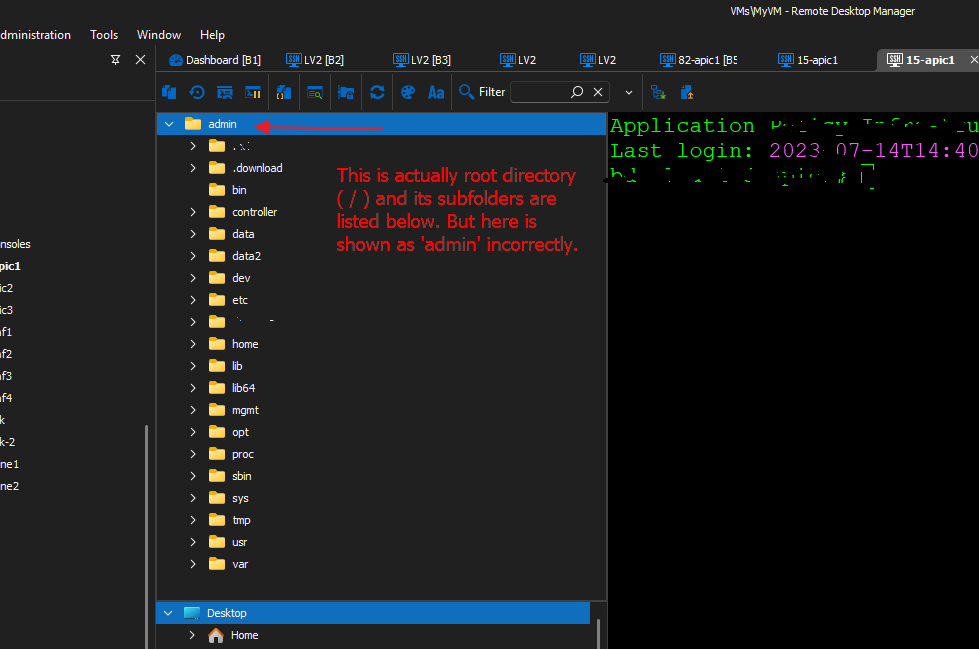
another glitch I just found, when I change the staring location of the session to ( / ) (from terminal -> Advanced). it works fine by listing content of root directory folder. However, the name of the root directory is 'admin' instead which is incorrect. 'admin' here is the default home directory name. (let me know if further clarification is required).
below screenshot can probably also help explaining this issue.
How to disable auto-bookmark header on SSH session?
Excellent. Thanks a lot Min :)
Hello,
I suspect it's the following setting:
Set bookmarks automatically - found ad File => Options => User Interface => Tab Bar
Regards,
Min
SFTP Download window
Thank you Clement. from visibility perspective, and as a workaround, you can drag the window to the bottom (that doesn't close it, but it hides it at least for your convenience. of course, better if the team help us getting it fixed).
but, I'd like also to highlight to the team one more issue with this kind of transfer also: If I start a transfer of a folder, there is no way that I can cancel it without closing the session! Once, I started transfer and I couldn't stop it!
Hello andaluspc,
The same way that you described in this thread (I'm also waiting for this feature to be implemented) :
https://forum.devolutions.net/topics/37067/sftp-on-ssh-session-doesnt-allow-going-to-parent-folder
SSH Session -> Properties -> Terminal -> Advanced -> Use SFTP connection then tick every option except "log to file".
Have a nice day,
Clement.
How to disable auto-bookmark header on SSH session?
Hello team,
Recently, I've enabled auto-bookmark of my SSH sessions so sessions get automatically bookmarked when I open them.
I want now to disable that auto-bookmark but I forgot where I can do that. LoL.
Hope you can help me to find the same to disable this auto-bookmarking.
