SFTP Download window

Hello,
I wanted to ask two things here.
The first is, when I download a file with SFTP on a SSH session, a window at the bottom of the screen pop with a list of the current download.
My issue here is that I don't see a way to close this window, even when the download is already finished,
aside closing the SSH session altogether. I can only reduce it to the very bottom of the window.
Is there another way to close it ?
The window:
My second issue is that when I am downloading a file with SFTP, that same window doesn't automatically refresh itself at all.
The only way I have to refresh this window, and see the actual percentage of progress increase, is by clicking anywhere on this window with my mouse.
The window will then refresh one time and freeze again.
So if I want to see the download progress from 0 to 100%, I have to click every second on the window, which is not really convenient.
Is it possible to make this window automatically refresh itself for example, every second ?
- Version: 2023.2.14.0 64-bit
- Date source: SQLite
Have a nice day,
Clement.
sftp_window.png
All Comments (17)
Hello Clement,
Thank you for reporting this, I have opened a ticket to improve these two behaviors.
Regards,
Hubert Mireault
Hello Hubert,
Thank you for the follow up.
Have nice day,
Clement.
Clement: quick question: how do you do it? I mean, opening SFTP to SSH session? :)
Hello andaluspc,
The same way that you described in this thread (I'm also waiting for this feature to be implemented) :
https://forum.devolutions.net/topics/37067/sftp-on-ssh-session-doesnt-allow-going-to-parent-folder
SSH Session -> Properties -> Terminal -> Advanced -> Use SFTP connection then tick every option except "log to file".
Have a nice day,
Clement.
Thank you Clement. from visibility perspective, and as a workaround, you can drag the window to the bottom (that doesn't close it, but it hides it at least for your convenience. of course, better if the team help us getting it fixed).
but, I'd like also to highlight to the team one more issue with this kind of transfer also: If I start a transfer of a folder, there is no way that I can cancel it without closing the session! Once, I started transfer and I couldn't stop it!
Hello andaluspc,
The same way that you described in this thread (I'm also waiting for this feature to be implemented) :
https://forum.devolutions.net/topics/37067/sftp-on-ssh-session-doesnt-allow-going-to-parent-folder
SSH Session -> Properties -> Terminal -> Advanced -> Use SFTP connection then tick every option except "log to file".
Have a nice day,
Clement.
@andaluspc We will add this to our ticket and investigate. Can you confirm you're able to cancel the transfer of files, it's only for folders that it's impossible to cancel?
Regards,
Hubert Mireault
Thank you Hubert.
There is no way for me to download files. I can't even see folder contents. I can only see directories and download them.
This is one glitch I hope you can fix.
another glitch I just found, when I change the staring location of the session to ( / ) (from terminal -> Advanced). it works fine by listing content of root directory folder. However, the name of the root directory is 'admin' instead which is incorrect. 'admin' here is the default home directory name. (let me know if further clarification is required).
below screenshot can probably also help explaining this issue.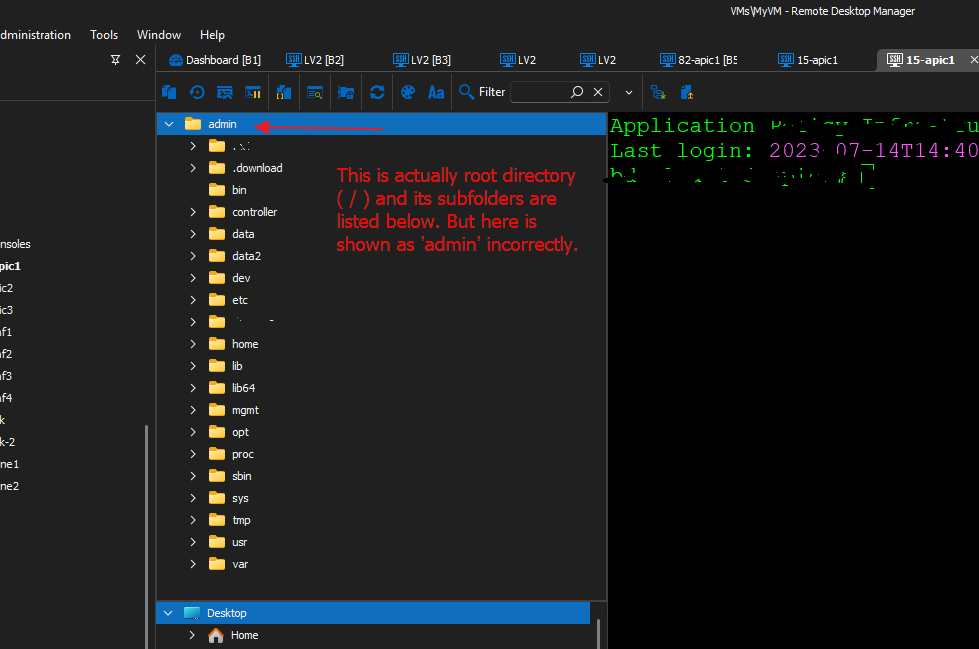
054e43e2-ccf0-4d31-ab08-e84428f42a5a.png
I've added these two additional things to the ticket. Thank you, we appreciate your feedback!
Regards,
Hubert Mireault
Hello,
Since the last update (Version : 2024.1.23.0 64-bit), the SFTP download window now refresh itself automatically !
Thank you for your work !
Unfortunately, we still do not see a way to close this window after the download is completed.
Do you have any news regarding this feature ?
Have a nice day,
Clement.
Hello,
This is currently assigned to a developer but I can't give you an estimate on when we will be working on this. I will check with our team if we can increase the priority.
Regards,
Hubert Mireault
Hello,
Thank you for the update !
Have a nice day,
Clement.
Still not possible to close the sftp download status bar in version 2024.2.21.0
Hello,
Our ticket is still opened and assigned to a developer, but we've had other priorities over time. We're also planning a rework of some of our file explorers, tentatively for 2025.2, and this would be addressed at the same time.
Regards,
Hubert Mireault
3-years later. Still not possible to close the sftp download status bar in version 2026.1.14.0
Hello,
We currently have a developer assigned to this. We will hopefully be able to work on a few improvements to the SFTP integration including this in the incoming weeks.
Regards,
Hubert Mireault
Hello,
I'd like to apologize for the delay it took to fulfill this request. You can expect to be able to hide the download window with the upcoming 2026.1.16. The option will be part of the menu that can be accessed when right clicking the download section.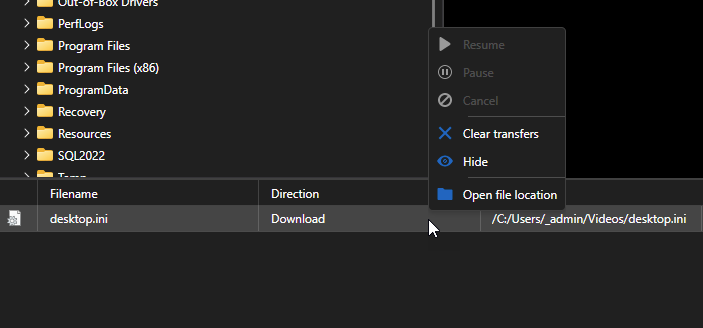
Regards,
Jafran Majeau
b73e0393-2dac-457c-9c7e-f8ecd73ec3b6.png
Hello,
Thank you for being so patient!
I'm pleased to inform you that a new version of RDM (2026.1.16.0) has been released, featuring the fix for your issue.
Latest Version: Download RDM
Please let us know if this works or if you encounter any issues.
Best regards,
Maxim Robert