SFTP on SSH session doesn't allow going to parent folder

Hello team,
I recently came across a feature I always wanted which is SFTP/SCP on opened SSH sessions. Your chat support directed me to enable that on Terminal -> advanced inside my SSH session.
However, the path I have can only navigate on home directory downward. I can't go to parent and upper directories.
I have always been using SFTP with WinSCP of same goal and I could navigate throughout all directory structure (usually Linux OS) to copy my files.
My question is: is there a way to allow me to navigate to parent directories of directory structure?
Thanks.
Amjad
All Comments (21)
Hello,
Thank you for contacting us on this matter!
I would like to ask you a few questions to situate me a bit and help me attempt to replicate this issue internally.
- What version of RDM do you currently use?
- Would it be possible to provide us a screenshot of how your SFTP connection currently configured in your SSH Shell entry? You can of course hide any sensitive information in the screenshot.
Best regards,
Gabriel Degrandpré
Hello Gabriel and thanks for your response.
I am on version 2022.1.17.0 .
Here is how SFTP is configured:
and this is how it looks like in SFTP after login! I am in user's home directory (here named 'admin') and I can't go into parent directory (although from the shell I can normally go to parent directory and to root directory as well).
Note that if I setup starting location to root directory (/) that works. However, I don't want users to start in root directory. I want it to start in home directory with ability to navigate through the directory tree freely.
Looking forward for your feedback on this.
Best,
Amjad
Hello,
I simply wanted to let you know that a ticket is now open so our engineering team can look into the behavior you describe.
We will keep you posted as progress is made on the case!
Best regards,
Gabriel Degrandpré
Hello team,
I recently came across a feature I always wanted which is SFTP/SCP on opened SSH sessions. Your chat support directed me to enable that on Terminal -> advanced inside my SSH session.
However, the path I have can only navigate on home directory downward. I can't go to parent and upper directories.
I have always been using SFTP with WinSCP of same goal and I could navigate throughout all directory structure (usually Linux OS) to copy my files.
My question is: is there a way to allow me to navigate to parent directories of directory structure?
Thanks.
Amjad
Hello Amjad,
The feature you described sounds a lot like the one i am looking for. Could please share in more detail how to activate that?
Thank you very much!
Alessandro
Hello team,
I recently came across a feature I always wanted which is SFTP/SCP on opened SSH sessions. Your chat support directed me to enable that on Terminal -> advanced inside my SSH session.
However, the path I have can only navigate on home directory downward. I can't go to parent and upper directories.
I have always been using SFTP with WinSCP of same goal and I could navigate throughout all directory structure (usually Linux OS) to copy my files.
My question is: is there a way to allow me to navigate to parent directories of directory structure?
Thanks.
Amjad
Hello Amjad,
The feature you described sounds a lot like the one i am looking for. Could please share in more detail how to activate that?
Thank you very much!
Alessandro
Hello Alessandro,
on a specific session property, you can go to Terminal -> Advanced and activate the feature as per below screenshot. I Hope this is useful.
Hello,
I simply wanted to let you know that a ticket is now open so our engineering team can look into the behavior you describe.
We will keep you posted as progress is made on the case!
Best regards,
Thank you Gabriel. Appreciate your assistance with this and looking forward to seeing this feature improved.
The workarround
You can change directory level, but you start from root level, not home directory
The workarround
You can change directory level, but you start from root level, not home directory
Thank you. Yes, I am aware of this. However, if you don't know the home directory of the user then you'll get lost and won't know where to go inside from root directory! It is more convenient to start from home directory and move up/down based on your need.
Hello GAbriel, team,
Is this feature on the pipeline? any timeline when it might be in production?
I believe it must be a simple one to add. But I can't see it implemented on latest version of RDM, though.
Hello,
I simply wanted to let you know that a ticket is now open so our engineering team can look into the behavior you describe.
We will keep you posted as progress is made on the case!
Best regards,
Hello,
I've raised the priority for this. We will see if can add this for the 2023.2 release in June.
Regards,
Hubert Mireault
Thank you Hubert. Appreciated. That must be useful to all users that utilize SSH/CLI with RDM.
Hello,
I've raised the priority for this. We will see if can add this for the 2023.2 release in June.
Regards,
Just to chime in, we use sftp with ssh entries a lot, and it always bugged me that you are jailed to the user home. Would be awesome if this could be fixed!
Hello,
Starting with beta version 2023.2.7.0, we've added an extra field to help with this situation.
The field "Home directory" corresponds to the old "Starting location", which specifies the root of the tree. The new "Starting location" is the folder that will be selected at the start.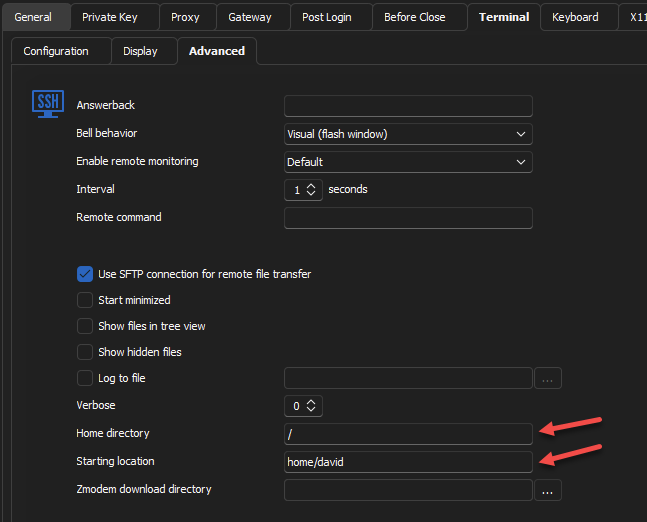
Regards
Jonathan Del Signore
cd345333-760a-402d-b1e0-53ffa4b44d25.png
Thank you Jonathan.
I do appreciate all efforts you guys do to improve the software.
For this specific feature, can't we allow going to default directory that LInux shell offers? rather than getting it manually configurable here?
imagine if I have multiple sessions to same machine, each with different username (root, admin, backup, ftp...etc.).
Each of those users land on a different home directory. It is extra unnecessary effort if I have to go to every session and update it for home user.
There is already a default home user that Linux shell will land me in and it varies per user. can't RDM inspect on that and set it as home directory by default?
Hello,
Starting with beta version 2023.2.7.0, we've added an extra field to help with this situation.
The field "Home directory" corresponds to the old "Starting location", which specifies the root of the tree. The new "Starting location" is the folder that will be selected at the start.
Regards
Hello,
What you're suggesting would indeed be a good improvement. We'll load the default directory when nothing is specified as a starting location.
We'll post here as soon as we have an update.
Regards
Jonathan Del Signore
Hello,
In version 2023.2.15.0, we made it so that when nothing is specified in the Starting location, the default value configured on the server will be used.
Regards
Jonathan Del Signore
Hello Jonathan.
That's great. Looking forward to test it :)
Hello,
In version 2023.2.15.0, we made it so that when nothing is specified in the Starting location, the default value configured on the server will be used.
Regards
Still not able to browse files in SFTP session version 2024.2.21.0 "like a normal world".
When I want to download the file, I first have to copy it to the shown folder, and then to copy it from there :/
@spaceman117
I'm not sure I understand what you're saying. Could you show a screenshot and describe more what you're trying to accomplish? This will help us understand, as it might already be supported through an option.
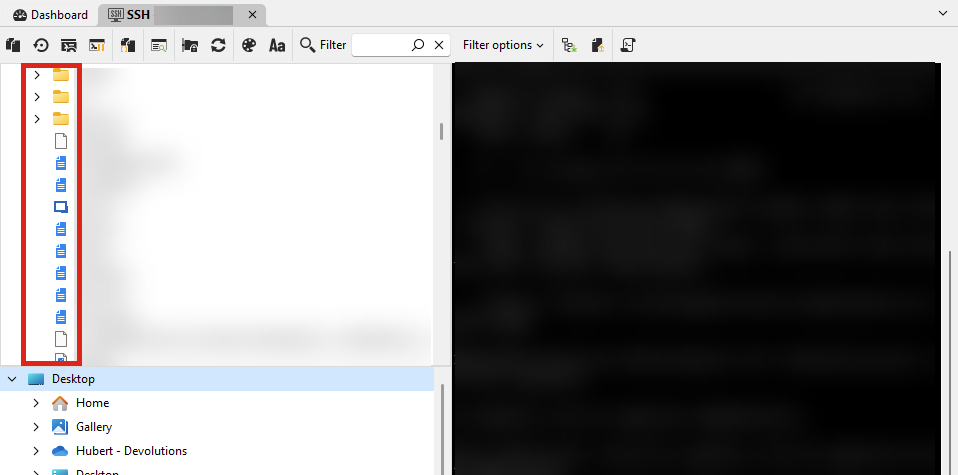
Also, did you make sure that "show files in tree view" is checked? With this option checked, I can see the files in the tree and open or download them: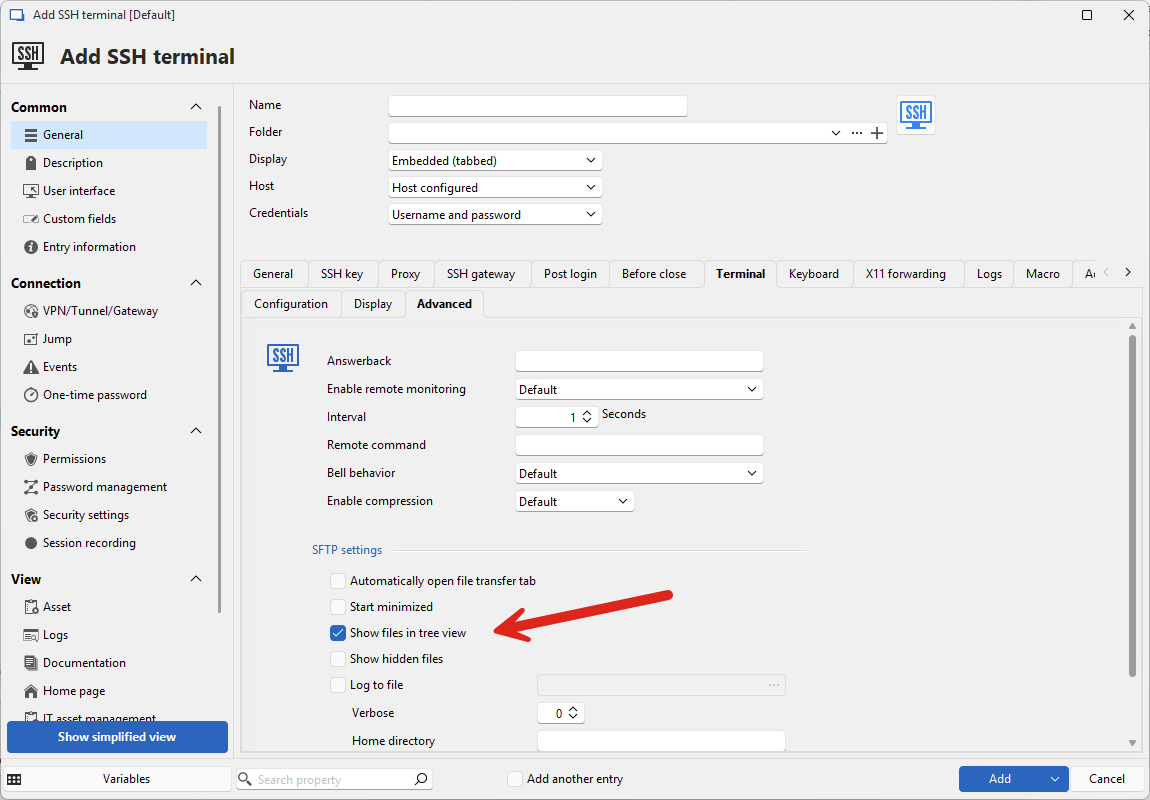
Regards,
Hubert Mireault
0b1b5fea-6e1a-4342-a9d3-2670b2d0658e.png
8e96eec8-1ca2-41bd-9de5-ea306c3af586.png
Thanks for the quick answer Hubert.
The "Show files in tree view" is checked.
I am not able to go up into the parent directory.
All I see is "root" directory and its content, so every when I need to transfer files from the system, I first need to copy that file to /root and then to download the file.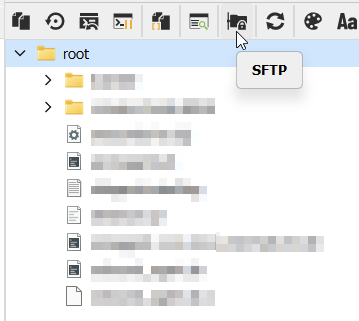
Also the solution with "Home directory" and "Starting location" mentioned above works good if i define "/" in both fields.
I am able to browse all directories.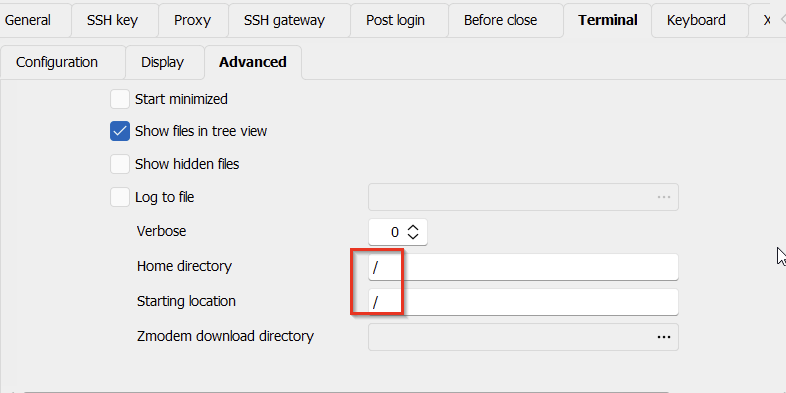
It's a bit unpractical though, if I need to do it for hundreds of servers manually.
Any chance to make it globally?
976bc027-100d-4710-bade-dcda2042b7a1.png
c267db8d-6888-4382-aa7f-975861841017.png
Hello,
Thank you for the clarification.
You could use the Batch Edit feature to apply this change to multiple entries. With a combination of the advanced search (to list all of your SSH terminal entries) and the batch edit, you should be able to accomplish this. There's also a batch action to use Powershell to edit any field of entries, you can find examples of scripts here.
Let me know if this helps. We're hoping to rework our file explorers with our 2025.2 major version, and it'll help us better handle such scenarios.
Regards,
Hubert Mireault