Importing sessions from SecureCRT
0 vote

Hello team.
I am trying to import SSH sessions from SecureCRT to RDM. I import it successfully. However, when I try to open the session, it opens in SecureCRT instead of RDM!
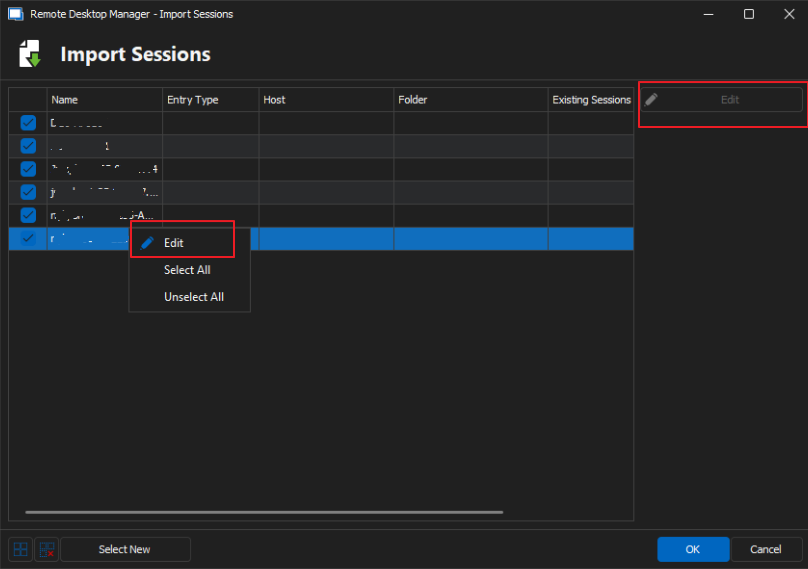
During the import process, I have a list of sessions to import, but I can't edit them. Edit button is faded out. If I right click on a session and choose "Edit", nothing happens.
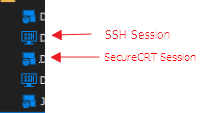
The sessions are getting obviously imported as "SecureCRT sessoins" and not as "SSH Shell" sessions. below I am including a photo of how SSH sessions and SecureCRT sessions look like in Navigation pane.
Is there a way to fix the issue so I import the session from SecureCRT and got it opened on RDM when I click on it? (I assume if we import them as SSH Shell, not as SecureCRT sessions, that'll fix the issue. But there can probably be other ways to do it as well).
All Comments (6)
Hello,
At the moment this is the expected behavior. I will move your thread to the feature request forum and we will open a ticket to allow importing as SSH Shell entries instead of SecureCRT entries.
Regards,
Hubert Mireault
Thank you Hubert. Appreciated.
Hello Hubert.
I also noticed that when I import .rdp files (remote desktop sessions) to RDM, they also reflect the same behavior. The session is imported to RDM but when I click it it opens on windows RDM client instead, and not on RDM. Would you please include this in the improvement request as well?
Best,
Hello,
At the moment this is the expected behavior. I will move your thread to the feature request forum and we will open a ticket to allow importing as SSH Shell entries instead of SecureCRT entries.
Regards,