string commands for SSH

Hello team.
In a CLI session (usually, SSH), SecureCRT offers commnds that I can press into and it will paste that text I save in that command line.
I believe typing macro is something similar in RDM. However, it doesn't give same flexibility I could find with command manager on secureCRT.
secureCRT command is more like a multi-content clipboard. I can press on a command and it will send whatever saved in that command to command prompt. This is usually used to save long commands or, for some people I see, save password and send it to CLI session by pressing the button than filling it every time.
Is there something similar in RDM?
If I use typing macro, I have to change the tab to use the macro and click on it. If I click on the macro on navigation pane it would also change the view than the CLI session I am opening.
I would expect a button that I click on then it sends whatever it holds to CLI line
It would be great if there is something similar. Otherwise, I hope you consider adding it.
My RDM is my favorite tool. My employer uses SecureCRT. But I still prefer to use RDM.
All Comments (9)
Hello,
You could leverage the terminal command palette feature. This is a feature that lists the Terminal Command entries and you can execute them in your terminal. The shortcut for this is Ctrl-Shift-P. You can find a little demo about it on our version 2024.1 blog here: https://blog.devolutions.net/2024/03/whats-new-in-remote-desktop-manager-20241/#new-terminal-command-palette
Let me know if that helps.
Regards,
Hubert Mireault
Hello and thank you for your feedback.
This feature seems available only for newer releases. right?
I am using 2023 release. I use portable because I don't have privilege on my machine to install software. When I tried to download latest portable version it asks to install .Net framework (which I don't have enough privilege to install).
Do we have a workaround for this issue? can .net framework be installed in a portable way for RDM, for example?
Hello,
You could leverage the terminal command palette feature. This is a feature that lists the Terminal Command entries and you can execute them in your terminal. The shortcut for this is Ctrl-Shift-P. You can find a little demo about it on our version 2024.1 blog here: https://blog.devolutions.net/2024/03/whats-new-in-remote-desktop-manager-20241/#new-terminal-command-palette
Let me know if that helps.
Regards,
Hello
We did some investigation for creating a portable install and determined that it should be possible. This isn't well tested and we're using an undocumented feature (an environment variable to set the path to the .NET runtime) so I can't promise that this is stable. However, I encourage you to try it and let us know if you find things that don't work quite right.
I'm going to work on getting a KB article written for this, but for now the steps are:
- Download the zipped .NET Runtime and .NET Windows Desktop Runtime. Microsoft don't publish these URLs on the download page, but they are available in the official project releases: https://dotnetcli.blob.core.windows.net/dotnet/release-metadata/8.0/releases.json
- Extract the runtime archives, into the same directory (the Desktop runtime should be in a subdirectory of the "main" runtime)
- Set the environment variable "DOTNET_ROOT" to point to the extracted .NET runtime directory
- Launch RemoteDesktopManager.exe with that environment variable properly set (i.e. from the same terminal / prompt)
A while ago I wrote a simple PowerShell script that will set this up for you; you need to provide the .zipped .NET runtime and .NET desktop runtime archives, as well as the zipped RDM portable archive, and a path to use for the package root. This will extract the archives into the proper structure and create a "launch-rdm.ps1" script that you can use to launch RDM by double-clicking. The script can be found here: https://gist.github.com/thenextman/2061ada9461f1f7a217ec84ffc5e79d1.
An example usage would be:
setup-environment.ps1 -DotNetRuntimeArchiveFilePath "c:\users\rmarkiewicz\downloads\dotnet-runtime-8.0.7-win-x64.zip" -DotNetDesktopRuntimeArchiveFilePath "c:\users\rmarkiewicz\downloads\windowsdesktop-runtime-8.0.7-win-x64.zip" -RemoteDesktopManagerArchiveFilePath "c:\users\rmarkiewicz\downloads\Devolutions.RemoteDesktopManager.Bin.2024.1.28.0.zip" -PackageRootDirectory "c:\users\rmarkiewicz\portable"
Please, let me know if something isn't clear, or you have further questions or comments
Kind regards
Richard Markievicz
Hi,
I think is more like what I am requested some time ago.
https://forum.devolutions.net/topics/42000/command-history-for-terminal#194787
Hope this feature can be considered.
SecureCRT's command manager offers quick command pasting, similar to a multi-content clipboard. RDM's typing macro requires tab changes, disrupting workflow. A dedicated button for sending saved commands directly would be a valuable addition to RDM. I hope you consider this feature. But if you want to pay someone to write your essay assignment then you can simply visit https://academized.com/pay-for-essay here. Because this service offers students the option to pay for essays that are professionally written and tailored to their specific needs. The platform guarantees high-quality, original content, ensuring that students can submit well-crafted essays that meet academic standards.
Hello team and happy holiday season.
I've been working with secureCRT for a few months now (as it is a customer's requirements). I can see the feature of "terminal command pallet" feature isn't as easygoing as command buttons in secureCRT.
Although both of them achieve same goal, but in secureCRT I have a palette where I can simply click a button to get its command written on SSH session/s or I can choose that command to be sent to specific set of opened tabs.
RDM terminal command pallet features needs you to go to the button and search for specific command/script. In secureCRT It lists all available buttons in a visible pane and I can double click that one to execute its script. Those scripts can be categorized in folders in their own commands button palette.
As RDM advocate, I'd like RDM to have as smoother feature as secureCRT. If you can implement this one I am sure I can pitch RDM to more colleagues of mine.
Hello,
Sorry about the delay, the holiday season had most of us on vacation and we're catching up on forum threads.
Would it be possible for you to show a screen capture of Secure CRT's feature? I might go and test it out on SecureCRT myself as well to get a better feel for it but it would help to see how it's organised for you, and how it works in your flow.
Regards,
Hubert Mireault
Hello team. It's been a while :)
Below are screenshots that explains the idea.
in this screenshot I click on the button "interface-status" and it then pastes "show interface status" on the CLI session. This location is called "command bar" which is located below the CLI session when visible.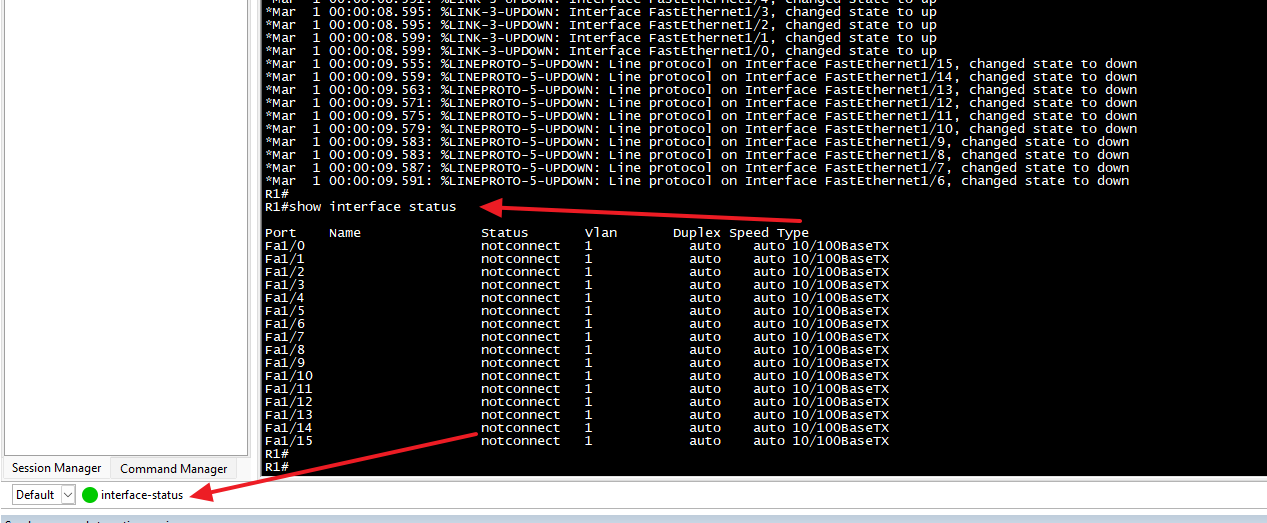
Below is the configuration of the button. the label is "interface-status" which is the button present name on the bar. The "Send string" is the field to fill the command to be sent. I added "\r" at the end to send a carriage return character after my command.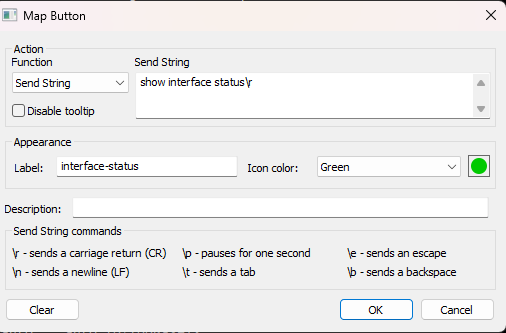
There is also a "command Manager" where command buttons of same concept can be created. in command Manager there is an option to send the command to multiple opened CLI sessions at once.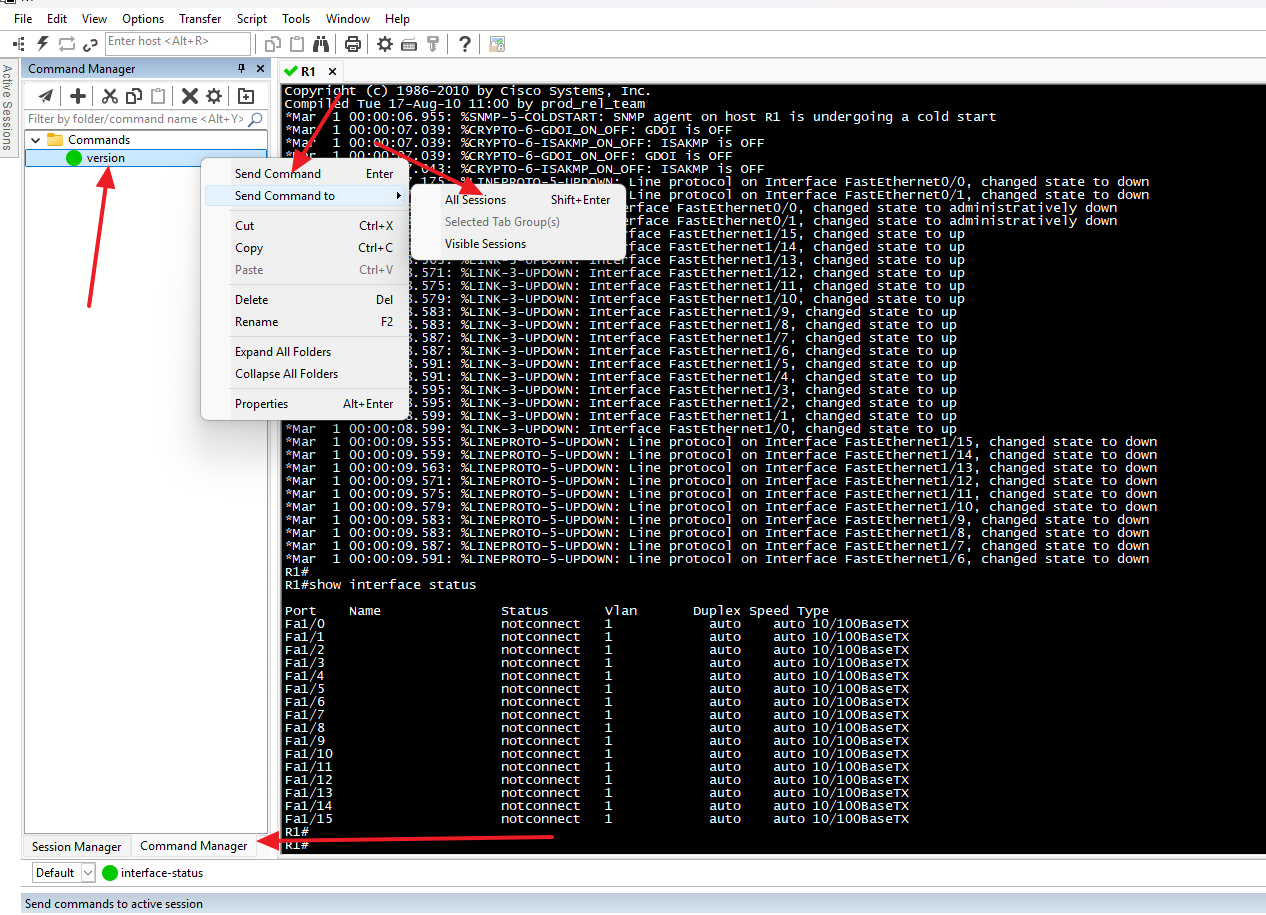
Hope this helps :)
088413c5-6386-487d-a78e-b9a6ae72b420.png
23c85899-a46e-4ee2-a9f3-8b86b98e2c7e.png
f0b7cc09-3432-4980-9c69-314ae0587371.png
Hello,
Thanks for getting back to us with that much detail.
We've recently made some small improvements to the macro bar for the SSH entries, inspired by SecureCRT's flow. If you go in File>Settings>Entry types>Sessions>Terminal, in the "user interface" section, there is an option to both turn on the macro bar, as well as have it in compact mode: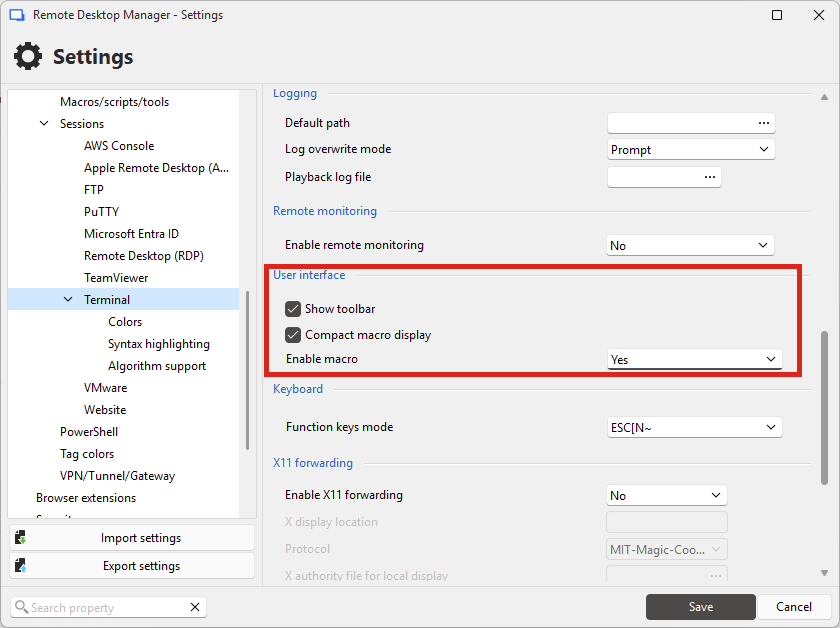
When you have these enabled, your SSH entry will, by default, list the macros available in your vault. You can use the "Macros" dropdown to select from which folder these macros should be listed: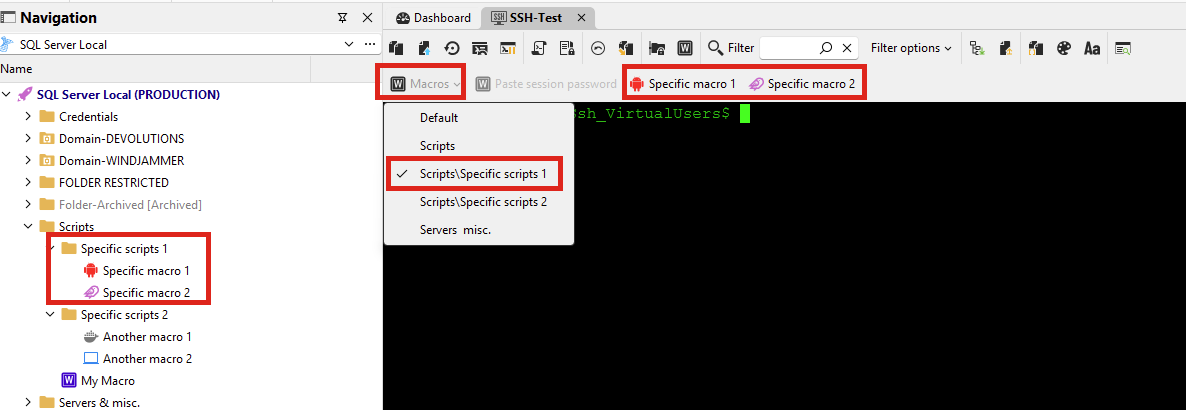
There's a few additionnal improvements I noticed we could make for clarity, like making clear that this is acting as a "folder", as well as showing which current folder you're in. We could also see about enabling this mode by default.
As for executing these macros on multiple entries at the same time, there's two ways to do this:
- Broadcasting input to SSH entries. You can read more about this here: https://docs.devolutions.net/rdm/kb/how-to-articles/broadcast-actions-in-ssh-sessions/
- Selecting multiple entries in the tree > right click > execute macro/script in the terminal
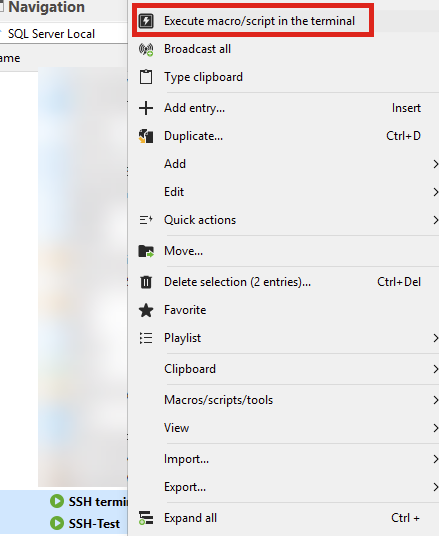
I understand it's not as convenient as clicking on the macro itself and having a button to execute it on all opened entries. We have something like that for the script dashboard but it might be too big of a feature for what you're trying to do. We could see about adding something similar to SecureCRT in the context menu of the macros.
Let me know what you think.
Regards,
Hubert Mireault
aff463d6-9fac-46cc-b021-765cf0bb35de.png
b7288eef-7e84-48aa-aa0a-f5c1aac9d78f.png
9fb502ad-f27f-48d3-bb9a-f03339a433ab.png