Issue with logging sessions of Cisco ACI

Hello team. when I SSH to Cisco ACI APIC and log the session, I notice that the session file is malformed. certain lines appear to the far right. I couldn't find the reason of this.
I tried multiple terminal emulators to save log session for same devices and I didn't notice this problem. Only RDM shows this problem when I save the session.
I couldn't reproduce the problem with other than Cisco ACI APIC. Seems that there is a specific hidden character that interpreted differently by RDM which shifts the whole line to the right.
I noticed that Cisco ACI APIC uses ZSH shell. When I manually go to bash from same session and run command from bash, log file appears fine. The problem seems to be only related to ZSH shell.
I hope you can identify the issue and solve it.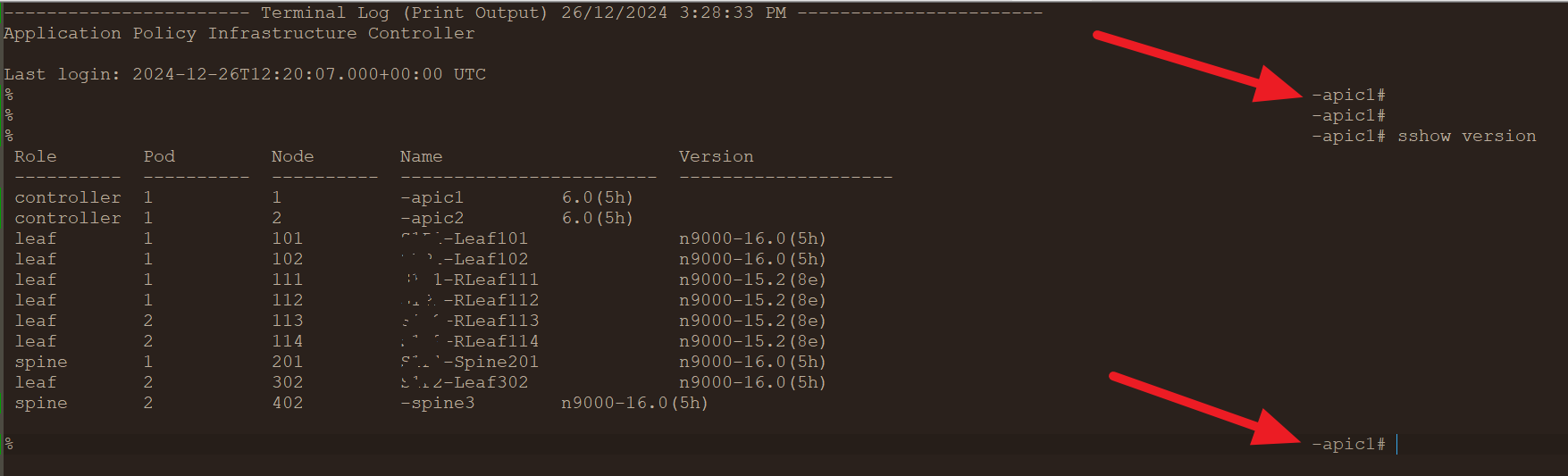
bbd080ef-dcd6-4b12-82fa-11894930ac1e.png
All Comments (6)
Hello,
Thank you for getting in touch with us. To better assist you, could you kindly provide us with the following information:
- Your current RDM version.
- The operating system you are using and its version.
- The data source you are utilizing.
- Have you changed any specific configuration on your SSH entry or in your RDM settings?
- Any additional information and screenshots you believe might be relevant.
Once we have this information, we will be better equipped to diagnose and resolve the issue.
Best regards,
Maxim Robert
Thank you for getting in touch with us. To better assist you, could you kindly provide us with the following information:
- Your current RDM version.
A>>: 2024.3.22.0 (personal)
- The operating system you are using and its version.
A>>: Windows 11
- The data source you are utilizing.
A>>: Devolutions Hub personal
- Have you changed any specific configuration on your SSH entry or in your RDM settings?
A>>: No. I've been experiencing this issue with multiple sessions on different machines even with local data sources.
- Any additional information and screenshots you believe might be relevant.
A>>: The problem seems to be related to ZSH shell in Linux. When I manually switch to BASH shell and run same command I see it in log file correct without the line-shift problem. I can't permanently use BASH for my work as not all scripts/commands that APIC product supports run from BASH.
Once we have this information, we will be better equipped to diagnose and resolve the issue.
Best regards,
Hello, and thank you for your response. Kindly find my answers inline in blue above.
Hello,
Thank you for your response!
Could you please provide us with a recording showing the steps that led to the issue? This will allow us to investigate and try to reproduce the issue. I sent you all the information in a direct message to provide us with the recording.
If you have any other questions, feel free to let us know.
Best regards,
Maxim Robert
Hello,
Thank you for your response!
Could you please provide us with a recording showing the steps that led to the issue? This will allow us to investigate and try to reproduce the issue. I sent you all the information in a direct message to provide us with the recording.
If you have any other questions, feel free to let us know.
Best regards,
Hello Max. I'll try the soonest. I don't have access to respective device from RDM meanwhile, but I'll try to provide something when I can.
Though, I am not sure how would recording help. All what I do is to setup the logging (which I do the same way for all other devices). But For this specific device (Cisco APIC) the output results is regularly shifted as described above.
Hello.
I sent the recording in a direct message to you @Maxim Robert .
The version I used in my recording was 2025.2.26.0 64-bit (JIT)
Best,
Amjad
Hello Amjad,
Thank you for your response!
We will review the recording and provide more details as soon as possible. In the meantime, if you have any other questions, please let us know.
Best regards,
Maxim Robert