
mka
Browser entry login scripts no longer working
Hi Olivier,
I mean the custom scripts here "Login -> Script -> Script Types".
It affects all entries.
Changing the version does not seem to do anything.
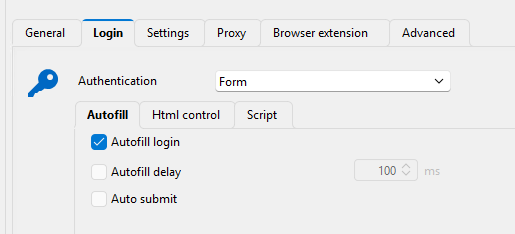
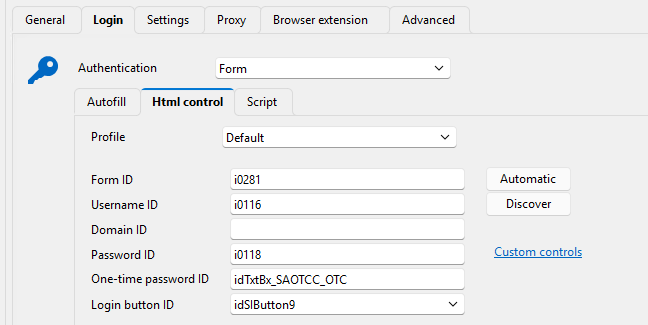
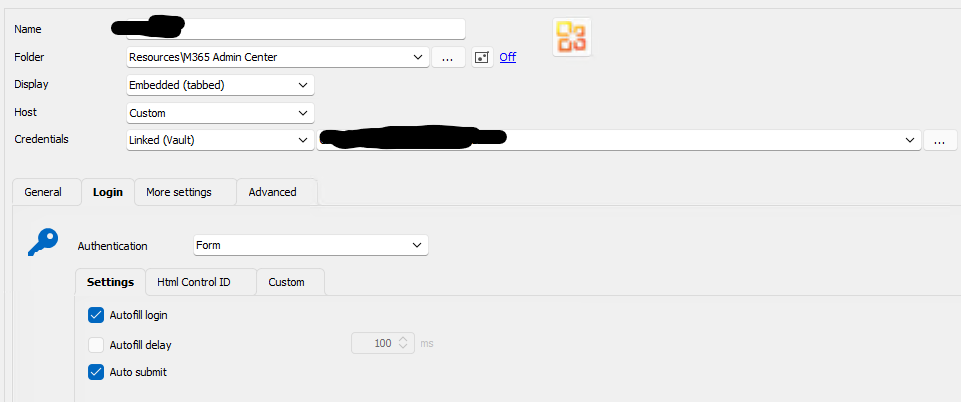
However I have found out that if i configure the entry likes this and having my custom script selected it runs the script. If autofill login and the values in Html control is not filled out it does not run the script at all. I tested this with a simple popup in the website window, and it only executes if i do the following config. This must be a mistake because my script does not need the values in Html control and it handles all the pressing buttons etc so the autofill also does not matter:
Browser entry login scripts no longer working
Am I the only one who can't get login scripts in browser entries to work anymore in 2025.1.25.0+?
It does not even seem to try to run the script.
PasswordState entry OTP no longer working as intended
Hi Carl,
Yes I can confirm that it has worked. We have used it for a long time. But the problem has been their for quite some time now (I would say 2-4 months). I just havent had the time to report it.
PasswordState entry OTP no longer working as intended
We are using a script for our browser entries. This script automatically gets $USERNAME$, $PASSWORD$ and $ONE_TIME_PASSWORD$ and add it into the correct fields and submit the form.
Our problem is that the $ONE_TIME_PASSWORD$ is empty. So it does not add in the OTP.
The credentials entry we use is a PasswordState entry which has the username, password and OTP. If we try to copy the information from the PasswordState entry directly it comes out correctly. So the integration to PasswordState works.
And I know my script works correctly because if i replace $ONE_TIME_PASSWORD$ with a string it adds this to the OTP field. Also if I create a username/password credentials with the OTP it also works correctly.
So I believe the issue is in the PasswordState entry not working with $ONE_TIME_PASSWORD$ for some reason.
I am using newest version of RDM: 2024.3.27.0 64-bit
Freezing issues with RDM 2024.3.10.0
I have tried the portable version you have linked to and I just saw the issue again.
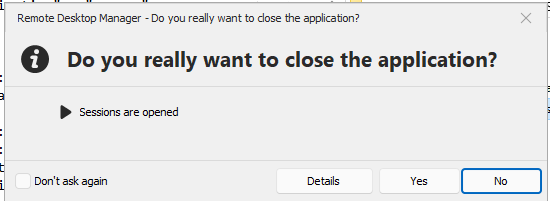
What I have found out is that if you go down on the windows bar and right click RDM and press "Close Window" while it is frozen a box will come up asking if i really want to close down RDM. If i just press no to this window it will fix the frozen RDM.
Can anybody else try this?
Freezing issues with RDM 2024.3.10.0
We are not using windows inside and have had this freezing problem for some time now. It's usually then we copy/paste things or work in a SSH connection.
Password list not working correctly (PasswordState)
Hi Jonathan,
Thank you, I can confirm that 2024.2.11.0 fixed it.
Password list not working correctly (PasswordState)
Hi,
After the latest release (2024.2.10.0) our password entries for Passwordstate where we select a password in a list does no longer work. In the screenshot below I have selected a specific account in the password list. But then I open a connection using this it ask me to choose a new entry in the list.

I get this window then I try to connect to a RDP entry with the above config. It should not ask me for this, because I have already defined in on the entry. It should just connect directly to the connection.

SSH Connections crashes RDM if they are closed by rebooting the server
Hi Samuel,
This is indeed fixed in the new version, thanks!
SSH Connections crashes RDM if they are closed by rebooting the server
Great, Thanks Samuel!
SSH Connections crashes RDM if they are closed by rebooting the server
I have now tested and it does not crash then we disable the SFTP checkmark. However we use the SFTP alot it would be nice if it would not crash with it enabled
SSH Connections crashes RDM if they are closed by rebooting the server
Hi Samuel,
Yes we use this feature for all our linux based entries. We will test with this option disabled.
SSH Connections crashes RDM if they are closed by rebooting the server
Hi,
We are using version 2023.3.39.0 64-bit, I have also noticed RDM crash if we leave RDM open for some time and the SSH connection timesout. If we then tries to press OK to the popup windows it just crashes
Browser connections causes URL to be stuck in RDM
We are using version 2023.3.39.0 64-bit
It only happens if we use Microsoft Edge, however we need to use Edge in this specific scenario.
I tested different sites and it actually only seems to happend on admin.microsoft.com and go.microsoft.com which of course is the pages we use the must and proberly the reason why i experience it alot. I have seen it happend on any other sites for now.
Im testing by navigating around the sites and switching windows in RDM until the URL gets stuck.
Browser connections causes URL to be stuck in RDM
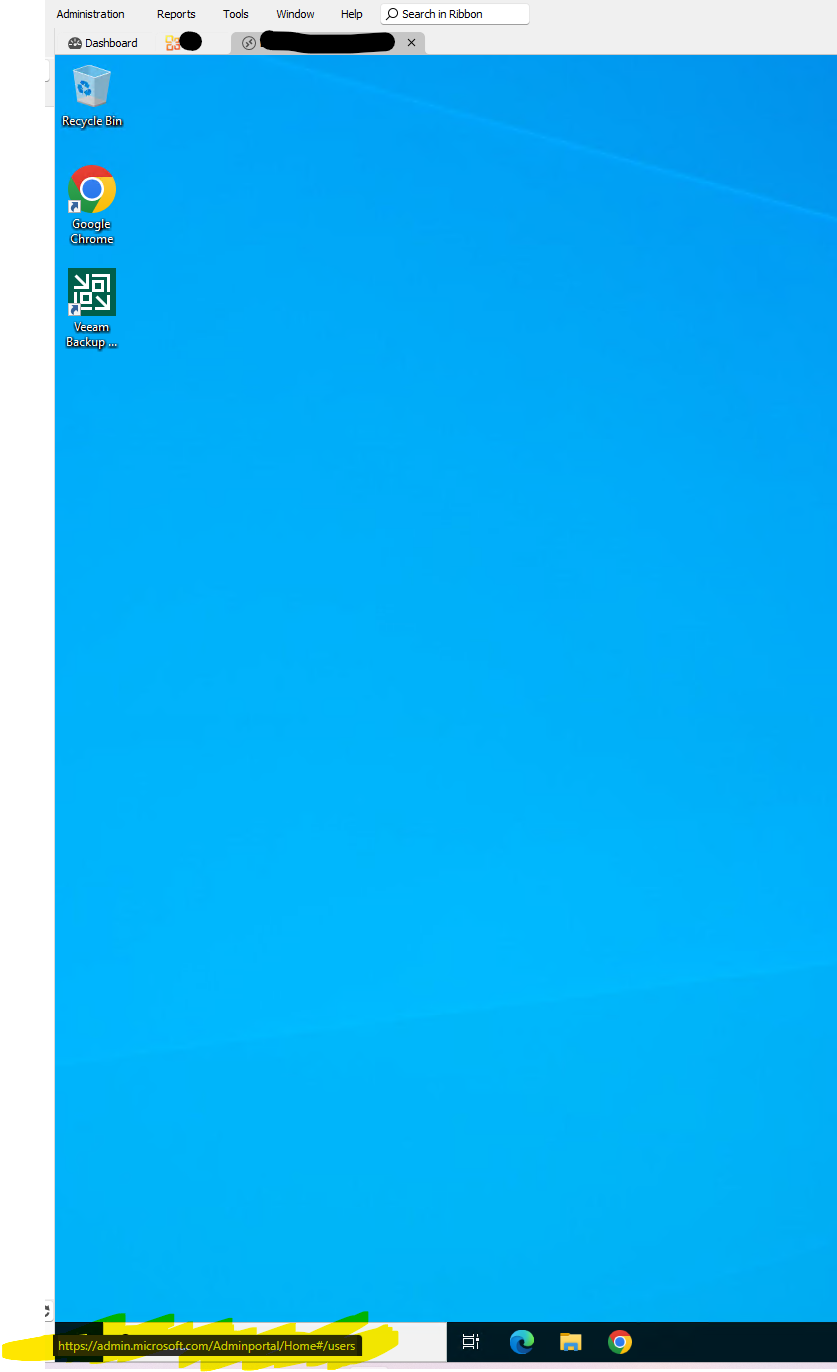
When we open up a browser conenction using Microsoft Edge and we press a button and quickly change the windows in RDM to any other connections. The URL in the button left is stuck until we go back to the browser connection and move the mouse away from a button that links to something and then wait for the link in the button left to disapear.
This is very anoying when you opens hundreds of connections daily and this URL gets stuck from just one of our browser connections. We then have to find out which one it is etc.
In my picture you can see that I have opened two connections. The first one is the browser and the second one is the RDP. But in the RDP window I now have the URL stuck.
SSH Connections crashes RDM if they are closed by rebooting the server
As my title simple says, if you create a SSH connection to our Linux based servers and we do a reboot on the server, normally RDM would just close the connection. But specifcally with SSH connections it just crashes RDM. This has happened for many months now.
We have 10 employees using RDM with the same datasource MsSQL. They all experience this issue. We experience the issue on all Linux based SSH connections.
If we SSH to the server and just close down the connection manually it works, it's only then we reboot the server it crashses.
PasswordState Entries with OTP not working anymore
Hi Patrick,
I have tried recreafting the the entry from new and I have tried having the "Allow OTP retrieval" checked and unchecked. But as long as there are a OTP code in the password in PasswordState I cannot seem to get it to work in RDM.
The following was changed in PasswordState in version 9.8 - Build 9811
Included OTPUri field in response for the API endpoints when retrieving password records
PasswordState Entries with OTP not working anymore
At some point with either upgrading PasswordState or Devolution RDM our PasswordState entries in RDM with OTP no longer works.
RDM does not retrieve either the username, password or OTP. If i in PasswordState disable the OTP. The RDM entry are able to retrive username and password again. This has been working for a long time, but as said just stopped working at some point.
RDM Version: 2023.3.28.0
PasswordState Version: 9.8 (9823)
Both newest versions.
RDM Website Entry autofill credentials admin.microsoft.com
Hi Samuel,
We are using version: 2023.1.23.0
Yes auto submit is enabled:
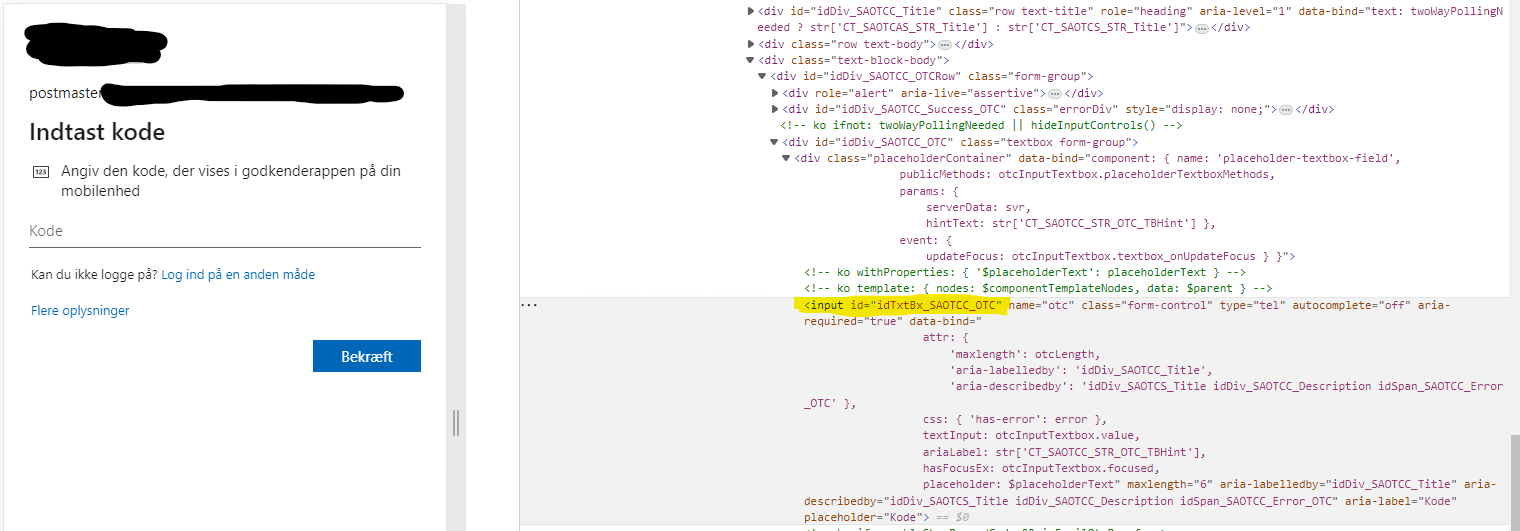
I followed method 2 in the link you provided to get username, password and OTP ids. Here is the result of the OTP inspect:
RDM Website Entry autofill credentials admin.microsoft.com
Hello,
I am so close to getting my Edge website entry to open admin.microsoft.com, set the username, password and OTP with autofill and just log us in.
However it does not work completely.
Then i open the website entry it opens admin.microsoft.com -> applies the username -> Next to password section -> applies the password -> And it stops here. We then have to press the next button our self and it comes to the OTP section which it does not apply, but we are apple to autofill the OTP from the autofill credentials button in the top.
I would I make it autofill this flow completely? Could we do something in the custom options?
Extra info:
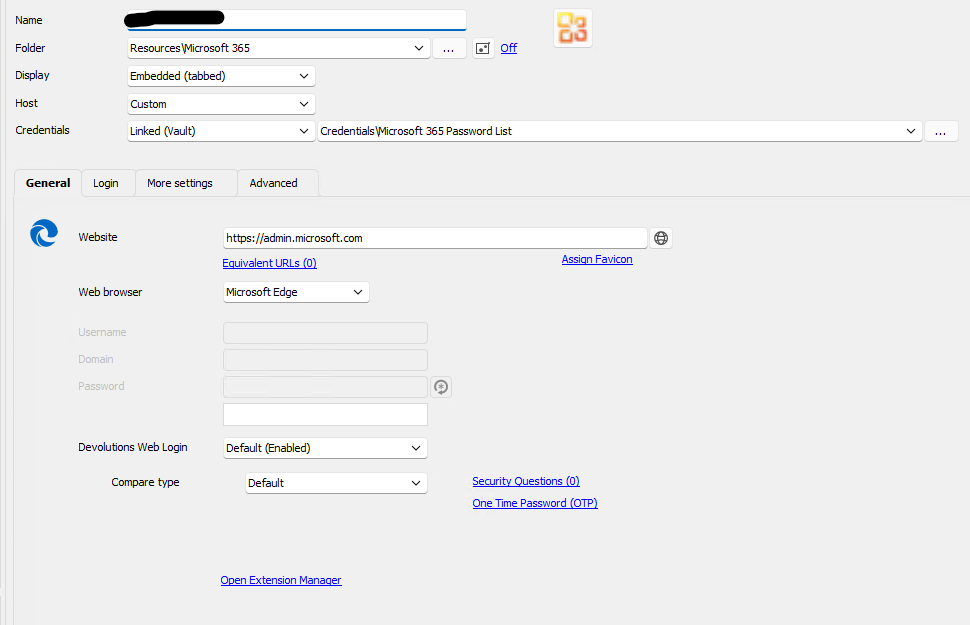
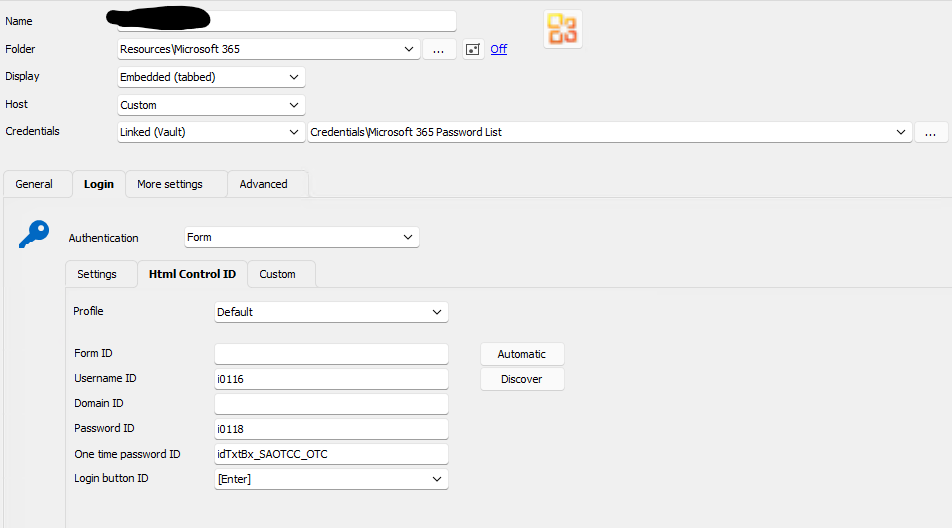
We get the username, password and OTP from a passwordstate password entry which as seen on the pictures in choosen on this website entry.
I am not sure if the One time password ID is correct, it does autofill it as said when we press the autofill button.
SSH Entries embedded SCP starting location
I am using version 2022.3.30.0 64-bit
We used to use the SFTP feature, but changed to SCP because we had some trouble with it keep asking for credentials for the SFTP. But I have just tested this feature again and it seems to work fine now. We will just use this feature again. :D
SSH Entries embedded SCP starting location
Yes this works, and this is the way we have done for now. We have a sub entry on the SSH machines with a SCP that inherit from the SSH entry.
But if we just could right click on the SSH entry and choose the SCP option then we wouldnt have to create the SCP entry for every linux machine.
But I don't know if this is the way this feature was intended. The other way is fine, but I was just curious about the what was possible with the embedded SCP parameter.
SSH Entries embedded SCP starting location
Hello,
It is now possible to open a SSH entry with the "Open with parameters -> Open Embedded (SCP)" but the folder view starts in /root/ folder and it does not seem to be possible to go further back in the diresctory tree and see all the other folders like home, var, opt etc.
Is it possible to change this behavior to make it start at the path "/" for example?
The option under the SSH entry "Terminal -> Advanced -> Starting location" does not seem to affect this feature.
RDM Dynamic Credential Linking Passwordstate Problems
Hello Gabriel,
This did the trick. Thank you!
Im using version 2021.2.28.0 64-BIT
//Mads
RDM Dynamic Credential Linking Passwordstate Problems
I think I might be missing something with the dynamic credential linking and Passwordstate.
I have created a passwordstate entry with standard API and chosen my Password List. It shows me the password list and passwords fine, so the API works.
But if I choose this password for a RDP entry it just gives me a password prompt then trying to open a session. If I choose custom credentials and manually type in the credentials it works fine.
I have also tried with setting the password directly in the passwordstate entry and chosen that in the RDP entry. Same issue. :(
The API is allowed to retrieve passwords.


