Freezing issues with RDM 2024.3.10.0

This has been happening through several updates, and it continues. Today I have had to end the program in task manager 2 times, and it averages about 8 times a week.
is there a Log that I need to look at when this happens?
Recommended Answer
Hello,
Thank you for reaching out to Devolutions Support.
I have reviewed your previous cases and noticed that you were using a Windows Insider build in the past. Could you confirm if that is still the case?
If you are still using the Windows Insider build, please refer to the following forum
threads for information on RDM support with Insider builds:
https://forum.devolutions.net/topics/30298/windows-insider-preview-builds
https://forum.devolutions.net/topics/43176/my-rdm-crashes#199830
If you are no longer using the Windows Insider build, please follow these troubleshooting steps before reaching out to us:
1. Close the Remote Desktop Manager (RDM).
2. Navigate to the following directory: `%localappdata%\Devolutions`
3. Rename the RemoteDesktopManager folder to RemoteDesktopManager.old.
4. Restart RDM.
Important: Resetting the configuration will remove all your data source information, and you will need to re-enter it.
If you are using a Local data source, ensure that you move the Connection.db file from the RemoteDesktopManager.old folder to the new RemoteDesktopManager folder.
After completing Step 4, please do the following:
- Restart RDM.
- Close RDM.
- Return to `%localappdata%\Devolutions`.
- Move the Connection.db file from the RemoteDesktopManager.old folder to the new RemoteDesktopManager folder.
- Start RDM again.
If the issue persists after completing these steps, please contact service@devolutions.net
Best regards,
Carl Marien
All Comments (71)
Hello,
Thank you for reaching out! My name is William, and I'm here to assist you in any way I can.
When you are experiencing these freezing issues, have you noticed if they were right after any specific action?
Would it be possible to confirm the Data Source and its version that you are using?
Have you tried waiting to see if RDM is unfreezing or does it stay stuck forever?
Best regards,
Thank you sir
There does not seem to be any "trigger" that I can determine, though most of the time it is while I am working within the rdp connection itself. the most I have let it sit is just a few minutes, since it usually is right in the middle of doing something.
The local data source is the default
C:\Users\jshea\AppData\Local\Devolutions\RemoteDesktopManager\Connections.db
this has been going on for several months though I have just been basically living with it, hoping that the next update would fix it.
and there are lulls in when it happens. It can go several days without an issue and then happen a few times a day.
I even uninstalled it completely and reinstalled it.
I have the same issue with 2024.2.21.0 64-bit.
The last couple of weeks its become worse. So I'm not sure it is RDM but maybe a windows update or similar.
I will try to update version to see if that helps.
It also happens with 2024.3.12 that I just installed. I will test opening the RDP connection w.o. RDM and see if it happens over that connection.
The issue also happens when not using RDM. So I guess it needs to be reported upstream to Microsoft. The connection is still up and accepting input, but you cannot see what's going on.
[Window Title]
Remote Desktop Connection
[Content]
Your connection quality is good and UDP is enabled.
[^] Hide details  [OK]
[Expanded Information]
Timestamp (UTC): 10/07/24 10:57:25 AM
Activity ID: 45b37f8a-4b93-4314-a436-71bf94440300
[Client details]
Client version: 10.0.22621.4036 (x64)
Local OS: Windows 10 Enterprise x64 (10.0, Build 22631)
[Network details]
Transport protocol: UDP
Round-trip time: 4 ms
Available bandwidth: Greater than 176 Mbps
Frame rate: 0 FPS
[Remote computer details]
Remote session type: Remote desktop
Gateway name: Not in use
Gateway logon method: Not in use
Remote computer: redacted
Upstream report: https://github.com/microsoft/microsoft-ui-xaml/issues/10009
We are experiencing freezes seemingly related to website entries (although we're not completely sure) but without being able to properly reproduce it.
When a colleagues RDM was frozen I could enter the task manager of the RDS server he was using RDM thru, and see a bunch of Edge WebView procceses and the RDM task itself being "not responding" - when I forcefully closed all the webview proccesses (related to his user), RDM unfroze and started functioning again. Has anyone else experienced this?
Version 2024.3.12.0.
We are experiencing freezes seemingly related to website entries (although we're not completely sure) but without being able to properly reproduce it.
When a colleagues RDM was frozen I could enter the task manager of the RDS server he was using RDM thru, and see a bunch of Edge WebView procceses and the RDM task itself being "not responding" - when I forcefully closed all the webview proccesses (related to his user), RDM unfroze and started functioning again. Has anyone else experienced this?
Version 2024.3.12.0.
This interesting, I will have a look the next time this happens.
also someone mentioned windows update, sadly this have been happening for several months if not more so hard to go back and determine.
The issue also happens when not using RDM. So I guess it needs to be reported upstream to Microsoft. The connection is still up and accepting input, but you cannot see what's going on.
[Window Title]
Remote Desktop Connection
[Content]
Your connection quality is good and UDP is enabled.
[^] Hide details [OK]
[Expanded Information]
Timestamp (UTC): 10/07/24 10:57:25 AM
Activity ID: 45b37f8a-4b93-4314-a436-71bf94440300
[Client details]
Client version: 10.0.22621.4036 (x64)
Local OS: Windows 10 Enterprise x64 (10.0, Build 22631)
[Network details]
Transport protocol: UDP
Round-trip time: 4 ms
Available bandwidth: Greater than 176 Mbps
Frame rate: 0 FPS
[Remote computer details]
Remote session type: Remote desktop
Gateway name: Not in use
Gateway logon method: Not in use
Remote computer: redacted
How did you test this?
thank you in advance
How did you test this?
I started the connection using Remote Desktop Connection. Worked for a bit and the picture froze like in RDM.
Hello,
Thank you for your feedback.
It appears that the issue is related to Windows RDP. I recommend trying a workaround for your RDP session.
Could you please change the RDP version to FreeRDP or IronRDP in your session properties?
Please let us know if this resolves the issue.
Best regards,
Patrick Ouimet
I've been experiencing freezing issues with RDM for months too. It's happened over two different PCs too (Windows 10 and Windows 11).
I've had a few different symptoms, so I'm not sure if they are exactly the same each time. Sometimes it comes back, sometimes it doesn't.
Most commonly, the RDM window itself will lock up. Sometimes my current tab will remain responding, as in my RDP session is still active, but I can't change tabs or click on anything within the RDM application window.
The freeze can affect other Windows applications at the same time. Most notably my ScreenConnect sessions also freeze. When frozen, both apps will be unresponsive. Although, even though my ScreenConnect app won't be responding to my clicks, I can see when the remote side moves their mouse or clicks on things. I can't even move the Window around on the screen by dragging the title bar, completely non-responsive to my input.
Usually, if I do wait a few minutes, it does seem to unfreeze and the apps will become responsive again. Sometimes I can't wait and kill them off.
I do think sometimes it seems to be triggered by a copy or paste action. I've had it happen once even with Word where I was trying to paste something into a Word doc that even Word locked up for a few minutes trying to access the clipboard. Sure enough, RDM was then also locked up, but not other windows, such as browser windows, etc. The item didn't paste (I think Word even threw up an error eventually), but everything came back responding after a few minutes.
I've tried changing clipboard settings in RDM, but changing between legacy or paste once methods doesn't seem to affect things much. Still get the freezes.
Where it seems inconsistent is sometimes things freeze up completely and the current session is also not responding. Also, sometimes, even if I wait it doesn't seem to come back responding.
Last time it happened, I could observer two different cores on my PC were locked at 100%, but no processes were being reported as using high cpu. Killed off RDM as it didn't come back responsive and the CPU usage immediately reduced on the cores that were up at 100%.
Just updated to 2024.3.13.0 yesterday and I had a lockup later that day.
Hello Steven,
Could you share your application logs from RDM under Help -> Application logs?
Could you also check the event viewer to see if anything is related?
Best regards,
Patrick Ouimet
Hello Steven,
Could you share your application logs from RDM under Help -> Application logs?
Could you also check the event viewer to see if anything is related?
Best regards,
There is seemingly no correlation to anything in the Help-> Application Logs. The last messages listed occurred weeks ago.
Also, I've not noted anything related from the event viewer either when these issues occur.
The next time it happens I'll be sure to check these locations again though.
Hello,
Thank you for your feedback.
It appears that the issue is related to Windows RDP. I recommend trying a workaround for your RDP session.
Could you please change the RDP version to FreeRDP or IronRDP in your session properties?
Please let us know if this resolves the issue.
Best regards,
FreeRDP is it
Lets see how this works out.
Hello Steven,
Could you share your application logs from RDM under Help -> Application logs?
Could you also check the event viewer to see if anything is related?
Best regards,
There is seemingly no correlation to anything in the Help-> Application Logs. The last messages listed occurred weeks ago.
Also, I've not noted anything related from the event viewer either when these issues occur.
The next time it happens I'll be sure to check these locations again though.
I will do the same
here is the logs from the most recent freeze just around 330
[10/10/2024 3:30:11 PM - 2024.3.13.0 - 64-bit] Error silent: [Devolutions.Sessions][Error][2024-10-10 15:30:11Z] failed to set clipboard data
System.ComponentModel.Win32Exception (0x80004005): The operation completed successfully.
[10/10/2024 3:30:11 PM - 2024.3.13.0 - 64-bit] Error silent: [Devolutions.Sessions][Error][2024-10-10 15:30:11Z] failed to set clipboard data
System.ComponentModel.Win32Exception (0x80004005): The operation completed successfully.
[10/10/2024 3:30:11 PM - 2024.3.13.0 - 64-bit] Error silent: [Devolutions.Sessions][Error][2024-10-10 15:30:11Z] failed to set clipboard data
System.ComponentModel.Win32Exception (0x80004005): The operation completed successfully.
[10/10/2024 3:30:11 PM - 2024.3.13.0 - 64-bit] Error silent: [Devolutions.Sessions][Error][2024-10-10 15:30:11Z] failed to set clipboard data
System.ComponentModel.Win32Exception (0x80004005): The operation completed successfully.
[10/10/2024 3:36:00 PM - 2024.3.13.0 - 64-bit] Error silent: [PipeClientTransport][Error][2024-10-10 15:35:54Z] System.OperationCanceledException: The operation was canceled.
at System.Threading.CancellationToken.ThrowOperationCanceledException()
at System.Threading.CancellationToken.ThrowIfCancellationRequested()
at System.IO.Pipes.NamedPipeClientStream.ConnectInternal(Int32 timeout, CancellationToken cancellationToken, Int32 startTime)
at System.Threading.ExecutionContext.RunFromThreadPoolDispatchLoop(Thread threadPoolThread, ExecutionContext executionContext, ContextCallback callback, Object state)
--- End of stack trace from previous location ---
at System.Threading.ExecutionContext.RunFromThreadPoolDispatchLoop(Thread threadPoolThread, ExecutionContext executionContext, ContextCallback callback, Object state)
at System.Threading.Tasks.Task.ExecuteWithThreadLocal(Task& currentTaskSlot, Thread threadPoolThread)
--- End of stack trace from previous location ---
at Devolutions.Ipc.Network.Transport.Client.PipeClientTransport.ConnectAsync(String pipeName, CancellationToken cancellationToken)
[10/10/2024 3:36:01 PM - 2024.3.13.0 - 64-bit] Error silent: System.NullReferenceException: Object reference not set to an instance of an object.
at Devolutions.RemoteDesktopManager.RemoteDesktopManagerCommunicator.Open(String[] parameters)
Hello All,
Thank you for those tests.
Can you follow the steps in this documentation:
https://docs.devolutions.net/rdm/kb/rdm-windows/troubleshooting-articles/rdp-session-troubleshooting/#generate-and-send-rdp-api-hooking-log-files
You can use the secure link below to send us the logs;
https://devolutions.sharefile.com/filedrop
Simply name your file “<your name>-FM-43042” to quickly identify it.
Make sure that this test is done when the session is embedded in RDM, and you use FreeRDP.
Best regards,
Patrick Ouimet
Hello All,
Thank you for those tests.
Can you follow the steps in this documentation:
https://docs.devolutions.net/rdm/kb/rdm-windows/troubleshooting-articles/rdp-session-troubleshooting/#generate-and-send-rdp-api-hooking-log-files
You can use the secure link below to send us the logs;
https://devolutions.sharefile.com/filedrop
Simply name your file “<your name>-FM-43042” to quickly identify it.
Make sure that this test is done when the session is embedded in RDM, and you use FreeRDP.
Best regards,
I will work on this today
I have actually made it happen 3 times so far trying to copy from an RDP session (right click and ctrl-c)
and now it is not happening
this is just so random
No one else experiencing freezes related to Edge WebView proccesses?
No one else experiencing freezes related to Edge WebView proccesses?
actually what do I need to look for when it freezes
another interesting note.
I am running a powershell in an RDP and while script was running devolutions froze
not only that, until I closed it via task manager, I could not type at all, edge, google, word document, txt file.
I am going to send the new log files
I uploaded the file requested
every freeze instance in the last week starts with a copy to the clip board from within the rdp
it has happened 4 times today.
Hello tbflyer,
Thank you for this feedback.
We are still investigating this issue.
Since this is related to the clipboard, could you also check the clipboard diagnostic and send us the result?
https://docs.devolutions.net/rdm/kb/troubleshooting-articles/clipboard-diagnostic/
Is the clipboard diagnostic also making your RMD freeze?
Best regards,
Patrick Ouimet
Hello everyone,
The development team has raised an important point regarding this case.
Are any of you using Windows Insider?
If you are, please refer to the last reply from Marc-Andre Moreau in this forum: https://forum.devolutions.net/topics/43176/my-rdm-crashes#199830
Best regards,
Patrick Ouimet
We are running RDM on Server 2022 session hosts.
I've been running a ticket with you (00071968) regarding the issue.
Thank you for this feedback.
I will investigate this and ask for any specific details in the case - 00071968
Best regards,
Patrick Ouimet
Hello tbflyer,
Thank you for this feedback.
We are still investigating this issue.
Since this is related to the clipboard, could you also check the clipboard diagnostic and send us the result?
https://docs.devolutions.net/rdm/kb/troubleshooting-articles/clipboard-diagnostic/
Is the clipboard diagnostic also making your RMD freeze?
Best regards,
Finally got back to this. the diagnostics show me no information. running the diagnostic has not frozen though yet
I will see if I can make it happen. it is no doubt the copy operation that if freezing it though. it has happened 4 times today.
interestingly, until I close the session my machine is all but stuck.
Sadly this is simply a non-functioning product at this point. I love what it does, but in the last hour I have had it freeze 10 times when I run a copy process.
unless there can be a fix, My organization will need to move on to something stable, even if it does not do what this does.
if you can, please post the full uninstall process including cleaning up anything that is left behind.
I will try a complete clean install and see if that helps.
I see no other options without a deeper dive from Devolutions
Could you reach out to their support and schedule a remote sesssion? It sounds like you can perhaps more easily replicate the issue while someone from Devolutions is looking at it with you.
Hello,
@tbflyer are you using Windows Insider Preview build? If so, you can refer to these posts on our forum from Marc-Andre and Maurice.
https://forum.devolutions.net/topics/43176/my-rdm-crashes#199830
https://forum.devolutions.net/topics/30298/windows-insider-preview-builds
If not, please open a case at service@devolutions.net with a reference to this forum's thread and we will send you a link to investigate your issue in a support session.
Thank you for your collaboration.
Best regards,
Érica Poirier
Hello,
@tbflyer are you using Windows Insider Preview build? If so, you can refer to these posts on our forum from Marc-Andre and Maurice.
https://forum.devolutions.net/topics/43176/my-rdm-crashes#199830
https://forum.devolutions.net/topics/30298/windows-insider-preview-builds
If not, please open a case at service@devolutions.net with a reference to this forum's thread and we will send you a link to investigate your issue in a support session.
Thank you for your collaboration.
Best regards,
No I am not, I use windows 11 on my company machine. I have also heard from others who are seeing the same issues with Devolutions.
Hello Everyone,
Could you double-check that all these settings are configured and tell me if you still freeze, crash, or have performance issues?
For any freeze or crash in general, the first workaround is to change the wait progress bar to Status or none: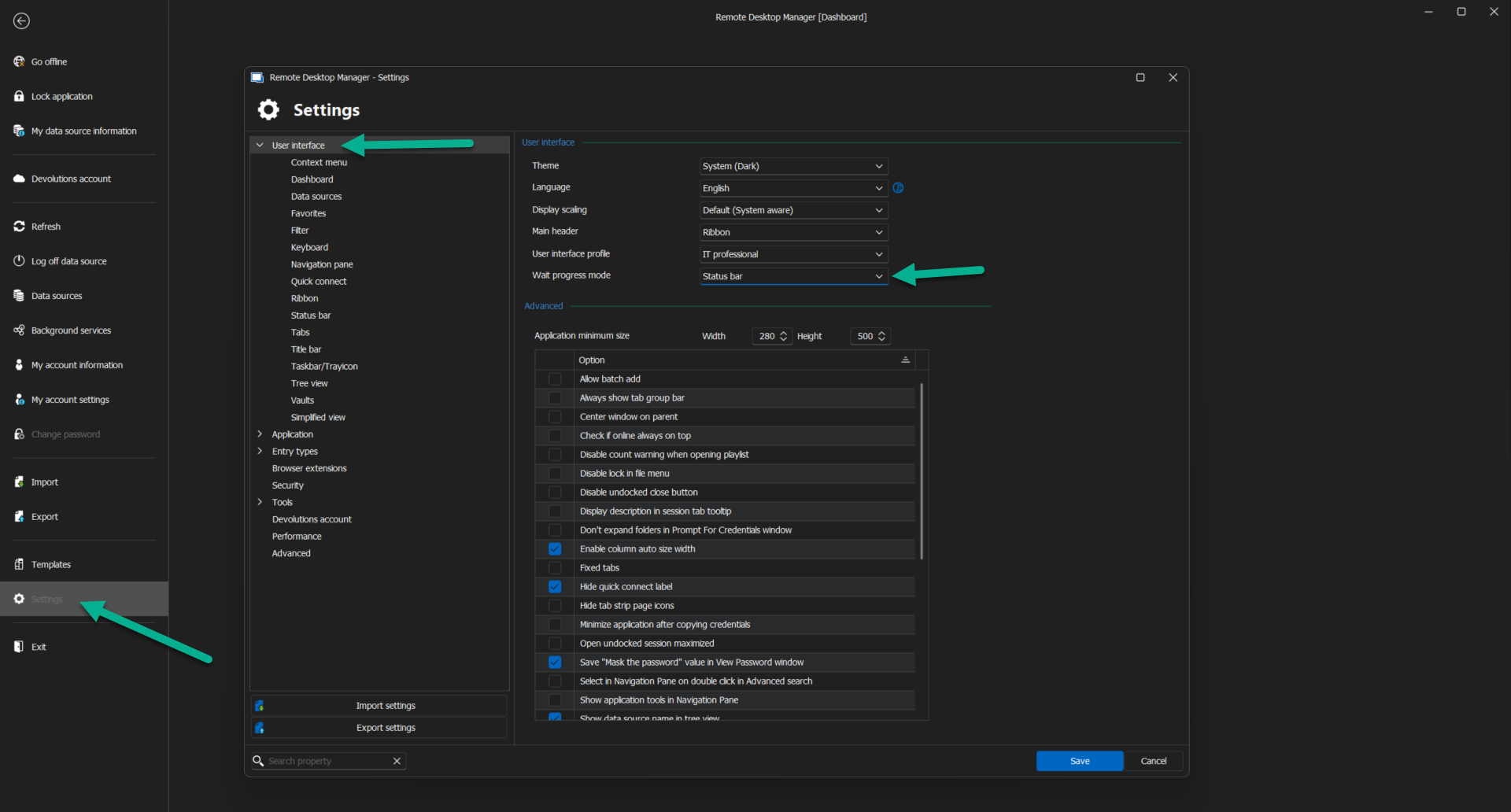
The second one is to change all your web entries settings to use the Disable loading messages: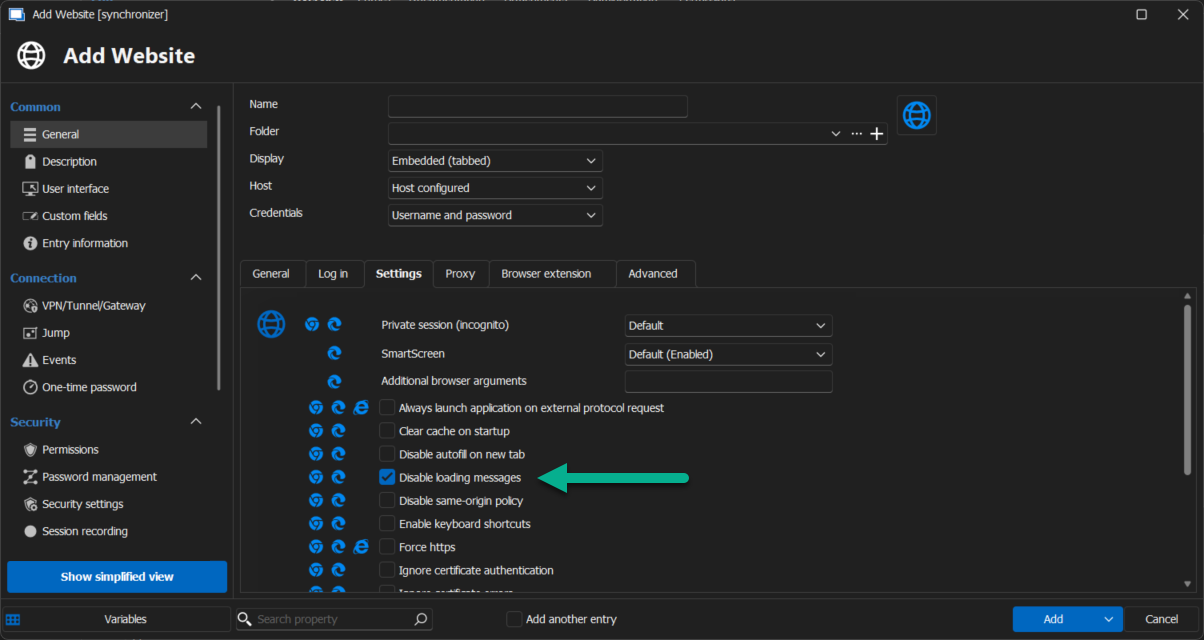
The last one is to use FreeRDP instead of MSTSC :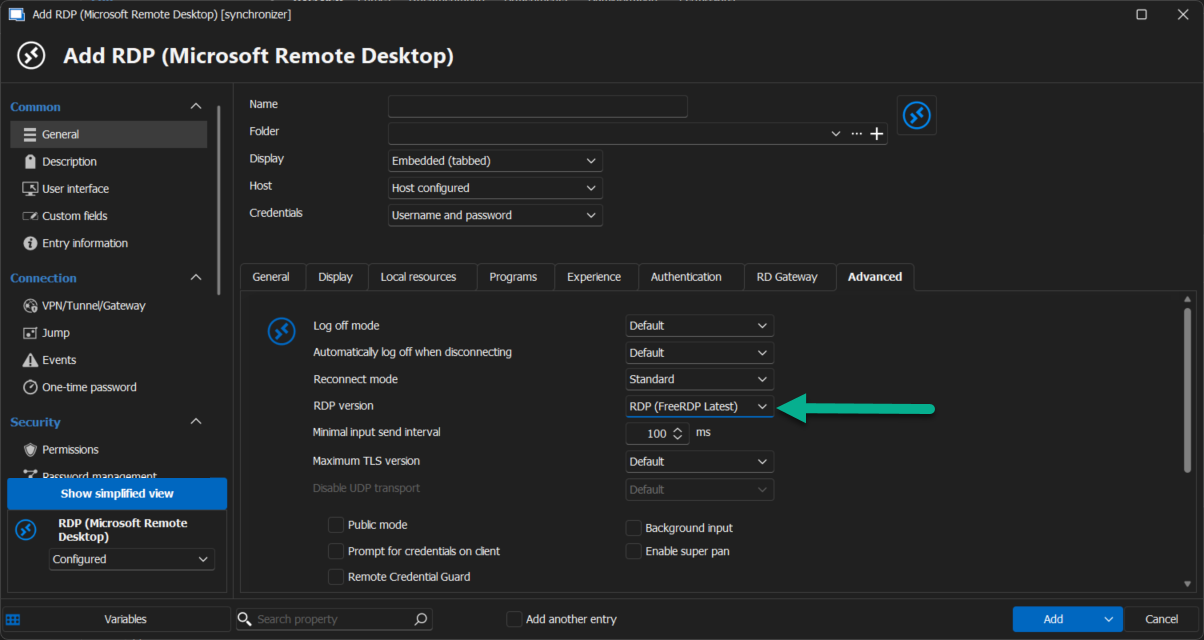
Let me know with all these 3 settings you still get this issue.
Best regards,
Patrick Ouimet
wait progress.png
disable message.png
free rdp.png
Hi
I still get the issue even with the recommended setting. I have this issue with RDP and SSH session.
The tool is pretty much unusable at this point, and it was working very well before.
Thanks
Hi
I still get the issue even with the recommended setting. I have this issue with RDP and SSH session.
The tool is pretty much unusable at this point, and it was working very well before.
Thanks
Same, here, and frankly this is still better than other tools, otherwise I would have given up by now.
We are not using windows inside and have had this freezing problem for some time now. It's usually then we copy/paste things or work in a SSH connection.
Hello Everyone,
I already have an internal case open with tbflyer.
I will also open one for stephanefortier and mka.
Best regards,
Patrick Ouimet
Hello,
After a session with tbflyer, It looks like this issue is related to the cache of RDM.
To check if this is the case, I suggest doing a portable version of RDM on the latest version and try to reproduce this issue.
To do so, you will need to do the following:
(Close RDM)
1- Download the .zip file below:
https://remotedesktopmanager.com/home/thankyou/rdmbin
2- Create a new folder on your Desktop
3- Extract the content of the .zip file into the folder created at #2
4- Go to this folder once the .zip file has been extracted and run remotedesktopmanager.exe
5- Connect to your data source
Best regards,
Patrick Ouimet
I have tried the portable version you have linked to and I just saw the issue again.
What I have found out is that if you go down on the windows bar and right click RDM and press "Close Window" while it is frozen a box will come up asking if i really want to close down RDM. If i just press no to this window it will fix the frozen RDM.
Can anybody else try this?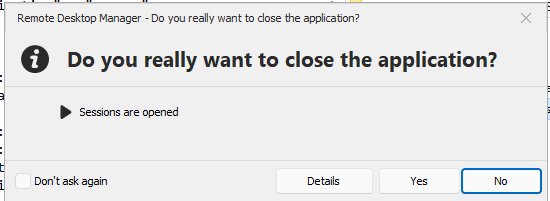
22b7af72-ef98-47c6-9a22-6ab4271d4460.png
Haven't noticed that one.
But we sometimes experience that it unfreeze when closing edge webview processes running on the user.
But not always. Depends on whether the freeze is caused by the Edge web entries a user might be running, I guess.
When your RDM is frozen, does it also enter a 'not responding' state (according to task manager) without actually fading out like programs typically do on Windows?
Hello,
I have created cases to investigate further.
From what I can see from this forum thread, Every RDM behaves differently.
I will investigate all of them with you.
Best regards,
Patrick Ouimet
In our case it seems like the freeze happens related to various reasons. Personally I've also experienced a freeze when using the clipboard and then I've got colleagues who freeze when RDM is left idle for a very short while. All seems random and hard to reprocedure, sadly.
Hi guys,
suffering from this as well since a few years throughout all releases that were published in that time. Remote Desktop Manager is freezing, sometimes multiple times per day.
I have applied the settings for the "wait progress mode", the error still occurs. FreeRDP is not an option for me as we are using smartcard login which seems to be not supported by FreeRDP. We do not use website logins, so this recommendation does not apply to us at all.
Kind regards,
Stefan
Hello sirfene,
I also answered in the internal case you have with us.
Best regards,
Patrick Ouimet
Hello,
After a session with tbflyer, It looks like this issue is related to the cache of RDM.
To check if this is the case, I suggest doing a portable version of RDM on the latest version and try to reproduce this issue.
To do so, you will need to do the following:
(Close RDM)
1- Download the .zip file below:
https://remotedesktopmanager.com/home/thankyou/rdmbin
2- Create a new folder on your Desktop
3- Extract the content of the .zip file into the folder created at #2
4- Go to this folder once the .zip file has been extracted and run remotedesktopmanager.exe
5- Connect to your data source
Best regards,
Update.
After clearing the entire cache (if you could list the instructions here for everyone) I did not have freezes till next day. after you then had me change back to mstsc instead of freeRDP the freezes have stopped completely. I have not had a freeze since 11/27.
now keep in mind the freezes initially started before I ever changed to freerdp, to maybe both the chache deletion needs to happen in conjunction with moving away from frerdp
Hello sirfene,
I also answered in the internal case you have with us.
Best regards,
Patrick
just to let you know I still have not had any freezes since the deletion of the cache and the resetting of the RDP function back to mstsc (away from freerdp)
can you remind me and let everyone know how to delete that stuff?
My co-worker wants to try it for his freeze issues
Hello tbflyer,
Sure, this is how you can reset the configuration of RDM and also clear the cache.
1. Close Remote Desktop Manager.
2. Go to the following directory: %localappdata%\Devolutions
3. Rename the RemoteDesktopManager folder to RemoteDesktopManager.old.
4. Launch RDM again.
Please note that resetting the configuration will remove all your data source information, and you will need to enter it again.
If you use a Local data source, note that the Connection.db file should be moved from the .old to the new one.
After step four, you have to:
- Restart RDM
- Close RDM
- Go back to %localappdata%\Devolutions
- move your Connection.db from RemoteDesktopManager.old to the RemoteDesktopManager folder.
- Start RDM
Best regards,
Patrick Ouimet
Hi guys,
I've been using the portable version of RDP Manager for the past 2 days and thought that it's working pretty stable. But not again, it got stuck. The RDP connection itself was still working OK, but no other part of the program was reacting on any interaction of mine. As I read the reply by mka in this post (https://forum.devolutions.net/topics/43042/freezing-issues-with-rdm-20243100#200837) I tried his suggestion and the program recovered! Hope this helps. Thanks for finding this workaround, mka!
Stefan
Hello @sirfene,
Thank you for your feedback. That's good news you have been able to unfreeze RDM using @mka's solution.
Another customer reported that double-clicking on the RDM icon on the Windows taskbar helped to unfreeze it. If RDM freezes again, let us know if this workaround solution works on your end.
Best regards,
Érica Poirier
Hello @sirfene,
Thank you for your feedback. That's good news you have been able to unfreeze RDM using @mka's solution.
Another customer reported that double-clicking on the RDM icon on the Windows taskbar helped to unfreeze it. If RDM freezes again, let us know if this workaround solution works on your end.
Best regards,
It does seem like interacting with the window preview of RDM in the task bar (i right clicked it) causes it to come back to life.
Hello tbflyer,
Sure, this is how you can reset the configuration of RDM and also clear the cache.
1. Close Remote Desktop Manager.
2. Go to the following directory: %localappdata%\Devolutions
3. Rename the RemoteDesktopManager folder to RemoteDesktopManager.old.
4. Launch RDM again.
Please note that resetting the configuration will remove all your data source information, and you will need to enter it again.
If you use a Local data source, note that the Connection.db file should be moved from the .old to the new one.
After step four, you have to:
- Restart RDM
- Close RDM
- Go back to %localappdata%\Devolutions
- move your Connection.db from RemoteDesktopManager.old to the RemoteDesktopManager folder.
- Start RDM
Best regards,
Thank you
That did the trick for him. I also had him make sure that all RDP instances were set to the MSTSC option from FreeRDP.
In light of these findings, are you getting any closer to making a proper bugfix? In our case, we use RDM via a Remoteapp so we cant interact with the taskbar in the same manner. Sometimes we have freezes that can be unfreezed by killing all msedgeview2.exe processes but sometimes it does not help.
I'm quite sure that having a Hyper-V Enhanced Session connected is causing at least some of the freezing issues I'm seeing. The last few freezes I have experienced with the program have been immediately released after closing the Hyper-V Enhanced Session.
I also think the clipboard monitoring also has something to do with it still too.
If you want us to delete cache files, can't you specify what folders we need to delete instead of the entire RDM appdata folder?
Hello @thm,
The mcdf2 cache files are located under the GUID subfolder names. If you have more than one, these folders represent the folders of each data source configured in RDM.
Because we want you to check if the RDM configuration can interfere with this issue, just deleting the cache files may not be enough to solve the issue. Renaming the RDM configuration folder is a quick method to restart RDM with a clean configuration.
If it's only a caching problem, then the following methods should be prioritized over manually deleting these files. This Caching documentation page provides more information about it.
- With an advanced data source, using CTRL+SHIFT+F5 invalidates cache files for all vaults.
- With an individual data source, CTRL+F5 invalidates the cache files.
Best regards,
Érica Poirier
Having this issue again myself on 2024.3.22 release. Just simple navigation causes freezing. The last time it happened I was in an SSH session and then it froze - could not click tabs, tree entries, nothing. Ended task from task manager then upon next launch tried to open the previous sessions but it opened one and then froze again which required a second task manager kill. Since the last time I reported this months back it was working extremely well and I have been keeping .NET up to date.
Now I have install .NET9 alongside .NET8 so would that cause any problems? Also yes I am on Windows Insider DEV channel but that has never been a problem for me and I know about all the Insider details for RDM.
Just an update for you all.
since I followed these instructions
"Hello tbflyer,
Sure, this is how you can reset the configuration of RDM and also clear the cache.
1. Close Remote Desktop Manager.
2. Go to the following directory: %localappdata%\Devolutions
3. Rename the RemoteDesktopManager folder to RemoteDesktopManager.old.
4. Launch RDM again.
Please note that resetting the configuration will remove all your data source information, and you will need to enter it again.
If you use a Local data source, note that the Connection.db file should be moved from the .old to the new one.
After step four, you have to:
- Restart RDM
- Close RDM
- Go back to %localappdata%\Devolutions
- move your Connection.db from RemoteDesktopManager.old to the RemoteDesktopManager folder.
- Start RDM
Best regards,"
and forced all RDP sessions from "FreeRDP" to MSTSC (Latest in the menu) all freezes have stopped
My co-worker did the same things and has also, no longer, had any freezes
I'm trying this now to see if it resolves my freezing. I don't use the local data source, but rather SQL Server on my laptop, so it should be ok there. Hopefully, this fixes things.
Still having freezing issues even after removing the local appdata information. Is this ever going to be fixed?? On version 2024.3.27.0
Still having freezing issues even after removing the local appdata information. Is this ever going to be fixed?? On version 2024.3.27.0
Devolutions seem clueless as how to, sadly.
Still having freezing issues even after removing the local appdata information. Is this ever going to be fixed?? On version 2024.3.27.0
Devolutions seem clueless as how to, sadly.
The portable version seems a bit more stable... It's sad because I've used this tool to manage 300+ vm. Now I don't have the choice to slowly transition to mobaxterm.
Hello,
Thank you for your feedback.
We understand that this freezing issue causes you so many nightmares and frustrations.
A method to try to understand what is happening in your environments, which are all different, is to send us what we call a minidump of RDM while it's unresponsive. Once you get that minidump file available, please open an individual ticket at service@devolutions.net with a reference to this forum thread, and we will send you a secure link to upload the file. Our developer team will analyze the file to try to find a solution.
Thank you all for your collaboration.
Best regards,
Érica Poirier
Still having freezing issues even after removing the local appdata information. Is this ever going to be fixed?? On version 2024.3.27.0
one other thing.
I had done the following as part of troubleshooting
I changed all RDP connections as shown below and the issue continued.
when we finally got to the point that we were ready to kill the app data, they also had me change all of them to Latest (not the freerdp option) thus using mstsc.
perhaps making sure that you are using the microsoft rdp is also key after you have cleared all cache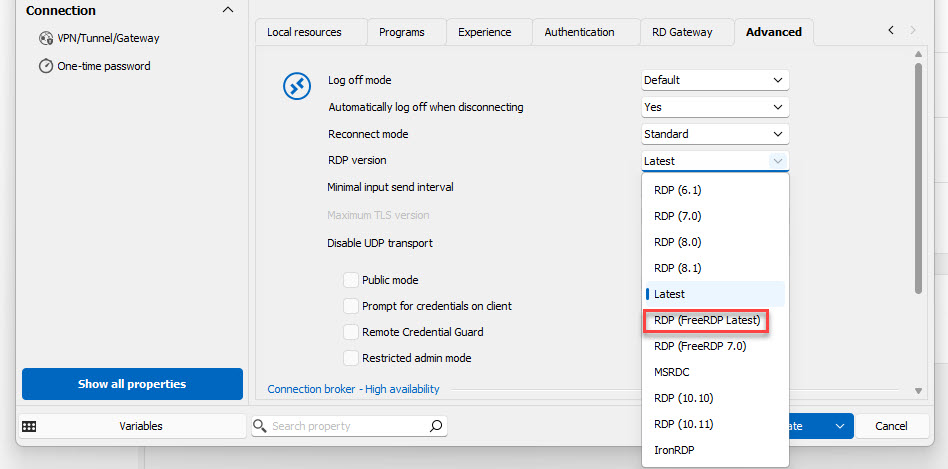
firstchange.jpg
Still having freezing issues even after removing the local appdata information. Is this ever going to be fixed?? On version 2024.3.27.0
one other thing.
I had done the following as part of troubleshooting
I changed all RDP connections as shown below and the issue continued.
when we finally got to the point that we were ready to kill the app data, they also had me change all of them to Latest (not the freerdp option) thus using mstsc.
perhaps making sure that you are using the microsoft rdp is also key after you have cleared all cache
That is what mine is by default and still has the problem. I am using the Portable version now and had no issues yesterday once I started using it. Will see how today goes but it seems more stable than the installed version.
Hello everyone,
I wanted to provide you with an update.
A user has reached out to us with a mini dump file, and the developers are currently working on it.
We will let you know as soon as there are any updates.
Best regards,
Carl Marien
Still having freezing issues even after removing the local appdata information. Is this ever going to be fixed?? On version 2024.3.27.0
one other thing.
I had done the following as part of troubleshooting
I changed all RDP connections as shown below and the issue continued.
when we finally got to the point that we were ready to kill the app data, they also had me change all of them to Latest (not the freerdp option) thus using mstsc.
perhaps making sure that you are using the microsoft rdp is also key after you have cleared all cache
That is what mine is by default and still has the problem. I am using the Portable version now and had no issues yesterday once I started using it. Will see how today goes but it seems more stable than the installed version.
part of me wonders if setting to freeRDP, closing the app
deleting all app data again and then reseting them all ack to latest might give it the kick it needs
Hello,
indeed, If the portable version of RDM is stable on your end, resetting RDM to its default settings may help resolve the issue.
Please follow these steps to reset RDM to its default settings:
https://docs.devolutions.net/rdm/kb/how-to-articles/reset-rdm-to-default-settings/
Best regards,
Carl Marien
Hello everyone,
I wanted to provide you with an update.
A user has reached out to us with a mini dump file, and the developers are currently working on it.
We will let you know as soon as there are any updates.
Best regards,
Any news on this dump and has it led to the root cause of the freezing?
Hello,
Thank you for reaching out to Devolutions Support.
I have reviewed your previous cases and noticed that you were using a Windows Insider build in the past. Could you confirm if that is still the case?
If you are still using the Windows Insider build, please refer to the following forum
threads for information on RDM support with Insider builds:
https://forum.devolutions.net/topics/30298/windows-insider-preview-builds
https://forum.devolutions.net/topics/43176/my-rdm-crashes#199830
If you are no longer using the Windows Insider build, please follow these troubleshooting steps before reaching out to us:
1. Close the Remote Desktop Manager (RDM).
2. Navigate to the following directory: `%localappdata%\Devolutions`
3. Rename the RemoteDesktopManager folder to RemoteDesktopManager.old.
4. Restart RDM.
Important: Resetting the configuration will remove all your data source information, and you will need to re-enter it.
If you are using a Local data source, ensure that you move the Connection.db file from the RemoteDesktopManager.old folder to the new RemoteDesktopManager folder.
After completing Step 4, please do the following:
- Restart RDM.
- Close RDM.
- Return to `%localappdata%\Devolutions`.
- Move the Connection.db file from the RemoteDesktopManager.old folder to the new RemoteDesktopManager folder.
- Start RDM again.
If the issue persists after completing these steps, please contact service@devolutions.net
Best regards,
Carl Marien