Browser connections causes URL to be stuck in RDM

When we open up a browser conenction using Microsoft Edge and we press a button and quickly change the windows in RDM to any other connections. The URL in the button left is stuck until we go back to the browser connection and move the mouse away from a button that links to something and then wait for the link in the button left to disapear.
This is very anoying when you opens hundreds of connections daily and this URL gets stuck from just one of our browser connections. We then have to find out which one it is etc.
In my picture you can see that I have opened two connections. The first one is the browser and the second one is the RDP. But in the RDP window I now have the URL stuck.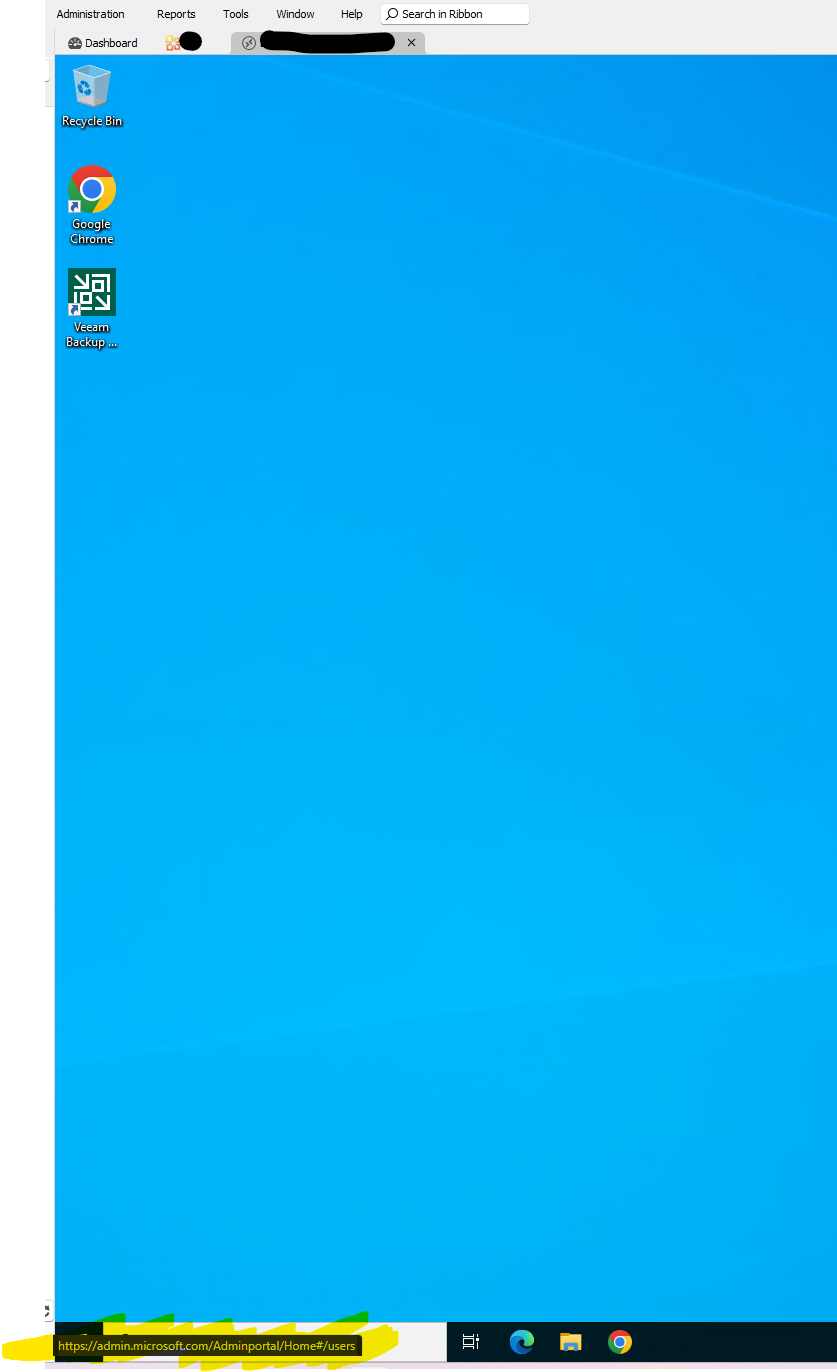
browser error.png
All Comments (13)
Hello,
Thank you for reaching out to us regarding this,
Could you please specify the version of RDM you are currently using?
I'm also wondering if this is occurring only with this specific website or can occur with any of your Websites entries? Do you have the same behavior when using another Browser than Edge for the Embedded connection?
Let me know
Best regards,
Samuel Dery
We are using version 2023.3.39.0 64-bit
It only happens if we use Microsoft Edge, however we need to use Edge in this specific scenario.
I tested different sites and it actually only seems to happend on admin.microsoft.com and go.microsoft.com which of course is the pages we use the must and proberly the reason why i experience it alot. I have seen it happend on any other sites for now.
Im testing by navigating around the sites and switching windows in RDM until the URL gets stuck.
Hello,
We will open an internal ticket to investigate this issue.
Regards,
Hubert Mireault
Hello,
We will open an internal ticket to investigate this issue.
Regards,
Hi there,
i have the same issue using Version 2025.1.29.0
are there any news regarding this Ticket?
Greetings,
Jonathan
Hello Jonathan,
This ticket is still opened on our end. There's an issue with the WebView2 control (Edge embedded) where the status bar sometimes stays visible. The workarounds that were suggested don't work, from our testing. We have a github issue opened with microsoft but at the moment it doesn't seem like this is something they're interested in fixing.
Regards,
Hubert Mireault
Hello Jonathan,
This ticket is still opened on our end. There's an issue with the WebView2 control (Edge embedded) where the status bar sometimes stays visible. The workarounds that were suggested don't work, from our testing. We have a github issue opened with microsoft but at the moment it doesn't seem like this is something they're interested in fixing.
Regards,
Tanks for the quick response. For me it also happens when i set the Browser to Chrome in Entry Properties. I can reproduce it 10/10 when opening my Website Session to https://admin.microsoft.com which redirects to https://admin.microsoft.com/Adminportal/Home#/homepage after login and then click Exchange Admin Center from the Sidebar.
The Chrome integration also uses WebView2 since RDM 2024.3, just with a different UserAgent to specify the browser should be handled like Chrome. This was done because the Chrome library wasn't updated quickly enough with security fixes in comparison to WebView2 which gets constant updates.
Because of that, both will be affected by this bug, unfortunately.
Regards,
Hubert Mireault
How is this still an issue years later?
Hello,
Unfortunately the only news we had on the Microsoft side is they mentioned a workaround to this problem and closed the issue we had opened with them, but this workaround didn't seem to work for us. We didn't receive a reply when we mentioned this.
I'll poke our development team to see if we could perform further tests as there have been a lot of Webview2 updates since. Maybe this workaround now works well. Otherwise, we'll consider opening another issue with the Microsoft team in charge of Webview2.
Regards,
Hubert Mireault
Thanks for updating us. I would also be fine with an option to hide that bar altogether or just for that entry. Could that be an option?
Regards
Last we checked, there weren't any specific option to hide this, but I'll also mention it to our devs to investigate with that in mind.
Regards,
Hubert Mireault
Hello,
We do have an option to permanently hide the status bar. It can be found in File - Settings - User interface. Under the name Show status bar in WebViews. Disabling this option will remove the status bar altogether.
That said, we've also implemented a fix for the issue presented in this thread. The Status bar should no longer display when switching between tabs. You can expect this to take effect with the upcoming 2026.1.10 version.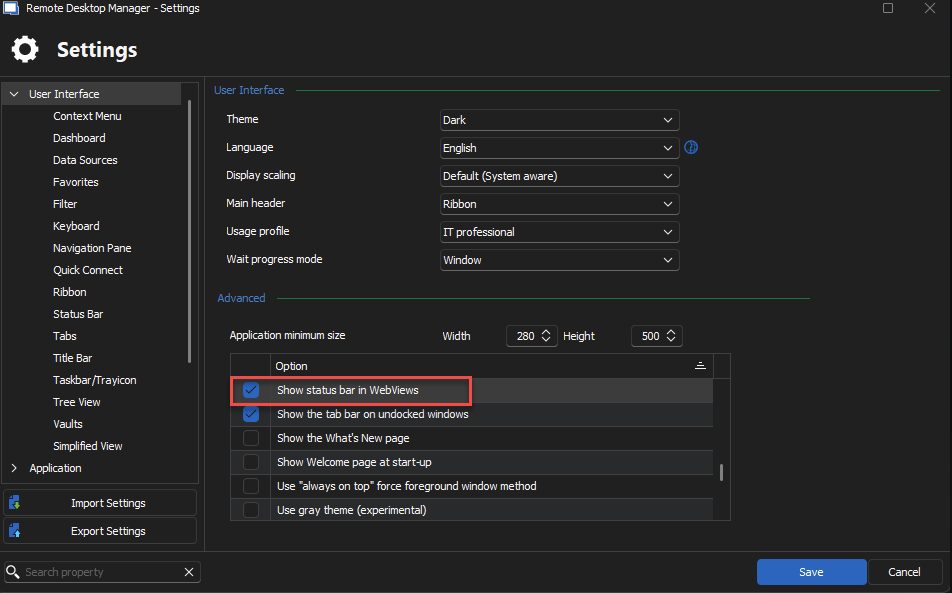
Regards,
Jafran Majeau
7098eb0f-0c01-4008-9b0f-6b934278a7df.png
@Jafran Majeau
Thank you so much! I did not find that setting on my own. Also great that you managed to find a fix. Great work!