
Javier Casares
Desktop background switched to black with RDM
I was testing further, and I think I found a way to not lose the background colour from remote servers.
I have to apply this configuration to each entry, it doesn't work if I do it for default connection settings.
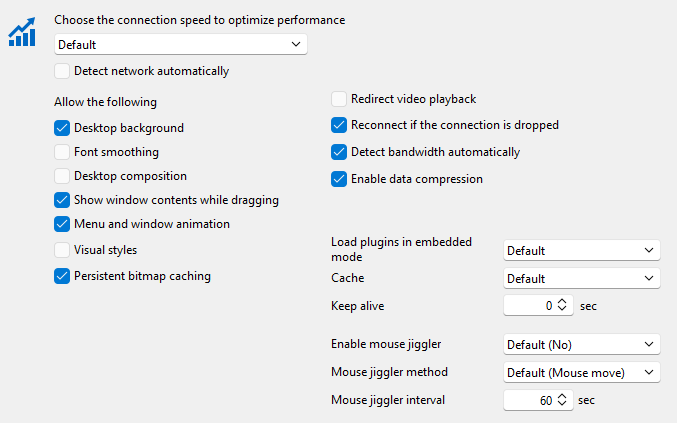
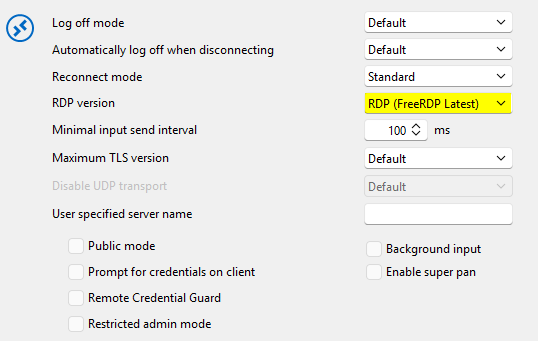
With these settings, the background colour is not changed randomly on Windows Server 2022+.
Desktop background switched to black with RDM
Today, I'm unable to reproduce it to be able to compare the logs.
There is only Microsoft-Windows-RemoteDesktopServices-RdpCoreTS in the server, but it seems confusing (many lines per connection and mixed with disconnections).
Will try it again when I was able to reproduce it.
NOTE: the RDM version was recently updated in the machine I was trying to reproduce it. Running 2026.2.7.0 now.
Desktop background switched to black with RDM
I will be testing what you point out, but be aware there is no background, just a background color that is changed to black by RDM when Windows Server is > 2022. This does not happen with Windows 10/11 and Server 2012/2016/2019. I agree that it is quite a strange thing, and is not always verifiable. For example, if I change the background to let's say red, and relogin in the following minutes I get the proper background. It is after hours/days that when I log in, the background is switched to black.
It is strange, not more people are experiencing this. :/
Desktop background switched to black with RDM
Apologies for my delayed response, but yes, it works as expected if I use RDC even inside RDM.
Update buttons in Help menu, missing
@Sebastien Duquette many thanks. I looked everywhere and did not find anything that fixed the issue of the menu missing. It was that!
Desktop background switched to black with RDM
Windows RDP client does not show that behaviour, that's why I'm asking here. RDM until some time ago either. Could be a recent update (last months) on RDM or, as you say, some Windows recent change under the hood for Server 2022/2025.
There is no GPO for handling that on the servers, and this happens in all servers of that version with RDM.
Remember, we don't have desktop background (wallpaper) but solid colours. What we see is that the grey colour is turned to black. I do not know if that is the behaviour for low speed connections.
I tried low bandwidth, high and auto-detect with RDP Client and in all cases the proper desktop background colour is shown (grey).
Will continue testing configurations in RDM regarding experience.
Desktop background switched to black with RDM
Sorry the late reply. Was testing the changes but it seems it does not resolve the issue. Still testing, as I'm not 100% sure (background might have been removed from a previous connection).
Desktop background switched to black with RDM
Version is 2025.2.26.0
This is what I have, but know that this did not change, at least done by me, since I have RDM years ago. This also happens with Windows Server 2022 and 2025 so far, not with previous versions.
Could be a change of behaviour of RDM?
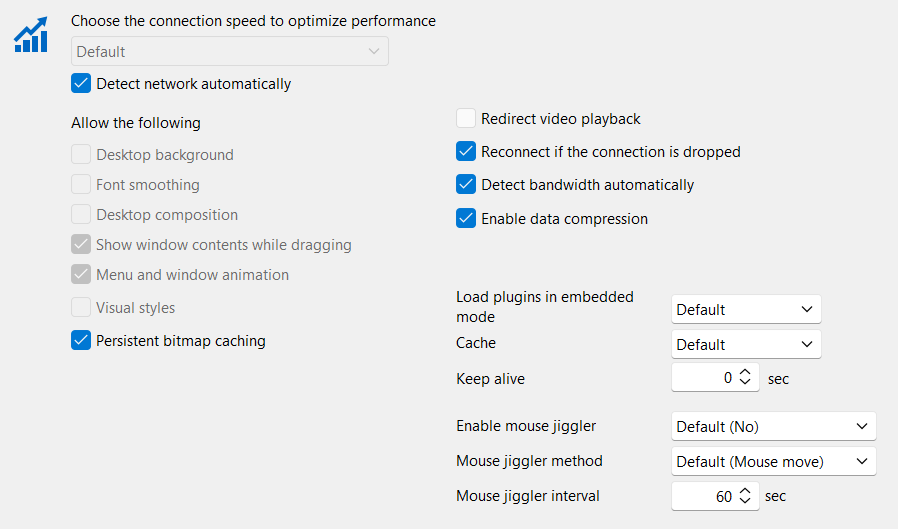
Desktop background switched to black with RDM
I don't know since when, but every time I connect to newer 2022 or 2025 Windows servers through RDM, the background colour is changed to black. I do set the colour to anything and when I reconnect it goes back to black. Using RDP client from WIndows I do not see this behaviour. Is there a setting I'm missing that causes this?
Keyboard not working on PowerShell inside RDP server
It is the same for the Microsoft RDP Client. So it's something with this installation. It has nothing particular. Will try other 2022 next week.
Keyboard not working on PowerShell inside RDP server
Strange. Enter works and CTRL+C writes a ^C to the console.
Keyboard not working on PowerShell inside RDP server
I deployed PowerShell 7.4 and it works. So the problem is with the Windows bundled version (5.1.x). Server is up to date.
Keyboard not working on PowerShell inside RDP server
I sent you a video by direct message so you see the issue.
Keyboard not working on PowerShell inside RDP server
Tried both a Server 2019 and a Windows 10 and it's not reproducible. Seems to be tied to Windows 2022. O_O;
Keyboard not working on PowerShell inside RDP server
It's a 2022, but I will try other OS and will make a video.
PowerShell is 5.1 as your test environment.
Keyboard not working on PowerShell inside RDP server
I did try setting the send as unicode.
Yes it works from RDM from Windows.
Windows bundled PowerShell (should be 5.x).
Android version is 2025.1.0.39
Keyboard not working on PowerShell inside RDP server
While the keyboard works for apps like notepad, it does not work for PowerShell. Is that known?
Tried both GBoard and Samsung Keyboard.
Regards.
Filter results not maximized (text cut)
I can confirm it works as intended now. Resizing the size of the column is kept over a restart of the client.
Thank you!
Filter results not maximized (text cut)
Excelent. I think this appeared after the GUI remake.
Filter results not maximized (text cut)
It's exactly the same. The column doesn't adjust to the increased with set in options (230 default to 300 custom).
Filter results not maximized (text cut)
A screenshot of your RDM dashboard
What you mean by that? I already shared a screenshot of the interface section affected. What exactly you want a screenshot from?
Your RDM version
2023.2.32.0
The data source you are using
XML
Any other information you think could be coherent
I customized filter properties, changing window height to 400 and width to 300. The problem is that the content is not stretching to that size unless you manually do it every time you open the app. So I'm unable to read all the connection name, even when I increased interface size..
Losing focus when opening multiple RDP sessions
No, it seems it does not accomplish what I want. When opening multiple connections, they steal focus one over the other until the last one is opened.
Losing focus when opening multiple RDP sessions
I do have that option configured. It seems is not working as expected.
Losing focus when opening multiple RDP sessions
Is this setting still available? I can't find it.
Alt+Tab problem
I was going crazy. Nice to find this is already found and resolved. Hoping it is out soon.