Filter results not maximized (text cut)

When I use the status bar filter to search for connections, the result list is not expanded to the maximum size of the filter box, and then text is then cut. This way I can't identify properly some similar connections. It requires a manual adjustment every time I open RDM. Is there any setting I'm missing that can fix this?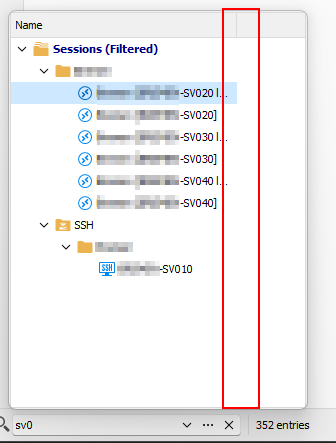
Even better, can't the list be adjusted automatically to the maximum possible regarding the setting that box has?
RDM.png
All Comments (9)
Hello,
Thank you for reaching out to us. to better assist you, could you please provide us with the following information:
· A screenshot of your RDM dashboard
· Your RDM version
· The data source you are using.
· Any other information you think could be coherent.
Thank you in advance for your help.
Best regards,
Carl Marien
A screenshot of your RDM dashboard
What you mean by that? I already shared a screenshot of the interface section affected. What exactly you want a screenshot from?
Your RDM version
2023.2.32.0
The data source you are using
XML
Any other information you think could be coherent
I customized filter properties, changing window height to 400 and width to 300. The problem is that the content is not stretching to that size unless you manually do it every time you open the app. So I'm unable to read all the connection name, even when I increased interface size..
Hello,
It seems I am unable to reproduce your issue on my end would it be possible to try to reproduce your issue in a portable installation of rdm ?
To do so, you will need to do the following:
1. Download the .zip file using this link : https://remotedesktopmanager.com/home/thankyou/rdmbin
2. Create a new folder on your Desktop.
3. Extract the content of the .zip file into the folder created at #2
4. Go to this folder once the .zip file has been extracted and run remotedesktopmanager64.exe
5. Connect to your data source.
This will tell us if the issue is tied to the local installation of RDM.
Thank you in advance for your help, and please don't hesitate to reach out if you have any questions or concerns.
Best regards,
Carl Marien
It's exactly the same. The column doesn't adjust to the increased with set in options (230 default to 300 custom).
Hello,
Thank you for providing this information. I will open an internal ticket so that our developers can investigate this issue further.
Best regards,
Carl Marien
Hello,
We've added the necessary to support saving the size of the columns displayed in this window. When these changes reaches the live versions, you won't have to resize it when closing and re-opening RDM. This should be available for 2023.3.16.
Regards,
Jafran Majeau
Excelent. I think this appeared after the GUI remake.
Hello,
We're pleased to inform you that a new version of RDM has been released. This update includes a fix for the issue you have.
Could you kindly update to this new version and check if your problem has been resolved?
Thank you for your patience. If you have any further questions, concerns, or need additional support, please do not hesitate to reach out. We're here to help.
Best regards,
Carl Marien
I can confirm it works as intended now. Resizing the size of the column is kept over a restart of the client.
Thank you!