Losing focus when opening multiple RDP sessions

This isn't a huge deal but I thought I'd ask.
Let's say I select 5 machines right click them and choose open selections. We'll simply call the machines 1-5. Each machine doesn't get to the desktop at the same speed... so if 1 gets there first and I start working but then 3 gets to its desktop its steals focus and switches to that windows... same with others.
Can I open multiple rdp sessions "in the background" without them stealing focus as they come up?
All Comments (9)
Hello,
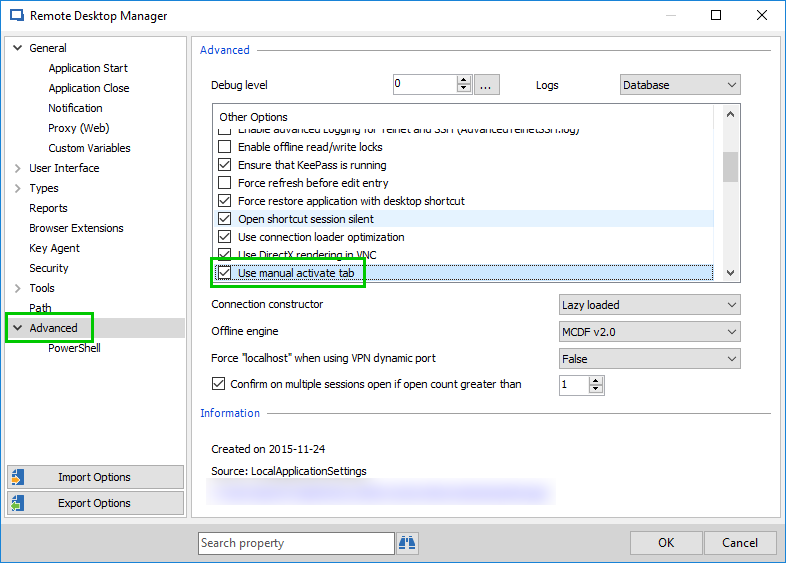
Could you please enable option Use manual activate tab in File - Options - Advanced? This should do the trick when you manually click on the tab. The others sessions that will open then should not steal the focus.
Best regards,
Érica Poirier
2018-12-07_14-21-13.png
Unfortunately that did not work, each tab continues to steal focus as it opens. (I did make the change and then close out of RDM, then go back in). I am on version 14.0.6.0.
Hello,
I am sorry that you still experience the focus issue when opening multiple RDP sessions. The provided solution works for some customers and for others, it doesn't. Unfortunately, this kind of issue isn't quite easy to resolve. The ActiveX seems to steel focus every time a new RDP entry is opened and we do not have any control on that ActiveX behavior. We do not have any other solution right now. We are very sorry about that.
Best regards,
Érica Poirier
Is this setting still available? I can't find it.
Hello,
The option isn't available anymore.
Could you please try the Auto focus tab on item select option in File - Options - User Interface - Tree View?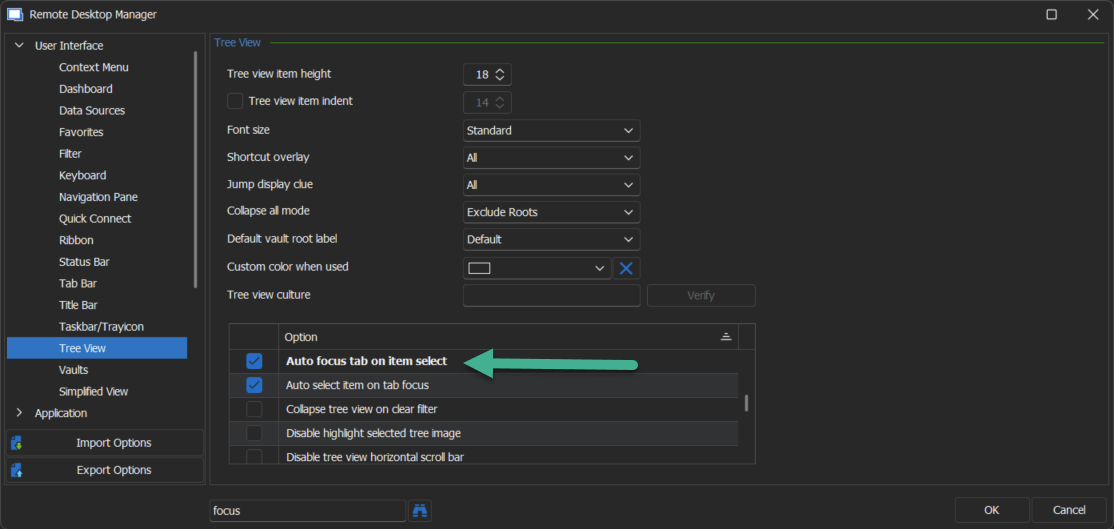
Let us know if that helps.
Best regards,
Érica Poirier
63104cea-57a4-4a4a-a72b-3afc2c780852.png
I do have that option configured. It seems is not working as expected.
Hello,
Thank you for your reply,
My apologies for the confusion, could you please uncheck the option and restart RDM, With this option unchecked, I believe you will have the behavior you're looking for when starting your sessions.
Let me know if this helps,
Best regards,
Samuel Dery
No, it seems it does not accomplish what I want. When opening multiple connections, they steal focus one over the other until the last one is opened.
Hello,
Thank you for your reply,
I see, If you go under "File" -> "Options" -> "Keyboard" you can find the option "Open (Without Focus" by default this option does not have a shortcut assigned you can however press the "Shortcut" button to assign one of your choice.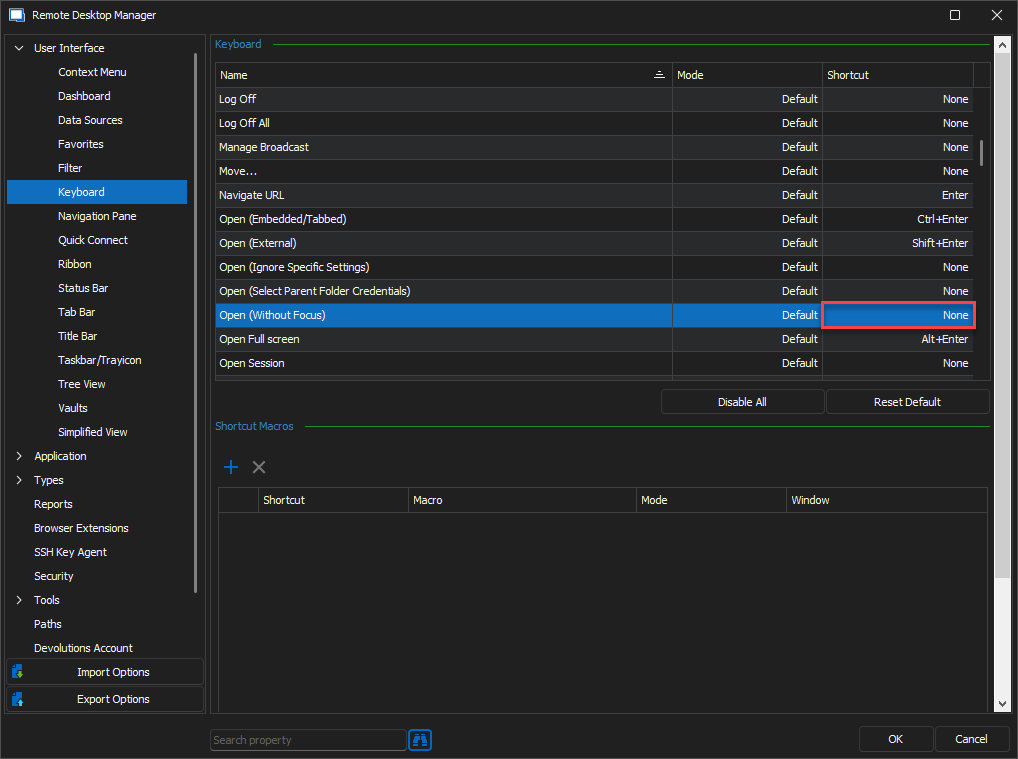
Once done, you can then select your entries and use the shortcut to open them without having the focus change for every opening session.
Let me know if this helps,
Best regards,
Samuel Dery
1b199783-d3f1-4781-97c8-f1b372f69d74.png