
gromovd
Unable to authenticate - localhst connection fails
I created a ticket and Tommy helped me find the fix that worked for me.
Settings >> Advanced >> Uncheck "Connect to Devolutions Account using Authorization Code Flow"
@trivthebofh I wouldn't call it a fix, more like a workaround. But good to hear thus is working.
Unable to authenticate - localhst connection fails
Yes, this was resolved once I made sure the latest version of KB2267602 is installed.
However - there is still no exact confirmation if that was indeed a root cause 😒
Unable to authenticate - localhst connection fails
Here is an update...
Looks like Microsoft KB2267602 is actually keeps the name but increments the version with each update.
When I was testing yesterday I had KB2267602 (Version 1.441.99.0) installed.
But today I got KB2267602 (Version 1.441.123.0) and KB2267602 (Version 1.441.125.0) and the issue with hub authentication got resolved.
From what I can find - the version 1.439.210.0 was the one which should have worked, but that wasn't the case for me.
And no, I am not completely sure that this was the actual issue, however nothing else has changed on that computer recently.
Unable to authenticate - localhst connection fails
Wanted to add - I first thought that the issue is possibly due to recent bug in one of the Microsoft updates which impacted http2, however - I have an update (KB2267602) which should fix this and also I have workarounds applied - but after some testing I do not see RDM executable to listen on port 60370 at all, I only see webview trying to connect:
>netstat -na | find "60370"
  TCP    127.0.0.1:62590        127.0.0.1:60370        SYN_SENT
  TCP    127.0.0.1:62591        127.0.0.1:60370        SYN_SENT
TCP 127.0.0.1:62592 127.0.0.1:60370 SYN_SENTUnable to authenticate - localhst connection fails
Hello,
Thank you for contacting us. To better assist you, could you kindly provide us with the following information:
- Did you update RDM recently? If yes, do you recall which version you were on?
- Your current RDM version.
- The operating system you are using and its version.
- Are you using Hub Personal or Hub Business?
- If you add the URL of the Hub, does it work?
- Any additional information and screenshots you believe might be relevant.
Once we have this information, we will be better equipped to diagnose and resolve the issue.
Best regards,
@Maxim Robert
Apologies for the delay.
The version I had installed worked previously - I was on 2025.2.26.0 but then it stopped, so I updated to the latest one - 2025.3.21.0 - and it is still an issue. (I checked UpdateHistory.xml for the previous version information)
The current one is 2025.3.21.0 since I updated when I encountered the issue - the new version uses embedded webview to authenticate instead of external browser, but the issue is exactly the same.
I am on Windows 10 Pro
Using Devolutions Hub Personal - can login via browser, no issues.
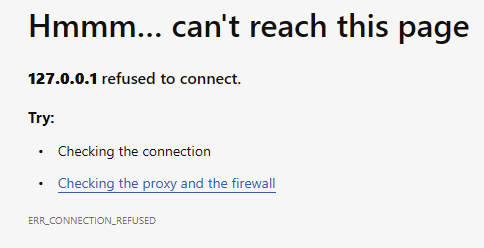
The issue is not login to the hub - that works, but redirect back to the localhost where RDM should be listening for the request with auth token...
Let me know what additional information you need - I can provide, but so far the only diagnostics I can provide it the one on the screenshots below indicating that call to http://127.0.0.1:60370/rdm-auth-loopback is failing.

Unable to authenticate - localhst connection fails
Hello!
I had free RDM for years, use it only occasionally, but it worked great.
The only recent concern I had was with the hub authentication flow - it looks like an OAuth2 flow, but it still worked... until today - authentication fails on "http://127.0.0.1:60370/rdm-auth-loopback" - looks like RemoteDesktopManager.exe fails to listen to this endpoint. The actual web login succeeds, but I am getting "127.0.0.1 refused to connect."
How do I fix this?
External browser open on every start with version 2023.3.20+
Hello gromovd,
I've managed to reproduce your issue and I created a ticket internally.
Great, thank you very much for your support!
External browser open on every start with version 2023.3.20+
Hello!
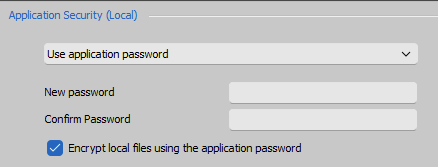
Apologies for the delay, but I run some tests, including fresh install of RDM and I think the issue is when local application security is enabled with local files encryption.
I tested on two computers and when this is configured, RDM starts Hub login on every launch.
External browser open on every start with version 2023.3.20+
Hi!
Upgraded to 2023.3.24.0 and tested - same result.
Here is what is logged in the application log today. This is the last entry, nothing new after update:
[11/8/2023 1:00:12 PM - 2023.3.22.0 - 64-bit] Error Silent: Error connecting to https://login.devolutions.com/auth/jwks. Object reference not set to an instance of an object..Keep in mind - I am running RDM from admin user but not elevated.
I am attaching diagnostics output in case you need it.
External browser open on every start with version 2023.3.20+
Hello!
All my data was in the cloud for several years already - starting with Devolution Online Drive and original Hub Personal - and for all these years I did not need to authenticate on every application launch!
Something has changed with version 2023.3.20 - looks like RDM stopped caching authentication token.
How this can be fixed?
External browser open on every start with version 2023.3.20+
Hello, thank you for the response!
I had both checked.
Unchecked and restarted - got exactly same behavior.
I am using Devolution Hub Personal and it looks like RDM have to authenticate with it on each login via browser to get vault loaded...
External browser open on every start with version 2023.3.20+
Hello.
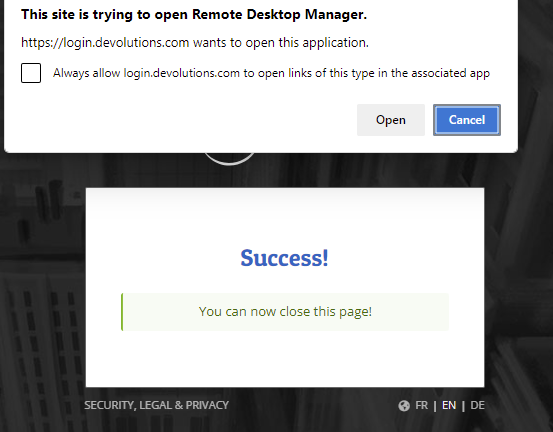
With version 2023.3.20 (and now 2023.3.22), every time I start RDM and enter password, it opens default browser for authentication.
This is new behavior and it is not good - it may break something I am doing on the computer (if I do not want default browser to run) or can break flow in the browser (when it is running already).
How this can be stopped?
Locked out of RDM
I am also getting bunch of 422 errors when RDM starts. Dismissing them allow things to work. However sometimes RDM starts and fails to load data from Hub completely.
Create one "Jump host" and assign to multiple connections
I think, we can now put this specific thread to rest - at least for RDP and SSH functionality, new SSH Gateway capability covers the requirement to have single SSH connection and multiplex other connections over ports forwarded via SOCKS.
The only thing I am not very happy about is the way HTTP/Web is implemented - it currently changes URL to point to localhost:port, which will break many things. Instead, this should use that dynamic port as actual socks proxy. Not sure about embedded Firefox and IE, but Chromium can have separate (from the system) proxy set in CEF (Chromium Embedded Framework).
But we should probably have a separate thread about this...
Thank you for your support!
Remote Desktop Manager 2020.1 Beta
Hi!
David, I understand. Although, this can be reproduced very easily.
I scheduled remote session, but will see if I can get you more details before then (we are all busy - I also have to catch small time frames in my main work for these small issues).
I see that 2020.1.10 - I upgraded, tested again with the same online DB I have - seems to be the same issue.
Not sure if I mention this already - but problem with ssh key agent not reading key passphrases at all was fixed even in beta - auto starting agent now works fine.
Connecting to SSH works as well - uses key from agent no problem.
This issue remains - and that's what we can focus on - creating RDP entry which uses ssh tunnel as gateway will prompt for password if that ssh session has password field empty - regardless of this ssh entry being able to connect with public key auth.
If you want, we can add the following problem as well:
- Using "portable" - zip - install of RDM - does not keep ssh server keys, asking to accept every time RDM starts.
This is correlated with RDM creating temporary folders in the install location with GUID as folder name, every start having new GUID - because of this, file known_host does not persist between RDM starts.
Thank you for your support!
Remote Desktop Manager 2020.1 Beta
Hello!
Thank you for looking at the items I outlined.
Regarding public key authentication - yes, I use standard authentication with agent in the following way:
create new Private Key item and set type to "Data"
Paste content of putty generated PPK file, key is passphrase-protected
(optional) Add passphrase to avoid prompt when importing key into the agent
(optional) Set "Automatically load key to agent"
I have agent start automatically and it imports key properly in beta version (and that was another issue 0 in current release version it was ignoring entered passphrase and prompting for it on each agent start).
Next, on any SSH entry which needs this key I check "Use SSH Authentication agent" in advanced tab.
All SSH entries work perfectly well if password field is blank - it is actually RDP entry using SSH Gateway which causes the password prompt to appear.
Thank you for updating the help topic - very helpful! But the screenshot, showing change of the delay is too low resolution and is not legible :(
I actually saw this setting and did not realize it was the one, because it is set to "-1" by default - what is the exact meaning of "-1" - use some global default value?
For HDPI I will create a separate topic in support area later today.
Thanks again for your help!
Remote Desktop Manager 2020.1 Beta
I tested RDP via SSH Gateway - works pretty well.
Couple of things I noticed:
The help topic should include instructions on adding VPN group right there - it is a must for this connection method (and quite simply to add - no need to set gateway on folder, just create group and mark all connections with it)
When using public key authentication for SSH and leaving password field blank, RDM prompts for SSH password after SSH connection is successfully established. It does not matter what to enter in the prompt - it will work. Filling password field in SSH VPN entry with some characters help, but this is still a bug - there is no password and password field should be blank.
Is it possible to reduce wait for ssh connection and tunnel?
Ideally, RDM should monitor putty/connect output and go to the next step right away (output like: "Listening on 127.0.0.1:3390" and "Successfully established connection 127.0.0.1:3390 ->")
This may become a bit more complex do implement, but I hope this can be a future enhancement... In a mean time, ability to reduce 5 sec wait would really help!
Thank you, this version seems to have also improved performance overall.
Another issue I noticed (even with current release) is a problem with dual monitor setup and HDPI - when two monitors have different DPI set...
It all starts with RDM only using DPI of primary monitor and becomes itself blurry (does not change its own DPI) when dragged to secondary monitor... And then there are bunch of scaling issues with RDP windows open on secondary monitor in this type of configuration...
Thanks a lot for providing this beta version!
Create one "Jump host" and assign to multiple connections
Hi!
David, thank you for your suggestion to check "Configure VPN for multiple sessions", but I do not think you understood what is going on there - the article applies to a single instance of VPN session, but in the case I described, each RDP session creates separate instance dedicated to it - with its own custom port.
It is not the issue to keep one common VPN connection up while any of the entries use it, it is actually an issue with RDP session closing ALL instances instead the only one it started.
Hope, that there are no such issues with new SSH Gateway implementation - I will review the guide and will most probably wait for free version to be available... As much as I would like to test and by Enterprise version, so far I found several other issues with RDM which may cause problems for my use.
I'll probably post about them separately later on.
Thank you.
Remote Desktop Manager 2020.1 Beta
Ok, no problem - I'll wait. Or request Enterprise trial :)
Remote Desktop Manager 2020.1 Beta
Hi!
Is there a beta of the free version?
I'd like to test new ssh gateway functionality...
Thank you!
Create one "Jump host" and assign to multiple connections
Hi!
Thank you very much, this is great news! Looking forward to this long overdue feature.
I also have quick update:
Turns out that remote name resolution works with SOCKS5, I had a typo in the name in the initial testing. Still, having destination name in separate entry didn't make it much usable
I was able to come up with another way of using SSH to tunnel RDP with much better usability, but still with some issues - see below.
While reading documentation and working through (quite complex and not fully documented) UI, I noticed two things available:
VPN type SSH
$PARENT_HOST$ and $PARENT_PORT$ variables
RDM's own "dynamic port", different from putty's socks proxy
Using this, I was able to create special SSH VPN entry, which had the following settings:
host:port is set to ssh gateway
use appropriate ssh authentication
mode set to "Local" and have "Use Dynamic Port" enabled
Source is set to some localhost IP (any of 127.0.0.1/8 subnet)
Destination is set to $PARENT_HOST$ and unfortunately, destination port cannot be set to $PARENT_PORT$ because UI accepts only numbers, but if only single/default port is used, things should work
This entry should also have advanced option set to "Allow open multiple connections", but it can be set at parent RDP entry as well
Once this is ready, I was able to create appropriate RDP entries, the way they should be:
host is set to a real host name on remote network, unfortunately port cannot be controlled, see above
VPN/SSH/Gateway is set to SSH and in settings tab the previously created session entry was selected
Important: "Use dynamic port" should be checked, this allows RDM to manage forwarded port allocation
There is also setting "force localhost" which corresponds to same entry in SSH VPN settings - I am not completely sure what is does technically; I checked it as well; I would love to know what exactly does it force if IP address is already set to localhost
Two more settings are also important: "Override parent ($PARENT_HOST$)" - I believe this probably also has to be checked, but not sure, didn't test without it (SSH VPN already has this configured) and "Force "Allow multiple instances" of VPN" - this only needs to be checked if SSH VPN entry is not set to "Allow open multiple connections" already
And the final setting for this to work - when VPN connects - I have it on "Always connect" for testing, but if condition is used, this would allow smart connection regardless is you are on local network or remotely.
But there is an issue with VPN close - if you set it to "On session close", closing ANY of the RDP sessions will close ALL SSH VPN sessions, killing other RDP connections! Basically, RDM does not properly track multiple instances of this VPN, which is probably a bug.
I set it to "Confirm disconnect", but then you need to carefully find appropriate instance and close it manually...
This is still not an ideal solution, but it is workable, short summary of issues:
Each RDP connection opens new SSH connection to gateway, those should really be shared across single connection - note that recent putty versions also have some provisions for connection sharing between processes
Cannot customize destination port in RDP entry because port fields accepts only numbers (it might be possible to set by scripting, did not check, but I am not sure why such technical product does not use common host[:port] notation everywhere)
SSH connections cannot be automatically closed at the end of the RDP session
Maybe this write up can help someone else - for some reason I could not find this kind of setup in the docs even that RDM has most of the settings available to make it work.
Thank you for the support.
Create one "Jump host" and assign to multiple connections
Hello!
It's been a while, but only recently I _really_ needed this to work and decided to test the solution thoroughly.
First - it does work... but not without issues.
1. This requires creation of a pair of entries for each internal host you need to connect. Good thing this can be done via PowerShell, but this is still not ideal - it also requires manual maintenance of local ports across all of those connections...
2. But the biggest issue is that socks client (the middle component between SSH connection and RDP client) does not support an option for remote host name resolution (this is -R parameter for connect.exe). This does not allow setting up remote computers by name - only by IP address.
How far are the improvements to this setup as mentioned above?
Moreover, we are currently looking to improve this feature. What we want to do is to allow the configuration to be RDP > SSH Tunnel > Remote Host, all through a Socks5 proxy.
The ideal setup would be something like this:
One SSH connection entry with dynamic port forward (socks proxy).
Ability to specify this as VPN in RDP connection directly with an intermediate plumbing being taken care automatically ( local ip:port allocation)
Use remote name resolution with socks 5
Since RDP entry now contains correct machine name/IP, make it possible to turn on/off "SSH VPN" conditionally, based on some criteria (ex. current subnet), this way same entry can be used either locally or remotely (either running on laptop or using shared DB between installations).
Thank you for the support.
Create one "Jump host" and assign to multiple connections
David, thank you, I will check out that post and report if it helps :)
But any improvements in the tunneling RDP (and other clients) over SSH are welcome!
Create one "Jump host" and assign to multiple connections
I took some time and tested connect.exe tunnell via pre-established SSH connection with socks proxy (Dynamic mode).
Created "Before Connect" event with command line similar to this:
connect.exe -p $PORT$ -S 127.0.0.1:3390 -a none -R remote $INFORMATION_MACHINE_NAME$ 3389
I put actual remote host name (or IP) in Information/Host field.
RDP General tab is set to connect to 127.0.0.1:user_port
Before connecting with RDP, I establish "site" connection with separate SSH Tunnel entry, which is set to Dynamic mode with source port 3390.
Now I can have just single SSH connection to gateway machine and as many RDP sessions to internal hosts as I need, with one condition - each machine has to have distinct user_port configured.
This is crude, since RDM does not monitor child processes it starts in "Before Connect" event and it won't kill it... Too make it clean, additional wrapper would be needed, I guess.
This is distinctly different from using Gateway, defined in VPN/SSH/Gateway option:
- you have to define SSH setting in place, so Local mode with "Dynamic port" can be properly set and actual destination specified in Destination field.
I was unable to pass correct destination if I used existing session - RDP connection always tries to connect to address specified in Host field, so it has to be 127.0.0.1, but variables like $INFORMATION_MACHINE_NAME$ are not passed to tunnel. I tried to use $PARENT_HOST$ - that is passed, but it had to be set to localhost for RDP client to connect... This will work if you connect to RDP on the host where SSH server is running...
- this creates new SSH connection for each RDP connection - and that is what I wanted to be avoid when SSH Gateway is available...
But even with the current design of specifying SSH Tunnel - it would be fine, if it would work like this:
- RDP connection $HOST$ and $PORT$ would transfer to destination for the tunnel (it does, if I set $PARENT_HOST$ in the tunnel session and use dynamic port)
- RDP client would connect to Dynamic local port, instead of what is written in $HOST$ field as it is in 2019.2.20.0 version I have (Dynamic port is used correctly, it is just host is wrong)
It is quite possible that this should actually designed to work this way and there is a bug...
Create one "Jump host" and assign to multiple connections
Hi!
Apologies for reviving this old thread, but how this solution helps with RDP tunneling through SSH?
If you'd have RDP which supports proxy, then it would work, but it does not.
As for SSH - there is almost no difference here between using SSH Tunnel with dynamic port (which provides http and socks proxy) vs using same host as SSH jump host.
One of the possible solutions might be:
Make RDM to dynamically allocate local ("source") port (which is different from "dynamic" socks port) when configured on VPN/SSH/Gateway tab for SSH Gateway, then use that temporary port as destination port on General settings tab.
This way when SSH connection established, the tunnel will be created 127.0.0.1:temp_local_port -> tunnel_destination:server_port
And once that is in place, whatever client is defined (RDP, VNC, etc) would connect to 127.0.0.1:temp_local_port automatically.
Added bonus would be to be able to specify tunnel_destination:server_port in General properties and configure the rest in SSH tunnel settings tab.
Also, there is a helper app out there called connect.c, which does very simple thing - it created dynamic tunnel via http/socks proxy.
Wrapping this program properly and again, generating dynamic port for it might help as well - this won't require creating new SSH Tunnel for every client connection.
I am using competing RDM where I was able to setup plink.exe as a helper app to create correct tunnel for each connection, but was thinking of switching to Devolutions RDM after seeing better capabilities for tunneling.
Unfortunately, I do not see the issue stated in the original email resolved:
- have one SSH server at destination
- create one RDP entry for each server behind that SSH which can all run via SSH tunnel and won't conflict with each other...