Locked out of RDM

RDM wouldn't run today without an update due to some change in the personal hub. However, it requires me to update via the web. But when I do this, it says access denied. "Ask later" has let me in for now so okay for today.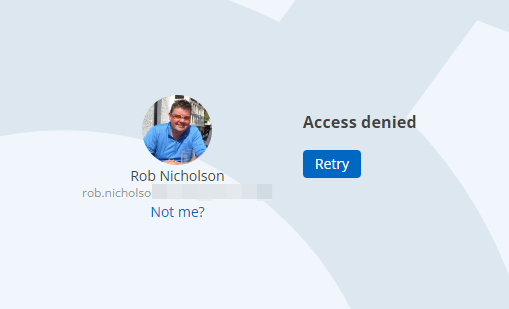
28cffc25-8b3e-4455-bfec-18fed9e2805b.png
All Comments (35)
Hello,
Hub Personal is currently down; the developers are currently working on the issue.
Please refer to https://status.devolutions.info/incidents/mpcg882t5gyn for upcoming details.
Best regards,
Richard Boisvert
Ahh that would explain it :-)
I'm back in now but 2023.3.20.0 seems rather unstable. Come back to it a while later and the interface is frozen. Shows the last screen but can't interact. Fortunately, it closes cleanly via close window. Will report back tomorrow.
Hello,
It should be up and working now. Let us know if you still have issues tomorrow!
Best regards,
Richard Boisvert
I'm afraid it's degraded and I now can't launch RDM. Series of messages and errors. The last just started and won't let me run RDM at all now.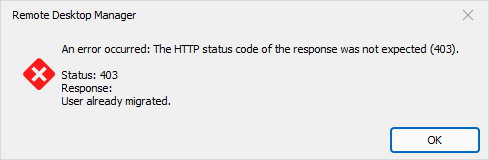
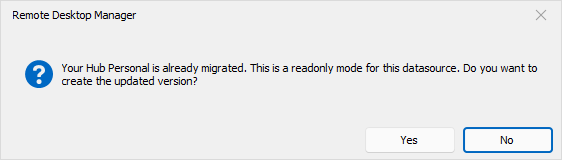
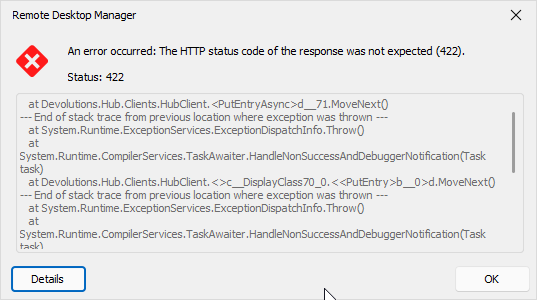
294e827f-bdc6-4c74-b8a4-9e2487ba71e0.png
01750757-088a-4521-a860-f6169a701019.png
f088d702-8e47-46d6-be9f-ad7013ae4603.png
Full error text:
at Devolutions.Hub.Clients.HubClient.<PutEntryAsync>d__71.MoveNext()
--- End of stack trace from previous location where exception was thrown ---
at System.Runtime.ExceptionServices.ExceptionDispatchInfo.Throw()
at System.Runtime.CompilerServices.TaskAwaiter.HandleNonSuccessAndDebuggerNotification(Task task)
at Devolutions.Hub.Clients.HubClient.<>c__DisplayClass70_0.<<PutEntry>b__0>d.MoveNext()
--- End of stack trace from previous location where exception was thrown ---
at System.Runtime.ExceptionServices.ExceptionDispatchInfo.Throw()
at System.Runtime.CompilerServices.TaskAwaiter.HandleNonSuccessAndDebuggerNotification(Task task)
at Devolutions.Hub.Clients.HubClient.PutEntry(Guid vaultId, Guid entryId, Entry entryToPut)
at Devolutions.RemoteDesktopManager.Managers.DevolutionsHubDataSourceManager.SaveConnectionAsEntry(Guid dataSourceID, Guid repositoryID, Connection toSave, Connection[] currentConnections)
at Devolutions.RemoteDesktopManager.Managers.DevolutionsHubDataSourceManager.SaveConnection(Guid dataSourceID, Guid repositoryID, Connection toSave)
at Devolutions.RemoteDesktopManager.Business.DataSources.HubConnectionDataSource.SaveConnection(Connection connection)
Re-install didn't help. I happen to have a Windows 11 VM that I use for DR which has RDM installed, linked to same personal hub. Just about to try that.
Later... I've gone through the update process on my test VM and aside from it a) requiring the update to be installed twice and b) the rather confusing prompt about read only (raised in separate post), it updated and is currently running fine. This HTTP error message doesn't occur. So at least I can use RDM for now.
I wonder if my problem is because I happened to update during the problems with the personal hub yesterday?
As a re-install didn't fix it, I wonder if something is left after an uninstall. Is there some registry key or folder that is left that I could delete? I've been here and got the t-shirt too many times so my PC is imaged every night using Reflect AND Veeam. So I can relatively quickly restore to an earlier version.
I am getting the same HTTP status code error (422). I have just updated to latest free version of RDM. I had to upgrade my Hub Personal and now cant get in to my vault.
Details seem the same as above.
at Devolutions.Hub.Clients.HubClient.<PutEntryAsync>d__71.MoveNext()
--- End of stack trace from previous location where exception was thrown ---
at System.Runtime.ExceptionServices.ExceptionDispatchInfo.Throw()
at System.Runtime.CompilerServices.TaskAwaiter.HandleNonSuccessAndDebuggerNotification(Task task)
at Devolutions.Hub.Clients.HubClient.<>c__DisplayClass70_0.<<PutEntry>b__0>d.MoveNext()
--- End of stack trace from previous location where exception was thrown ---
at System.Runtime.ExceptionServices.ExceptionDispatchInfo.Throw()
at System.Runtime.CompilerServices.TaskAwaiter.HandleNonSuccessAndDebuggerNotification(Task task)
at Devolutions.Hub.Clients.HubClient.PutEntry(Guid vaultId, Guid entryId, Entry entryToPut)
at Devolutions.RemoteDesktopManager.Managers.DevolutionsHubDataSourceManager.SaveConnectionAsEntry(Guid dataSourceID, Guid repositoryID, Connection toSave, Connection[] currentConnections)
at Devolutions.RemoteDesktopManager.Managers.DevolutionsHubDataSourceManager.SaveConnection(Guid dataSourceID, Guid repositoryID, Connection toSave)
at Devolutions.RemoteDesktopManager.Business.DataSources.HubConnectionDataSource.SaveConnection(Connection connection)
I restored my PC back to Tuesday's image and went through the install process again. No warnings this time except one about auto-update. Working okay now. Not the smoothest update!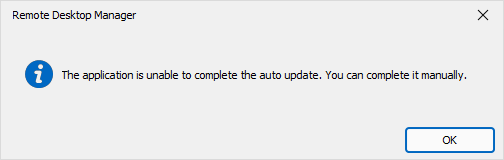
a384f9b3-a25f-4fc5-b66a-52344354ab87.png
I am getting the same HTTP status code error (422). I have just updated to latest free version of RDM. I had to upgrade my Hub Personal and now cant get in to my vault.
Hmm, I rolled back my PC to Tuesday's image which sent me through the update again. It's currently running. But then again, it did run for a day yesterday but only failed after the PC was turned off overnight. Hope it doesn't back tomorrow and that support find a fix for you. Rolling back PC to an earlier image isn't an option for most people.
I have just managed to get past the Errror status popup. I dont know if something has changed server side or if me just spamming the close button has done something.
Just going to do some more testing.
Closed app and went back in, error started popping up. I noticed the following window pop up just before the error kicks in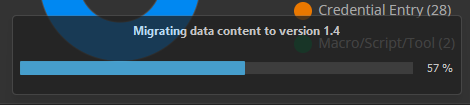
Each time I cancel the error message the version number creeps up to 1.11 before the error clears and I can access my vault.
@rob02 - yup I have no roll back options
059196c6-e340-4fcb-b04c-99c2bccde26f.png
Hello,
I believe the issue is already fixed for Rob since he made another thread for another issue.
Andrew - Please go to https://hub.devolutions.com and validate that the migration is completed. Do you see your entries there?
Best regards,
Richard Boisvert
Sadly not totally. I keep getting HTTP status code error (422) periodically but much pressing of cancel button appears to get around it. Guessing but it seems to be when the app has to talk to the personal hub.
Hello,
The migration is not working completely for some users. We will open a case on our end and contact you via email Rob.
Best regards,
Richard Boisvert
Andrew - Please go to https://hub.devolutions.com and validate that the migration is completed. Do you see your entries there?
I can go to the above website and all looks good all the connections and entries are there, is there anything I need to do to validate or is it if I can log on and see stuff is validation enough?
Hello Andrew,
If the entries are on the web, you should be all set for RDM. Can you try to close it and re-open it?
Best regards,
Richard Boisvert
Just restarted and I am still getting the 422 error :(
When I got in last time I set the system to allow me to choose the vault that I want to connect to (as I wasn't too sure if it was connecting to the old vault or not)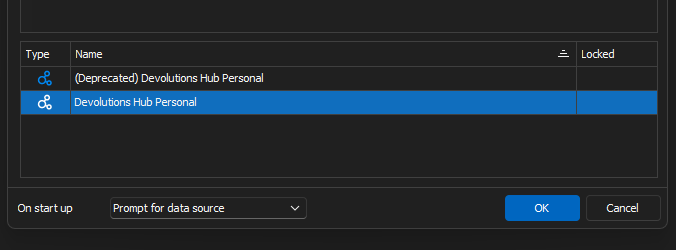
and I get the 422 error when I select the new data source, if I select the depreciated data source then I get the "Your Hub Personal is already migrated. This is a readonly mode for this datasource. Do you want to create the updated version" popup.
68b3298d-5d51-418f-a0f1-b98a7f7e3652.png
If I select no to the upgrade then swap over to the new data source on the top of the Navigation side bar, I dont get any errors when it loads up. If that helps in any way.
opps! Spoke to soon! I get errors when I moved from the Navigation window to Favourites.
Hello Andrew,
We will open a case for you as well.
Best regards,
Richard Boisvert
I am also getting bunch of 422 errors when RDM starts. Dismissing them allow things to work. However sometimes RDM starts and fails to load data from Hub completely.
Hi all,
Thank you all for the information.
We have found the issue and are working on the fix.
Best regards,
Stéfane Lavergne
Hi all,
The fix has been finalize and will be available in RDM starting version v2023.3.22 (or grater)
Best regards,
Stéfane Lavergne
Smashing, thanks for the quick fix. Will keep an eye out of the new version. BTW - I installed the beta today, will I have to manually upgrade or will auto upgrade from beta prompt still appear?
any prognosis on the release of RDM starting version v2023.3.22 (or grater)?
I'm able to get in after 10-20 ok's to the 422 error
@rob02, not sure about the beta upgrade but if I had to guess you will need to update manually (could be wrong)
@berno82, will check with QA to see where they are at with the build acceptance testing
Stéfane Lavergne
@rob02, not sure about the beta upgrade but if I had to guess you will need to update manually (could be wrong)
IT support have said they'll email when the new version is available. Considering it's currently prompting to install the latest (broken) version, I'm guessing I will get prompted as well.
Great to hear a fix is in the pipeline, and now I have gone from spamming the close on the error to spamming the "Check for updates" button! :D
I would just like to say that this is how you work with your customers, even the free edition freeloaders like myself. I have had so many bad experiences of support forums where the actual company doesn't engage with the forum themselves directly and every time things go bad with the product the forums just end up a toxic mess. Well Done Devolution, this is how its done properly!!
Andy
Hi Andy,
Great to hear a fix is in the pipeline, and now I have gone from spamming the close on the error to spamming the "Check for updates" button! :D
lol, I will post here once the build is released.
I would just like to say that this is how you work with your customers, even the free edition freeloaders like myself. I have had so many bad experiences of support forums where the actual company doesn't engage with the forum themselves directly and every time things go bad with the product the forums just end up a toxic mess. Well Done Devolution, this is how its done properly!!
Thank you for the kind words.
Yes, we try to treat everyone as equals. It's a win-win situation, you get it free (software) but, on the other hand, you are inclined to help us out (time) when you encounter issues making the software better for everyone.
And who knows, one day your security posture might change or your team might get big enough where you will require a larger solution (licences).
Best regards,
Stéfane Lavergne
@all
v2023.3.22 is now available
https://devolutions.net/remote-desktop-manager/home/download/
Best regards,
Stéfane Lavergne
I would just like to say that this is how you work with your customers, even the free edition freeloaders like myself. I have had so many bad experiences of support forums where the actual company doesn't engage with the forum themselves directly and every time things go bad with the product the forums just end up a toxic mess. Well Done Devolution, this is how its done properly!!
Seconded...
@all
v2023.3.22 is now available
https://devolutions.net/remote-desktop-manager/home/download/
Best regards,
Whoop! Installing as I type this!! Will update in a few minutes
Straight in, no more error messages and all entries are there.
Thanks again to the Devolution team, great work.
Andy