Create one "Jump host" and assign to multiple connections

Disabled
Is there a way to create a SSH "jump host" and then assign it to SSH connections that require a jump host? I find it odd that you're required to specify the jump host IP address, login and password for each and every connection that requires a jump host. What am I missing?
Thanks
All Comments (25)
Hello,
I think you mean SSH Tunnel when you mentioned SSH Jump Host right?
If it's the case, I think the solution you are looking for is in this blog
https://blog.devolutions.net/2016/10/how-to-configure-ssh-tunnel-in-remote-desktop-manager
Best regards,
Jeff Dagenais
Disabled
I was under the mistaken impression "jump host" and "SSH Tunnel" were synonymous. You are correct, I'm referring to an SSH tunnel. The blog article provides instructions on how to tunnel to a remote host using the local port forwarding method. This method works well if you only need to tunnel traffic to single host. If you need to tunnel traffic to multiple hosts then this method quickly becomes an administrative nightmare.
I'm looking for a feature like this in RDM: https://blog.royalapplications.com/2015/04/21/new-feature-secure-gateway-ssh-tunnels/
I'd like to create one SSH tunnel object and then reference that object for any connection that can be reached via that particular SSH tunnel. Is something like this possible? I assume I'd have to use the dynamic ssh tunnel option somehow.
Hello,
Indeed, what you are looking for is available in RDM and explain in the blog above.
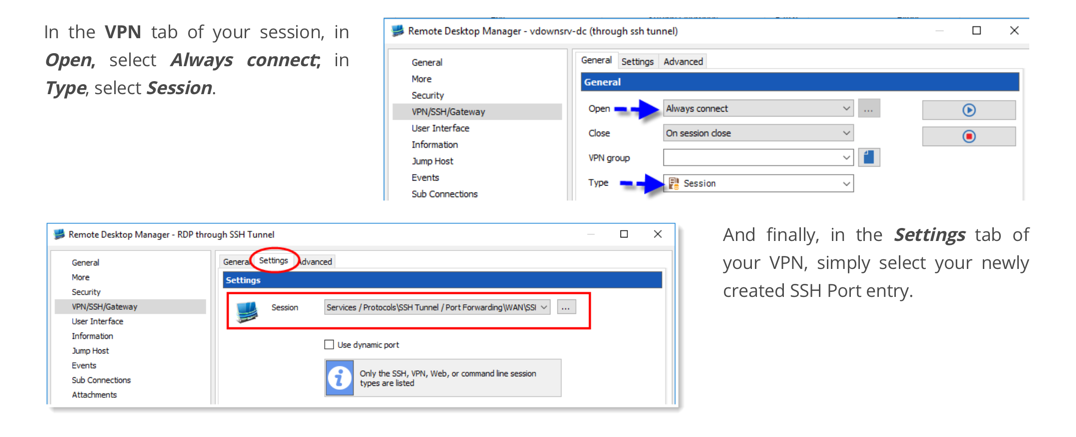
After creating the SSH Tunnel session, go in VPN section of you entry and configure it like the following:
This should do the trick.
Best regards,
Jeff Dagenais
2019-06-19_08-37-53.png
Disabled
Thanks for the reply. Please correct me if I am wrong but specifying a session in VPN/SSH/Gateway ---> settings tab as mentioned in your previous message makes RDM auto-start the specified SSH tunnel prior to starting the session. That's it. It doesn't mean "Route this session through the specified SSH tunnel." It's a shortcut to auto-connect the tunnel. Nothing more nothing less.
I think there is some confusion in regards to what I'm asking about. Assuming I have 30 servers behind a firewall and want to connect to said servers via an "ssh jump host/SSH tunnel" I would have to create 60 total entries using the instructions provided in that blog post.
30SSH-tunnel connections. One for each server
30 SSH connections pointed at 127.0.0.1
I have a hard time believing that this is the only method available to connect hosts via an SSH tunnel. If this is indeed how things work in RDM then there has been a gross oversight to say the least which I'd like to believe isn't the case.
Ideally I'd create ONE ssh tunnel entry with a type of dynamic or something and point all connections to use the SOCKS proxy created by that SSH tunnel. An added benefit of doing it this way is that my ssh server entries don't have to be pointed to an artificial IP address such as 127.0.0.1.
If you're unsure of what I'm trying to do please see: https://blog.royalapplications.com/2015/04/21/new-feature-secure-gateway-ssh-tunnels/
Thanks for your help on this.
Hello,
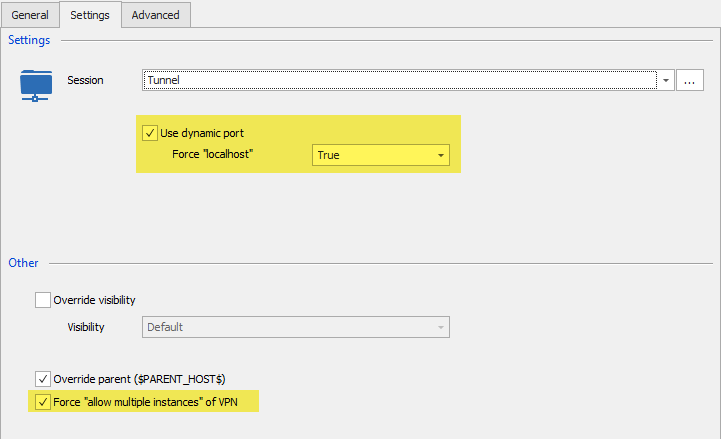
I had a chat with our engineering department and we think that you should use a dynamic port and force the localhost. Then, you can enable the Force "allow multiple instances" of VPN option.
With this option and a VPN Group that is matching, it should work.
Best regards,
Jeff Dagenais
jump1.png
Disabled
Sorry for the late reply, I was out of town. I've followed your instructions but still can't get it working.
The error I get is:
Here's my config:
SSH Tunnel Connection:
The ssh session that is configured to connect through the ssh tunnel:
The VPN/SSH/Gateway tab of the ssh-connection:
The settings tab of the ssh session
Thanks for all your help on this.
Hello,
The SSH Gateway feature is different than using an SSH Jump host, I mean Gateway is an ssh feature itself. You need to install SSH Gateway on the server to be able to use it.
That being said, the configuration seems fine, have you any error message?
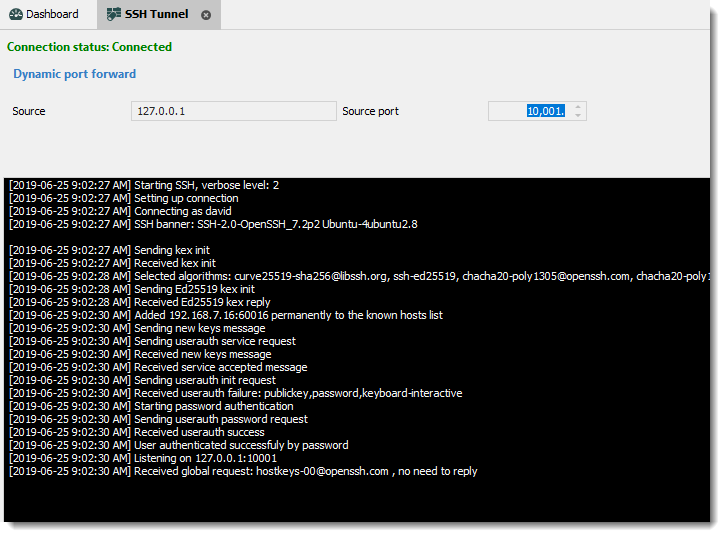
Is the Tunnel connect properly? You should see a window like
Best regards,
David Grandolfo
ssh_dynamic.png
Disabled
The error I get is:
Something isn't adding up. If I connect the ssh tunnel session manually I get this:
That tells me that a socks proxy has been setup to listen on 127.0.0.1 on port 41813. If I configure Firefox to use that socks proxy listening on 127.0.0.1 port 41813 it works. I'm able to browse the internet via that SSH tunnel in Firefox. This tells me that the ssh-tunnel is up and that the socks proxy is working as expected.
Now if I click on an SSH-connection connection that is configured to use that ssh-tunnel another ssh-tunnel session is opened. Why would RDM open another socks proxy on 127.0.0.1 when it already has one open?
Are you saying that you're able to connect to an SSH session using that ssh-tunnel connection you have setup and working? The screenshot only shows that your ssh-tunnel session is opened. Can you actually connect to an SSH session through said tunnel?
Thanks
Hello Isaac,
First I would like to thank you for all the tests you performed. I was able to reproduce the behavior.
It seems that we miss understood the needs and we did not talk about the proxy option in the SSH Shell entry.
I sent you a personal email to schedule a remote session, so we could assist you in the session of the SSH Shell entry.
Best regards,
David Grandolfo
Hello,
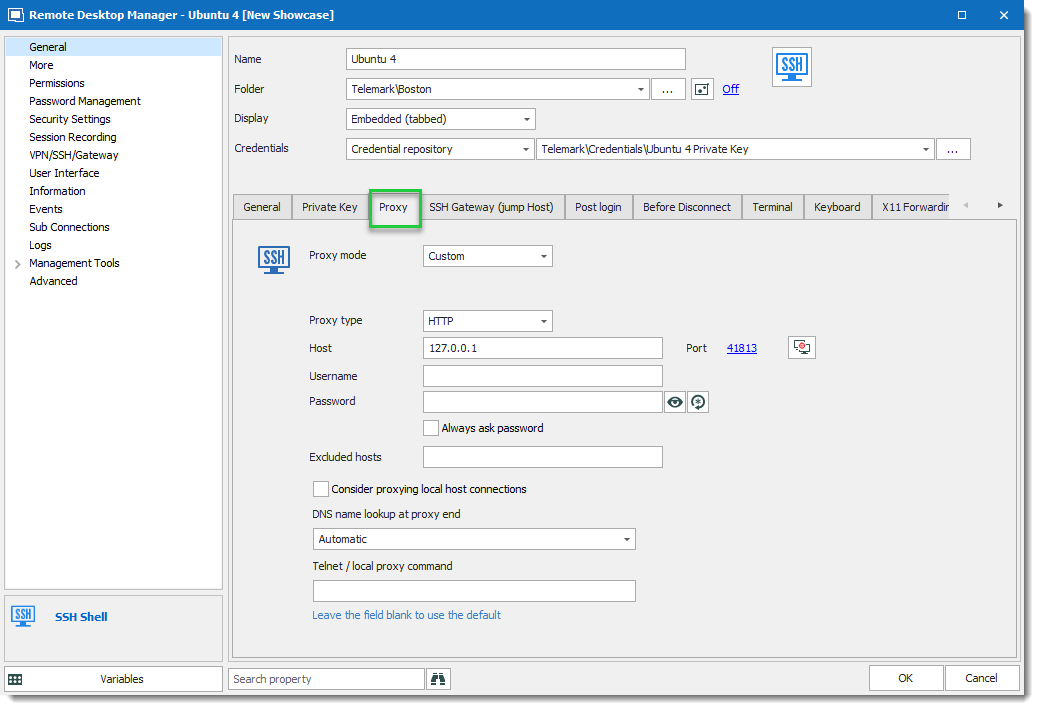
As brief descriptions for customers that will look at this thread. The final solution for Isaac is to use an SSH Tunnel dynamic, configure the SSH Shell session to open this SSH Tunnel in the VPN/SSH/Gateway section.
And to add the Proxy configuration in the proxy tab of the SSH Shell entry. The IP and the port is the one set in the SSH Tunnel Dynamic. As example:
Best regards,
David Grandolfo
SSH_Shell_Proxy.png
Hi!
Apologies for reviving this old thread, but how this solution helps with RDP tunneling through SSH?
If you'd have RDP which supports proxy, then it would work, but it does not.
As for SSH - there is almost no difference here between using SSH Tunnel with dynamic port (which provides http and socks proxy) vs using same host as SSH jump host.
One of the possible solutions might be:
Make RDM to dynamically allocate local ("source") port (which is different from "dynamic" socks port) when configured on VPN/SSH/Gateway tab for SSH Gateway, then use that temporary port as destination port on General settings tab.
This way when SSH connection established, the tunnel will be created 127.0.0.1:temp_local_port -> tunnel_destination:server_port
And once that is in place, whatever client is defined (RDP, VNC, etc) would connect to 127.0.0.1:temp_local_port automatically.
Added bonus would be to be able to specify tunnel_destination:server_port in General properties and configure the rest in SSH tunnel settings tab.
Also, there is a helper app out there called connect.c, which does very simple thing - it created dynamic tunnel via http/socks proxy.
Wrapping this program properly and again, generating dynamic port for it might help as well - this won't require creating new SSH Tunnel for every client connection.
I am using competing RDM where I was able to setup plink.exe as a helper app to create correct tunnel for each connection, but was thinking of switching to Devolutions RDM after seeing better capabilities for tunneling.
Unfortunately, I do not see the issue stated in the original email resolved:
- have one SSH server at destination
- create one RDP entry for each server behind that SSH which can all run via SSH tunnel and won't conflict with each other...
I took some time and tested connect.exe tunnell via pre-established SSH connection with socks proxy (Dynamic mode).
Created "Before Connect" event with command line similar to this:
connect.exe -p $PORT$ -S 127.0.0.1:3390 -a none -R remote $INFORMATION_MACHINE_NAME$ 3389
I put actual remote host name (or IP) in Information/Host field.
RDP General tab is set to connect to 127.0.0.1:user_port
Before connecting with RDP, I establish "site" connection with separate SSH Tunnel entry, which is set to Dynamic mode with source port 3390.
Now I can have just single SSH connection to gateway machine and as many RDP sessions to internal hosts as I need, with one condition - each machine has to have distinct user_port configured.
This is crude, since RDM does not monitor child processes it starts in "Before Connect" event and it won't kill it... Too make it clean, additional wrapper would be needed, I guess.
This is distinctly different from using Gateway, defined in VPN/SSH/Gateway option:
- you have to define SSH setting in place, so Local mode with "Dynamic port" can be properly set and actual destination specified in Destination field.
I was unable to pass correct destination if I used existing session - RDP connection always tries to connect to address specified in Host field, so it has to be 127.0.0.1, but variables like $INFORMATION_MACHINE_NAME$ are not passed to tunnel. I tried to use $PARENT_HOST$ - that is passed, but it had to be set to localhost for RDP client to connect... This will work if you connect to RDP on the host where SSH server is running...
- this creates new SSH connection for each RDP connection - and that is what I wanted to be avoid when SSH Gateway is available...
But even with the current design of specifying SSH Tunnel - it would be fine, if it would work like this:
- RDP connection $HOST$ and $PORT$ would transfer to destination for the tunnel (it does, if I set $PARENT_HOST$ in the tunnel session and use dynamic port)
- RDP client would connect to Dynamic local port, instead of what is written in $HOST$ field as it is in 2019.2.20.0 version I have (Dynamic port is used correctly, it is just host is wrong)
It is quite possible that this should actually designed to work this way and there is a bug...
Hello,
I'm not sure if the request is related to the current post. That said, we have a nice blog that explains the exact scenario of how to use a dynamic (socks5) SSH Tunnel with an RDP session.
In this scenario, we are also explaining the usage of the Proxy tunnel, further details available at https://blog.devolutions.net/2018/10/how-to-setup-dynamic-port-forwarding-in-remote-desktop-manager
Moreover, we are currently looking to improve this feature. What we want to do is to allow the configuration to be RDP > SSH Tunnel > Remote Host, all through a Socks5 proxy.
I hope the blog could help you in the short term. We will inform you in this thread as soon as our improvement is available.
Best regards,
David Grandolfo
David, thank you, I will check out that post and report if it helps :)
But any improvements in the tunneling RDP (and other clients) over SSH are welcome!
Hello!
It's been a while, but only recently I _really_ needed this to work and decided to test the solution thoroughly.
First - it does work... but not without issues.
How far are the improvements to this setup as mentioned above?
The ideal setup would be something like this:
Thank you for the support.
Hello,
Good news in the latest beta of RDM we release the feature name "Secure Gateway" which will create the Proxy automatically. Moreover, the RDP connection will contain the target machine IP, instead of the IP 127.0.0.1.
Probably today or tomorrow I will create a procedure to configure the Secure Gateway feature. Please follow the beta thread https://forum.devolutions.net/topic33177-remote-desktop-manager--beta.aspx?lastpage=1#post137284 , as I will post it there.
Best regards,
David Grandolfo
Hi!
Thank you very much, this is great news! Looking forward to this long overdue feature.
I also have quick update:
While reading documentation and working through (quite complex and not fully documented) UI, I noticed two things available:
Using this, I was able to create special SSH VPN entry, which had the following settings:
Once this is ready, I was able to create appropriate RDP entries, the way they should be:
And the final setting for this to work - when VPN connects - I have it on "Always connect" for testing, but if condition is used, this would allow smart connection regardless is you are on local network or remotely.
But there is an issue with VPN close - if you set it to "On session close", closing ANY of the RDP sessions will close ALL SSH VPN sessions, killing other RDP connections! Basically, RDM does not properly track multiple instances of this VPN, which is probably a bug.
I set it to "Confirm disconnect", but then you need to carefully find appropriate instance and close it manually...
This is still not an ideal solution, but it is workable, short summary of issues:
Maybe this write up can help someone else - for some reason I could not find this kind of setup in the docs even that RDM has most of the settings available to make it work.
Thank you for the support.
Hi,
Thanks a lot for this detail post, it will probably help other user of course. Regarding the VPN that close every other session, I suggest looking at the Configure VPN for multiple sessions help topic.
Also as you could see in the Beta Forum I posted the help topic for Secure Gateway.
If you are excited to test it and don't want to wait for the free version, feel free to ask a trial key here.
Regards,
David Grandolfo
Hi!
David, thank you for your suggestion to check "Configure VPN for multiple sessions", but I do not think you understood what is going on there - the article applies to a single instance of VPN session, but in the case I described, each RDP session creates separate instance dedicated to it - with its own custom port.
It is not the issue to keep one common VPN connection up while any of the entries use it, it is actually an issue with RDP session closing ALL instances instead the only one it started.
Hope, that there are no such issues with new SSH Gateway implementation - I will review the guide and will most probably wait for free version to be available... As much as I would like to test and by Enterprise version, so far I found several other issues with RDM which may cause problems for my use.
I'll probably post about them separately later on.
Thank you.
Hi,
I will wait for your test and if you get the same issue or if you would like to open the other issues please feel free to contact us directly through our ticketing system at ticket@devolutions.net.
Also, having a video describing the issue helps us to clearly understand it.
Regards,
David Grandolfo
I think, we can now put this specific thread to rest - at least for RDP and SSH functionality, new SSH Gateway capability covers the requirement to have single SSH connection and multiplex other connections over ports forwarded via SOCKS.
The only thing I am not very happy about is the way HTTP/Web is implemented - it currently changes URL to point to localhost:port, which will break many things. Instead, this should use that dynamic port as actual socks proxy. Not sure about embedded Firefox and IE, but Chromium can have separate (from the system) proxy set in CEF (Chromium Embedded Framework).
But we should probably have a separate thread about this...
Thank you for your support!
That's true, what a better way to improve the Secure Gateway with Web Browser entry.
Thanks for this comment, I opened a ticket (RDMW-4621) with the engineering department and we will improve the current integration. (base on what code let us do)
Regards,
David Grandolfo
Hi,
Good news, the secure gateway improvement is complete and tested. You could download RDM 2020.1.20.0 here which include the improvement.
Regards,
David Grandolfo
Disabled
Any updates on the "Secure Gateway with Web Browser entry"?
I have multiple servers, each with 5 different http ports. How I do this now, is to create
- 5 SSH tunnels with fixed ports
- (could maybe be dynamic, but i dont see how i can get the browser sessions to use that specific port) .
- 5 web browser sessions with VPN/SSH/Gateway type:`session`.
- Where each sessions has to match the port of the respective tunnel.
So right now i have 12 server-> 12*5*5 = 300 sessions+(12 tunnels), where each need a manual mapping of ports between tunnel and session.
I wish the number was 1 tunnel for each server, resulting in 60 individual sessions(+12tunnels) !
I am allready using both templates and variables, but with the much-needed "automatic port-system", I would basically only need to specify host & credentials for each server.
Or am I doing it wrong?
Hello Tord,
Thank you for contacting us on that matter!
The secure gateway feature is now available to the Web Browser entry type. If you would like to configure it, I would recommend consulting this link: https://kb.devolutions.net/rdm_how_configure_secure_gateway.html
Let us know if you encounter any issues with this feature.
Best Regards,
James Lafleur