Unable to authenticate - localhst connection fails

Hello!
I had free RDM for years, use it only occasionally, but it worked great.
The only recent concern I had was with the hub authentication flow - it looks like an OAuth2 flow, but it still worked... until today - authentication fails on "http://127.0.0.1:60370/rdm-auth-loopback" - looks like RemoteDesktopManager.exe fails to listen to this endpoint. The actual web login succeeds, but I am getting "127.0.0.1 refused to connect."
How do I fix this?
Recommended Answer
Hello,
Unfortunately, we haven’t received any confirmation on our end. However, it does seem likely that the issue may have originated from that area.
Best regards,
Tommy Sanders
All Comments (9)
Hello,
Thank you for contacting us. To better assist you, could you kindly provide us with the following information:
- Did you update RDM recently? If yes, do you recall which version you were on?
- Your current RDM version.
- The operating system you are using and its version.
- Are you using Hub Personal or Hub Business?
- If you add the URL of the Hub, does it work?
- Any additional information and screenshots you believe might be relevant.
Once we have this information, we will be better equipped to diagnose and resolve the issue.
Best regards,
Maxim Robert
Hello,
Thank you for contacting us. To better assist you, could you kindly provide us with the following information:
- Did you update RDM recently? If yes, do you recall which version you were on?
- Your current RDM version.
- The operating system you are using and its version.
- Are you using Hub Personal or Hub Business?
- If you add the URL of the Hub, does it work?
- Any additional information and screenshots you believe might be relevant.
Once we have this information, we will be better equipped to diagnose and resolve the issue.
Best regards,
@Maxim Robert
Apologies for the delay.
- The version I had installed worked previously - I was on 2025.2.26.0 but then it stopped, so I updated to the latest one - 2025.3.21.0 - and it is still an issue. (I checked UpdateHistory.xml for the previous version information)
- The current one is 2025.3.21.0 since I updated when I encountered the issue - the new version uses embedded webview to authenticate instead of external browser, but the issue is exactly the same.
- I am on Windows 10 Pro
- Using Devolutions Hub Personal - can login via browser, no issues.
- The issue is not login to the hub - that works, but redirect back to the localhost where RDM should be listening for the request with auth token...
- Let me know what additional information you need - I can provide, but so far the only diagnostics I can provide it the one on the screenshots below indicating that call to http://127.0.0.1:60370/rdm-auth-loopback is failing.
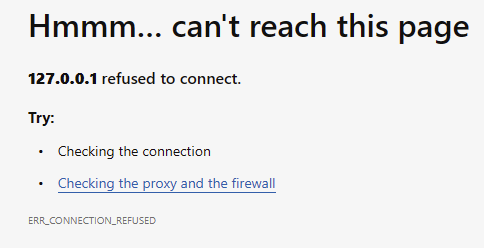

fcb618cc-cabb-4b49-a61e-bdda9dcfc2d2.png
11894e82-1b80-4422-b100-58c42516549e.png
Wanted to add - I first thought that the issue is possibly due to recent bug in one of the Microsoft updates which impacted http2, however - I have an update (KB2267602) which should fix this and also I have workarounds applied - but after some testing I do not see RDM executable to listen on port 60370 at all, I only see webview trying to connect:
>netstat -na | find "60370"
  TCP    127.0.0.1:62590        127.0.0.1:60370        SYN_SENT
  TCP    127.0.0.1:62591        127.0.0.1:60370        SYN_SENT
  TCP    127.0.0.1:62592        127.0.0.1:60370        SYN_SENT
Here is an update...
Looks like Microsoft KB2267602 is actually keeps the name but increments the version with each update.
When I was testing yesterday I had KB2267602 (Version 1.441.99.0) installed.
But today I got KB2267602 (Version 1.441.123.0) and KB2267602 (Version 1.441.125.0) and the issue with hub authentication got resolved.
From what I can find - the version 1.439.210.0 was the one which should have worked, but that wasn't the case for me.
And no, I am not completely sure that this was the actual issue, however nothing else has changed on that computer recently.
Were you ever able to resolve this? I'm still running into it. I'm able to authenticate with the hub but the redirect back is failing.
Yes, this was resolved once I made sure the latest version of KB2267602 is installed.
However - there is still no exact confirmation if that was indeed a root cause 😒
Hello,
Unfortunately, we haven’t received any confirmation on our end. However, it does seem likely that the issue may have originated from that area.
Best regards,
Tommy Sanders
Hello,
Unfortunately, we haven’t received any confirmation on our end. However, it does seem likely that the issue may have originated from that area.
Best regards,
@Tommy Sanders
Thank you Tommy and everyone else.
I created a ticket and Tommy helped me find the fix that worked for me.
Settings >> Advanced >> Uncheck "Connect to Devolutions Account using Authorization Code Flow"
Once I unchecked that option I was able to log in immediately.
I created a ticket and Tommy helped me find the fix that worked for me.
Settings >> Advanced >> Uncheck "Connect to Devolutions Account using Authorization Code Flow"
@trivthebofh I wouldn't call it a fix, more like a workaround. But good to hear thus is working.