
devolutions15
Unable to login to Devolutions Drive on Chrome OS
Hi,
After a few unsuccessful tests, we wonder if it could be as simple as clearing your browser history and cookies in Google Chrome. It's not supposed to happen, but it might be locked data/cookies for the login process.
Cordially,
No, the Chrome tablet was new and never used to login to RDM or be used much at all. It's also forced to be the latest after a few reboots and what not, so Chrome is current and there are no cookies or cache issues. The same thing happens in Incognito mode.
Moving the signin process outside of your app and into an third party app was probably not a good choice. You lost control of the process and have no way to troubleshoot the issue.
Unable to login to Devolutions Drive on Chrome OS
I rebooted and tried again, same thing. Just blank city wallpaper and a cancel option.
My Windows desktop connects just fine, so I don't think its firewall/DNS.
Unable to login to Devolutions Drive on Chrome OS
I've installed 2022.3.1.2 on a chrome OS tablet from the Play Store. I went to sign into Devolutions Online Drive from the Data Sources page, but the login screen doesn't work. Unfortunately, the tablet just screenshots a black screen, but I can see the city wallpaper and cancel, but no box to login. I can't see any DNS calls being blocked that aren't obvious ads being blocked, but who knows.
Any workaround without having to switch away from Devolutions Drive?
Upgrade to latest version when checking for updates
FYI, I see that the update page has been updated, but still not downloading the latest version available to download which requires TWO downloads/upgrades to get to the latest update. I've been whining about this for years.
Was this supposed to be fixed in the upgrade page redesign or is this still not on the issues list?
Why is this so tricky to solve? There should be some sort of look up string on the latest version that matches the release notes and the latest version available. I don't see how they should be disconnected. When updating the back end, do you not update the Release Notes and the latest version available at the same time as part of the same process? I think I'm so frustrated by this because I think its pretty straight forward to fix. The logic about installing now/later/whatever is more complex than a simple "what is the latest version" check and display the result, so my mind is being blown over this.
Now, if you said that you need middleware builds to handle one time migrations or conversions or something, then I'd understand. But I don't see that happening, or at least not as often as I see the double upgrade requirement.

The update has already been downloaded.
On the three PC's I have RDM installed, the update checks are regularly broken and excessive and gets on my nerves. On two PC's, the monthly check is outright ignored and done daily or more and one PC that did seem to have working monthly checks has recently gone bonkers as well. I think this happened after 2021.2.26.0 became available.
Currently running 2021.2.25.0 and getting daily prompts to upgrade to 2021.2.26.0, I've told it to skip that version the first time getting the prompt, and it hasn't. I've also told it to download and install when app closed (which should have halted further version checks and upgrade prompts) and now when the prompt KEEPS occurring every day, the option "Download this version and install now" and press OK, I just get a pop up that says "The update has already been downloaded" and instead of proceeding with the upgrade, it just does NOTHING. (This scenario of a file downloaded but not installed may also happen when Windows does a forced reboot to apply Windows updates).
This is incorrect behaviour. This is a very straight forward and specific bug fix. It's irrelevant whether the file was already downloaded to the end user (so no need for the popup), it should just use that downloaded file and proceed with installation as per the action the user just told it to do or download it again.
So to recap:
1) "ignore this version" didn't work and kept prompting daily. You really should be setting a flag "skip_version" and then checking that flag BEFORE doing upgrade prompts.
2) "Download this version and install now" has silly bug that doesn't do the install if it already downloaded the file. Proceed with install if the file exists, not based on a successful NEW download, or else just force overwrite the old version. Regardless, the popup "The update has already been downloaded" is pointless and unnecessary blocker.

Besides the focus bug, the upgrade prompts are the next most annoying issues with RDM for me and I will try and open more specific bug reports so that specific fixes can be implemented rather than a big, unresolved thread of multiple issues.
p.s. After manually closing RDM (right corner "X") to trigger the upgrade installation, the installer still prompted to say RDM was running and will need to be closed. That seems wrong since I manually told RDM to close which triggered the upgrade installation... anyway, it's just not as smooth as it should be for an upgrade process totally within your control. There really needs to be an auto update that doesn't require the user to click 10 times on a bunch of default buttons to get through an installer (ie. uses the msi installer with /quiet switch). Even companies that rely on installing adware during installation do not have the upgrade hassles as this to upgrade minor versions! (e.g. Driver booster).
Upgrade to latest version when checking for updates
Hello,
Out of curiosity, are you running a portable installation of RDM?
Best regards,
No, and I'm surprised there'd be options to download and install when running a program without an installer. It would make even less sense to get 2 upgrade checks in a day in a portable version.
Log to file doesn't work for serial connections
Gabriel,
"Log mode" is set to "Printable output".
When set to "Event", "Log overwrite mode" is greyed out.
When I set to "Printable output", then the "Log overwrite mode" is interactive, but only saves changes from the Local Data Source session properties, not from the actively open session.
In other words, changing it from the tab doesn't save "Log overwrite mode". I need to edit the Local Data Source properties to have that setting take effect.
Focus issue in Chrome since version 2021.2.X when RDM is opened inside RDP session
Dennis,
Good work narrowing it down to 60 second reproduction! The key to solving any bug is being able to reproduce it at will...
I'm going to say that using TeamViewer instead of RDP is also likely exacerbating the issue.
Upgrade to latest version when checking for updates
James,
https://forum.devolutions.net/topics/36064/check-for-updates-setting-ignored makes it sound like there was a fix applied, but I'm not seeing it.
Came in Monday to see a prompt on the screen for 2021.2.20 to 2021.2.21 on one PC. Something less than 4 hours later, I see another upgrade popup on the screen. On another PC (2021.2.19) that was idle all weekend, it didn't have the upgrade pop up. Both Auto Update screens have the same config. The 2021.2.19 PC that it didn't happen to would have been installed years ago and upgraded since, whereas the PC having the most upgrade prompts was installed sometime in the last few months.
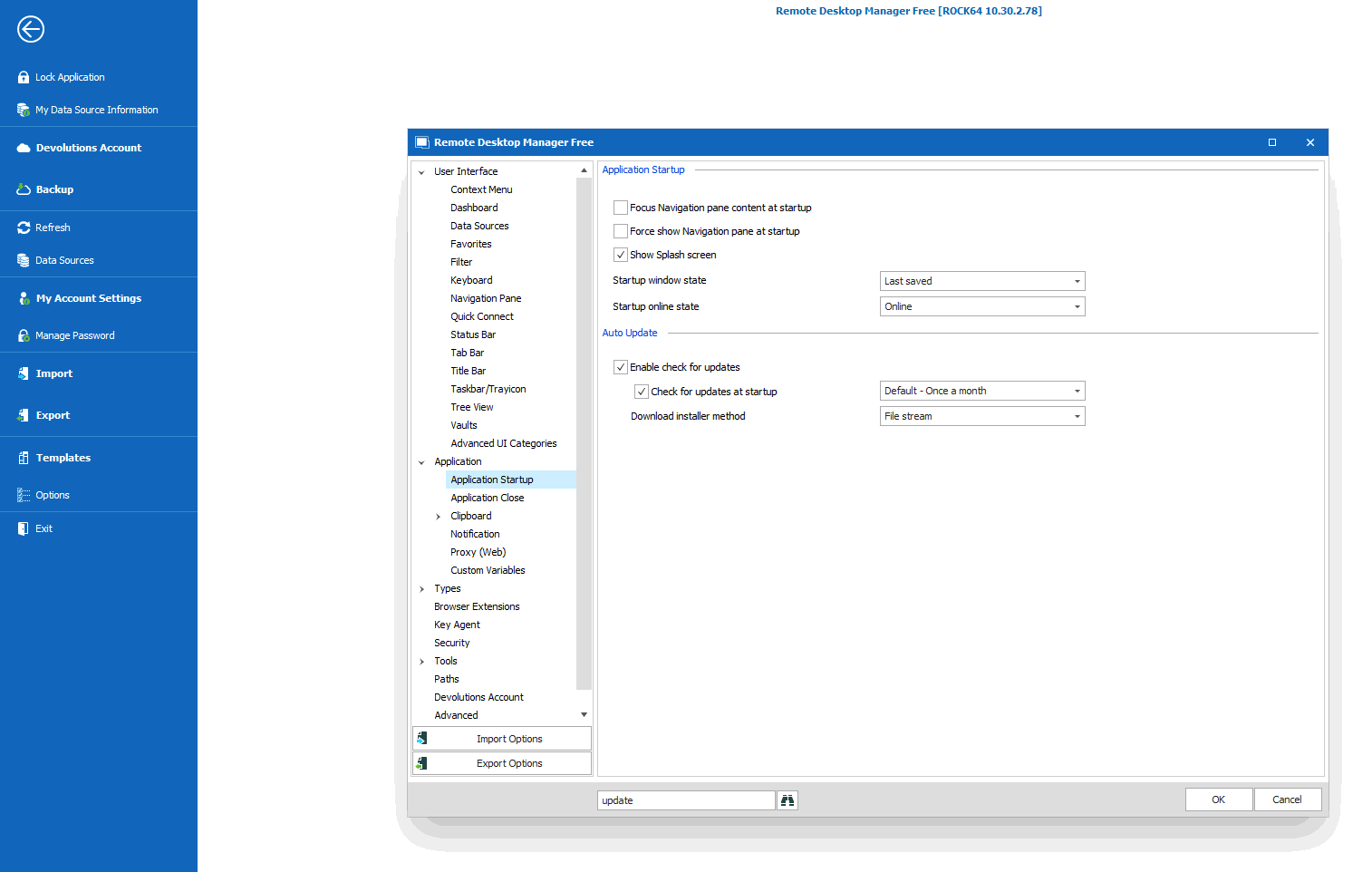
When I'm not in the middle of something and can do the next round of updates, I'll try and get a screen recorder going to catch the installer update.
Thanks
Upgrade to latest version when checking for updates
James,
I'm getting multiple update checks happening a day on multiple workstations. I've checked both and the options are set to "Default - Once a month". My home is on 2021.1.40 and was prompted TWICE in several hours this afternoon to upgrade to 2021.2.20 (with release notes showing 2021.2.21). "Download this version and install when application is closed" is selected, I click OK and pop up says its already been downloaded.
Given that this is really easy to observe on three different computers for months, I'm really surprised you have to go out of your way to reproduce this and it just isn't in your face all the time.
Can you clarify exactly how many new version popups should I get a day with a setting of "Once a month" in the options? The settings look like they're not being used correctly, at all. Because of this bug, the version that just got installed was 2021.2.20 and not 2021.2.21. So with the setting to check for updates on Startup enabled, I'd 100% expect that opening RDM would give me the new release notification to update me from 2021.2.20 to 2021.2.21 so that I don't launch into my work with a still outdated version and get the popup for a new version later today or tomorrow or something. But it doesn't. I have to manually check and go through this process again. You guys really need to do these updates silently and not require 10 clicks. Tell it to update, and 2 minutes later it relaunches (I probably wouldn't say this was necessary if the installer wasn't so slow, its like being a caller on hold).
Thanks
p.s. you really need to speed up your code that handles configuring shortcuts in the installer. I'm doing typical upgrades and this takes 15-25 seconds before loading the license agreement page and looks like unexpected or poorly coded or something as I'm always wondering if it hung or if it accepted me pressing "next" correctly or not.
Unable to regain focus and need to kill RDM fairly often
Stefane,
Thanks for those details, that's appreciated. I can say on the multiple PC's that I've run into this, none of them use hibernation or lock screens but the issue is pretty much observed after coming back to an idle bench (ie, running a test overnight and then checking for results the next day). But its also happened a few times while in normal desktop usage. For a long time, I thought it was exacerbated by having multiple monitors but one of the most recent times happened on a headless machine I'm TeamViewered into. I don't know for sure, but its possible that might have actually been the hanging when trying to download new binaries and not the stuck minimized issue.
Please send me the details on using the switch. I don't know if I can run into on all my machines, but I'll try and run in where the additional CPU shouldn't be much of an issue.
Thanks
Log to file doesn't work for serial connections
Oof, spoke too soon.
So in 2021.2.20 where its now logging serial, `Log overwrite mode` is stuck on Default and won't let me change to Append.
Edit: With the serial session open, if I right click on the Tab-Properties, then changing to Default to Append wouldn't stick. But I edited the session under "Local Data Source" and then when I right clicked on the tab and did properties, it was now showing Append. So If I try to change the setting in the tab, it doesn't take effect. If I change it in the Local Data Source, the change is immediately reflected in the tab. That is new behaviour from my understanding, where changes to saved sessions wouldn't change currently open tabs launched from those sessions.
Log to file doesn't work for serial connections
Doh! I had started a reply to say its happening on multiple machines (2021.2.18), using Local source.
However, I just upgraded from 2021.2.18 to 2021.2.20 and when checking the logging settings, the previously configured settings are now showing and enabled!
It looks like the log files have an exclusive lock. Explorer had a timestamp of 6:21pm and 0KB size files and it was 6:33pm. Since I was expecting logged data, I tried to open the log and Windows complains the file is open in RDM and doesn't let me view it. Now the data size is updated in Explorer and I can see the size change to 28KB. I try to copy the log so that I can view it, and it also gets a Windows message about it still being open in RDM. So it would be nice if there wasn't an exclusive lock on the file, or at least allow it to be copied and opened separately.
Upgrade to latest version when checking for updates
Ran into this again. Running 2021.2.18. Multiple times did the new release update screen appear showing 2021.2.18 installed and 2021.2.20 available. I tell it to download and install upon exit. It tells me its already downloaded. If you're going to keep prompting to install the latest version (even after the user told it to download and install after exit), you really need to use the latest version and especially the version displayed to the user.
I exit RDM and let it install the update. (There is a new bug in the installer where you can't get focus, clicking on the RDM install screen acts like a mouse was clicked elsewhere, observed in 2021.2.19 and 2021.2.20 installed before the license agreement.) Start RDM, and its 2021.2.19 and not 2021.2.20 like it said it had downloaded and would install.
Now in 2021.2.19, I go to check for updates and 2021.2.20.0 is offered. I say "Download this version and install now". It says "The update has already been downloaded." and then DOES NOTHING. It should be installing it, not stopped because it was already downloaded. X-ing the window and exiting RDM installed the 2021.2.20 update.
Unable to regain focus and need to kill RDM fairly often
Ran into this problem twice this week. Once on an older version 2021.1.x from a few months ago and again today on a more recent version (it just installed 2021.1.41 after it was running 2021.1.38 or 39 IIRC, now its offering 2021.2.19). It seems to happen when I critically need test results and RDM decides to be a dick.
I first notice I can't get focus on any tab. I minimize all windows to make sure there isn't an RDM window behind everything else. After that, cannot maximize the RDM window again.
I right click on taskbar and tell it to close window, then RDM appears and shows me each of my tabs closing (with all my test results!!!) and then the upgrade screen appears.
At this point, I've lost so much critical data from this bug (happened more than 10 times in last two years), I don't think I can keep using RDM :(
Log to file doesn't work for serial connections
Went to enable file logging for a serial port, but found the settings were not saving and taking effect.
Version 2021.2.18
To reproduce:
Start with a serial console session.
Right click the tab, Properties
Logs:
-Enable logging
Log filename, saved to desktop with .log extension
Log overwrite, tried default and append.
Click OK
No logging file generated. Go back into Properties/Logging, and none of the changes were retained and still disabled.
Disable Serial console
In putty, the feature is called "Reset scrollback on display activity" and I leave it UNCHECKED so that I can scroll up in a live serial console and see what happened without the screen display constantly resetting to display the current console.
Where is that basic feature in RDM for serial console?
Thanks
Unable to regain focus and need to kill RDM fairly often
Jeff,
The crash behaviour is different in 2021.1.36.0 than 32.0, if I am experiencing the same bug. Instead of RDM being minimized to taskbar and can't maximize, the window is still full size but can't click on anything and the mouse is now doing the infinite spinning, like it's waiting on something. Right clicking RDM in the taskbar and selecting "Close" or "Exit" does nothing.
After killing the process, I've restarted RDM and will install 2021.1.40.0 now. There isn't anything in the changelog looking like it's going to resolve this issue, so from your side, do you still show this bug as open and not fixed?
Thanks
Unable to regain focus and need to kill RDM fairly often
Jeff,
Doh! Can't believe I left that out. I was most recently at 2021.1.32.0 and just upgraded to 2021.1.36.0 when I made the post. I see 2021.1.40.0 is showing available to me now. I see in the changelog for 2021.1.36.0 "Fixed possible freeze after application is activated after idle", so hopefully that will take care of this!
I'll check back again after some cycles.
Thanks
Unable to regain focus and need to kill RDM fairly often
I suspect this problem is related to multiple monitors as I experience this problem VERY FREQUENTLY at both home and work PC's. Home is 3 monitors and work is 2 monitors. If this happens with just one monitor, I'd be perplexed how this isn't happening for everyone and be a high priority bug. Anecdotally, there seemed a time this never happened and then one day, it happened regularly. I'm going to have to start filing more bugs so there is a better record of when these critical bugs occur.
Generally, I'll have RDM open with a few consoles open. I'll be away from the computer and come back hours or days later and cannot get RDM focus. If I minimize all windows, sometimes I can see an RDM popup because one of the serial or SSH sessions died, but this popup box doesn't ever get to main focus through alt+tab or by clicking on RDM in the taskbar. Other times, no popup occurred and cannot maximize or close or exit from RDM. At that point, I have to end process from Task Manager.
This happens so frequently, I cannot believe that no one else is experiencing this as a high priority bug. Losing the ability to see what is shown in several open sessions and having to kill open active SSH sessions due to RDM bugs is really starting to offset the RDM efficiency and may have to use other manager if this continues. Do the majority of Devolutions developers use just one monitor?
Can't hide useless toolbar
Issue resolved in 2021.1.32.
Upgrade to latest version when checking for updates
When checking for new updates using Help->Check for new Updates, it's annoying (the more terminals to reopen the more annoying and slower the process is) to have to upgrade twice to get to the newest version. Today, I checked and said I was on 2021.1.25 and I would be upgraded to 2021.1.27 while showing the release notes for 2021.1.32. I had to install 2021.1.27 and then upgrade again to 2021.1.32. This happens way too often, there should be the option to upgrade to the latest version matching the release notes and do it all in 1 step.
Can't hide useless toolbar
Ok, I see, you think that I'm just a stupid guy from the support. Now I understand.
Thank you for your feedback I will forward it to my management.
PS: You're right about the remote monitoring, it was not supposed to be released with the version .31.
David, you need to go have a drink and chill out. You're in a mood that you shouldn't bring to work.
No, I really don't think you're stupid and I have no idea why you'd think that (I didn't think you were the developer who wrote this code, or a QA tester who failed to test this, or the release manager who released this with poor test coverage). How smart or stupid you are hasn't even come up in this thread. However, I think your attitude is poor for being in Support. Seriously, your responses are huge red flags you're not cut out for Support.
Can't hide useless toolbar
David,
Frankly, if its Sunday, don't feel the need to respond unless it actually resolves the problem. Otherwise, just forward the request to QA to deal with on Tuesday. You didn't actually answer my question, you asked me a question (with an action item). So you can feel free to not like my attitude, as I am free to not like yours or the frequent bugs that I run into. If you can't live with the frustration from customers when support asks redundant questions, you're probably not cut out for Support.
To be clear, the Remote Monitoring feature was poorly implemented and tested and that is what my main issue is that would have appreciated an immediate response. But I resolved it myself before you replied. The other complaint is not a showstopper, so don't feel like you need to take time out of your day off to not deal with it.
Best regards
p.s. what will bring more QA testing? When you report to management "customers would like to see more QA testing before releases" or "customers f&*cking hate all the bugs they run into from the lack of QA testing between releases."?
Can't hide useless toolbar
Hello,
Thank you for your feedback. We will look into it. In the meantime, could you post a print screen of the RDM icon changing from grey to blue? I suspect that a default behavior from the third party we use.
Regards
David,
Are you saying you don't experience this or you simply haven't tried? I'm not sure what value screenshots showing the taskbar blue or grey provides beyond my text description.

