Upgrade to latest version when checking for updates
0 vote

When checking for new updates using Help->Check for new Updates, it's annoying (the more terminals to reopen the more annoying and slower the process is) to have to upgrade twice to get to the newest version. Today, I checked and said I was on 2021.1.25 and I would be upgraded to 2021.1.27 while showing the release notes for 2021.1.32. I had to install 2021.1.27 and then upgrade again to 2021.1.32. This happens way too often, there should be the option to upgrade to the latest version matching the release notes and do it all in 1 step.
All Comments (13)
Hello,
Thank you for the bug report. I will look into it.
Regards
David Hervieux
Ran into this again. Running 2021.2.18. Multiple times did the new release update screen appear showing 2021.2.18 installed and 2021.2.20 available. I tell it to download and install upon exit. It tells me its already downloaded. If you're going to keep prompting to install the latest version (even after the user told it to download and install after exit), you really need to use the latest version and especially the version displayed to the user.
I exit RDM and let it install the update. (There is a new bug in the installer where you can't get focus, clicking on the RDM install screen acts like a mouse was clicked elsewhere, observed in 2021.2.19 and 2021.2.20 installed before the license agreement.) Start RDM, and its 2021.2.19 and not 2021.2.20 like it said it had downloaded and would install.
Now in 2021.2.19, I go to check for updates and 2021.2.20.0 is offered. I say "Download this version and install now". It says "The update has already been downloaded." and then DOES NOTHING. It should be installing it, not stopped because it was already downloaded. X-ing the window and exiting RDM installed the 2021.2.20 update.
Hello,
Thank you for reaching back to us on that matter!
Have you encountered this issue on more than one workstation? Also, are you using the Free or the Enterprise edition of RDM?
We will try to reproduce this issue on our end and contact you with our results.
Best regards,
James Lafleur
James,
I'm getting multiple update checks happening a day on multiple workstations. I've checked both and the options are set to "Default - Once a month". My home is on 2021.1.40 and was prompted TWICE in several hours this afternoon to upgrade to 2021.2.20 (with release notes showing 2021.2.21). "Download this version and install when application is closed" is selected, I click OK and pop up says its already been downloaded.
Given that this is really easy to observe on three different computers for months, I'm really surprised you have to go out of your way to reproduce this and it just isn't in your face all the time.
Can you clarify exactly how many new version popups should I get a day with a setting of "Once a month" in the options? The settings look like they're not being used correctly, at all. Because of this bug, the version that just got installed was 2021.2.20 and not 2021.2.21. So with the setting to check for updates on Startup enabled, I'd 100% expect that opening RDM would give me the new release notification to update me from 2021.2.20 to 2021.2.21 so that I don't launch into my work with a still outdated version and get the popup for a new version later today or tomorrow or something. But it doesn't. I have to manually check and go through this process again. You guys really need to do these updates silently and not require 10 clicks. Tell it to update, and 2 minutes later it relaunches (I probably wouldn't say this was necessary if the installer wasn't so slow, its like being a caller on hold).
Thanks
p.s. you really need to speed up your code that handles configuring shortcuts in the installer. I'm doing typical upgrades and this takes 15-25 seconds before loading the license agreement page and looks like unexpected or poorly coded or something as I'm always wondering if it hung or if it accepted me pressing "next" correctly or not.
Hello,
Thank you for your swift reply!
Since you have selected "Once a month" under File -> Options -> Application -> Application startup, you should be prompted only 1 per month, regardless of the number of updates pushed by us.
If you wish to receive a notification to inform you each time a new version is released, I would recommend opting for "All (major and minor updates)" instead of "Once a month".
That being said, could you please provide me a screenshot of your File -> Options -> Application -> Application startup section?
As for the silent updates, this is something that our Engineering Department already has in mind. They will see what can be done on that matter. As for the performances of the installer, would it be possible for you to record this process and send it to me via private message? This will allow me to see it in real-time and see if it is unusual.
Best regards,
James Lafleur
James,
https://forum.devolutions.net/topics/36064/check-for-updates-setting-ignored makes it sound like there was a fix applied, but I'm not seeing it.
Came in Monday to see a prompt on the screen for 2021.2.20 to 2021.2.21 on one PC. Something less than 4 hours later, I see another upgrade popup on the screen. On another PC (2021.2.19) that was idle all weekend, it didn't have the upgrade pop up. Both Auto Update screens have the same config. The 2021.2.19 PC that it didn't happen to would have been installed years ago and upgraded since, whereas the PC having the most upgrade prompts was installed sometime in the last few months. 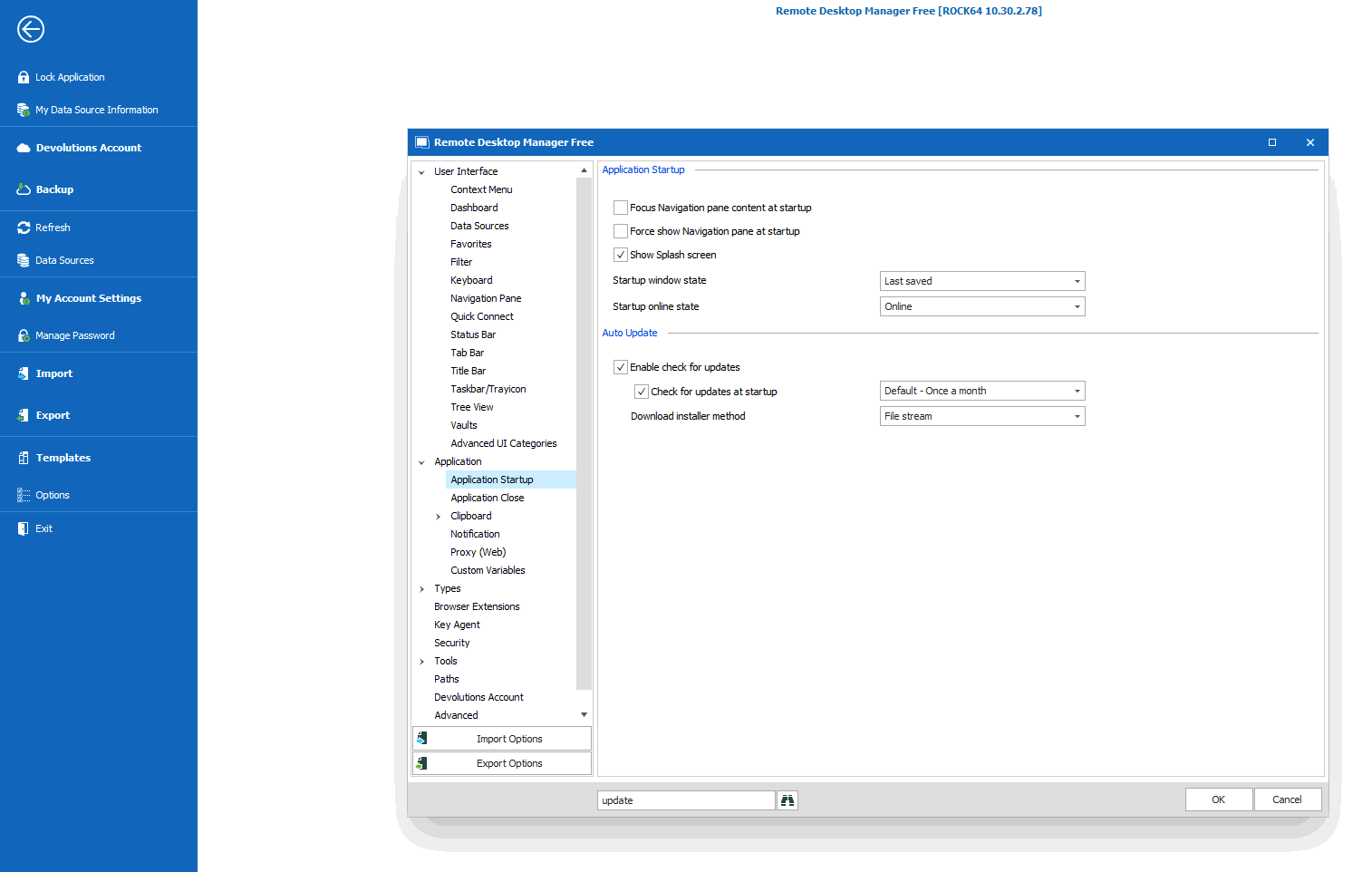
When I'm not in the middle of something and can do the next round of updates, I'll try and get a screen recorder going to catch the installer update.
Thanks
RDM_update_options.png
Hello,
Thank you for your swift reply!
I will open a ticket with our QA department and we will be in touch when we will have an update to provide on that matter.
If you have the time to record this, please use the link that I will send you via private message to send it securely to us.
Best regards,
James Lafleur
Hello,
Out of curiosity, are you running a portable installation of RDM?
Best regards,
James Lafleur
Hello,
Out of curiosity, are you running a portable installation of RDM?
Best regards,
No, and I'm surprised there'd be options to download and install when running a program without an installer. It would make even less sense to get 2 upgrade checks in a day in a portable version.
Thank you for this information, I will transfer it to our QA department.
James Lafleur
Hello,
According to the tests performed by our QA department, the only thing that would trigger this would be to use a GPO to be prompted with the update window. That being said, to avoid getting prompted for updates in RDM, you could decide to use the following GPO and simply download the latest version of RDM from the website when you are ready to update.
%Root%\SOFTWARE\Policies\Devolutions\RemoteDesktopManager\DisableAutoUpdate
Other GPOs also exist to manage the updates of RDM. For more information, please consult this link: https://kb.devolutions.net/rdm_group_policies.html
Best regards,
James Lafleur
FYI, I see that the update page has been updated, but still not downloading the latest version available to download which requires TWO downloads/upgrades to get to the latest update. I've been whining about this for years.
Was this supposed to be fixed in the upgrade page redesign or is this still not on the issues list?
Why is this so tricky to solve? There should be some sort of look up string on the latest version that matches the release notes and the latest version available. I don't see how they should be disconnected. When updating the back end, do you not update the Release Notes and the latest version available at the same time as part of the same process? I think I'm so frustrated by this because I think its pretty straight forward to fix. The logic about installing now/later/whatever is more complex than a simple "what is the latest version" check and display the result, so my mind is being blown over this.
Now, if you said that you need middleware builds to handle one time migrations or conversions or something, then I'd understand. But I don't see that happening, or at least not as often as I see the double upgrade requirement.
Hello,
we've managed to reproduce your Update issue, we'll create a ticket to the Engineering Team and verify what is causing this.
Best regards,
Antoine Mauger