
Jonathan Iannone
Mass entry permissions edit
Hi,
Good news — this is fully supported in Remote Desktop Manager (RDM). You don't have to grant access entry by entry: RDM lets you apply permissions to many entries at once through Batch edit.
Here's the workflow:
Select the entries you want to update. You can select them in several ways:
Manual multi-selection (Ctrl/Shift-click),
Advanced search (e.g. filter on session type = SSH to catch all your SSH entries at once),
Multi vault search.
With the entries selected, go to Edit → Batch edit → Edit entries (general settings).
Open the Permissions tab.
Check Override permissions.
Set the permission (e.g. View / Connect to Custom), then click Grant permission and select your LinuxAdmins group.
Click OK to apply.
The permissions are then applied to every selected entry in a single operation.
📖 Documentation:
DVLS Bug: Mail Spam
Hi Andreas, hi Alex,
Thank you both for the detailed reports. I was able to reproduce the issue on my side, and we’ve opened a ticket with our development team to investigate and address this bug.
We’ll keep you updated as soon as we have more information or a fix available.
Best regards,
SQL New User syntax error
Hello Patrick,
Thank you for the detailed follow-up and for sharing the error you are encountering.
I was able to reproduce the same issue on my side when trying to create a new SQL login with integrated security (Active Directory) directly from the SQL Server entry in RDM. The syntax error occurs when entering a domain\username, even though the exact same operation works fine in SQL Server Management Studio (SSMS).
I have already opened an internal ticket with our development team to investigate this behavior further. In the meantime, the recommended workaround is to continue creating new AD logins directly in SSMS. Once created, refreshing the Logins list in RDM will display the new user without problem.
We’ll keep you updated as soon as we have more information or a fix available.
Best regards,
Devolutions Server Update Fails - devoltuions.dll access denied
Thank you for the update, and I’m glad to hear you were able to resolve the issue!
If this problem ever happens again, we’d appreciate it if you could run the following PowerShell command before taking the instance offline:
Get-Process | Where-Object { $_.Modules.FileName -like "*Devolutions.dll*" }Replace "Devolutions.dll" with the name of the file in case the issue occurs with a different file.
Sharing the results with us will help us pinpoint the root cause and work on improving the update process to prevent similar issues in the future.
Thank you for your understanding and collaboration!
Best regards,
Devolutions Server Update Fails - devoltuions.dll access denied
Hi Chris,
Thank you for providing the details and the screenshot.
This issue typically occurs when the Devolutions.dll file is locked by another process. To help us investigate further, could you please run the following PowerShell command and share the output with us? This will allow us to identify the process that might be locking the file:
Get-Process | Where-Object { $_.Modules.FileName -like "*Devolutions.dll*" }Once you’ve done that, here are a couple of steps you can try to resolve the issue:
Cancel and restart the update: This often resolves the issue if the file lock is temporary.
Restart the server: If the file remains locked, restarting the server can release it.
We appreciate your assistance in helping us troubleshoot this issue. Let us know the results of the command or if you need further support.
Best regards,
Secure Email function not working any more in version 2024.3.3.0
Hi Michael,
Thank you for your detailed testing and feedback. We have successfully replicated the issue on our side as well.
A ticket has been raised with our engineering team to address this problem. We will keep you updated on the progress and notify you as soon as a fix is available.
Thank you again for your cooperation and for helping us troubleshoot this issue.
Best regards,
Secure Email function not working any more in version 2024.3.3.0
Hello,
Thank you for your swift response. To help us narrow down the cause, could you please provide the following details:
Does the issue occur for other users as well, or is it limited to your account?
What web browser or client are you using to access the Devolutions Server? Would it be possible for you to try using a different browser or in incognito mode to rule out cache or extension issues?
This will help us proceed with further investigation. I appreciate your cooperation and look forward to your response.
Best regards,
Secure Email function not working any more in version 2024.3.3.0
Hi Michael,
Thank you for bringing this to our attention. I am currently working to replicate the issue on our end to better understand the cause.
Could you please provide a bit more information to help us troubleshoot further? Specifically:
Does the issue occur consistently every time you try to send a secure email, or is it intermittent?
Are there any specific steps or conditions that seem to trigger the error?
Have any recent changes been made to your environment or configuration that could be related?
Additionally, could you check if there's a full stack trace available in the datasource logs? This information would be very helpful for our investigation.
Once I have this information, I will proceed with further investigation and keep you updated on the progress.
Thank you for your patience and cooperation.
Best regards,
Sync from AD through RDM duplicate issue
Hi Ben,
Thank you for your detailed explanation of the issue.
We have successfully replicated the problem on our end. A ticket has been raised with our engineering team to investigate and address this behavior. We will provide you with updates as soon as we have more information or a solution in place. Thank you for your patience and understanding.
Best regards,
Add ticket number and comments to credential entries
Hello sjames,
The same set of options from the System Settings is also available in the Properties of most of the entries, also supporting the Inherited mode :

Regards,
Performance/lead time difference Web Browser Extension (2024.1.0.3) in RDM Version 2024.1.12
Hello Marcel,
I'm currently trying to replicate the issue. Last week we acknowledged a performance issue regarding varriable resolving within the Workspace web extension that seems to be related with the problem you are experiencing at the moment.
Could you confirm if varriables are used in that specifc Vault / entries ?
Best regards,
Joanthan Iannone
Bug - Folder Templates
Hi nOrphf,
Thank you for warning us about that issue! We are currently able to replicate the faulty behavior internally. A ticket has been opened to the engineering department.
Best Regards,
Jonathan Iannone
Search for all words in Devolutions Web Login
Hi Patrick,
We've been working on implementing some improvements regarding this in the last internal DWL version. This upcomming version will have search options to treat the space character as AND or as OR, just like RDM does :
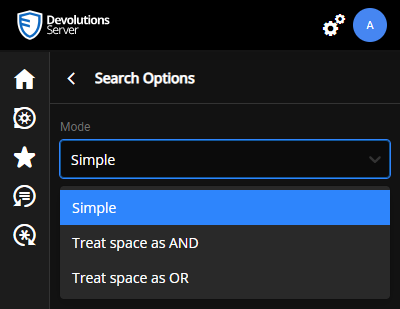
Plus, we renamed some of the tooltips and placeholders to avoid confusion regarding where to search for Matching entries/Vaults/Entries within a specifc Vault.
Best regards,
Search for all words in Devolutions Web Login
Hi Patrick,
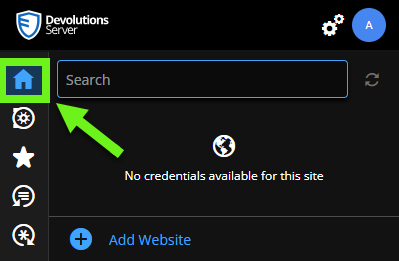
Are you able to find the entries you are looking for by using the Search bar inside the "Matching" section rather than in the "All Entries" one?
Here:
Regards,
Search for all words in Devolutions Web Login
Hi Patrick,
I'm currently trying to replicate the behavior your user has... Would you be willing to verify with her if she is able to see the entries that have the issue, but directly in the UI of DVLS Web, or RDM (without DWL)?
I also wonder if the sub-folder of the Vault she has access to is directly in the root of the Vault, or if that folder is inside another folder in which she doesn't have the permission to view it?
Lastly, I'd like to know the DVLS version you are using.
Best regards,
Jonathan Iannone
RDP Sessions not resizing (2019.2.6.0)
@Martin_
Hi,
Because of the many possibilities to reproduce this issue, we'd like you to give us a video recording of how you reproduce the problem.
Best Regards,
Changing credentials in sub-connection
Hello,
We are unable to reproduce your issue with the provided informations.
Could it be possible for you to make a short video that shows how you reproduce the issue?
Best regards,