Performance/lead time difference Web Browser Extension (2024.1.0.3) in RDM Version 2024.1.12
Performance/lead time difference Web Browser Extension (2024.1.0.3) in RDM Version 2024.1.12

After the update to version 2024.1.x We notice a significant difference when retrieving, displaying the available accounts for login in the linked workspace web extension.
Before the update (was latest 2023 version), for example, you obtained a website which had about 40 accounts for an admin in RDM, these were shown in about 1-2 seconds in the Web Extension for selection. If we now perform this same action, the processing time is continuous at least between 9-12 seconds. Even if, for example, only 1 account is available for a specific website, the time to retrieve the account displaying is much longer than before, unworkable for the users. When just opening a new tab (in which no address is yet present) the workspace web extension is searching for a long time, where RDM is also 'locked' this time, before showing No credentials available for this site
It is striking that the extension quite quickly retrieves the available accounts for a specific website from the existing Hub Personal vault from RDM. Do you also experience this lead time difference between the 'old 2023' and the 2024 versions?
Regards, Marcel
All Comments (15)
Hello,
Thank you for reporting this behavior.
What data source type are you experiencing this slowness?
How many records are stored in the vault where this entry is located, and how many vaults do you have?
Is the Workspace extension connected directly to the data source or RDM?
This will help us to try to reproduce this issue in our environment.
Best regards,
Érica Poirier
Hi Érica,
Datasource is Microsoft Azure SQL and the Workspace Extension is connected to RDM.
The vault where this behavior is present concerns 1 of the 4 present (and which is only available to most users) and it contains 10K> records.
Previously, so with the 2023 version in combination with the extension (and here I cannot directly indicate whether this was with the earlier version of the extension or with the most recent one 2024.1.0.3) the performance was just ok and workable.
My first expectation/impression seems to me that the new Workspace browser extension handles data retrieval differently as earlier?
Regards, Marcel
I played a little bit with the profiler when starting the webbrowser (Edge) after which I enter a certain web address in an Inprivate session and various accounts/credentials
should be shown.
The first thing I notice is starting Edge then RDM is freezing for a short time (Seems to me the time it takes longer with these new versions before accounts/credentials become visible in the extension). Switching to an Inprivate session in Edge also freezes RDM for a short time.
After entering a web address, I notice that the Workspace Extension immediately indicates a 3 which exactly are the accounts/credentials that are present in the Personal Hub for this Web address.
When you now select the Remote Desktop Manager Icon in the Wokspace Extension, it takes about 10 seconds before the available accounts/credentials become visible.
Available accounts/credentials shown = 54 ( RDM vault 51 + Personal Hub 3)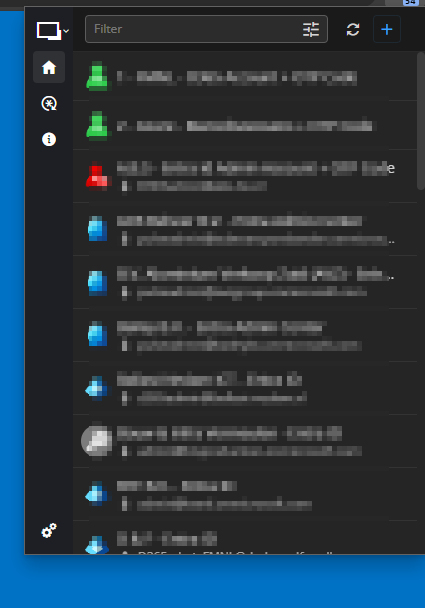
In the debugger below info is after selecting Remote Desktop Manger in the Workspace Extension, nowhere I don't really see the long waiting time for availability in de Workspace Extension. Matching entries count is ok, and all refresh/load times are minimal. Prob in communications RDM ->Workspace Extension -> RDM ?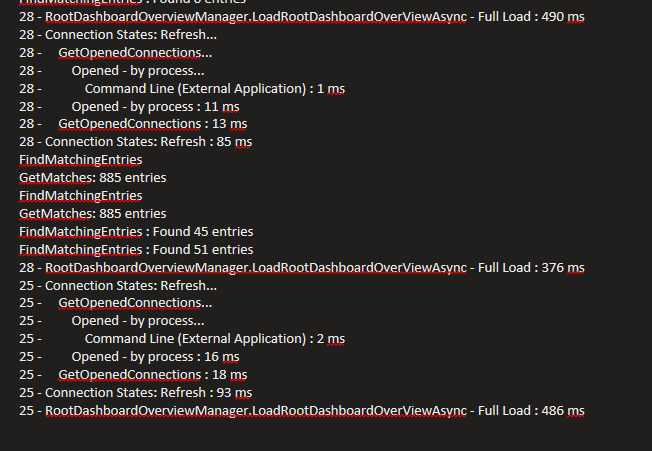
Regards, Marcel
3.png
2.png
1.png
Update:
Switched back to a client version 2023.3.39 and the performance is back to normal, performing the same action immediately displays the accounts/credentials available in Workspace Extension. ;-)
Regards, Marcel
Recently released client version (2024.1.15) shows the same perf behavior in combination with Devolutions Workspace Extension in browser (unfortunately)
Regards, Marcel
Hi,
We are currently investigating and attempting to replicate the issue.
To clarify, does this problem occur exclusively in one particular vault, with other vaults not experiencing similar slowdowns when accessing the same website?
Is this issue present on all websites you visit, or is it limited to specific ones?
Could you also specify the types of credentials utilized in your website entries? For instance, are they using Username and Password, Linked (Vault), Embedded, Inherited, etc?
Best regards,
Olivier Désalliers
Hi,
If I select another vault in RDM, I see no problems in RDM, everything can be selected directly, etc. As I then select the vault in question, no problems in RDM, selecting something or other functionality just all works . As soon as I just start a Browsersession or just a new tab (so empty address) in the browser (edge) then RDM freezes for about 8 seconds. When then enter a random web link, for example portal.azure.com then RDM freezes again, and the Devolution Workspace Extension then releases the accounts/credentials after a long wait time (a little later after RDM has been unfreezed). The same action(s) at the same time from a 2023 client causes no problems at all, RDM and Workspace Extension respond normally.
Regards, Marcel
Is this issue present on all websites you visit, or is it limited to specific ones?
This happens with any website/weblink.
Types of credentials utilized in your website entries.
For all types, we have sites that only contain username/password which are directly present in the session, there are sessions that contain
linked Vault and/or user vault accounts/credentials. Also are present sessions where the Personal Accounts is linked ect.
And also, often linked to user vault OTP credentials. So, a mixture of basically all possible combinations.
Hello,
Thank you for your feedback.
As you offer, a remote session would be much better for collecting all the information we need to reproduce this behavior.
You should receive an email soon with a link to book the session at your convenience.
Thank you for your collaboration.
Best regards,
Érica Poirier
HI Érica,
Perhaps more additional information for the analysis following our remote session last week.
I installed the latest client version (2024.1.18) and I noticed that it was again 'faster' than the previous version 2024.1.15.
It remains less fast/workable than the 2023 client version, but compared to 2024.15 that we viewed in our remote session and where we saw 'get-entries' of over 10-15
seconds, with this latest 2024 version, the get-entries have been reduced to 6 seconds.
DevTools:
Opening site where around 50 accounts/credentials must be shown available in RDM. Refreshing Workspace 4 times. Client version 2023. 3. 39: < 1 sec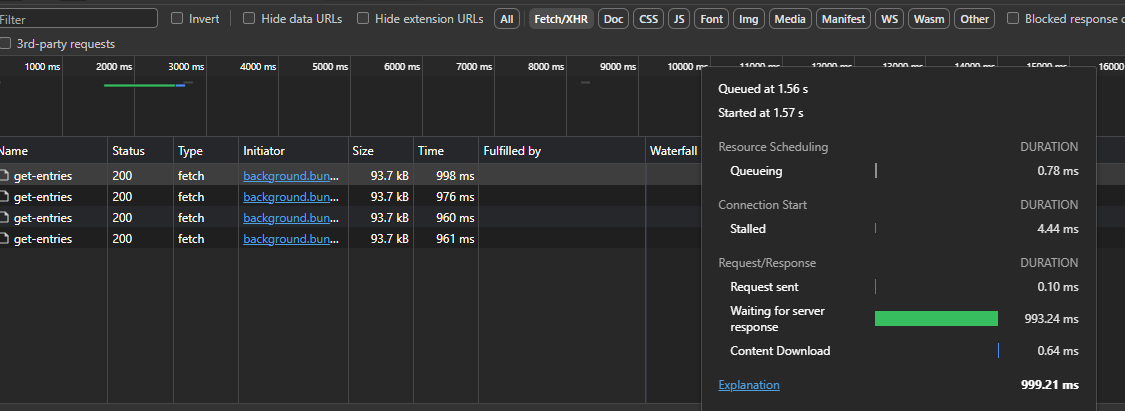
DevTools: Same site/ action with 2024.1.18 : 6 sec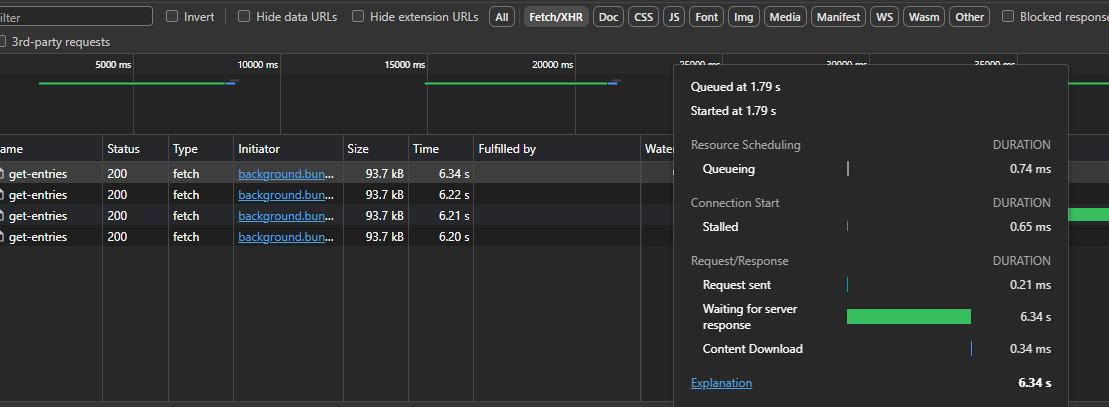
note:I have now also been able to clean up all the Virtual Folders that we saw during the remote session. ;-)
Regards, Marcel
Dev1.png
Dev2.png
Hello Marcel,
I'm currently trying to replicate the issue. Last week we acknowledged a performance issue regarding varriable resolving within the Workspace web extension that seems to be related with the problem you are experiencing at the moment.
Could you confirm if varriables are used in that specifc Vault / entries ?
Best regards,
Joanthan Iannone
Jonathan Iannone
Hi Jonathan,
Yes, variables are mainly used for the linked accounts/credentials and OTP.
For example, a part of the (starting, same) web address as a variable followed by a $Company_Custom Field$ with a following variable to further realize the address which determines the availability in the Workspace.
Regards, Marcel
Hi,
Checking issue with the new 2024.1.20.0 version... I'm going to miss my cup of coffee ;-) Performance is absolutely good! As before.
You've found the problem that caused this?
Regards, Marcel
Hello Marcel,
It's as you said, we figured out the issue once we noticed with your help and our own investigation that the variables were the main culprit of this performance issue. This happened because of the way we compared strings, which wasn't optimized at all, so we've improved this in our 2024.1.20.0 build.
We are planning to add further improvements to the performance of variables. It probably won't drastically improve performance like it did for this fix, but the small improvements add up regardless.
Regards,
Hubert Mireault
Hi Hubert,
Great, thanks for the further analysis and solution!
I can now let deploy the 2024 Client build global internally without any problems.
Regards, Marcel