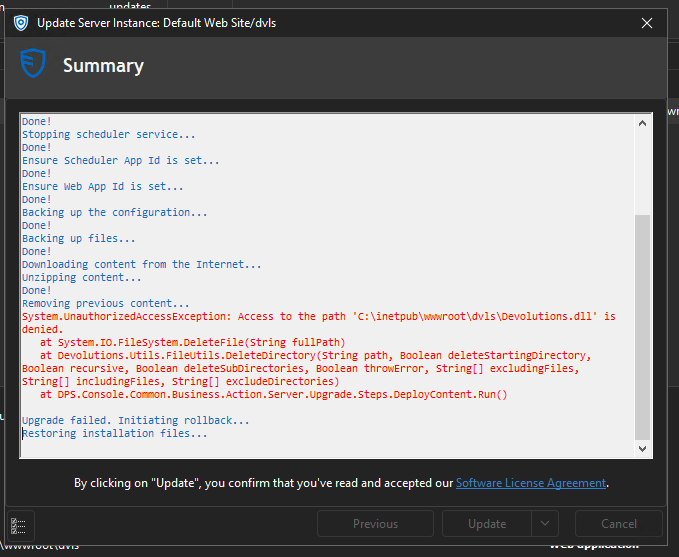
Devolutions Server Update Fails - devoltuions.dll access denied

 App Version 2024.3.9
Site Versions 2024.3.2
Permissions look correct, but the updater keeps failing on this single file C:\inetpub\wwwroot\dvls\Devolutions.dll
RemoteDesktopManager_n8JrkwAepW.png
Recommended Answer
thank you.
I took the instance Offline, then stopped the DVLS Server Serivices. Finally I stopped IIS.
Re-ran the upgrader, successfully.
Been fighting with this since 2024.3.4. We are good now.
All Comments (3)
Hi Chris,
Thank you for providing the details and the screenshot.
This issue typically occurs when the Devolutions.dll file is locked by another process. To help us investigate further, could you please run the following PowerShell command and share the output with us? This will allow us to identify the process that might be locking the file:
Get-Process | Where-Object { $_.Modules.FileName -like "*Devolutions.dll*" }
Once you’ve done that, here are a couple of steps you can try to resolve the issue:
- Cancel and restart the update: This often resolves the issue if the file lock is temporary.
- Restart the server: If the file remains locked, restarting the server can release it.
We appreciate your assistance in helping us troubleshoot this issue. Let us know the results of the command or if you need further support.
Best regards,
Jonathan Iannone
thank you.
I took the instance Offline, then stopped the DVLS Server Serivices. Finally I stopped IIS.
Re-ran the upgrader, successfully.
Been fighting with this since 2024.3.4. We are good now.
Thank you for the update, and I’m glad to hear you were able to resolve the issue!
If this problem ever happens again, we’d appreciate it if you could run the following PowerShell command before taking the instance offline:
Get-Process | Where-Object { $_.Modules.FileName -like "*Devolutions.dll*" }Replace "Devolutions.dll" with the name of the file in case the issue occurs with a different file.
Sharing the results with us will help us pinpoint the root cause and work on improving the update process to prevent similar issues in the future.
Thank you for your understanding and collaboration!
Best regards,
Jonathan Iannone