
SaT
Edge Browsererweiterung füllt keine Logindaten mehr aus
Seit kurzem füll die Edge-Browsererweiterung keine Zugangsdaten mehr aus, sondern zeigt "Die URL ist ungültig".
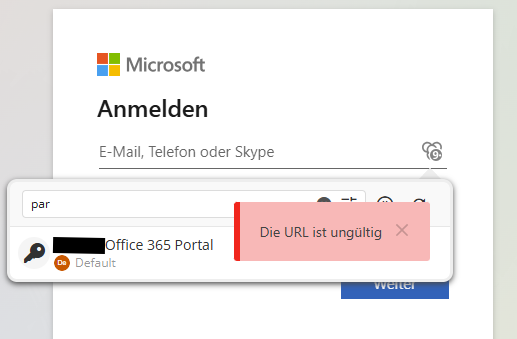
Der Workaround per Rechtklick auf die Erweiterung -> Devolutions Workspace -> Eintrag auswählen funktioniert (ist mir aber zu umständlich).
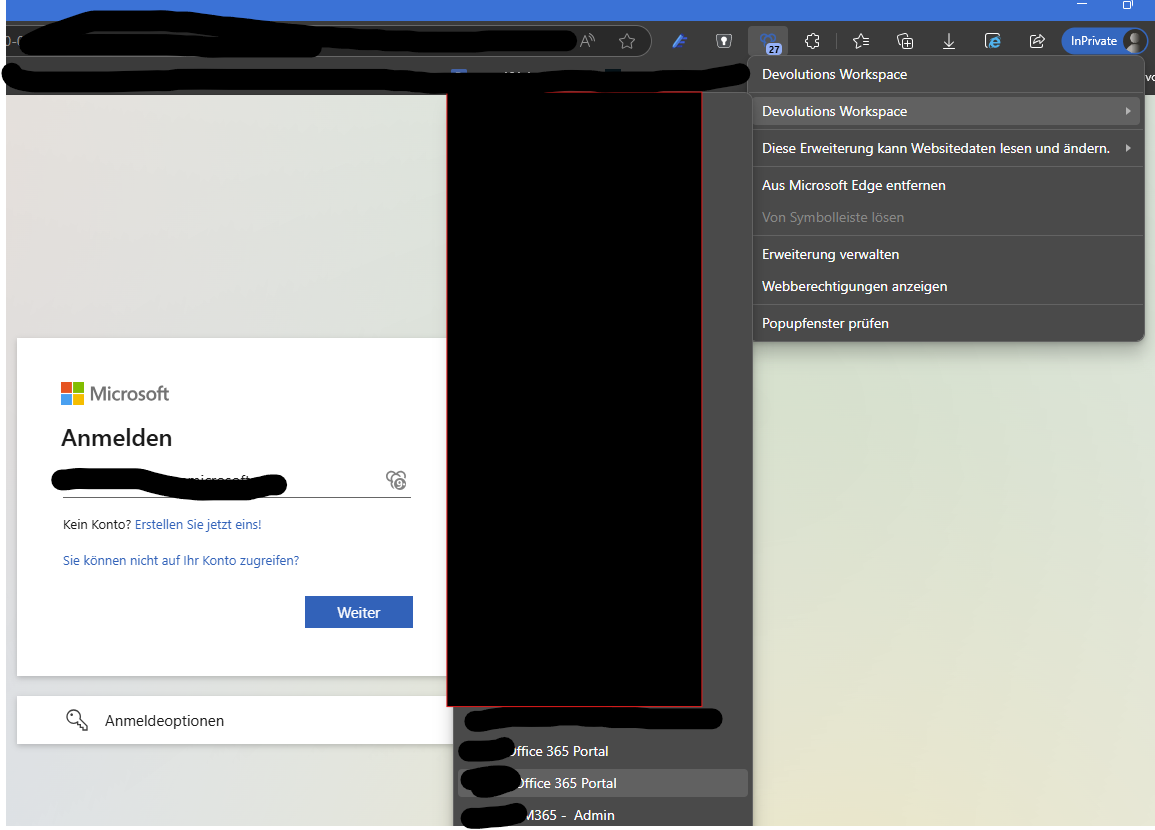
wir nutzen weder Hub noch Devolutions Server:
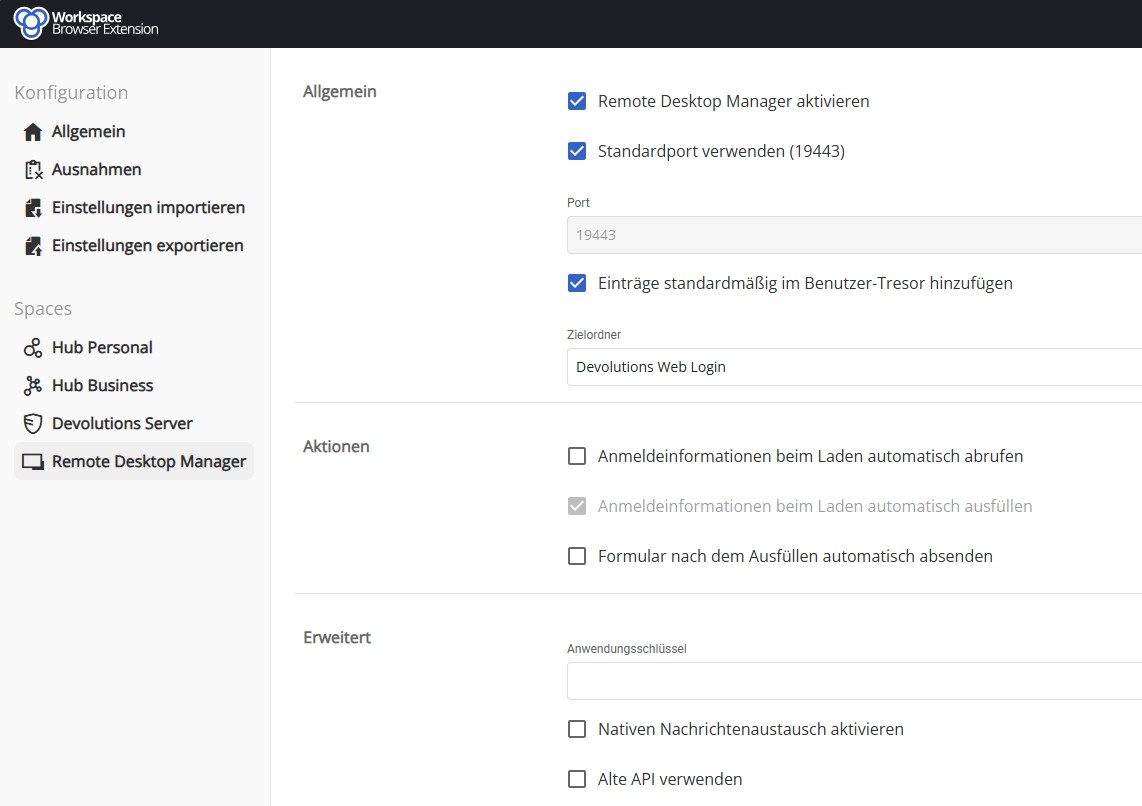
Bei anderen Kollegen funktioniert es problemlos. Woran kann das liegen?
RDM Version Control Issues
Hello, I can confirm this error.
We are Using MS-SQL as Datasource. As far as I can remember, somewhere in v 2022 this Problem acured the first time: It doesn' t matter which version we are on, 1 or 2 times per month the versionmanagement resets itself to active with a maximum version below the current one. All users (custom / devolutions) are thrown out. We must reconnect with a Database user (SQL Server) and turn off or adjust the version Management again. Seems like a bug to me
Version Management Reverting
Hello, I can confirm this error.
We are Using MS-SQL as Datasource. As far as I can remember, somewhere in v 2022 this Problem acured the first time: It doesn' t matter which version we are on, 1 or 2 times per month the versionmanagement resets itself to active with a maximum version below the current one. All users (custom / devolutions) are thrown out. We have to reconnect with a Database user (SQL Server) and turn off or adjust the version Management again. Seems like a bug to me
Edge Browser Plugin findet RDM nicht
habt ihr ev. einen Proxy im Einsatz? Wenn ja, gibt es unter den Ausnahmen die Einträge localhost und 127.0.0.1?
Ich kann mich an ein ähnliches Phänomen aus der Vergangenheit erinnern - da hat die Proxy Ausnahme das Problem gelöst.
... Nein, bzw. der ist transparent auf der Firewall und nicht im MS-Edge eingetragen.
EDIT: Problem gelöst. Schuld war ein 3CX WebClient und die zugehörige Click2Call-Extension, die sich um localhost/127.0.0.1 mit der RDM-Extension gestritten haben. Von daher danke an 'Min' für den Denkanstoß in die richtige Richtung.
Edge Browser Plugin findet RDM nicht
Hallo,
welche RDM Version hast du in Verwendung?
LG,
Min
Die aktuelle '2022.2.21.0' x64
Edge Browser Plugin findet RDM nicht
Wäre es möglich, einen benutzerdefinierten Port sowohl in RDM als auch in DWL einzustellen und zu sehen, ob das Problem weiterhin besteht?
Der Wechsel auf andere Ports hilft nicht. Habe 19444 und 20444 getestet, mit und ohne ApplikationKey. Ich habe die BrowserExtension entfernt und neu hinzugefügt. Die Verbindungsanfrage ( Punkt 3 in Secure Devolutions Web Login (remotedesktopmanager.com)) erscheint im RDM nicht.
Netstat -ano zeigt einen aktiven listener auf TCP 127.0.0.1:19443 - Dahinter steckt mit ProzessID die ntoskrnl.exe (Originalname: ntkrnlmp.exe) welche im Taskmanager als 'System' angezeigt wird.
Es scheint aber am MS-Edge (Version 105.0.1343.33 (Offizielles Build) (64-Bit)) bzw. der Extension (Version: 2022.2.6.2) zu liegen: In Brave und Firefox funktionieren die Standard-Einstellungen ohne Probleme.
Edge Browser Plugin findet RDM nicht
Seit einiger Zeit funktioniert das Devolutions Web Login Plugin im S Edge nicht mehr: 'Beim Senden der Anfrage ist ein Fehler aufgetreten. Bitte überprüfen Sie, ob RDM ausgeführt wird'
RDM läuft; Port ist standard
Hat jemand ne Idee?
User Specific Settings for ReadOnly Users on MSSQL-DB
We are using 14.1.0.0 and it is as you said: Read-Only Users are able to configure a "User Specific Settings" on single entries but can NOT use "Batch Edit" feature.
I was just not sure, whether the "Batch Edit" is tied to the "Edit Permission" or something else.
We can live with this restriction.
Thanks!
User Specific Settings for ReadOnly Users on MSSQL-DB
Hello,
I have a few Read-Only-Users in our MSSQL-Datasource. Is it possible, that they can use 'User Specific Settings' and maybe 'batch edit' to set User-Specific Settings without granting them write-permissions to the data-source? Which settings are required for this?
HowTo use Credentials with OTP from private Vault within a Entry of the public Database?
Nice - looking forward to it ! ;)
Please Note required Database Updates in the changelog!
Please ALWAYS highlight a required Database-Update in the changelog and update-info-window! Today almost the whole team upgraded from 14.0.6 to 14.1 and was NOT able work cause the DB needs an update. Since the DB-admin is not 24/7 available we all had to downgrade manually to be able to access our Remote-connections.
:(
HowTo use Credentials with OTP from private Vault within a Entry of the public Database?
yes - exactly!
HowTo use Credentials with OTP from private Vault within a Entry of the public Database?
Hi,
I did some more testing on the scenario.
We can store individual Logins (username and password) in the 'personal credentials' (File -> my account preferences) and I can use them in public datasource entries via 'my personal creds'.
We can also also store individual Logins (username and password) in the 'private vault' (and set it to 'global available') and I can use them in public datasource entries via 'private vault search'.
The entry-type 'Web-Browser (http/https)' also has an option 'OTP Preferences' where I can select the source 'repository creds'. Here I am missing the option to choose an entry from a folder on connect like it is possible to choose from a 'password list' !
If we had a credential-type 'OTP list' like 'password list' my problem would be solved.
My wish is: User connects to the 'web-browser' entry and is asked for a username, password and OTP (which is different for each database user). The user picks the apropriate creds from either 'personal credentials' or 'private vault' pop-up and all three web-form fields are automatically filled.
Since 2 factor authentication is forced on more and more services it becomes a pain to find the correct token on the authenticator-app on the smartphone.
I was not successful using the "Custom Fields" :(
HowTo use Credentials with OTP from private Vault within a Entry of the public Database?
Yes the OTP - token is a 6-digit number which is generated every 30 seconds out of a security-key. In RDM you can set up a 'credential'-entry of the type 'OTP' where you just insert the base security-key. Just like every 2-Factor-Authentication where you scan the original security-key with your OTP-Generator like Google-Authenticator.
The Url is a non-public WebUI-admin interface of a 'securepoint UTM' with the Login-Form-Fields 'user', 'password' and 'OTP'.
In the http/https-entry-settings I can provide 1 credential-entry to be used for auto-filling. But the major question for me is: How can I get username, password and OTP into one 'credential entry' ?
** yes 2FA with OTP is not meant to be stored aside with username and password but that is another question. **
HowTo use Credentials with OTP from private Vault within a Entry of the public Database?
I want to add https-entries to our MS-SQL-Datasource. The entry itself is available for all RDM-users. Each user has it's own credentials and OTP for the https-site. I can remember a tutorial where each user added his personal creds to his private vault and has to use 'userspecific Settings' to force the use of his personal creds from private vault for the specific entry on the public datasource. This works fine for RDP-Connections.
Is it possible to combine this with OTP?
Usecase: a webportal with login-form where username, password and OTP is requested.
I could not manage to autofill all these 3 fields from credentials of my private vault.
Is this possible at all and how do I do this?
Fehlermeldung beim offline-Start des Remote Desktop Manager
It seems to be a problem with the machine itself. Tried several RDM-Versions. All report a successful Database-Connection but do not show any entry. No matter if I connect as user or admin. Will check this 1st.
Fehlermeldung beim offline-Start des Remote Desktop Manager
The 13.5.11.0. beta won' t even show any entries in Online mode :(
The Datasource-connection to MS-SQL only works with administrative SQL login for standard users (userdefined login(Devolutions))
The Datasource login for standard users with user-SQL-Login fails at all:
System.Data.SqlClient.SqlException (0x80131904): Die INSERT-Berechtigung wurde für das UserSecurity-Objekt, rdpmanager-Datenbank, dbo-Schema, verweigert.
bei System.Data.SqlClient.SqlConnection.OnError(SqlException exception, Boolean breakConnection, Action`1 wrapCloseInAction)
bei System.Data.SqlClient.TdsParser.ThrowExceptionAndWarning(TdsParserStateObject stateObj, Boolean callerHasConnectionLock, Boolean asyncClose)
bei System.Data.SqlClient.TdsParser.TryRun(RunBehavior runBehavior, SqlCommand cmdHandler, SqlDataReader dataStream, BulkCopySimpleResultSet bulkCopyHandler, TdsParserStateObject stateObj, Boolean& dataReady)
bei System.Data.SqlClient.SqlCommand.FinishExecuteReader(SqlDataReader ds, RunBehavior runBehavior, String resetOptionsString, Boolean isInternal, Boolean forDescribeParameterEncryption)
bei System.Data.SqlClient.SqlCommand.RunExecuteReaderTds(CommandBehavior cmdBehavior, RunBehavior runBehavior, Boolean returnStream, Boolean async, Int32 timeout, Task& task, Boolean asyncWrite, Boolean inRetry, SqlDataReader ds, Boolean describeParameterEncryptionRequest)
bei System.Data.SqlClient.SqlCommand.RunExecuteReader(CommandBehavior cmdBehavior, RunBehavior runBehavior, Boolean returnStream, String method, TaskCompletionSource`1 completion, Int32 timeout, Task& task, Boolean& usedCache, Boolean asyncWrite, Boolean inRetry)
bei System.Data.SqlClient.SqlCommand.InternalExecuteNonQuery(TaskCompletionSource`1 completion, String methodName, Boolean sendToPipe, Int32 timeout, Boolean& usedCache, Boolean asyncWrite, Boolean inRetry)
bei System.Data.SqlClient.SqlCommand.ExecuteNonQuery()
bei Devolutions.RemoteDesktopManager.Business.DataSources.DatabaseConnectionDataSource.ExecuteNonQuery(String sql, IDbTransaction dbTransaction, IDbDataParameter[] parameters, Int32 commandTimeout)
bei Devolutions.RemoteDesktopManager.Business.DataSources.DatabaseSecuritySubDataSource.InsertUserSecurity(UserEntity user, IDbTransaction dbTransaction)
bei Devolutions.RemoteDesktopManager.Business.DataSources.SQLServerSecuritySubDataSource.c420570cc362838b38ecc18ba825950e5(UserEntity cf98b881282579a38f0d3820b4755fa4a, Boolean cd589fb599494638c495afc5cf9b2449e, String ceb81d1ee93f91e0bc57f34876c263863, SaveUserInfoAdvancedCustomData ca846991ced5070300e1c8ec384f436f9, Guid[] cf090f8a8f0907c3009c224a9172cab64)
ClientConnectionId:61bb8a03-9cf7-46de-b38b-216769797f81
Fehlernummer (Error Number):229,Status (State):5,Klasse (Class):14
Fehlermeldung beim offline-Start des Remote Desktop Manager
hmmm...
Für mich funktioniert es soweit (Administrator). Mein Kollegen (nicht-Administratoren) sehen im Offline-Modus jedoch nur den Orderstamm ohne irgendwelche Einträge. In der Benutzerverwaltung ist auch Lese-/Schreibzugriff im Offline Modus aktiviert.
Woran könnte das liegen?
Fehlermeldung beim offline-Start des Remote Desktop Manager
Welche RDM Version hast Du im Einsatz?
Enterprise 13.5.8.0 x64
Welcher Offline Modus ist unter Administration => Datenquelleneinstellungen => Offline konfiguriert?
Read/Write mit 21 Tagen Ablauf
Welche Option ist unter Datei => Optionen => Allgemein ==> Anwendung starten => Online Status beim Start
Bei "Standard" tritt der Fehler auf; Mein aktueller Workaround ist "Automatisch offline gehen"
und zuletzte bei der Datenquelle selbst in der zweiten Registerkarte Einstellungen => unter Online Testmethode ?
Bingo: "keine" ist vermutlich die falsche Option. Ich teste mal mit "Ping" und aktives "Automatisch Offline gehen"
Was bewirkt "Sperre deaktivieren" ?
Fehlermeldung beim offline-Start des Remote Desktop Manager
Wenn ich den RDM ohne eine Verbindung zur MS-SQL Datenbank starte, erhalte ich regelmäßig die Fehlermeldung:
Timeout abgelaufen. Das Zeitlimit ist vor dem Anfordern einer Verbindung aus dem Pool abgelaufen. Möglicherweise werden alle Verbindungen im Pool bereits verwendet, und die maximale Poolgröße wurde erreicht.
Der RDM friert dann ein, lässt sich nur noch per Taskmanager beenden und ist nicht mehr nutzbar bis wieder eine Datenbankverbindung besteht.
Woran liegt das? Gibt es ein best-practice zur Offline-Konfiguration mit MS-SQL-Datenquellen?
Permissions to view Logs
That' s it! thx!
Permissions to view Logs
Hi,
where can I set the permissions for all users/groups to "view the logs". We are using MS-SQL Datasource. I as administrator can view all the logs. I want my users be able to see them too.
Session Check-Out without Comment
Global has a higher priority for us. Per session with the possibility of inheritage would also be nice. I am thinking of scenarios where a customer insists of a report of all accessed sessions while other customers don' t.
Thx for the reply. For the moment we will have to get along with the 'unuseful' extra-click :)
Session Check-Out without Comment
Yes - that is exactly what I want: Hide the checkout dialog prompt and start the session immediately (if it is not already checked out).
Session Check-Out without Comment
Hey there,
is it possible to disable the Comment-Box on Check-out of a session? We would like to keep the checkout-mode aktive to inform other users that a session is already in use but want to get rid of the Comment-Box.
I didn' t find anything in the manual.