
mhrubes
session recording
Is it technically possible to add a condition to record only when a person is active in the given session? Would it be possible to add meta information to records in the future so that the record can be searched?
LDAP filter AD synchronizer
Hello,
it´s included in my post.
LDAP filter AD synchronizer
Hello,
can you advise me how I should modify the LDAP filter so that in RDM it automatically deletes servers deleted at the AD level during synchronization? I am now using the following LDAP filter:
(!userAccountControl:1.2.840.113556.1.4.803:=2)
(&(objectClass=Computer)(operatingSystem=*server*)(!(userAccountControl:1.2.840.113556.1.4.803:=2)))
I have the following set up on the Advanced AD sync tab. Servers deleted at the AD level are not deleted after synchronization at the RDM level.
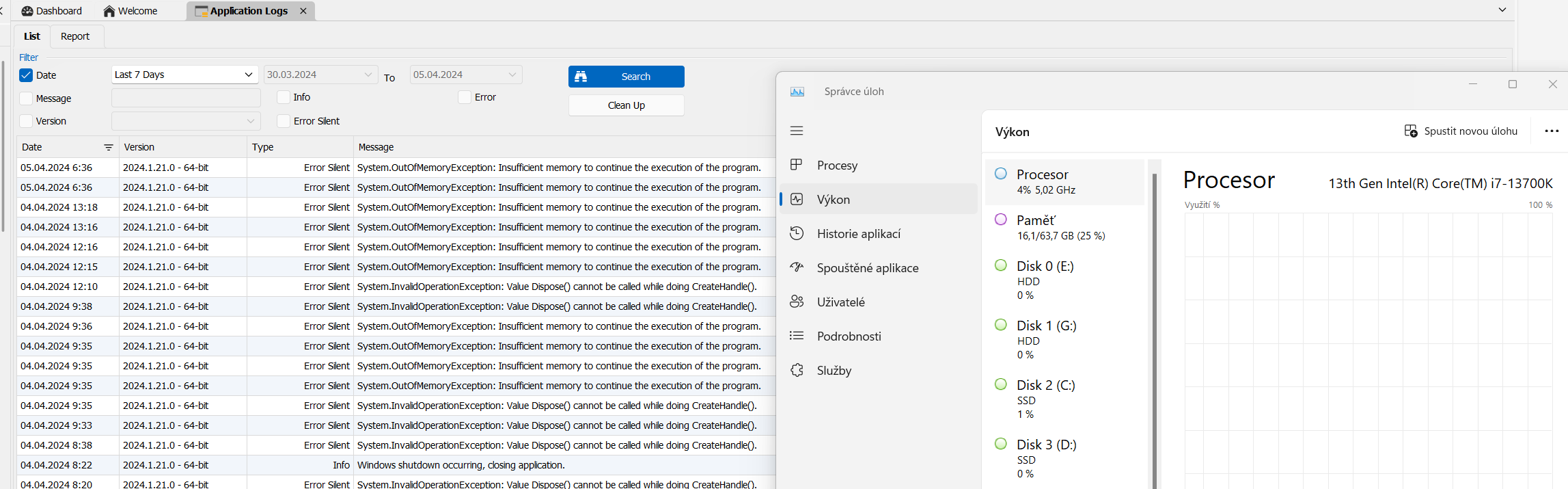
RDM 2024.1.21.0 64bit Insufficient memory to continue the execution of the program.
Hello,
Thank you for reporting this issue, we have noted that a number of our customers are encountering a similar issue when the secure desktop feature is activated.
Could you please confirm if this feature is currently enabled on your end?
Regards,
Mathieu Morrissette
Hello,
I disabled secure desktop in the settings and now everything is working.
Regards,
Martin
RDM 2024.1.21.0 64bit Insufficient memory to continue the execution of the program.
Hello,
I send the generated logs.
RDM 2024.1.21.0 64bit Insufficient memory to continue the execution of the program.
Hello,
winver command: Microsoft Windows version 23H2 (OS build 22631.3296).
Your command: FileVersion : 10.0.22621.2506 (WinBuild.160101.0800)
ProductVersion : 10.0.22621.2506
RDM 2024.1.21.0 64bit Insufficient memory to continue the execution of the program.
I can't open any session. RDM generates an error Insufficient memory to continue the execution of the program. The RAM size of me Workstation is 64GB. 16 GB of RAM is used.
[04.04.2024 13:16:24 - 2024.1.21.0 - 64-bit] Error Silent: System.OutOfMemoryException: Insufficient memory to continue the execution of the program.
at MSTSCLib.IMsRdpClient9.Connect()
at AxMSTSCLib.AxMsRdpClient9NotSafeForScripting.Connect()
at Devolutions.RemoteDesktopManager.Frames.Embedded.FreEmbeddedRDP.Connect()
[04.04.2024 13:18:16 - 2024.1.21.0 - 64-bit] Error Silent: System.OutOfMemoryException: Insufficient memory to continue the execution of the program.
at MSTSCLib.IMsRdpClient9.Connect()
at AxMSTSCLib.AxMsRdpClient9NotSafeForScripting.Connect()
at Devolutions.RemoteDesktopManager.Frames.Embedded.FreEmbeddedRDP.Connect()
[05.04.2024 6:36:00 - 2024.1.21.0 - 64-bit] Error Silent: System.OutOfMemoryException: Insufficient memory to continue the execution of the program.
at MSTSCLib.IMsRdpClient9.Connect()
at AxMSTSCLib.AxMsRdpClient9NotSafeForScripting.Connect()
at Devolutions.RemoteDesktopManager.Frames.Embedded.FreEmbeddedRDP.Connect()
[05.04.2024 6:36:09 - 2024.1.21.0 - 64-bit] Error Silent: System.OutOfMemoryException: Insufficient memory to continue the execution of the program.
at MSTSCLib.IMsRdpClient9.Connect()
at AxMSTSCLib.AxMsRdpClient9NotSafeForScripting.Connect()
at Devolutions.RemoteDesktopManager.Frames.Embedded.FreEmbeddedRDP.Connect()
[05.04.2024 6:49:58 - 2024.1.21.0 - 64-bit] Info: Windows shutdown occurring, closing application.
[05.04.2024 6:52:11 - 2024.1.21.0 - 64-bit] Error Silent: System.OutOfMemoryException: Insufficient memory to continue the execution of the program.
at MSTSCLib.IMsRdpClient9.Connect()
at AxMSTSCLib.AxMsRdpClient9NotSafeForScripting.Connect()
at Devolutions.RemoteDesktopManager.Frames.Embedded.FreEmbeddedRDP.Connect()
[05.04.2024 7:19:03 - 2024.1.21.0 - 64-bit] Error Silent: System.OutOfMemoryException: Insufficient memory to continue the execution of the program.
at MSTSCLib.IMsRdpClient9.Connect()
at AxMSTSCLib.AxMsRdpClient9NotSafeForScripting.Connect()
at Devolutions.RemoteDesktopManager.Frames.Embedded.FreEmbeddedRDP.Connect()
Devolutions Password Manager version 2022.2.6
Okay. Here is recorded screen from my telephone. I tried stopping and restarting the app manually, but the result was the same.
Devolutions Password Manager version 2022.2.6
Okay. I also had the problem of not being able to unlock the app on my phone after the update to this version. I had to uninstall and reinstall it.
Devolutions Password Manager version 2022.2.6
Hi,
after update to this version I can´t add new entries by QR code.
Authenticator push notification
Hello,
I use Authenticator application for 2FA for my Devolution Account. I have push notifications set up. How do I set up each push notification to be approved by entering the app login PIN?
Best regards,
Martin
YubiKey support
Hello,
can you add support for the secondary Yubikey key in case the primary key is destroyed? Without the backup key support option, Yubikey support doesn't make sense to me.
Regards,
Martin
RDM freezing
Hello,
I tried to generate a dump, but the application generates the following.

RDM freezing
The last few versions I'm seeing a freeze RDM application. I need to dirty shutdown the application and run it again. I am now on RDM version 2020.3.26.0 Ent. I have Win 10 20H2 including all patches.
AD sync /LDAP over SSL TCP ports
Is it possible to force the use of LDAP over SSL in AD synchronization in RDM? If I set up the synchronizer and enable the use LDAP over SSL option on the General tab and I have the incoming TCP port 636 enabled on the inbound firewall on the Domain Controller, then the synchronization does not work. It will only work when I enable TCP port 389 on the ibound interface on the Domain Controller firewall.
Best regards,
Martin
Devolution Authentificator.
Can You add option for numeric pass code and not only biometrics for locking application?
Thanx
Martin
Problem with session recording
Hello,
I have one qeustion about session recording. Is it possible to change the default values for session recording ? I mean bitrate.
problem to sync OU infrastructure from AD
Hello,
I have problem with AD sync. I have created a folder (organization name) in RDM and two sub folders (domain names). In each domain I have set up synchronization with AD for DC and Domain Servers. Computers objects sync with AD, but I can't sync sub OUs from AD. Everything is synchronized to the root directory created in RDM, even if Create folders from OU / containers is checked in the \ Settings connector and the appropriate level is set.
Best regads,
Martin
start virtual console from iDRAC
Hello,
we can cooperate to solve this issue. I have no problem with remote session to me.
Best regards,
Martin
start virtual console from iDRAC
Hello,
any news? The selection: enable web browser extentsion link doesn´t solve my problem with opening my VC in HTML5 mode.
Best regards,
Martin
Problem with session recording
Hello,
thanks for your answer. I use for Fileneme : Entry Name + Date/Time. Entry Name + Date is OK but the time is not correct with PC from which I record sessions :(. I want the same time in video filename.
Best Regards,
Martin
Problem with session recording
Hello,
I think it will be a problem on my site. Where can I change the default format for session recording for all sessions? Does session recording support autopause function? To record only when I'm active in a session?
I tried session recording on another PC with a clean installation of RDM and it was working there. Is it possible to reset the global settings for session recording for all sessions?
Best regards,
Martin
Problem with session recording
Hello,
I am using RDM Ent. 2019.2.24.0 64-bit. I want to record RDP sessions or web session (only the window with active sesion) not the whole applicaiton windows.
Best regards,
Martin
Problem with session recording
Hello,
I have a problem with session recording. If I give a recording from the Ribon Help card, then the whole application window is recorded.
If I give Properties a particular session \ Session Recording and choose Mode: Optinonal, RDM will ask me if I want to record when I start the session. Select YES. I quit the session and log out. The directory with saved video opens, but the video is just a black screen.
Best regards,
Martin
additional icons for folder
Hello,
I sent You private message.
Best regads,
Martin