RDM 2024.1.21.0 64bit Insufficient memory to continue the execution of the program.
RDM 2024.1.21.0 64bit Insufficient memory to continue the execution of the program.

I can't open any session. RDM generates an error Insufficient memory to continue the execution of the program. The RAM size of me Workstation is 64GB. 16 GB of RAM is used.
[04.04.2024 13:16:24 - 2024.1.21.0 - 64-bit] Error Silent: System.OutOfMemoryException: Insufficient memory to continue the execution of the program.
at MSTSCLib.IMsRdpClient9.Connect()
at AxMSTSCLib.AxMsRdpClient9NotSafeForScripting.Connect()
at Devolutions.RemoteDesktopManager.Frames.Embedded.FreEmbeddedRDP.Connect()
[04.04.2024 13:18:16 - 2024.1.21.0 - 64-bit] Error Silent: System.OutOfMemoryException: Insufficient memory to continue the execution of the program.
at MSTSCLib.IMsRdpClient9.Connect()
at AxMSTSCLib.AxMsRdpClient9NotSafeForScripting.Connect()
at Devolutions.RemoteDesktopManager.Frames.Embedded.FreEmbeddedRDP.Connect()
[05.04.2024 6:36:00 - 2024.1.21.0 - 64-bit] Error Silent: System.OutOfMemoryException: Insufficient memory to continue the execution of the program.
at MSTSCLib.IMsRdpClient9.Connect()
at AxMSTSCLib.AxMsRdpClient9NotSafeForScripting.Connect()
at Devolutions.RemoteDesktopManager.Frames.Embedded.FreEmbeddedRDP.Connect()
[05.04.2024 6:36:09 - 2024.1.21.0 - 64-bit] Error Silent: System.OutOfMemoryException: Insufficient memory to continue the execution of the program.
at MSTSCLib.IMsRdpClient9.Connect()
at AxMSTSCLib.AxMsRdpClient9NotSafeForScripting.Connect()
at Devolutions.RemoteDesktopManager.Frames.Embedded.FreEmbeddedRDP.Connect()
[05.04.2024 6:49:58 - 2024.1.21.0 - 64-bit] Info: Windows shutdown occurring, closing application.
[05.04.2024 6:52:11 - 2024.1.21.0 - 64-bit] Error Silent: System.OutOfMemoryException: Insufficient memory to continue the execution of the program.
at MSTSCLib.IMsRdpClient9.Connect()
at AxMSTSCLib.AxMsRdpClient9NotSafeForScripting.Connect()
at Devolutions.RemoteDesktopManager.Frames.Embedded.FreEmbeddedRDP.Connect()
[05.04.2024 7:19:03 - 2024.1.21.0 - 64-bit] Error Silent: System.OutOfMemoryException: Insufficient memory to continue the execution of the program.
at MSTSCLib.IMsRdpClient9.Connect()
at AxMSTSCLib.AxMsRdpClient9NotSafeForScripting.Connect()
at Devolutions.RemoteDesktopManager.Frames.Embedded.FreEmbeddedRDP.Connect()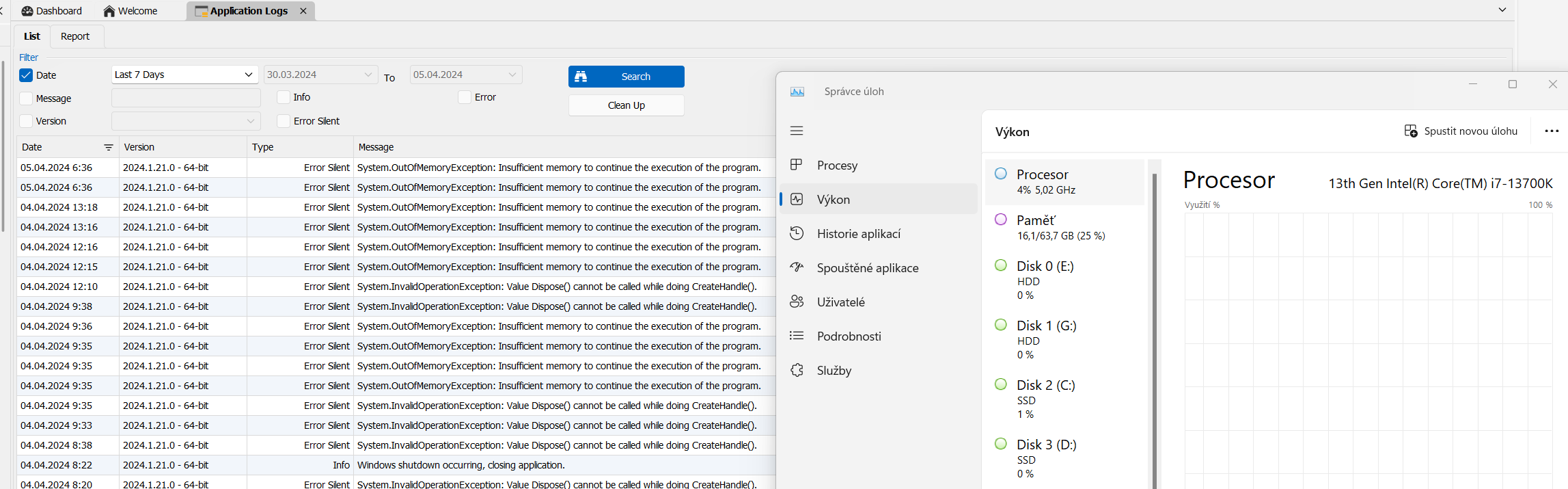
2024-04-05_06-37-26.png
All Comments (7)
Hello,
Thank you for reporting this issue, we have noted that a number of our customers are encountering a similar issue when the secure desktop feature is activated.
Could you please confirm if this feature is currently enabled on your end?
Regards,
Mathieu Morrissette
Mathieu Morrissette
Hi,
The error reported most likely doesn't have to do with a true out of memory exception, but would be an internal error related to resource allocation in the Microsoft RDP ActiveX.
Can you send me your Windows OS version and build number (winver command) and also the version of mstsc.exe on your system:
(Get-Item "C:\Windows\System32\mstsc.exe").VersionInfo
Next, try disabling RDP API hooking in RDM to see if the problem goes away:
https://docs.devolutions.net/kb/remote-desktop-manager/troubleshooting-articles/rdp-session-troubleshooting/#disable-rdp-api-hooking
Best regards,
Marc-André Moreau
Hello,
winver command: Microsoft Windows version 23H2 (OS build 22631.3296).
Your command: FileVersion : 10.0.22621.2506 (WinBuild.160101.0800)
ProductVersion : 10.0.22621.2506
Hello,
I send the generated logs.
MsRdpEx_RDM.log
Hello,
Thank you for reporting this issue, we have noted that a number of our customers are encountering a similar issue when the secure desktop feature is activated.
Could you please confirm if this feature is currently enabled on your end?
Regards,
Mathieu Morrissette
Hello,
I disabled secure desktop in the settings and now everything is working.
Regards,
Martin
Hello,
Just to let you know that we have a fix internally for this issue.
We had to do major changes to the secure desktop feature and are awaiting QA testing.
I can't provide the exact version when this fix will be included but I'll keep you updated.
Regards,
Mathieu Morrissette
Mathieu Morrissette
Hello,
The fix is available in RDM 2024.1.25.0 release.
Best regards
Mathieu Morrissette