start virtual console from iDRAC

Hello,
I want to use RDM to connect to iDRAC and than to VC. If the Plug-In type is set to JAVA, then I can start the Virtual Console. If the plug-in type is set to HTML5, an alert is generated, see screnshot and Virtual Console will not start. For security reasons I prefer to use HTML5 Plu-in type. Is this possible?
Best regards,
Martin
iDRAC_Plug-in Typ Java.PNG
iDRAC_Plug-in Typ HTML5_2.PNG
iDRAC_Plug-in Typ HTML5_1.PNG
All Comments (32)
Hello,
We will take a look but I can't be sure it's possible due to the limitations of embedded web browsers.
Regards,
Hubert Mireault
Also an additional question, what version is your iDRAC server?
Regards,
Hubert Mireault
Hello,
I don't know exactly what you mean by iDRAC version. But the iDRAC firmware version is 4.00.00.00. I have one more question about configuring the iDRAC session. What exactly does the Enable web browser link in the General settings menu mean?
Best regards,
Martin
Hello Hubert,
I ´ve looked at my server and have additional info about my iDRAC:
Best regards,
Martin
Hello Martin,
Thanks for the information, this is exactly what I needed. I know it wasn't possible to support the console in older iDRAC versions, so maybe they've changed it in this one. We'll try and see what we can do, but I can't guarantee we will find a solution.
As for "enable web browser extension link", it allows Devolutions Web login (our web browser extension) to use this entry to autofill credentials on your browser. This could be a way to use the iDRAC entry with a working console, while still storing your credentials within RDM.
Regards,
Hubert Mireault
Hello,
any news? The selection: enable web browser extentsion link doesn´t solve my problem with opening my VC in HTML5 mode.
Best regards,
Martin
Hello,
We are still investigating at the moment. We can't access an iDRAC9 setup since we don't have the hardware, but we will try things out with iDRAC8.
For "enable web browser extension link", this is for external web browsers using Devolutions Web Login extension, not embedded within RDM. I suggested it as an alternative to be able to use the console, since it works in external browsers, and it would allow you to store your credentials within RDM.
Regards,
Hubert Mireault
Hello,
we can cooperate to solve this issue. I have no problem with remote session to me.
Best regards,
Martin
Hello,
Unfortunately a remote session wouldn't help us figure out the implementation, as we would need to debug in our environment to see what's going on. Regardless, I appreciate the offer and I'll let you know if we make progress with the implementation. For now, using the console externally is our workaround.
Regards,
Hubert Mireault
Hello,
I've been doing further tests on iDRAC8 and I have a question for you.
Can you try connecting to your iDRAC through an embedded Web Browser entry, set in Google Chrome mode, and then trying to open the HTML5 console? Does it work when used this way?
I realised that our browser seems to be able to work with the HTML5 console but only if multiple tabs are allowed to be opened. Otherwise, it seems to fail, and I'm not sure why. If through the Web Browser entry works for you, you'd have a good workaround for the moment, and we'd have an idea on how to fix it on the iDRAC entry itself.
Regards,
Hubert Mireault
Hi Hubert,
I am having the similar issues with iDRAC8 (firmware version 2.70.70.70) and trying to open HTML5 console. When I click launch console I see the console buttons at the top, but nothing loads (the screen just stays grey). This does use the same tab as the iDRAC.
I did test a regular web browser type session with Chrome and the HTML5 console runs perfectly in its separate tab.
Hello,
Thank you for the information, this is what happens for us on our iDRAC8 setup as well. The solution we've come up with should work with both iDRAC8 and iDRAC9 (and hopefully other versions of iDRAC). At the moment, we can't give you an estimate on when we'll be able to work on this, so unfortunately the workaround is to use a Chrome entry.
Regards,
Hubert Mireault
Hi,
same here... we have about 400 DELL Servers (all iDRAC 9 Enterprise) and would be really nice if we could have the iDRAC Console directly open within RDM.
Any news on that whould be more than welcome.
Br,
Kasi
@Kasi
Just to be sure, can you confirm the workaround of using a Chrome entry works for you?
We're currently working on modifying the iDRAC entry to support multiple tabs just like the Chrome entry, which should fix the problem. We'll let you know once we have something working.
Regards,
Hubert Mireault
Hi Hubert,
i have more Problems on that topic.
1. webinterface of the iDRAC is partly working... iDRAC DNS name will be load and the credentials will transmitted, but sadly the "click" on Login dosen´t work... My workaround is a Marko which hit the "Enter" key after a a waiting time of 2 sec.
2. the HTML5 Console does not have full functionality and we need to use the Java one... that one is downloading a viewer.jnlp and this one i have no idea how to transmit credentials.
I saw an Thread inside this Forum but its 8+ years old...
Br,
Kasi
ahhh...
btw: connections to an CMC (and old iDRAC8) are not even getting the credentials transmitted.
;)
Hello,
Regarding using the Java console versus the HTML5 console, the only way RDM could send the credentials to the Java console would be through using macros.
For the issues with the automatic login, would it be possible for you to provide us the HTML of the page(s)? RDM needs the IDs for the Form/Username box/Password box/Submit button to be able to successfully login. Without these, it wouldn't be possible for us to fix the auto login.
Regards,
Hubert Mireault
HTML for an iDRAC9:
<!DOCTYPE html>
<html ng-app='loginapp' ng-controller="loginController" ng-init="onInit(0)">
<head>
<title ng-bind="settings.title"></title>
<link rel="icon" href="images/favicon.ico">
<meta http-equiv="CACHE-CONTROL" content="NO-CACHE">
<meta charset="utf-8">
<meta http-equiv="X-UA-Compatible" content="IE=edge,chrome=1" />
<meta name="viewport" content="width=device-width, initial-scale=1, user-scalable=no" />
<meta name="apple-mobile-web-app-capable" content="yes" />
<meta name="mobile-web-app-capable" content="yes" />
<link rel="stylesheet" href="css/bootstrap/bootstrap.css">
<link rel="stylesheet" href="css/custom.css">
<link rel="stylesheet" href="css/personality.css">
<link rel="stylesheet" href="images/clarityicons/style.css">
</head>
<body>
<!-- Spinner -->
<!-- <div ng-show="pendReqCount > 0" style="left: 48%;top: 48%;position: absolute;z-index: 1;">
<i ng-if="!settings.show" class="cui-spinner cui-spinner-color-black" style="height: 60px; width: 60px;"></i>
<i ng-if="settings.show" class="cui-spinner cui-spinner-color-white" style="height: 60px; width: 60px;"></i>
</div> -->
<div ng-show="pendReqCount > 0" style="position: fixed;width: 100%;height: 100%;background: rgba(0,0,0,0.5);z-index: 9000;">
<div style="left: 48%;top: 48%;position: absolute;z-index: 1;">
<i class="cui-spinner cui-spinner-color-white" style="height: 60px; width: 60px;"></i>
</div>
</div>
<div ng-show="settings.show">
<idrac-start-screen config="settings" on-button-click="onBtnAction(action)" on-text-change="onChange(map)">
</idrac-start-screen>
</div>
<div id="activeX" style="width:0;height:0;display:none;"></div>
<script src='js/angular/angular.min.js' type="text/javascript"></script>
<script src='js/angular/angular-translate.min.js' type="text/javascript"></script>
<script src='js/angular/angular-translate-loader-static-files.min.js' type="text/javascript"></script>
<script src='js/lib/xml2json.min.js' type="text/javascript"></script>
<!-- Application scripts -->
<script src="js/common/constants.js" type="text/javascript"></script>
<script src="js/common/validator.js" type="text/javascript"></script>
<script src='js/services/resturi.js' type="text/javascript"></script>
<script src='js/bootstrap/ui-bootstrap-tpls-0.13.3.min.js' type="text/javascript"></script>
<script src='js/loginapp.js' type="text/javascript"></script>
<script src='js/controllers/logincontroller.js' type="text/javascript"></script>
</body>
</html>
HTML for an CMC:
<?xml version="1.0"?>
<!DOCTYPE html PUBLIC "-//W3C//DTD XHTML 1.0 Transitional//EN" "http://www.w3.org/TR/html4/strict.dtd">
<html xmlns="http://www.w3.org/1999/xhtml" xmlns:fo="http://www.w3.org/1999/XSL/Format">
<head>
<meta http-equiv="content-type" content="text/html; charset=UTF-8" />
<meta http-equiv="Content-Script-Type" content="text/javascript" />
<meta http-equiv="content-Style-Type" content="text/css" />
<title>DE02-BC01mgt:
Anmeldung</title>
<link href="/cmc/css/loginmaster.css?0332" rel="stylesheet" type="text/css" />
<link xmlns="" href="/cmc/css/dell/custom.css?0332" rel="stylesheet" type="text/css" />
<link xmlns="" rel="SHORTCUT ICON" href="/cmc/images/dell/Clarity_application_icon.ico" />
<script type="text/javascript" src="/cmc/js/Clarity.js?0332"></script>
<script type="text/javascript" src="/cmc/js/prototype.js?0332"></script>
<script type="text/javascript" src="/cmc/js/validate.js?0332"></script>
<script type="text/javascript" src="/cmc/js/cookie.js?0332"></script>
<script type="text/javascript" src="/cmc/js/dell.js?0332"></script>
<script type="text/javascript" src="/cmc/js/oem.js?0332"></script>
<script type="text/javascript" src="/cmc/js/context_help.js?0332"></script>
<script type="text/javascript">
var systemID = "0x0000"
var strDefault = "Standardeinstellung ("
var strMinutes = " Minuten )"
var strMaxSessions = "Verbindung verweigert, maximale Sitzungen bereits im Einsatz."
var strInvalidLogin = "Anmeldeinformationen fehlerhaft, bitte versuchen Sie es noch einmal."
var errorCode = "0x0"
var langCode = "de"
var strLogging = "Überprüfung der Anmeldedaten"
var requestLang = "de-DE"
var strNotLicensed = "Benutzertyp nicht lizenziert."
var strUserIdDisable = "Anmeldeversuche werden vorübergehend für diesen Benutzernamen deaktiviert. Versuchen Sie es später."
var loggingIn = false;
var isCancel = false;
var ns=!(!document.layers);
if (top.frames.length !=0) { top.location.replace("/cgi-bin/webcgi/login"); }
Delete_Cookie("select_module", "", "");
Delete_Cookie("logout", "", "");
var login = {
loginFailed: null,
clicked: null,
showProgress: function (obj) {
if (!login.clicked)
{
login.clicked = true;
$('login_info').hide();
$('login_failed').hide();
$('login_submit').className = 'blackpage_button_emphasized_clicked';
//ie does not like animated gifs hidden so we have to create this the first time.
if ($('login_progress').innerHTML.blank())
{
var progressTemplate = new Template('<div class="login_progress"><div class="hr"></div><div class="login_progress_text">#{Text}</div><div class="hr"></div></div>');
var data = { Text: strLogging };
$('login_progress').innerHTML = progressTemplate.evaluate(data);
}
else
{
$('login_progress').show();
}
}
},
showFailed: function () {
$('login_info').hide();
$('login_buttons').hide();
$('login_failed').show();
$('login_failed_buttons').show();
login.loginFailed = 1;
login.clicked = false;
setTimeout(login.showTryAgain, 3000);
},
showTryAgain: function () {
$('login_failed').hide();
$('login_failed_buttons').hide();
$('login_info').show();
$('login_buttons').show();
$('login_submit').className = 'blackpage_button_emphasized';
login.clicked = false;
document.auth.user_id.focus();
login.setLanguage();
},
setLanguage: function () {
if ( requestLang.toLowerCase().match(/^de/) ||
requestLang.toLowerCase().match(/^es/) )
{
$('WEBSERVER_timeout_select').style.width = "230px"
}
}
}
function f_help()
{
var lang = langCode;
window.open("/cmc/cgi/help/" + lang + "/" + context_help("Login"), "help",
"height=500,width=600,scrollbars=yes,toolbar=no," +
"menubar=no,resizable=yes,location=no,directories=no,status=no");
}
function frmCancel()
{
if(login.clicked == false)
{
$('user_id').value = ""
$('password').value = ""
$('domain').selectedIndex = 0;
$('WEBSERVER_timeout_select').selectedIndex = 0;
return;
}
f_logout('login.xsl', null);
}
function f_about()
{
window.open("/cgi-bin/webcgi/about", "About",
"height=320,width=600,scrollbars=no,"+
"toolbar=no,menubar=no,resizable=yes,"+
"location=no,directories=no,status=no");
}
function f_support(oem, url)
{
oemDisplaySupport(oem, url);
}
function frmSubmit()
{
var user = $('user_id').value;
var sobj = $('domain');
var sIdx = sobj.selectedIndex;
var sDomain = sobj.options[sIdx].innerHTML;
$('user').value = user;
if (!user.match(/@/) && sIdx > 0)
{
$('user').value += "@"+sDomain;
}
Set_Cookie("custom_domain", selectText[2], 0, "", "" );
Set_Cookie("domain_selected", sDomain, 0, "","","");
login.showProgress(this);
if(loggingIn == true)
{
return;
}
else
{
document.auth.submit();
document.auth.user.disabled = true;
document.auth.password.disabled = true;
loggingIn = true;
}
}
function select(val)
{
if(val == 27)
{
frmCancel();
return( false );
}
if(val == 13)
{
frmSubmit();
return( false );
}
return( true );
}
function DropdownChanged()
{
$('WEBSERVER_timeout').value = $('WEBSERVER_timeout_select').value;
}
var selectText = null;
var selectValues = null;
var displayOptions = null;
var custom_domain = ""
function UpdateDomainList()
{
var sobj = $('domain');
var nList = sobj.options.length;
var adEmpty = displayOptions[1];
var cEmpty = displayOptions[2];
var nEntries = 3;
if (!adEmpty) { nEntries--; }
if (!cEmpty) { nEntries--; }
var diff = Math.abs(nList - nEntries);
if (nList > nEntries)
{
// Remove entries
for (var i = 0; i < diff; i++)
{
var idx = sobj.options.length-1;
sobj.remove(idx);
}
}
else if (nList < nEntries)
{
// Add entries
for (var i = 0; i < diff; i++)
{
var idx = sobj.options.length;
sobj.options[idx]= new Option("", idx);
}
}
// Populate the options
var idx = 1;
for (var i = 1; i < displayOptions.length; i++)
{
if (displayOptions)
{
sobj.options[idx].text = selectText;
sobj.options[idx].value = selectValues;
idx++;
}
}
}
function SetSelect(pos)
{
var sobj = $("domain");
for (var i = 0; i < sobj.length; i++)
{
if (sobj.options.value == pos)
{
sobj.options.selected="1"
break;
}
}
}
function OnKeyUp(obj)
{
if (obj.id != 'user_id') return true;
if (obj.value.match(/@/))
{
// User Typed a Domain.
var newDomainName=obj.value.replace(/^.*@(.*)$/, "$1");
selectText[2] = newDomainName;
displayOptions[2] = 1;
UpdateDomainList();
if (newDomainName != "") { SetSelect(2); }
}
if (selectText[2] == "")
{
selectText[2] = custom_domain;
displayOptions[2] = ( selectText[2] == null ||
selectText[2] == "" ) ? 0 : 1;
if (obj.slectedIndex == 2) { SetSelect(0); }
UpdateDomainList();
}
return true;
}
function InitDomainList()
{
if (selectText != null) { return; }
var sobj = $('domain');
// Fetch custom domain
custom_domain = Get_Cookie("custom_domain");
custom_domain = (custom_domain == null) ? "" : custom_domain;
var adDomain = sobj.options[1].text;
if (adDomain == custom_domain) { custom_domain = "" }
sobj.options[2].text = custom_domain;
selectText = new Array();
selectValues = new Array();
displayOptions = new Array();
for (var i = 0; i < sobj.options.length; i++)
{
selectText = sobj.options.text;
selectValues = sobj.options.value;
displayOptions = (selectText == "") ? 0 : 1;
}
UpdateDomainList();
// Select the previous domain.
var sDomain = Get_Cookie("domain_selected");
if (sDomain == null) { sDomain = "" }
for (var i = 0; i < sobj.options.length; i++)
{
if (sDomain == sobj.options.text)
{
sobj.selectedIndex = i;
break;
}
}
}
function init()
{
login.setLanguage();
// Pre-fetch the login spinner.
var img = new Image();
img.src='/cmc/images/login_progress.gif';
// Change default time from seconds to minutes.
var value = $('default_time').value / 60; // minutes.
$('default_time').innerHTML=strDefault+value.toFixed(0)+strMinutes;
InitDomainList();
if (errorCode != '0x0')
{
if (errorCode =='0x2002')
{
$('login_failed_message').innerHTML=strMaxSessions;
}
else if (errorCode =='0x202d')
{
$('login_failed_message').innerHTML= strUserIdDisable;
}
else
{
$('login_failed_message').innerHTML=strInvalidLogin;
}
login.showFailed();
$('login_frame').show();
}
else
{
$('login_frame').show();
login.showTryAgain();
}
}
</script>
</head>
<body onload="init()" onkeypress="return(f_keypress(event));">
<div id="login_frame" style="display: none;">
<div class="login">
<div class="login_header">
<img alt="Chassis Management Controller" src=" /cmc/images/dell/cmc_title.png" title="Chassis Management Controller" />
</div>
<div class="login_left">
<div class="login_right">
<div class="login_content">
<div id="login_info" style="display: block;">
<div class="hr"></div>
<div class="login_help">
<a href="#" onclick="f_help();" title="Hilfe">
<span class="login_help_icon"> </span>
</a>
</div>
<div class="login_title">
<div class="login_text" id="login_text">Anmeldung</div>
</div>
<div class="login_server_info"><span class="login_server_name">DE02-BC01mgt</span> |
<span class="login_server_type">PowerEdge M1000e</span></div>
<div class="login_instructional_text">Geben Sie den Benutzernamen und das Kennwort ein, und klicken Sie dann auf Senden.</div>
<div class="login_userinfo">
<form name="auth" action="/cgi-bin/webcgi/login" method="post" id="auth">
<input xmlns="" type="hidden" value="NOTSET" name="ST2" id="ST2" />
<input type="hidden" name="user" id="user" value="" />
<input type="hidden" name="WEBSERVER_timeout" id="WEBSERVER_timeout" value="1800" />
<table>
<tr>
<td class="left">
<span>Benutzername:</span>
</td>
<td class="right">
<span>Kennwort:</span>
</td>
</tr>
<tr>
<td class="left input">
<input onfocus="javascript:isCancel=false;" OnKeyUp="return OnKeyUp(this);" name="user_id" id="user_id" value="" maxlength="256" type="text" style="width:175px" />
</td>
<td class="right input">
<input onfocus="javascript:isCancel=false;" name="password" id="password" value="" maxlength="128" type="password" style="width:175px" autocomplete="off" />
</td>
</tr>
<tr>
<td class="left">
<span>Domäne:</span>
</td>
<td class="right">
<span>Sitzungszeitüberschreitung:</span>
</td>
</tr>
<tr>
<td class="left input">
<select id="domain" onchange="DropdownChanged(this);" style="width:180px">
<option value="0">Dieses Gehäuse</option>
<option id="AD_cmc_domain" value="1"></option>
<option id="custom_domain" value="2"></option>
</select>
</td>
<td class="right input">
<select name="WEBSERVER_timeout_select" style="width:180px" id="WEBSERVER_timeout_select" onChange="javascript:DropdownChanged();">
<option selected="selected" id="default_time" value="1800">Standardeinstellung
(1800
Sekunden)
</option>
<option value="300"> 5 Minuten</option>
<option value="1800"> 30 Minuten</option>
<option value="5400"> 90 Minuten</option>
<option value="10800">180 Minuten</option>
</select>
</td>
</tr>
</table>
</form>
</div>
<div class="hr"></div>
</div>
<div id="login_progress" style="display:block;"></div>
<div id="login_failed" style="display: none;">
<div class="login_failed_hr_top"></div>
<div id="login_failed_text">Anmeldefehler</div>
<div id="login_failed_message" class="login_failed_message">Anmeldeinformationen fehlerhaft, bitte versuchen Sie es noch einmal.</div>
<div class="login_failed_hr_bottom"></div>
</div>
<div>
<div class="button_clear" id="login_buttons">
<a id="login_submit" class="blackpage_button_emphasized" href="#" onclick="frmSubmit();">
<span>Senden</span>
</a>
<a class="blackpage_button" href="#" onclick="frmCancel();">
<span>Abbrechen</span>
</a>
</div>
<div class="button_clear" id="login_failed_buttons" style="display: none;">
<a class="blackpage_button" onclick="login.showTryAgain();" href="#">
<span>Nochmals versuchen</span>
</a>
</div>
</div>
</div>
</div>
</div>
<div class="login_footer"></div>
<div class="title_links"><a href="#" onclick="f_support(0, "");">Support</a> |
<a href="#" onclick="f_about();">Info</a></div>
</div>
</div>
</body>
</html>
Hello,
Unfortunately, it seems that both of these HTMLs are unable to work by themselves since they take resources from other websites, which means I'm unable to analyse the sites for a proper solution.
Is it possible to send me privately the URL for an iDRAC? I know it might not be possible due to security policies, but it would be the fastest way for us to figure out a solution.
Otherwise, you could try to create an embedded web browser entry with Chrome as a browser, and figure out the combination of userID/passwordID/formID/submitID that lets RDM successfully connect to the iDRAC site. Maybe RDM's "auto-detect" would work, but it's possible you might have to find these manually, by doing "inspect element" in your browser of choice.
Regards,
Hubert Mireault
Hi Hubert,
sorry, a direct connection for you to an iDRAC can not be done...
I did the inspect element and get this here:
<button disabled="disabled" class="cux-button" type="submit" ng-disabled="idracStartScreen.$invalid || config.blockingTime>0" ng-click="config.tfa ? onButtonAction('tfa') : onButtonAction('login')">
<span class="ng-scope" translate="sign_in">Anmelden</span>
</button>
is this somehow helpful for you?
Br,
Kasi
Hello,
Unfortunately I don't think this will help without having the full code of the page. What you've sent me does show that the submit button has no ID, so only "[ENTER]" would work for RDM auto-submit. You would have to find the IDs (if they exist) for the username and password boxes and try them out in a Chrome (embedded) entry. Otherwise I don't think there is much we can do.
Regards,
Hubert Mireault
Hello,
Just jumping in to let you know that HTML5 virtual consoles will be supported on iDRAC entries with version 2020.1.14.0.
Regards
Jonathan Del Signore
Hi...
i saw it inside the release notes... but sadly i have no idea how i can jump into a VC (HTML5) with just one session?
How do i use this kind of remote session feature inside RDM?
Login to the iDRAC (version 9) is not a big deal...
I was also able to setup the credetial auto-submit and hit the "Enter-Button" by using a keyoard marco as an workaround.
Br,
Kasi
Hi,
no answer? :)
Br,
Kasi
Hello,
I'm not sure if I understand your question properly. The fix we made was to launch html5 virtual consoles from an idrac session.
Html5 virtual consoles are not something we support directly from rdm.
If this is not what you meant, please let me know exactly what you're trying to do so we can better assist you.
Regards
Jonathan Del Signore
Hello
I realize this is an old thread, but for anyone still looking for this information; the DRAC virtual console is now available as a standalone (native) session type as of RDM 2023.3.
Please don't hesitate to post with any questions or comments.
Kind regards,
Richard Markievicz
Richard,
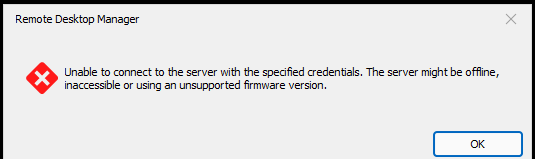
I'm trying out the new virtual console for DRAC but cannot get it to connect. I have tried every console type you provide.
I'm running iDRAC 9 7.00.30.00 Firmware
Is there something else that needs configuration before it works?
Thanks,
Mike
Screenshot 2023-11-07 165735.png
Also tried using Native console with iDRAC9 6.10.00.00 Firmware and got same error
Hello
The first thing to check, is that you are connecting on the correct port number. The default port in RDM is 5900, which is the default virtual console port on DRAC firmwares older than (7.0.0.0) - I believe.
Assuming you are running RDM 2023.3.22 the best thing to try would be to set "Default" or "Automatic" as the connection mode, and configure the port to the management interface of the DRAC (for example: I access my DRAC9 management interface at https://192.168.1.56, so the "Host" would be 192.168.1.56 and the port would be 443). This will query Redfish for the proper console settings and use them.
If you're on RDM 2023.3.20, for the DRAC 7.x firmware, choose VNC-over-websockets and, again, use the management port (in my example, 443). This is non-intuitive, but we query the management interface for an authentication token before opening the websocket on the proper (virtual console) port.
For the DRAC 6.x firmware, again you should be able to use "Default" or "Automatic" and the management port. Otherwise, configure the connection mode to "Native" and ensure the port matches the virtual console port configured on the DRAC (by default it's 5900 but perhaps you have it configured differently?).
If it's still not working after checking the above or you have questions, please don't hesitate to post back. I appreciate this is not very intuitive, the problem is that while we wish to present a "unified" connection type for DRAC, there sadly isn't a consistent way to get the virtual console over different firmware versions. And it's not straightforward to support variable "default ports" in RDM. I'm interested in your feedback as we work to make this more user friendly.
Thanks and kind regards,
Richard Markievicz
Richard,
Port number was the issue - I thought the default would change with the console type. Once I set the port everything worked!
Thanks!
Mike
Hello Mike
Glad that it solved the issue, and again I'm sorry it's not very intuitive. I'm trying to make this easier to use and I think my recommendation going forward will be to use the "Automatic" negotiation and use the management port. That should simplify things, but in the "real world" I'm not sure if it's common to run the interface on port 443 or if users more normally run a custom port here.
I did improve the error message for the next version of RDM to highlight that the port might be the issue, as one of our QA team stumbled on the same problem.
Thanks for the feedback and please don't hesitate if you have further questions or comments.
Kind regards
Richard Markievicz