
Michael L
RDM - Any embedded login form available? (when only using native devolutions server login)
Hi
Is there in RDM any way to allow an embedded login form, when only native devolutions server logins are used/allowed on our DVLS data source?
Our users were used to the small login popup i previous RDM versions, but in the new version the login is always inside an external browser tab.
Regards
Michael
RDM settings for RDP Session - Full Screen (with smart sizing when tabbed)
RDM 2024.3.14.0 64-bit
DVLS v2024.3.6.0
Windows 11 23H2
RDM settings for RDP Session - Full Screen (with smart sizing when tabbed)
Hi
I am missing a setting in RDM, that avoid my RDP sessions initially starting in "Full Screen", I want the resolution to be "Full Screen", but I want it to start out as docked/embedded tab with smart sizing applied.
(and to clarify, I am planning to also have the setting enabled, that ensures my RDP session jumps into full screen, when I double click the embedde session tab)
1st test I did:

When I connect to a new RDP session, it will go into full screen straigt away and I can double tab to dock it into an embedded tab, which then is using smart sizing as expected.
I was hoping to reverse this, so it is smart sizing in the tab at first and I can now double click any tab I wish to go into full screen mode with.
Then i noticed another "Remote desktop size" setting, called "Current Screen Size", which is my 2nd test
2nd test I did:

When I connect to a new RDP session, it will start in en embedded tab, but with large scroll bars, because the resolution is the same an my current screen size, so smart sizing is not applied.
I was hoping that the smart sizing was applied straight away and actually it seems smart sizing doesn't work at all, when using these settings.
Maybe ad an advanced setting in the RDP sesssion settings in RDM, which can force the results I am hoping for, either for 1st or 2nd scenario or even both scenarios?
Regards
Michael Leeming
Sync all vaults in offline mode
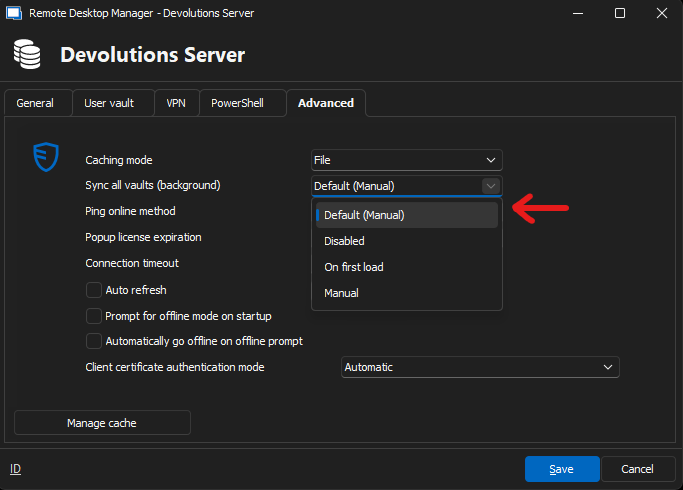
Before letting this topic go, I would like to know if I need to send new data source settings to our users, or if the "Default" setting is fine for "Sync all vaults" under Advanced, after enabling the "Allow sync all vaults" in the System Settings?
During my own testting, I am not sure it makes a difference between "Default (Manual)" and "On first load", but I must admit I don't really understand how "On first load" is supposed to work, it is not explained here https://docs.devolutions.net/rdm/kb/how-to-articles/synchronize-vaults-background/#configuration
The wording does not indicate much about auto background syncing the vaults, what are the triggers for vaults auto background sync, is it time or user/system events in RDM?
Secure Messages in RDM (and on DVLS Web) should hide disabled users
Secure Messages in RDM (and on DVLS Web) should hide disabled users when searching for recipients.
Sync all vaults in offline mode
I see, now I see it, when accessing as admin.
But I was conviced all DVLS related settings were available and only available using Administration on DVLS Web, and thought it had been like that ever since the DVLS.Console app would forward me to DVLS Web, when clicking any of the settings in the Administration tab inside DVLS.Console (which also includes a "System settings" button)
How many special settings need to be set using "System settings" as Admin in RDM?
Are you admin? Admin is required to access Administration > System settings
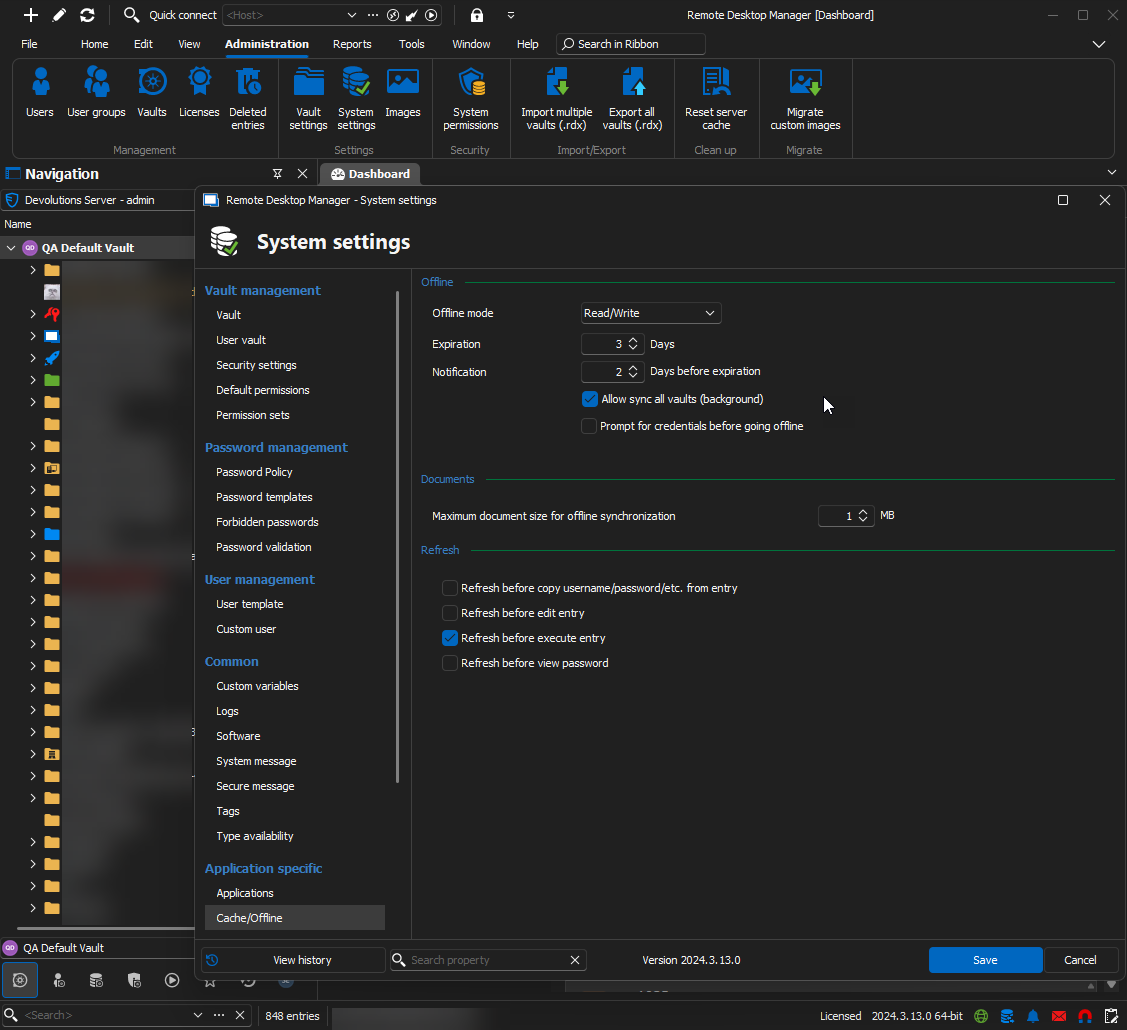
Sync all vaults in offline mode
But I don't have "System Settings" in RDM, it looks like system settings are only available in RDM, when using SQL server as data source, which the screenshot in post 198596 looks to be, not when using onprem DVLS server as data source.
You must activate it first, please follow the steps outline here (they also apply to the DVLS data source). They must be performed with RDM, not via the DVLS website.
https://forum.devolutions.net/topics/40469/sync-all-vaults-in-offline-mode#198596
The first part can be forced via GPO:
0 = Not configured
1 = Allowed
2 = Not allowed
Let me know if you have other questions.
Best regards,
Sync all vaults in offline mode
Hi Devolutions
Am I missing something here?
Can't seem to find any system settings, to force all vaults sync, when using latest RDM (DVLS datasource) with latest DVLS
How can I force all vaults sync in the background? (and does the datasource settings need to have a specific setting also?)
(Also, I'm not sure what the setting "Enable synchronization by non-administrators" in DVLS -> Administration -> System Settings -> "Application Specific" is suppose to Enable/Disable - There is no explaination in your documentation regarding this setting)
Thanks :-)
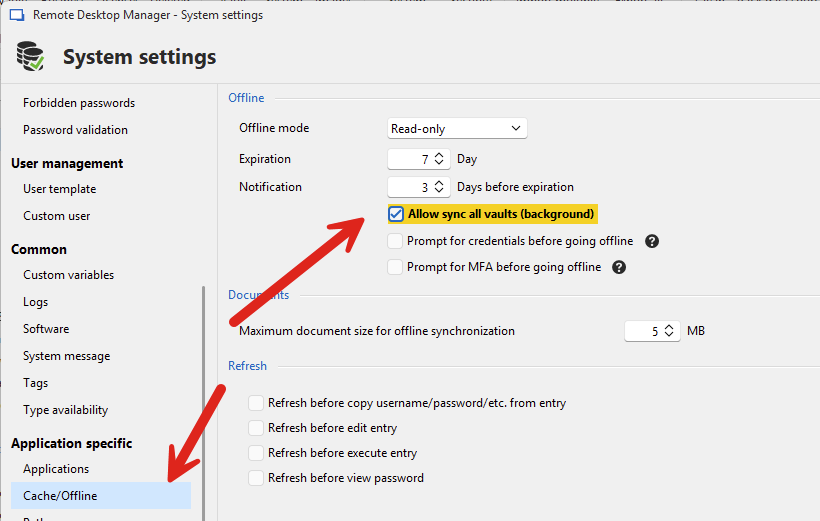
Good news, with our release of RDM 2024.3, the background vault sync feature is now available.
You must first enable this by going in your System Settings and allowing synchronization in the background:
Linked account - misleading description in the doc page
https://docs.devolutions.net/server/kb/how-to-articles/link-account/
The Linked account feature allows users to associate another account under the same user. This feature is particularly beneficial when a user needs to manage different accounts simultaneously.
How does this explaination make any sense, when it is not possibleto manage different accounts simultaneously?
The guide even says you need to logout and login ti switch between accounts.
Linked account only brings license sharing for a user with 2 logins, I can't see what else it brings?
Regards
Michael
Link domain user, Office365 user to DVSL custom user
Hi
We like the fact that Devolutions has native user accounts to login and also that it can be setup with 2FA.
It is our preferred login, to make sure we are not dependant of other account services to be working, in order to log into an important system like DVLS.
But we would really like an option to link our domain users and office365 users to our DVLS custom user. (link multiple credentials to the same user entity)
As we would like the option to also login using Windows Authentication or office365 authentication, and always have our DVLS custom user login as fallback credentials.
If we create both domain user and office365 user now, then we will end up with 3 individual accounts on the DVLS server, and they will have different private/user vaults, which would not make sense for our users.
Is this possible?
Devolutions Gateway - Grayed out Install button after uninstall
Maybe it was something in the subsystem blocking.
Because I also tried using the Gateway msi install file to see If I could install it outside the console while the install button was unavailable.
However the msi installation would fail in the middle becasue of missing permissions, but I was full elevated administrator, så I think the error was something else blocking.
After it finally went back to normal with the install button, I tried the MSI file again and it worked fine.
So I think you are right about blocking processes, I checked for any exe gateway files, but none were running while I was blocked.
Maybe from when I first uninstalled, it probably did not fully complete closing the GW windows service, but it did however remove it from the services list in windows.
Devolutions Gateway - Grayed out Install button after uninstall
Hmm, tried unistall of console and install older version, no luck
Then reinstalled latest once again and now the Install button is back.
Strange :-)
Devolutions Gateway - Grayed out Install button after uninstall
DPS.Console 2021.2.13.0
Unistalled gateway succesfully and wanted to re-Install it again.
But Install is grayed out, Update buttons completes without issue, even while Gateway is not installed.
Unistall again even says gateway is not installed
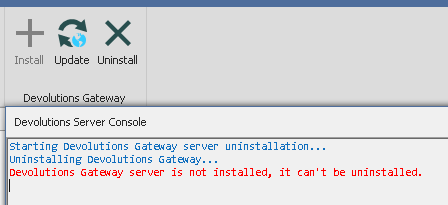
I did however have a cmd.exe shell opened with path "C:\Program Files\Devolutions\Gateway" opened during succesful uninstall, maybe this blocked something that should have been removed.
I have tried deleing all gateway and devolutions folders and also uninstalle of DPS.console and re-install of DPS-console.
But the buttons are still stuck like this.
(I also deleting various registry settings that were left behind, no luck)
Version 2021.2.13.0 (November 18th 2021)
Will all DVLS licenses that are renewed after September 30th 2021 lose the PAM module?
Or will they continue with the PAM module with their license agreement?
Restrict built-in admin (custom Devolutions accounts) to login from localhost only
Will it be possible to add the option to restrict admin users to only login from localhost?
Imagine many "custom( Devolutions)" users on a DVLS server, all with 2FA enabled.
But to make sure that all admin users will not be locked out from 2FA failure, 2FA will not be enabled on the admin users and DS is setup with 2FA as optional.
It could be option 1 or alternative option 2
Restrict Admin users to only login from DVLS localhost (from the server running DVLS)
Allow Admin users to login without their 2FA from DVLS localhost (even if 2FA is mandatory and enabled on admin users)
Our worry
I am not aware if there is a way back into the system if all 2FA is lost, can local windows administrator on the DVLS server always disabled 2FA without login with a DVLS admin account?
As I see it, it seems like the DVLS console always opens the administration website and require the DVLS admin authentication, and if 2FA is lost for ever, there is no way back?
TREE VIEW Invisible / Gone
Sounds great - it is a lot better than a permanent blank tree-view, because you would have to know to rigth-click the blank grey bar and know you have to re-add "Name" column.
Thank you
TREE VIEW Invisible / Gone
Know this is old, but can you please add to RDM that It adds a "Choose Columns" link or "Right-click to choose columns" when users accidentally end up with a blank tree view, because they often by accident drag "Name" out of the tree-view and think that there are caching issues with the data source.
/Michael
DPS console - missing 2FA setup - both general settings and user 2FA setup
Okay, fair enough.
I just hope you remember to have som way of to login from localhost only, to be able to reset 2FA
Let says 2FA is down and from the web we only allow users with 2FA to log in.
We would never want an admin user to be able to log into the web interface without 2FA, unless it was from the localhost.
So one of the following would help:
Make it possible to restrict a user to only login to the web interface from localhost
Make it possible to administer user logins and reset 2FA some other way from the localhost
Today it is actually possible to use DPS concole to control users and 2FA without logging in with a devolutions user, local administrator on the server is enough.
This is probably the best way to solve issues with user logins etc, because the login procedure is not a dependency when admin tasks are being made to DPS.
Option 2 would be a lot like how it is today.
Regards
Michael
DPS console - missing 2FA setup - both general settings and user 2FA setup
Hi
The DPS console does not have 2FA setup anymore, found it in the web interface?
What is the plan regarding the DPS console?
It seems weird that we need to be able to log into the web interface, if 2FA is failing.
The DPS console ealier allowed for 2FA reset on the server desktop without needing to login with a 2FA protected devolutions user.
As I understand, the web interface requires login with a devolutions user and we don't want a user without 2FA with admin access from the web frontend.
Regards
Michael
2FA - Expand Alternate-2FA options
How come this was never added?
I really can't see the safety in alternate 2FA being an email or backup codes.
/Michael
Yubikey issues since friday
Done
2FA - Expand Alternate-2FA options
I have always wondered why "Enable alternate 2FA" only supports "Email" and "Backup codes"
I would prefer to allow ie. Yubikey as Primary and Google Authenticator as alternate 2FA
My Feature request: Allow same list of 2FA options in Primary and Alternate 2FA (and maybe even allow 2x yubikeys, one for primary and one for alternate)
Nice to have: It would also be great if Administrator optionally could receive a notification email, when alternate 2FA is used by a user
Regards
Michael
Yubikey issues since friday
Btw. I have always wondered why "Enable alternate 2FA" only supports "Email" or "Backup codes".
I would prefer to allow Yubikey as Primary and Google Authenticator as alternate 2FA.
Regards
Michael
Yubikey issues since friday
I have on our DVLS server forced TLS 1.2 for .NET application and for WinHTTP in the registry database
This seems to have worked for us.
My idea came after I saw in Wireshark, that TLS1.0 var in use, maybe sometimes it was TLS1.2, which explains why it worked sometimes.
But I can't confirm if DVLS is using protocol v2 or v1 as mentioned in
But right now it seems it is working for us...
Yubikey issues since friday
Have you seen this? (and coincidentially our Yubikeys have stopped working yesterday for good)
https://status.yubico.com/ (Read status for 4. February - YubiCloud no longer accepting v1 protocol, plain-text or old TLS version requests)
And this probably also explains why it has worked on/off for a while now
Note - We would need a hotfix for DVLS server 4.5.0.0, as we can't upgrade to newer version at the moment.
Regards
Michael