Where are defined entries default settings?

Hello,
With the SSH session entries, we have the well-known PuTTY issue regarding numeric keypad not working in some applications such as nano, unless you disable the "keypad keyboard mode" in the "Terminal" tab of the entry's settings: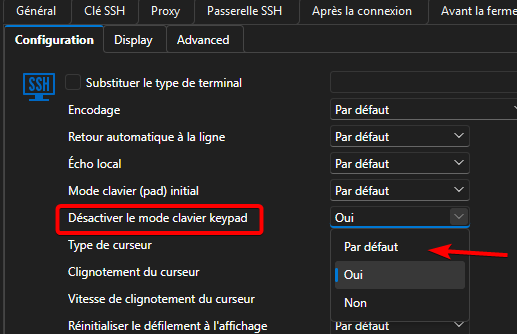
We regularly have this issue with new entries (as it default to a "Default" option which seems to imply "No"), and with the quick connect toolbar.
My question is: can we change the default value for this option? I believe the "Default" option is actually inheriting the settings from somewhere, but I cannot find where.
We are on a licensed RDM 2026.2 with a shared MSSQL Server database.
1ed36528-71cb-4cb4-96f1-1a520e972931.png
All Comments (2)
Hello,
The default for this can be changed locally in File -> Settings -> Entry types -> Sessions -> Terminal
Best Regards,
Michaël Beaudin
As a side note, if you want a way that works more naturally accross the organisation, you can go in Administration -> Entry templates and create a shared template of your SSH with the keypad setting set to "Yes" or "No".
Once a shared template exists for an entry type, anyone creating an entry will be prompted to select which template they want to use when adding that entry type. You can also choose "Blank" to have an empty entry.
If you don't want users to have the option to use "Blank", you can even change the setting in the dropdown to "Template list only". 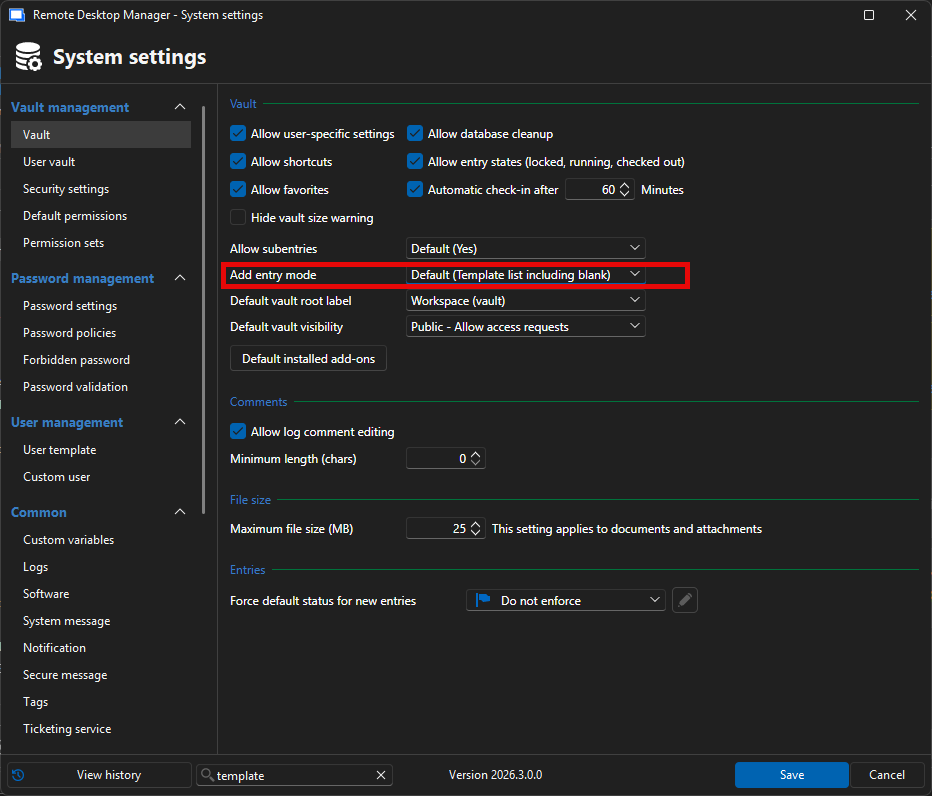
Best Regards,
Michaël Beaudin
83d7b7e2-6fa7-426e-94f3-f433039dcfd1.png