
Tobi
ssh linux session terminal is off screen
Same here, this release brings multiple issues in basic functions ..
Session Website: Webbrowser - missing installed browsers
Hey Min,
Thank you for the fast reply.
OK, I wasn't sure about the embedded, but it now makes sense .. sorry for that!
If I'm able to delete this post I'll delete it ..
Best Regards
Tobi
Session Website: Webbrowser - missing installed browsers
Hello everyone!
With release 2026.1.10.0 64-bit (PreJIT) or maybe an earlier release, I'm missing to possibility to change the browser to e.g. Chrome which is installed, instead only "Standard", IE and Edge are available.
If I check the session settings for "Website" in the settings, I can see multiple browsers even none installed (Opera).
Screenshots are in German language:


Is there an explanation, or did I missed something?
Thank you!
Best Regards,
Tobi
Resolution of variables in folders and sessions
Thank you for the feedback, I've one more question.
I have two "server" folders where I enter for both the FQDN and IP.
Now I want to use the entered Host as session name and want to use the variable "$HOST_WITHOUT_DOMAIN$".
For one of the folders that's working, but if I want to use this variable in the next server folder I still get the error message: (German) "Sie können keine Ordner mit dem gleichen Namen duplizieren."
Like: "You cannot duplicate folders with the same name." - Same name is the variable $HOST_WITHOUT_DOMAIN$
Is it correct, that I only can use this variable once?
I want to reorganize all our connections and make them more dynamical.
In the entries of the server folders (RDP or SSH) I'm using the variable "$PARENT_HOST_WITHOUT_DOMAIN$" multiple times, and this works.
Any idea if this is a bug too, or something I'm doing wrong?
To recreate this scenario, just use my export and duplicate the second/sub folder "test".
Thank you!
BR,
Tobi
RDM Version 2024.1.27.0: Fix turns into bug? // Embedded Powershell (MSC / MMC)
Hi Eric,
I can confirm that 2025.2.29.0 is working with the mentioned Terminal settings.
On my Win11 this setting was default.
BR,
Tobi
RDM Version 2024.1.27.0: Fix turns into bug? // Embedded Powershell (MSC / MMC)
Hi Eric,
I'm still on 2025.2.28.0 64-bit and it's working .. so *.29 should have the changes which brings back the issue.
I don't get the roll out of 2025.2.29.0 yet, so I can test it too. Maybe end of the week.
BR,
Tobi
Resolution of variables in folders and sessions
Hi Tommy,
Thank you for your feedback!
BR,
Tobi
Resolution of variables in folders and sessions
Hi Min,
Thank you for the screenshot, I knew there is an option, there is always an option :]
But it was missing in my RDM, because the option was disabled in the context menu .. *hmpf*
Take your time and thank you in advance!
BR,
Tobi
Resolution of variables in folders and sessions
Hi Min,
I would bet there is an option to export only this structure instead of the whole data source / tresor, right?
I missed also the option to copy /move the structure to my local data source.
If you need the .rdm file, I'll create a new DS with the structure and export it as .rdm.
But maybe you can use this copied settings:
<?xml version="1.0" encoding="utf-8"?>
<ArrayOfConnection>
  <Connection>
    <AppVersion>2025.2</AppVersion>
    <ConnectionType>Group</ConnectionType>
    <CreatedBy>Tobi</CreatedBy>
    <CreationDateTime>2025-08-13T18:51:39</CreationDateTime>
    <Group>test</Group>
    <ID>d3626420-3a47-4d6a-96f3-ddc1beba933e</ID>
    <Name>test</Name>
    <TemplateSourceID>c3b22a6f-7679-41ea-be81-cad8c669db30</TemplateSourceID>
  </Connection>
  <Connection>
    <AppVersion>2025.2</AppVersion>
    <ConnectionType>Group</ConnectionType>
    <CreatedBy>Tobi</CreatedBy>
    <CreationDateTime>2025-08-13T18:53:01</CreationDateTime>
    <Group>test\$HOST_WITHOUT_DOMAIN$</Group>
    <ID>49250ab2-56d5-4a93-b663-444eaf2ef4c9</ID>
    <Name>$HOST_WITHOUT_DOMAIN$</Name>
    <GroupDetails>
      <GroupType>Server</GroupType>
      <Host>test.domain.com</Host>
      <IP>10.10.10.10</IP>
    </GroupDetails>
  </Connection>
  <Connection>
    <AppVersion>2025.2</AppVersion>
    <ConnectionType>RDPConfigured</ConnectionType>
    <CreatedBy>Tobi</CreatedBy>
    <CreationDateTime>2025-08-13T18:54:24</CreationDateTime>
    <CredentialConnectionID>00000000-0000-0000-0000-000000000000</CredentialConnectionID>
    <CredentialConnectionSavedPath>--- Bei Verbindung abfragen ---</CredentialConnectionSavedPath>
    <Group>test\$HOST_WITHOUT_DOMAIN$</Group>
    <HostSourceMode>Inherited</HostSourceMode>
    <ID>142cf95b-39cd-4ba8-b018-81d2e31c0c60</ID>
    <Name>$PARENT_HOST_WITHOUT_DOMAIN$</Name>
    <OpenEmbedded>true</OpenEmbedded>
  </Connection>
  <Connection>
    <AppVersion>2025.2</AppVersion>
    <ConnectionType>Credential</ConnectionType>
    <CreatedBy>Tobi</CreatedBy>
    <CreationDateTime>2025-08-13T18:55:12</CreationDateTime>
    <Group>test\$HOST_WITHOUT_DOMAIN$</Group>
    <ID>ddc92cee-aba9-487f-840d-a3bdb6ec13ca</ID>
    <Name>$USERNAME$</Name>
    <Credentials>
      <Domain>domain.com</Domain>
      <SafePassword>+Hjd9aNOUfn4eN31o05R+TaIamynm9lFRN+3gxdY4Vg=</SafePassword>
      <UserName>test</UserName>
    </Credentials>
  </Connection>
</ArrayOfConnection>
Yes, the second screenshot was just to get you the full information about the structure. ;-)
Please let me know if you need the .rpm file, no problem, but tomorrow.
Good night!
BR,
Tobi
Resolution of variables in folders and sessions
Hello everybody,
I don't know if it's a bug, or a feature I don't understand.
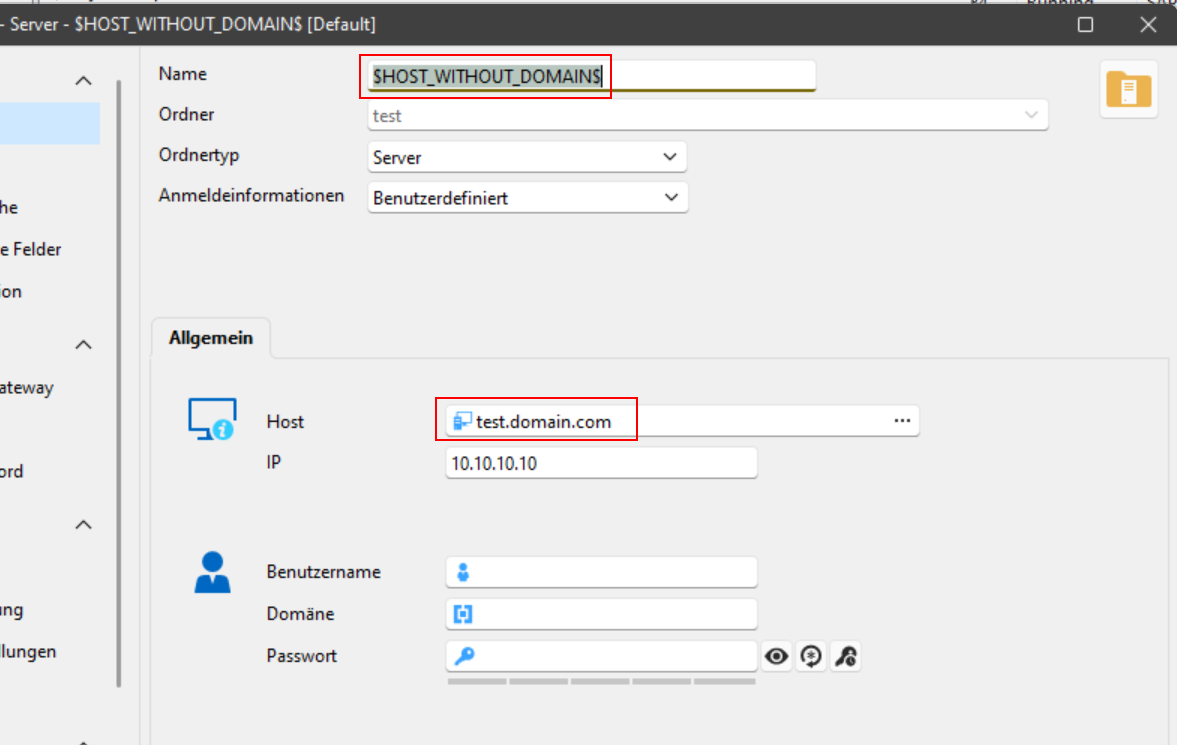
I want to use the variable $HOST_WITHOUT_DOMAIN$ as name for a server folder, it works as expected at first view.
But If I create a second server folder with the same variable but different server, it's not possible (message with "same name").
Folder structure:
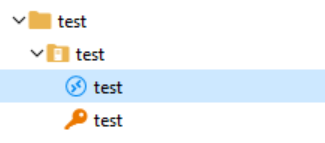
Server folder:
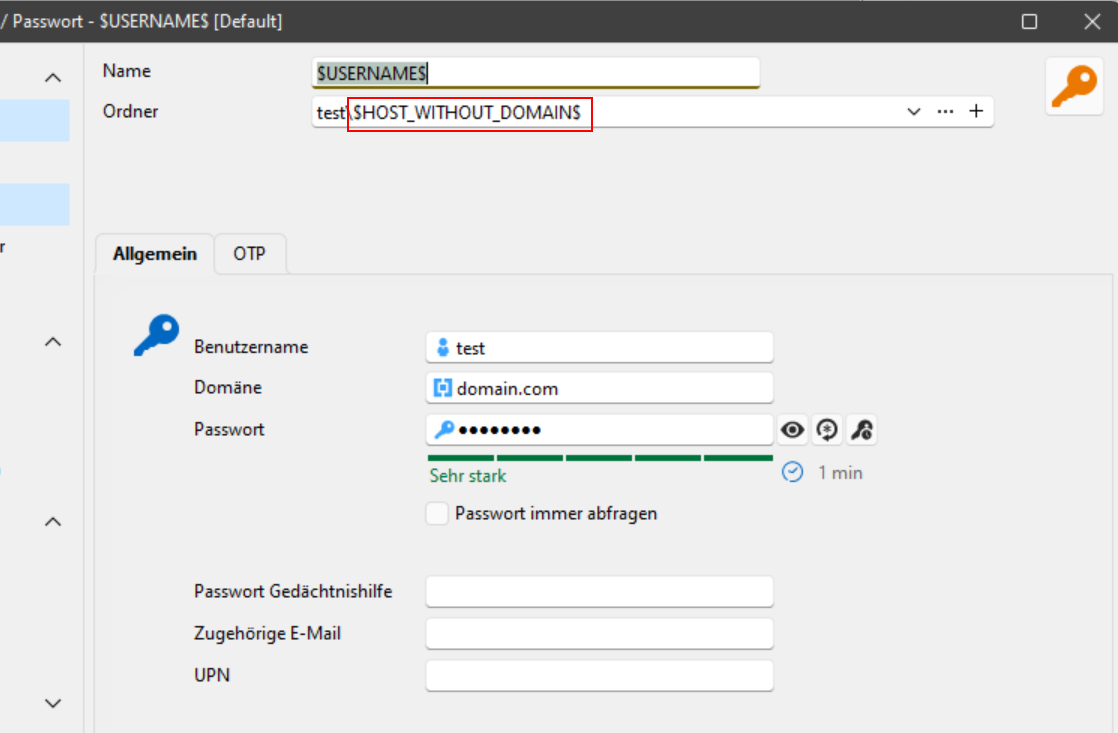
Credential: (here you can see the variable is not resolved)
RDP session: (here you can see the issue "doubled" > folder variable is not resolved
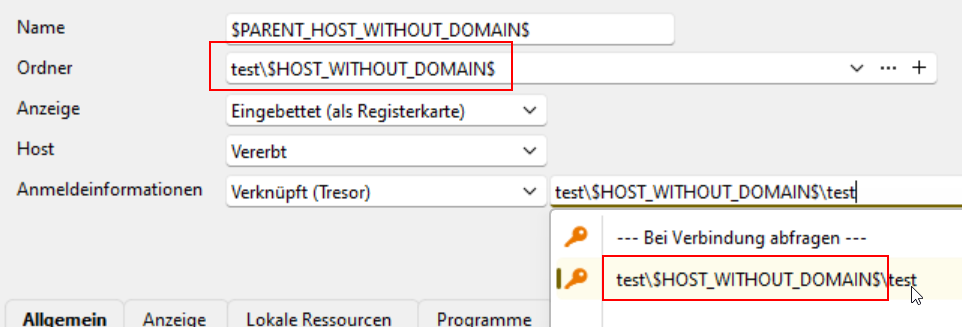
From my POV it's a bug or a missing setting, because the variable should be resolved.
Can somebody explain this behavior and may be recreate the simple setup to check how it looks on you side?
I'm using RDM Enterprise 2025.2.25.0 64-bit (JIT)
Thank you!
Best regards,
Tobi
WinSCP not working with inherited credentials // 2024.3.14.0 64-bit
Hi Samuel,
I'm sorry for the delay, but at the moment I don't find time to test with the old RDM versions.
But .. with version 2024.3.19.0 64-bit the bug was fixed and I can use WinSCP as described again.
Case closed ;)
Best regards,
Tobi
WinSCP not working with inherited credentials // 2024.3.14.0 64-bit
Hello Samuel,
I wasn't able to download an older version of 2024, because only the previous release (V2024.3.15.0) is available (https://devolutions.net/remote-desktop-manager/home/previousversions/).
But I've downloaded a version of 2023 (2023.3.35.0 64-bit) and with this version the connection with both inherited settings is working.
Is there a way to download a version of 2024 from maybe July to find the version with the change?
Best regards,
Tobi
WinSCP not working with inherited credentials // 2024.3.14.0 64-bit
Hello Samuel,
This kind of setting we are using over the last two years, so it works like a charm until one of the last RDM updates.
The ssh connection is linked to my personal credentials. My personal credentials holds my ssh key and the passphrase.
So every sub connection ( like WinSCP) also using this ssh key (Inherited).
This settings (inherited creds) still working for the SFTP connection. But not for the WinSCP connection.
Greetings,
Tobi
WinSCP not working with inherited credentials // 2024.3.14.0 64-bit
Hi Samuel,
Thanks for your feedback, yes even with the latest version 2024.3.15.0 I have the issue.
All SSH Key parameter are empty because it's inherited from the main SSH connection.
I've attached some screenshots, maybe it's better to understand ;-)
My personal credentials - SSH-Key (used in SSH connection as credentials):

Navigation overview:

Folder and Server settings (Name + Host + IP):

Main SSH Connection (Host = inherited / Credentials = linked credentials) // nothing more

SSH-Key section is empty:

WinSCP entry (host = inherited / credentials = inherited / +some parameter):

WinSCP SSH-Key section (empty):

Thank you!!
Best regards,
Tobi
WinSCP not working with inherited credentials // 2024.3.14.0 64-bit
Hi Samuel,
Thank you very much!
Best regards,
Tobi
WinSCP not working with inherited credentials // 2024.3.14.0 64-bit
Hi Samuel,
Sorry, I put the version in the subject: 2024.3.14.0-64bit Enterprise
As data source we are using MSSQL.
Best Regards,
Tobi
WinSCP not working with inherited credentials // 2024.3.14.0 64-bit
Hello,
Since the a couple of RDM updates I have the problem, that WinSCP isn't working anymore with inherited credentials like Linked (vault).
My structure is:
Folder with host information
SSH entry (inherited host + linked creds)
WinSCP subentry (inherited host + inherited creds)
Creds (ssh privat keys for each user)
If I start the WinSCP session, WinSCP wants to start with the ssh privat key password:

Screenshot only in German
If I change the session entry from inherited credentials to custom credentials and set the exactly same ssh key parameters, then WinSCP is working as it should be and as it worked before. I cannot say which update broke the function.
Could someone quickly recreate my structure to check it twice, so maybe the Dev's can create a fix?
Thank you!
Best regards,
Tobi
RDM Version 2024.1.27.0: Fix turns into bug? // Embedded Powershell (MSC / MMC)
Hello!
As Eric said, I can also confirm that with 2024.1.29.0 embedding is working again.
Thank you!
BR
Tobi
Right click & logoff not working after update
My RDM client is on 2024.1.28.0.
Just want to say that I'm using the enterprise version with MSSQL datasource, if that might have an impact.
Right click & logoff not working after update
FYI: on 2024.1.28.0 (Enterprise on MSSQL) logoff on Win2k12/16/19/22 works.
Close open sessions with Ctrl+W: last session closed first then selected session
Hi Samuel,
The version 2024.1.28.0 - Enterprise on MSSQL was rolled out in my company. Same behavior.
For another bug, I tested a portable version of 2024.1.25.0, and couldn't reproduce (quick) this issue with SSH/RDP.
but as said, even with our main installation of RDM this behavior doesn't come up everytime
I'll try to reproduce it with the 2024.1.28.0 portable version and also try to reproduce it on another notebook in my team.
Best regards,
Tobi
RDM Version 2024.1.27.0: Fix turns into bug? // Embedded Powershell (MSC / MMC)
Hello Tobi,
We will check to see if we can still reproduce. The code should have been reverted and the embedding should work as well as it did in 2024.1.25.0.
Can you confirm this embeds properly with 2024.1.25.0?
Regards,
Hi Nathan & Hubert,
I've tested this issue with the portable 2024.1.25.0 version and with this version, embedding is working.
I hope that helps.
Best regards,
Tobi
RDM Version 2024.1.27.0: Fix turns into bug? // Embedded Powershell (MSC / MMC)
Hi Nathan,
Sorry for the delay.
I'm still on Win10 and use the same settings as you (Let Windows decide).
Attached a screenshot (German).
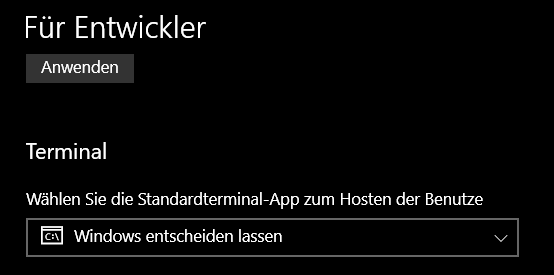
Best regards,
Tobi
SFTP issues from SSH session
Thank you both for the quick reply.
I'm already using separate SFTP sessions, but just wondering if I was missing maybe something new.
Thank you!
Tobi
SFTP issues from SSH session
Hello!
If you don't mind I have an additional question about SFTP via SSH Session.
If I set the advanced option to use SFTP and open the SFTP "sidebar", I land in my users home. But I'm not able to travel upwards to / or somewhere else.
Is there a hidden trick I don't get or do I have to set always / (root) directory as starting "Home directory"?
Thank you!
Best regards,
Tobi