Resolution of variables in folders and sessions

Hello everybody,
I don't know if it's a bug, or a feature I don't understand.
I want to use the variable $HOST_WITHOUT_DOMAIN$ as name for a server folder, it works as expected at first view.
But If I create a second server folder with the same variable but different server, it's not possible (message with "same name").
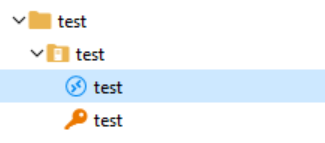
Folder structure:
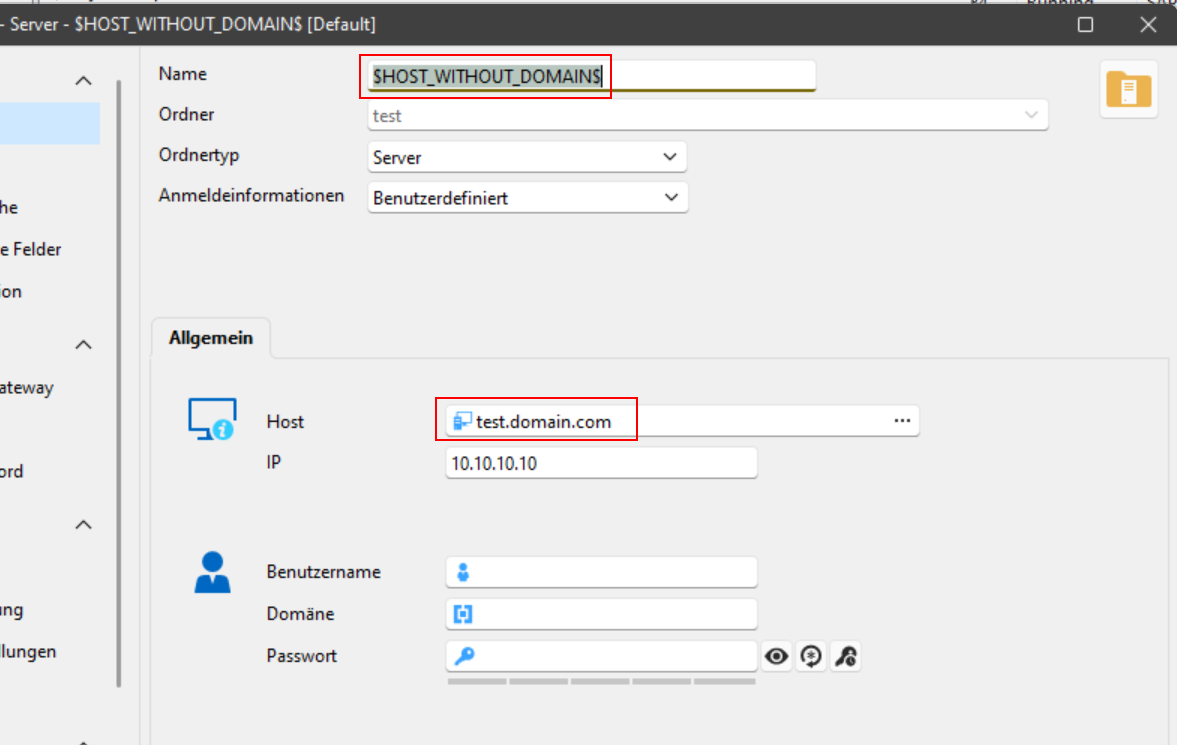
Server folder:
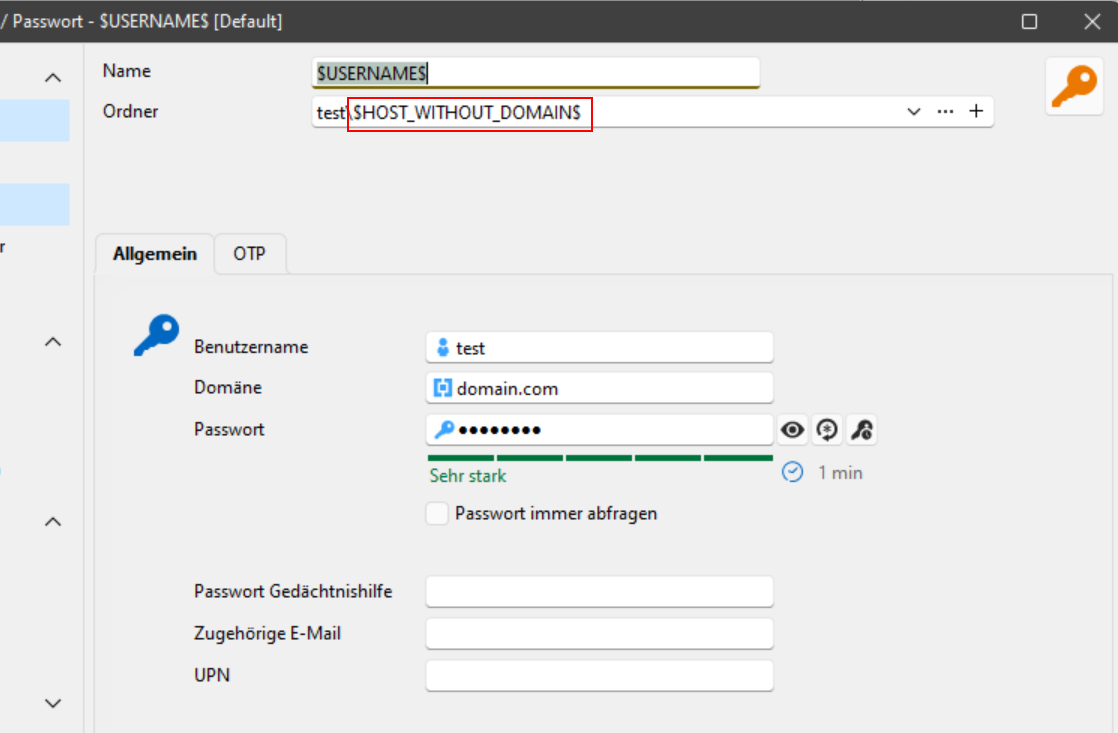
Credential: (here you can see the variable is not resolved)
RDP session: (here you can see the issue "doubled" > folder variable is not resolved
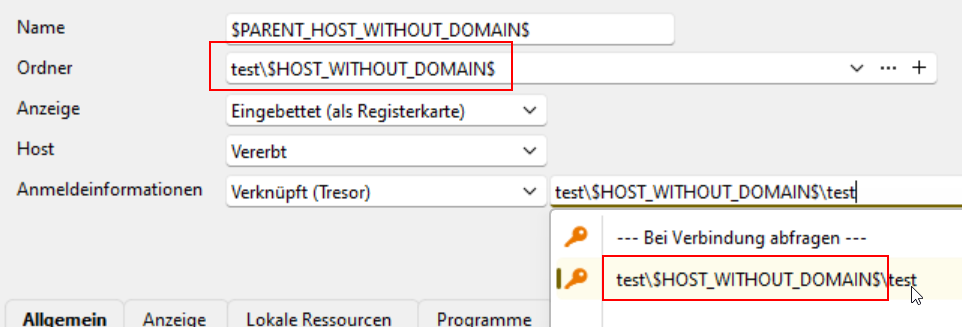
From my POV it's a bug or a missing setting, because the variable should be resolved.
Can somebody explain this behavior and may be recreate the simple setup to check how it looks on you side?
I'm using RDM Enterprise 2025.2.25.0 64-bit (JIT)
Thank you!
Best regards,
Tobi
All Comments (9)
Hello Tobi,
As far as I can see, these are all test data without any confident content, right?
If so, could you please provide the whole structure as an RDM export? I want to do some tests on my side.
At first glance, the unresolved variable in the server folder properties is intended. (Second screenshot)
I agree that it should be resolved at the third and fourth screenshots (for the folder name)
Regards,
Min
Hi Min,
I would bet there is an option to export only this structure instead of the whole data source / tresor, right?
I missed also the option to copy /move the structure to my local data source.
If you need the .rdm file, I'll create a new DS with the structure and export it as .rdm.
But maybe you can use this copied settings:
<?xml version="1.0" encoding="utf-8"?>
<ArrayOfConnection>
  <Connection>
    <AppVersion>2025.2</AppVersion>
    <ConnectionType>Group</ConnectionType>
    <CreatedBy>Tobi</CreatedBy>
    <CreationDateTime>2025-08-13T18:51:39</CreationDateTime>
    <Group>test</Group>
    <ID>d3626420-3a47-4d6a-96f3-ddc1beba933e</ID>
    <Name>test</Name>
    <TemplateSourceID>c3b22a6f-7679-41ea-be81-cad8c669db30</TemplateSourceID>
  </Connection>
  <Connection>
    <AppVersion>2025.2</AppVersion>
    <ConnectionType>Group</ConnectionType>
    <CreatedBy>Tobi</CreatedBy>
    <CreationDateTime>2025-08-13T18:53:01</CreationDateTime>
    <Group>test\$HOST_WITHOUT_DOMAIN$</Group>
    <ID>49250ab2-56d5-4a93-b663-444eaf2ef4c9</ID>
    <Name>$HOST_WITHOUT_DOMAIN$</Name>
    <GroupDetails>
      <GroupType>Server</GroupType>
      <Host>test.domain.com</Host>
      <IP>10.10.10.10</IP>
    </GroupDetails>
  </Connection>
  <Connection>
    <AppVersion>2025.2</AppVersion>
    <ConnectionType>RDPConfigured</ConnectionType>
    <CreatedBy>Tobi</CreatedBy>
    <CreationDateTime>2025-08-13T18:54:24</CreationDateTime>
    <CredentialConnectionID>00000000-0000-0000-0000-000000000000</CredentialConnectionID>
    <CredentialConnectionSavedPath>--- Bei Verbindung abfragen ---</CredentialConnectionSavedPath>
    <Group>test\$HOST_WITHOUT_DOMAIN$</Group>
    <HostSourceMode>Inherited</HostSourceMode>
    <ID>142cf95b-39cd-4ba8-b018-81d2e31c0c60</ID>
    <Name>$PARENT_HOST_WITHOUT_DOMAIN$</Name>
    <OpenEmbedded>true</OpenEmbedded>
  </Connection>
  <Connection>
    <AppVersion>2025.2</AppVersion>
    <ConnectionType>Credential</ConnectionType>
    <CreatedBy>Tobi</CreatedBy>
    <CreationDateTime>2025-08-13T18:55:12</CreationDateTime>
    <Group>test\$HOST_WITHOUT_DOMAIN$</Group>
    <ID>ddc92cee-aba9-487f-840d-a3bdb6ec13ca</ID>
    <Name>$USERNAME$</Name>
    <Credentials>
      <Domain>domain.com</Domain>
      <SafePassword>+Hjd9aNOUfn4eN31o05R+TaIamynm9lFRN+3gxdY4Vg=</SafePassword>
      <UserName>test</UserName>
    </Credentials>
  </Connection>
</ArrayOfConnection>
Yes, the second screenshot was just to get you the full information about the structure. ;-)
Please let me know if you need the .rpm file, no problem, but tomorrow.
Good night!
BR,
Tobi