Right click & logoff not working after update

I just updated to 2024.1.23.0 64bit,
.Net is 8.0..2
After the update, the right click on the tab, and select Logoff does not work. I get the dialog asking me to confirm, but after I click Yes, I still do not actually get logged off.
The Reconnect function works properly.
The Force Logoff seems to cause it to renegotiate the connection, but I remain logged in.
If I click Close it does disconnect me properly.
I can still use the normal Windows logoff processes, so it's not crippling, it is just an annoyance. :-)
Thank you,
David F.
All Comments (20)
Hello,
Thank you for contacting us on that matter!
Would it be possible for you to create a portable installation of the latest version of RDM and see if this issue still occurs? To do so, you will need to do the following:
(Close RDM)
1- Download the .zip file below:
https://remotedesktopmanager.com/home/thankyou/rdmbin
2- Create a new folder on your Desktop
3- Extract the content of the .zip file into the folder created at #2
4- Go to this folder once the .zip file has been extracted and run remotedesktopmanager.exe
5- Connect to your data source
This test will allow us to rule out your local installation of RDM as a possible cause for this issue.
Please note that if you are using an Advanced Data Source, I recommend skipping step #5 and using the default data source created by the portable installation of RDM instead.
Best regards,
Maxim Robert
Hello Maxim
we have the same issue after upgrading to the latest RDM version. We updated the server and the client at the same time.
We have the version 2024.1.25.0 64bit installed.
We have also tried with the portable version 2024.1.28.0 you mentioned.
I have some news on this.
We found out that the issue only occurs on "Windows Server 2016" servers. We do not have the issue on "Windows Server 2019" and "Windows Server 2022" servers.
FYI: on 2024.1.28.0 (Enterprise on MSSQL) logoff on Win2k12/16/19/22 works.
FYI: on 2024.1.28.0 (Enterprise on MSSQL) logoff on Win2k12/16/19/22 works.
Is the RDM client on this version or the server?
My RDM client is on 2024.1.28.0.
Just want to say that I'm using the enterprise version with MSSQL datasource, if that might have an impact.
Hello John222,
Thank you for your response!
Could you provide me with the information below?
- Does the problem occur with all entry types or especially one?
- Is your Windows 2016 a server-core installation?
Also, could you provide me with a screenshot of your Files > Settings > Types > Sessions > Remote Desktop (RDP)?
Thank you for letting us know. If you have any other questions, feel free to let us know.
Best regards,
Maxim Robert
Hello @Maxim
no, our RDM server is running on a normal Windows Server 2019 (Desktop experience). Our RDM clients runnung on different server versions, as mentioned already.The screenshot with the settings i will send you as a private message.
Hello,
Thank you for your response!
After contacting the development team, a ticket regarding this issue has been opened. I will let you know with more details as soon as possible.
Thank you for your collaboration. If you have any other questions, feel free to let us know.
Best regards,
Maxim Robert
Hello @Maxim
do you have any news on this issue?.
Hello John,
Thank you for following up on this issue,
Unfortunately, the development team is still investigating the issue. But could you provide us with the information below?
- Is the server a regular Windows desktop or server-core installation? It’s server core, is it tagged with that role? (See screenshot)
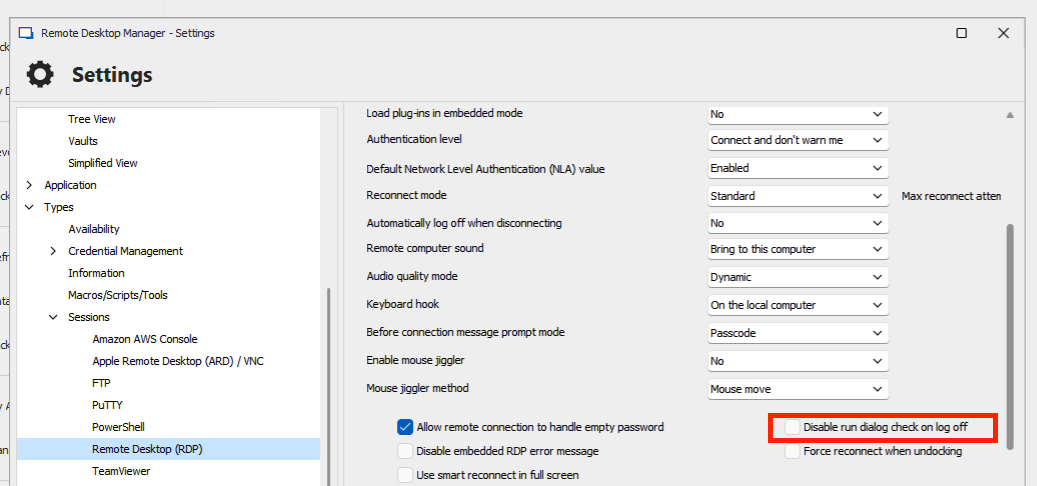
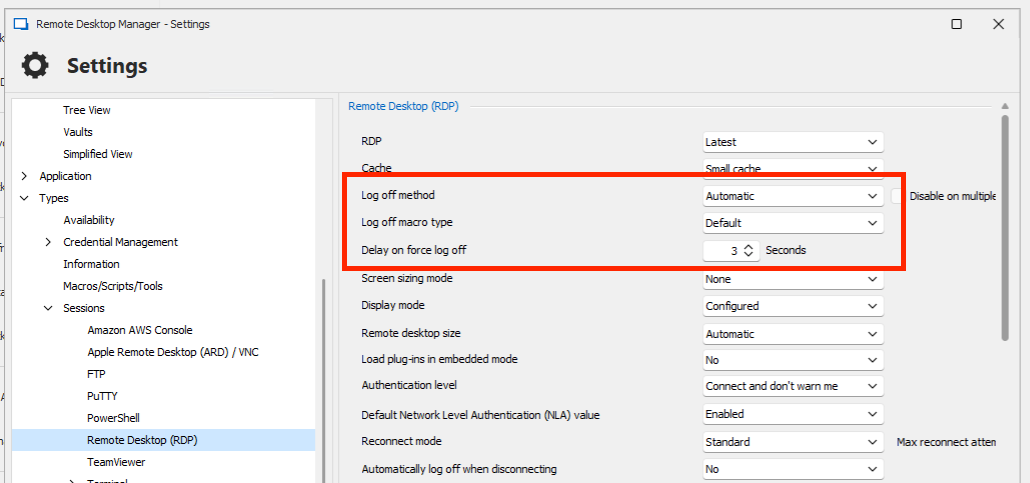
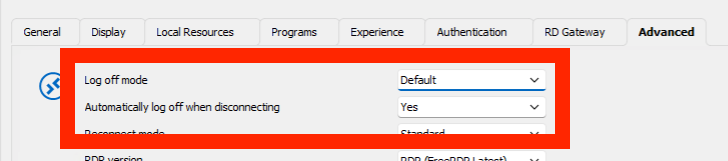

Thank you for letting us know. If you have any other questions, feel free to let us know.
Best regards,
Maxim Robert
09c54a6d-989c-496d-a623-31c9d8ee27c4.png
894f4fc9-1d83-4d84-8776-2e90cc1fa28d.png
5ac076ec-7be3-46e5-90d4-5ab8aeacb1e2.png
Screenshot 2024-05-24 at 11.17.49.png
The screenshots you provided are not the cause of it. As the settings
are the same on both jump host servers. The only difference is "Windows
Server 2016" and the other one is "Windows Server 2019". Both
servers are obviously installed with a gui. Otherwise we could not open RDM
without a gui.
The destination servers are also setup with a GUI.
I have to mention that the issue occured when we upgraded our RDM server and client to the newest RDM and Devolutions server version.
Hello
I'm sorry if I repeat some information that's already been gathered, but the post has become a little confusing and I don't see the information in the attached ticket.
Originally I had thought that this was a straightforward setup - you have RDM running on your client system, you connect to various Windows servers by RDP and choose "Log Off" and it no longer worked on Win2k16 servers.
However, do I understand that the setup is a little more complex than that? It sounds like you are doing:
RDM (Client) -> RDM (Jump Server) -> Server
And that this is failing when the RDM (Jump Server) is a Win2k16 host, but working correctly if it's a Win2k19 host. Is that correct? Do the final RDP servers also have RDM or RDMAgent installed? Please let me know if I'm wide of the mark here.
It's important that we understand this correctly because there is no API for logging off a server over RDP. We have a few different techniques that can be used (as seen from the settings) and this is all very dependent on the environment.
Thanks and kind regards,
Richard Markievicz
Hello again
First, the good news is that I reproduced the issue and understand the problem. This is clearly a regression and not caused by something in your environment.
The bad news is that I currently can't explain that behaviour. I'm actively investigating the issue and will post back here once I have some more information.
In the meantime, please don't hesitate with further questions or comments.
Kind regards,
Richard Markievicz
Hello
I'm sorry if I repeat some information that's already been gathered, but the post has become a little confusing and I don't see the information in the attached ticket.
Originally I had thought that this was a straightforward setup - you have RDM running on your client system, you connect to various Windows servers by RDP and choose "Log Off" and it no longer worked on Win2k16 servers.
However, do I understand that the setup is a little more complex than that? It sounds like you are doing:
RDM (Client) -> RDM (Jump Server) -> Server
And that this is failing when the RDM (Jump Server) is a Win2k16 host, but working correctly if it's a Win2k19 host. Is that correct? Do the final RDP servers also have RDM or RDMAgent installed? Please let me know if I'm wide of the mark here.
It's important that we understand this correctly because there is no API for logging off a server over RDP. We have a few different techniques that can be used (as seen from the settings) and this is all very dependent on the environment.
Thanks and kind regards,
Hello Richard, we are connecting to a jump host which is either a "Windows Server 2016", "Windows Server 2019" or "Windows Server 2022". On this jump host the RDM is installed and we connecting with the RDM with the RDP protocol to the servers. I hope i could help you with that answer.
Hello
I remain confused by this issue. I can't explain the behaviour with any of the changes on our side in 2024.1.x. That being said, I believe I found a way to fix this behaviour and that will be part of the next release. We'll update this thread once that is available (it should be relatively soon; I expect at least one more bug fix release before 2024.2 in a few weeks).
In the meantime, a possible workaround is to change the "RDP Version" in the "Advanced" tab to FreeRDP (Latest). This may or may not work for you, depending on if you need specific features that FreeRDP doesn't support.
Thank you for your patience, and I apologize for the inconvenience
Kind regards,
Richard Markievicz
Hello again
Thanks for your patience. Can you please try this again after updating to 2024.1.31 and let me know if the problem persists?
Thanks and kind regards,
Richard Markievicz
Thank you Richard.
I let you know, as soon we updated it RDM and Devolutions server.
Hello Richard
we updated our RDM version yesterday. It's now working again. Thank you for fixing it.
Kind regards
Reto Rayen
Hello
Good news! While I can't explain the regression on Windows 2016, I'm happy that we were able to resolve it.
Please don't hesitate with further questions or comments.
Kind regards,
Richard Markievicz