SFTP issues from SSH session

hi team,
we use RDM to support network infrastuctrure
the ssh sessions are working wekk but i am having issues with the sftp connection
in my home network where i test things before I i roll them out to the company i have run into the following issue
when i open a ssh shell to the device in question (in this case a Juniper ex2300) and open the sftp tab i can see folders but no files 
however here at home i can open a SFTP session to that device using the unbuilt SFTP session type and i can see files 
so for testing, i will call the SFTP optin within the SSH session the SSH Session and the native SFTP session ill call native
1, if i use the SSH session to add a new folder - the new folder will show up in both the ssh and native sessions
2, if i use the ssh session to upload a file - the file shows as completed but it dose not show up in the SSH session tho i can see it in the native session
3 if i use the native session to upload a file it shows completed - again the file only shows up in the native session
now at home this is no great issue as i can run native SSH sessions to the network devices to pull any logs i need , but in the corprate network i am unable to connect to the devices with a native SFTP session as the SFTP session dose not have the same SSH gateway options as the SSH session and i cant seem to find any combination of building a manual ssh gateway that works
the best solution for me would be if we could answer why the SFTP session from inside the SSH shell is not displaying files while it clearly reads directory names and can write new files
any thoughts ?
Regards
Joshua
ff7fea86-ebe8-47bf-9763-dcddce8ad327.png
b7d1d5d2-75fd-4f54-9019-199d551d6195.png
All Comments (9)
Hello,
Could you go in your SSH Shell entry and check the "use SFTP connection for file transfer" and "show files in tree view" settings: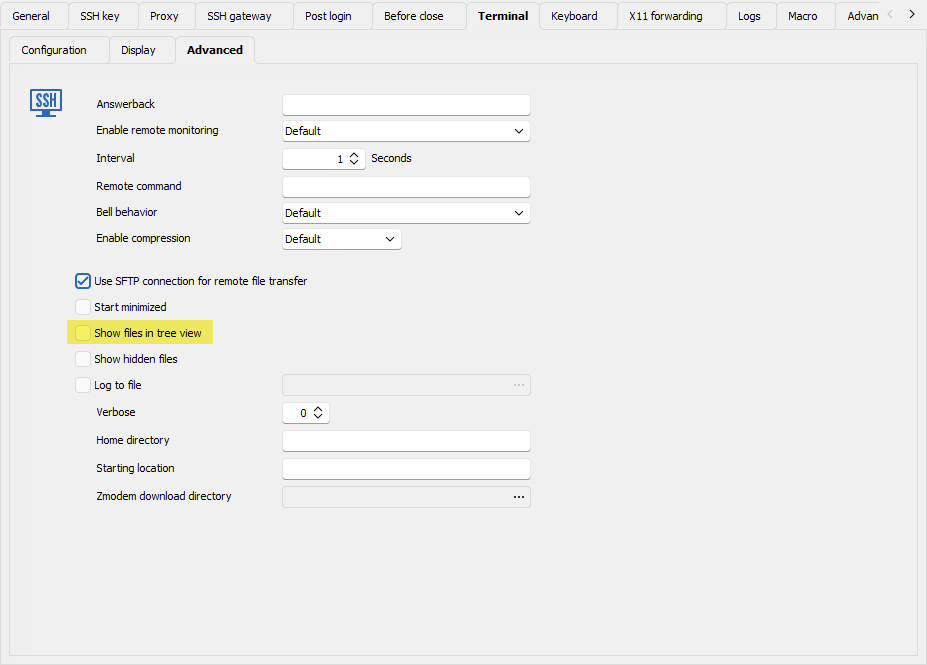
Try with these two settings enabled and let me know if it works as you'd expect.
Regards,
Hubert Mireault
91af6732-6e5d-4b82-bc55-19c71d6a1547.png
thanks ... that got it sorted
after turning it on and off it a few times and restarting twice
is there a global setting that i can use to set this across all sessions or do i need to change it on each session
i had a look and i cant seem to find anything
Hello,
You could change it using the batch edit feature, for more information you can look at our documentation: https://docs.devolutions.net/rdm/commands/edit/batch/batch-edit/
In your case you would need to use the "Edit entries (session type settings)" batch edit method as this is a setting for the SSH Shell entry specifically.
We will open a ticket to change the default value of this setting for our 2024.2 version. I think it would be more usable to see the files by default.
Regards,
Hubert Mireault
sweet thanks for that i was dreading having to change 200 odd sessions manually .. and honestly i would likey not change them at all till i needed to get files of a device
thanks a bunch for the advice ill look at it soon
Hello!
If you don't mind I have an additional question about SFTP via SSH Session.
If I set the advanced option to use SFTP and open the SFTP "sidebar", I land in my users home. But I'm not able to travel upwards to / or somewhere else.
Is there a hidden trick I don't get or do I have to set always / (root) directory as starting "Home directory"?
Thank you!
Best regards,
Tobi
That seems to be the only war I have found.... But honestly unless you have som weird tunneling requirements like we do on our core routers it's probably best to just build a scp or sftp session rather than use the ssh shell session.... You get a full range of navigation options in those.... And on my home network it works well... The issue I was facing is that the session options gor scp and sftp are different to the ssh shell ones and I couldn't get the session right to jump through the hoops we have
@Tobi:
Setting the home directory to the root in your case would be the solution. There's some compromises we've made when it comes to the UI and configurations of the SFTP contained within the SSH Shell entry. If you need the full SFTP UI I would recommend as @parsious said to use the standalone SFTP entry at the moment.
I'm also noting that we might want to rethink the way the SFTP-within-SSH-Shell feature is presented so that it's more useful and intuitive to use. We appreciate your feedback, as it is part of why RDM is as versatile and feature-rich as it is today.
Regards,
Hubert Mireault
Thank you both for the quick reply.
I'm already using separate SFTP sessions, but just wondering if I was missing maybe something new.
Thank you!
Tobi