
Olivier Desalliers
Chrome Browser Plug in Freeze
Hi,
We have an upcoming fix for an issue where certain passphrase settings can cause the application to freeze, as mentioned in my previous message. This fix may also help resolve issues with incompatible Password Policy settings.
In the meantime, could you try creating a new Passphrase Password Policy and let us know if it works? From what I understand, your other password policies seem to be working correctly, and the issue appears to be specific to the Passphrase policy.
Best regards,
Chrome Browser Plug in Freeze
Hi,
The freeze you experienced was likely caused by the Passphrase settings in your Password Policy, where the Frequency value was set higher than the password length.
Could you try switching between the Default Password Policy and your Passphrase Policy to verify that passwords are generated correctly according to the selected policy?
Best regards,
Chrome Browser Plug in Freeze
Hi,
We're investing into your password generator freeze.
To help us confirm the cause, could you tell us:
1. Does it only happen when you generating a passphrase?
2. If so, is Append number set to Randomly, with a Frequency always higher than the Passphrase length?
In the meantime, you can try importing the attached file. It resets the password generator to its default settings:
1. Open the extension's settings. Don't open the password generator first.
2. Select Import settings, then choose the attached file.
3. Confirm the import.
The import only replaces your password generator settings. Your other settings stay the same.
Does the password generator still freeze after the import?
Best regards,
DPM browser plugin issue
Hi,
The additional window displaying entries with names similar to the one searched for using Find By Name might be related to wildcard support.
For example, searching for MyEntry* will return all entries whose names start with MyEntry.
Regarding the username format settings, we will investigate this.
Best regards,
Problem with Web Logins - Firefox
Hi,
For some multi-step login pages, such as https://admin.webex.com, getting “Automatically autofill on load” to work may require manually specifying the input field’s ID or name in the entry’s HTML Controls section:
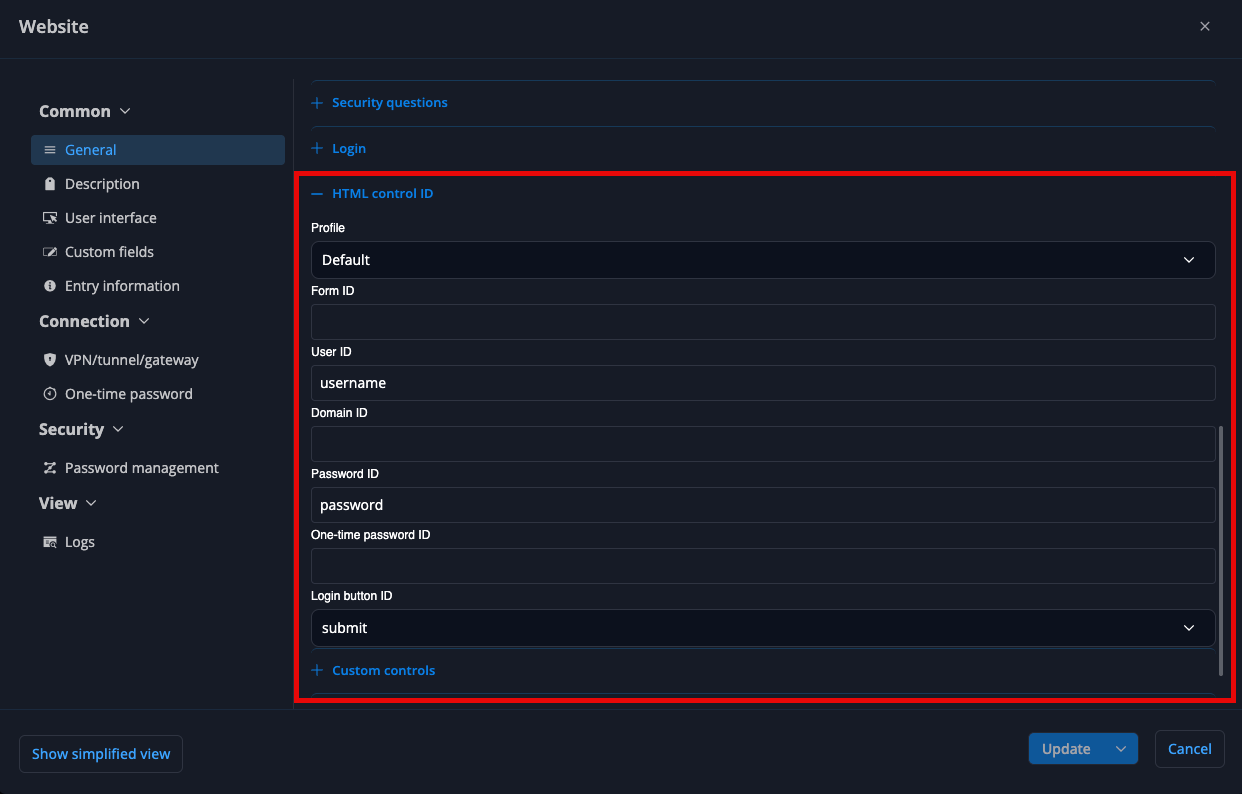
For example, on https://admin.webex.com, you can set the User ID field to email.
Auto-submit/auto-login on multi-step login pages is a bit more complex. Depending on how a website’s login process is implemented, the extension may not always be able to reliably identify when or how to submit the form. Some websites may have specific behaviors that prevent automatic submission altogether.
We’ll investigate the multi-step login Automatically autofill on load and auto-submit behavior on https://admin.webex.com to see if improvements can be made.
In the meantime, feel free to share any other websites where you’re experiencing issues with “Automatically autofill on load” or auto-submit/auto-login, particularly when HTML control IDs haven’t been manually configured. You can create a separate forum thread listing the affected websites. This would help us identify common patterns in how these login pages are built and potentially improve the extension’s compatibility across multiple websites.
Best regards,
Auto fill in username and password not working
Hi,
Devolutions Password Manager Browser Extension for Firefox 2026.3.2.1 is now available, including a fix for the auto-submit functionality that didn't work as expected on some Palo Alto management webpages.
The update should be installed automatically the next time Firefox checks for add-on updates.
If you’d like to update manually, you can follow these steps:
Open Firefox and navigate to about:addons.
Click the gear icon (⚙️).
Select Check for Updates from the menu.
Best regards,
Problem with Web Logins - Firefox
Hi,
Devolutions Password Manager Browser Extension for Firefox 2026.3.2.1 is now available, including improvements to “Automatically autofill on load” (autofilling without having to manually select an entry) and “Auto-submit” (automatically logging in without having to specify HTML element IDs).
The update should be installed automatically the next time Firefox checks for add-on updates.
If you’d like to update manually, you can follow these steps:
Open Firefox and navigate to about:addons.
Click the gear icon (⚙️).
Select Check for Updates from the menu.
Best regards,
Problem with Web Logins - Firefox
Hi,
Improvements to “Automatically autofill on load” (autofilling without having to manually select an entry) and “Auto-submit” (automatically logging in without having to specify HTML element IDs) will be included in the next version of the browser extension.
Best regards,
Possible regression in Devolutions Password Manager 2026.3.1.9 – Autofill fails with linked credentials and password lists
Hi,
To help us narrow down the issue:
Is the Devolutions Password Manager browser extension connected directly to Remote Desktop Manager or Devolutions Server or Devolutions Cloud?
Are you using the “Automatically fill in credentials on load” option, or are you manually selecting the entry from the extension?
Have you configured any HTML Control IDs in the affected website entries?
Best regards,
Problem with Web Logins - Firefox
Hi,
A new version will be available as soon as it has been reviewed and approved by the browser extension stores (Mozilla Add-ons, Chrome Web Store, etc.).
This update should improve the “Automatically autofill on load” and “Auto-submit” features, providing a smoother and more seamless experience on both of your websites.
We’ll post an update here as soon as the new version is available.
Best regards,
My Privileged Account option in password manager and password manager can access PAM vault.
Hi,
Is your extension connected to Remote Desktop Manager, Devolutions Server, or Devolutions Cloud?
What credential type is configured for your “My Privileged Account” credential? Is it a Devolutions Cloud Privileged Account, Devolutions Server Privileged Account, or another credential type?
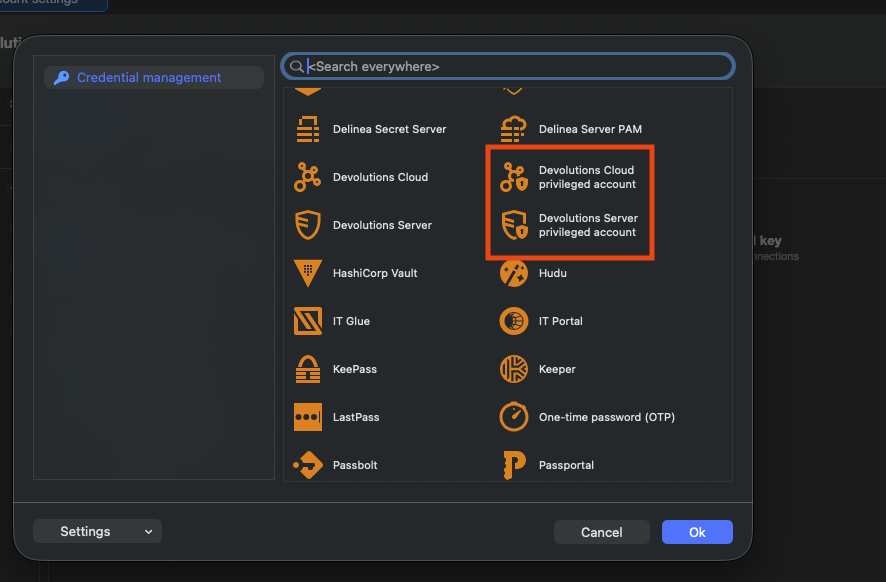
Or are you referring to using the “My Privileged Account” credential type in the same way as the “Privileged Account” credential type, where you can select a PAM entry from a PAM vault?
Best regards,
Problem with Web Logins - Firefox
Hi,
Does the autofill work when you click on the entry?
For vSphere, you can configure the following HTML IDs by editing the entry and scrolling down to the HTML Control ID section:
User ID: username
Password ID: password
Login button ID: submit
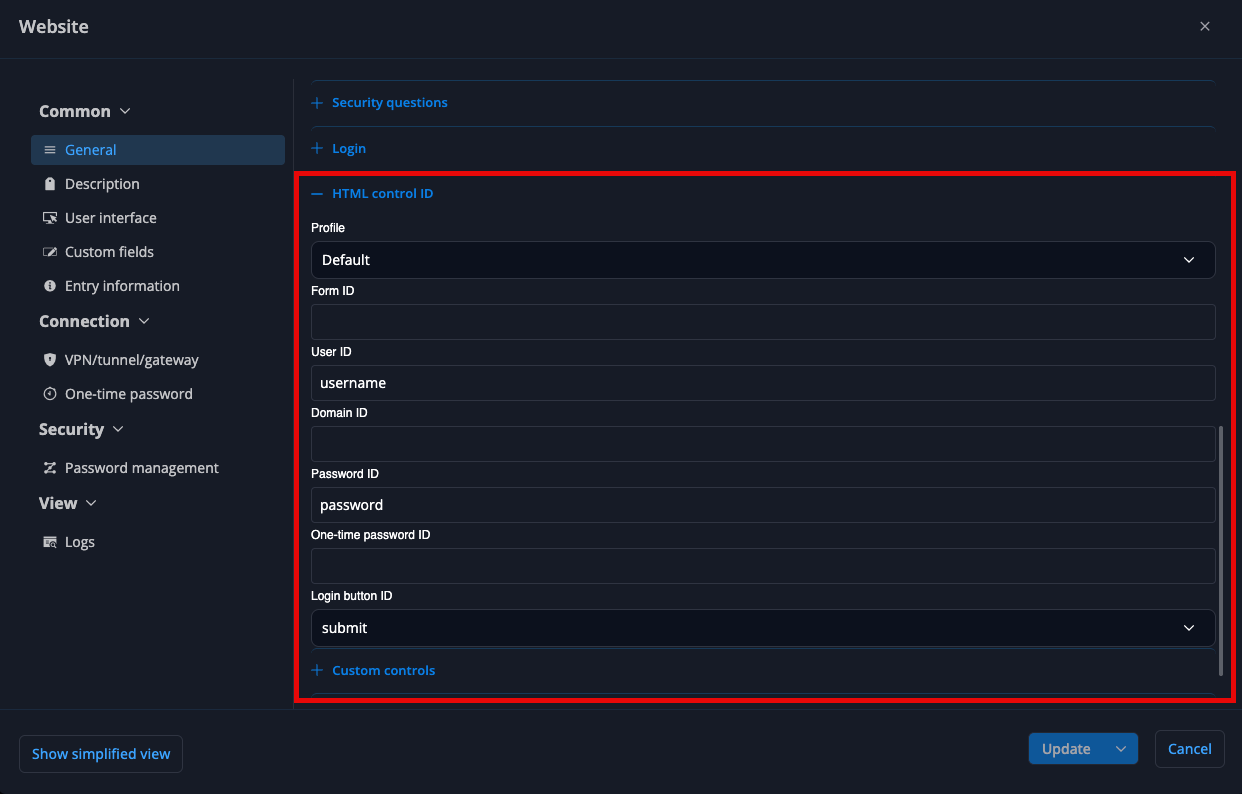
Are there any other websites besides vSphere where Autofill on load doesn’t work unless HTML IDs are specified, but clicking on the entry successfully triggers the autofill?
We’ll investigate why Autofill on load doesn’t work on vSphere without specifying the HTML IDs.
Best regards,
Auto fill in username and password not working
Hi,
The Login button ID for the Palo Alto management webpage is "submit".
We’ll investigate why the auto-submit functionality doesn’t work as expected on some Palo Alto management webpages.
Best regards,
Auto fill in username and password not working
Hi,
Does autofill on load work if you configure the following HTML control IDs in the entry?
Username ID: user
Password ID: passwd
Please note that the IDs/names may differ depending on the version of your internal Palo Alto management webpage.
Best regards,
Problem with Web Logins - Firefox
Hi,
Is the browser extension connected directly to Remote Desktop Manager (RDM) or to Devolutions Cloud?
Based on your screenshot, the extension appears to be connected to Devolutions Cloud, while the pages you are editing are in RDM.
When opening a website from RDM, the browser extension needs to be linked to that RDM instance in order to retrieve the associated credentials.
You can find step-by-step instructions for retrieving credentials here:
When connected to Devolutions Cloud: https://docs.devolutions.net/password-manager/browser-extension/devolutions-password-manager-browser-extension-with-devolutions-cloud/using-the-devolutions-password-manager-browser-extension-with-devolutions-cloud/retrieve-credentials
You can also refer to this video for the Devolutions Cloud workflow: https://youtu.be/PiYDKIU-q-A?si=7vzQ67CYOonB73JY
Best regards,
Auto fill in username and password not working
Hi,
Do you have HTML IDs configured in the entry? Did the website change those IDs?
Does it work when the Website entry doesn’t have any HTML IDs configured?
Best regards,
Problem with Web Logins - Firefox
Hi,
Do you have “Automatically fill in credentials on load” and “Automatically submit the form after filling it” enabled in Extension Settings > Remote Desktop Manager Workspace?
Does it work when you manually select the entry in the extension popup?
For the equivalent URLs, you can add the URLs in the “Equivalent URLs” section of a Website entry. Where was your list of URLs before?
Best regards,
Auto fill in username and password not working
Hi,
When you initiate the fill from the extension popup in the browser toolbar, does the password field get filled correctly?
For the example shown in the screenshot above, could you also try removing the HTML IDs from both the username and password fields and let us know if that changes the behavior?
Best regards,
Auto fill in username and password not working
Hi,
We’ve been able to reproduce this issue on some websites.
As a workaround, you can manually specify the HTML id or name attributes for the input fields on the website. You can find the steps here:
For Devolutions Cloud, the HTML IDs can be configured in the HTML control ID section by scrolling down in the entry settings:
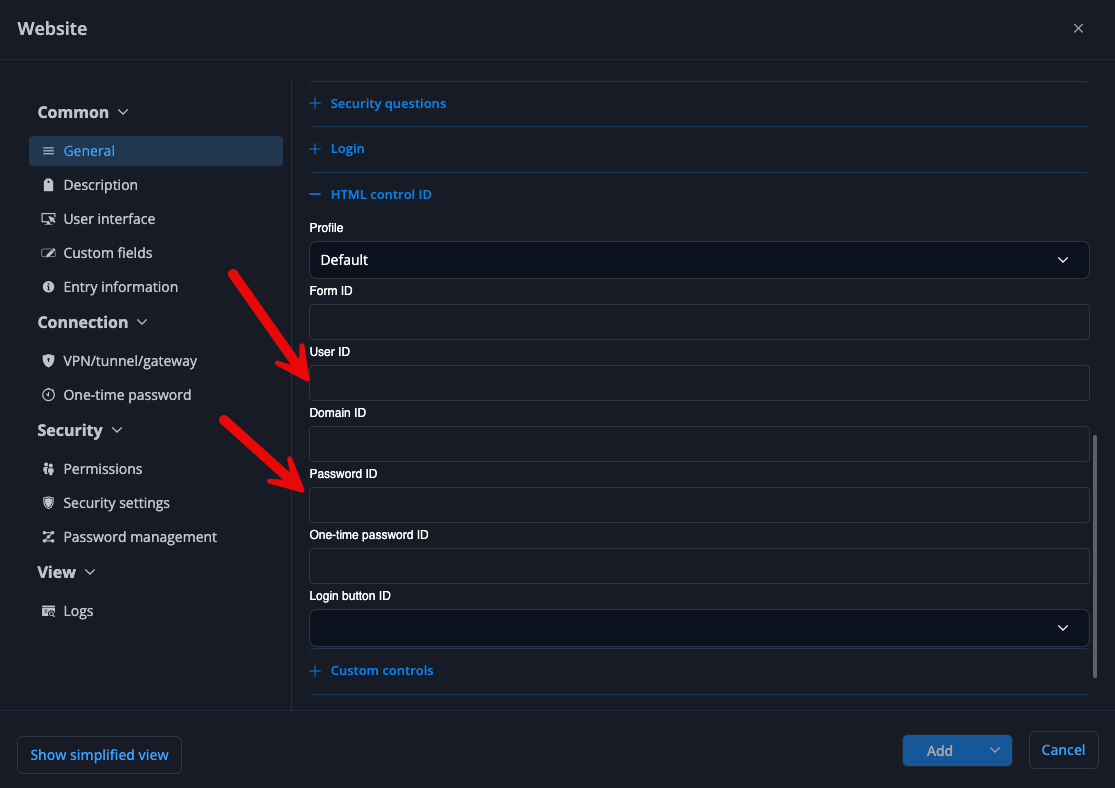
We’ve also made improvements that will be available in the next version, which may help resolve the issue with the websites you’re experiencing problems with.
Best regards,
Auto fill in username and password not working
Hi,
@GioGG, we are currently investigating the issue and trying to reproduce it on our end. We haven’t made any changes to how the extension analyzes websites that are not using HTTPS or that have invalid certificates.
Could you please provide the following information?
What version of Firefox are you using?
Are you using macOS, Windows, or Linux?
Is the extension connected directly to RDM, or is it connected through Devolutions Cloud or Devolutions Server?
This information will help us narrow down the issue and reproduce it more reliably.
@NeilSmith2025, we are also investigating the issue you reported and are working on reproducing it on our end.
Best regards,
Auto fill in username and password not working
Hi,
By autofill, do you mean with “Automatically fill in credentials on load” setting is enabled?
Does this issue occur on every website, or only on specific ones?
Regarding the website shown in your screenshot, is it an internal website, or is it publicly accessible so we can try to reproduce the issue on our end?
Also, how are you opening the website? Are you opening it directly in your browser, or are you using Open External from RDM?
Best regards,
Devolutions Password Manager Extension
Hi,
Are you using the “Disconnect workspace on close” setting in DVLS?
You can find this setting in the DVLS Web interface under:
Administration → System Settings → RDM and Password Manager Clients → Select the client → On Close
Are you able to log in successfully when this setting is unchecked?
Best regards,
Option to mark entry NOT associated when showing up
Hi,
The setting you’re looking for is URL Comparing Types:
If the comparing type for your Website URL and Equivalent URLs is set to Default, it will use the setting configured in the browser extension, which is Host by default.
With the Host comparing type, an entry will appear as long as the hostname matches. The URL path is not taken into account.
In your case, if you want the entire URL to be compared and require an exact one-to-one match, you may want to use the Exact comparing type instead.
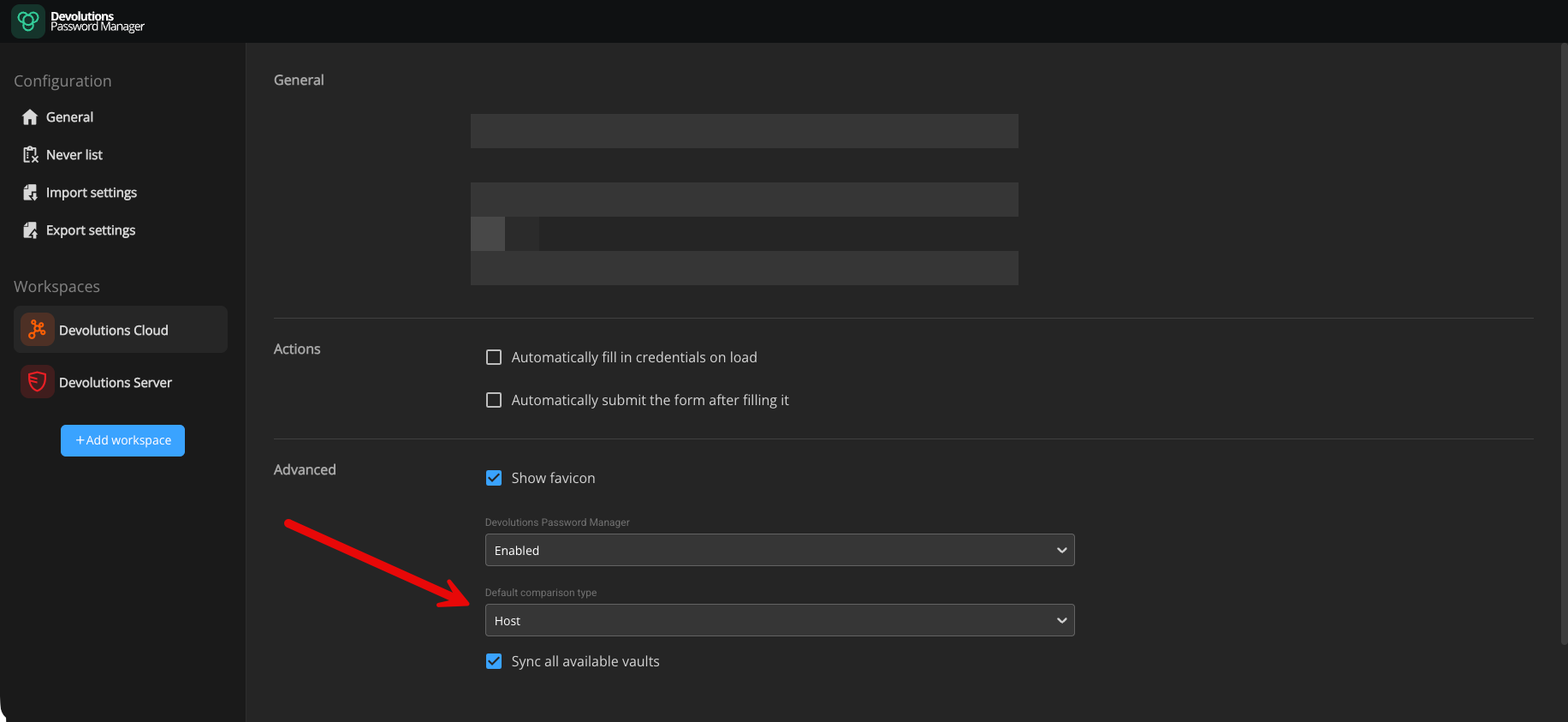
Best regards,
Devolutions Password Manager (Webbrowser) - Filter for Credentials
Hi,
We will add to the ticket to add an option that allows users to choose which entry statuses should appear in search results.
Best regards,
404 - Page Not Found with any browser extension
Hi,
Are you using a custom name/subdomain for your Devolutions Cloud URL, the default URL, or the legacy hub.devolutions.com URL (for example, if you previously used Hub Personal)?
You can find more information about Devolutions Cloud URLs here:
When accessing your database through the web interface, do you also receive the “Access denied” error?
Also, could you confirm whether you are using the same URL in both the web interface and the browser extension?
Best regards,