Devolutions Password Manager Extension

Hi,
we found an issue in login from extension version 2026.3.1.6 to Devolutions Server 2026.2.16.0.
The DVLS server site says Success, but the plugin still need Log in: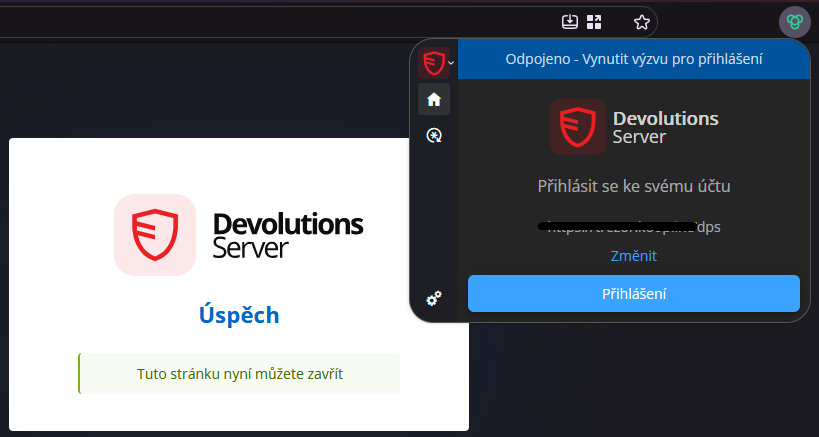
In the plugin debug mode the console says:
"Uncaught TypeError: can't access property "id", t.tab is undefined
handleContentScriptMessage moz-extension://b9db24f1-9cb0-4317-be62-98d85be2339e/entries/background/background.js:1"
The same issue is reported from users with Chrome browser.
MS Edge still use an older version 2026.2.3.5 and there is no problem.
Upgrade to the Devolution Server 2026.3.5.0 is not possible because there exists an issue with login to the CyberArk plugin used in RDM (reported at https://forum.devolutions.net/topics/56266/202635--saml-authentication-failed-against-cyberark).
Snímek obrazovky 2026-09-17 111209.png
All Comments (2)
Hi,
Are you using the “Disconnect workspace on close” setting in DVLS?
You can find this setting in the DVLS Web interface under:
Administration → System Settings → RDM and Password Manager Clients → Select the client → On Close
https://docs.devolutions.net/password-manager/knowledge-base/browser-extension-knowledge-base/understanding-disconnect-causes#disconnect-on-close
Are you able to log in successfully when this setting is unchecked?
Best regards,
Olivier Désalliers
Hi Oliviere,
I can confirm that this helped us.
Thank you
Best regards,
Jirka