
Hubert Mireault
Central Setting in Devolutions Hub + Server to activate Windows Hello RDM lock
Perfect, thank you for the clarification, we'll open a ticket to add support in Cloud for this setting.
Regards,
POST LOGIN CHANGE
Hello,
I think it's an interesting idea but we would have to figure out the best way to include this without complexifying the settings too much. We'll keep this in mind for future improvements, but for now we'll focus on at least re-establishing a way to have the previous behavior to not send Ctrl-C when a command times out.
Regards,
Central Setting in Devolutions Hub + Server to activate Windows Hello RDM lock
Hello,
This should already be available for Devolutions Server. In RDM, if you go in Administration > System Settings, under Application > Security, there's a setting to enforce Windows Hello when available:
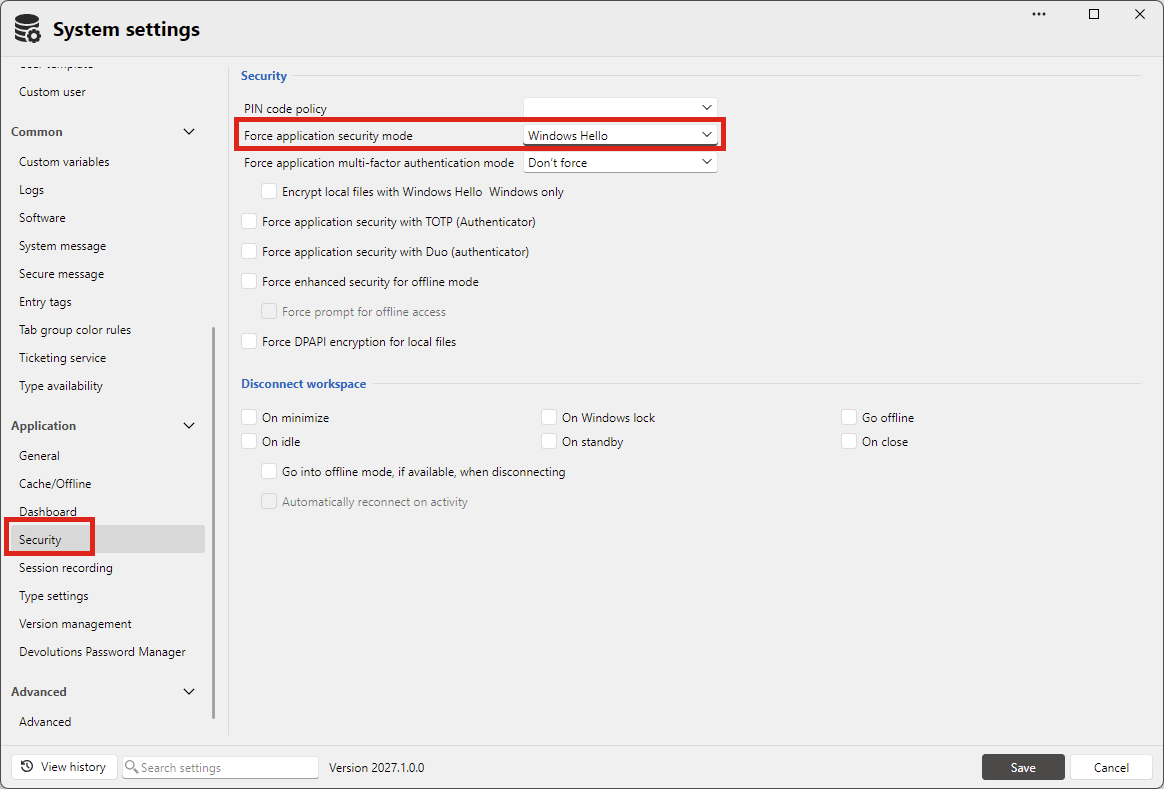
Are you using Server or Cloud? On Cloud I do notice it's not available.
Regards,
POST LOGIN CHANGE
Perfect, this is really helpful.
I discussed with our terminal expert and this was indeed a change that was made between 2024 and now. At one point we changed our terminal implementation from C to C# and while we tried to make it a 1:1 recreation, some things were changed and this was among them. The reason for it is that if part of the post-login commands were sent, once the next prompt isn't found, we assumed that a user would want the ongoing action to be stopped. Obviously, from your feedback, this was not necessarily a good assumption.
I have opened a ticket and we will see about adding an option to change the behavior, and will reconsider the default behavior as well. We will post back here once we have an update.
Regards,
Network Scan Improvement
Hello,
We could add this no problem. What kind of format are you looking for, something human readable or more of a CSV to use in other tools?
Also, do you have any other use cases than the export that are missing?
Regards,
POST LOGIN CHANGE
Hello,
I would like to know a few additional things about your configuration. Screenshots might help here.
- How did you configure your post-login commands? Are you using an SSH entry with its "post login" section, or a different kind of entry in the "events" tab?
- If using the SSH post-login section, did you enter anything in the "Expected prompt" and "Timeout" fields?
It would also be interesting to know the version of RDM you used prior to this. Was it a much older version, or relatively recent? You could check in Help > About, there's a version history that lets you know what version you updated to and from. If your version is too old it's possible it won't be listed there, but it would be good to check.
I'm intrigued that you mention it worked beforehand. This means that there may be a bug and there could be no need to add a new feature here, but it's hard to tell without more information.
Regards,
Slim Hidden Navigation Panel
Thank you for the clarification.
For the first point we could definitely improve this, we'll see what we can do. I have opened a ticket.
For the second, at the moment the behavior is like this:
- If the navigation pane is pinned, entries will be resized to fit its size
- If the navigation pane is not pinned, entries will take the "full" available size. Clicking the navigation pane to open it will not resize the opened entries, as long as you don't pin it
The space an opened entry can take is dependent on whether you pin the navigation pane or not. I'm not sure it would make sense to have entries "underneath" a pinned pane, otherwise the pane would get in the way. Maybe I don't quite understand the behavior you'd like here, so if you have an example of another application that has this behavior, I would be interested in seeing it so we can take inspiration from it.
Regards,
Overview Page - Add Name field with copy to clipboard
Hello,
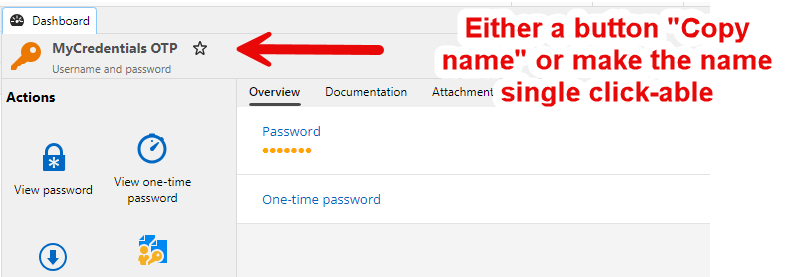
We could make the name clickable to copy, or add a "Copy name" button directly in the header next to the favorite button, what do you think?
Regards,
"Last used" field on entries
Hello,
I believe at the moment we don't support this, but it's the kind of information we already have through logs, so we should be able to create the appropriate reports to surface this information.
I have opened an internal ticket so we can add this to our products.
Regards,
Automated HTML Export of Passwords
Hello,
Thanks for detailing your requirements, this is very useful to know exactly what you need. The good news is that unless I'm missing something in how our codebase works, this should all be possible.
One important thing is that the export being encrypted with a custom password will mean the scheduled task will have to include this password in the command line it will run. Depending on your security policies, that may not be considered secure, but if it's a solution that works for you, then I believe everything you've listed will be covered by the feature.
Just one confirmation I'd like from you, if you manually perform an HTML export, is the result exactly what you're looking for? You can do this either through the ribbon menu or the context menu on the tree, by going in the "export" section, then "special" and exporting the vault to HTML:
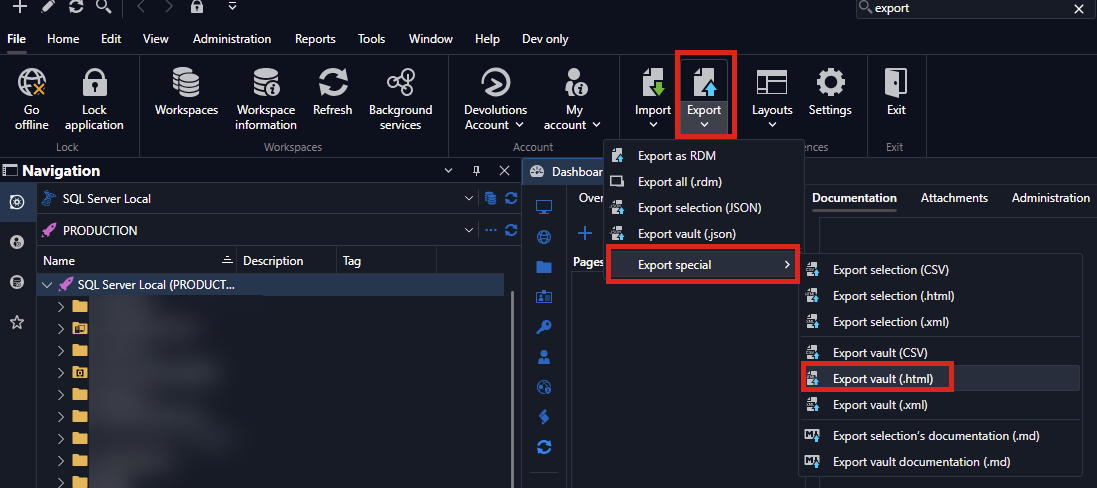
From there you're able to set a password, either as a ZIP file, or on the HTML file itself if you opt not to use a ZIP. I want to confirm with you that this HTML format is what you're looking for as that is definitely the easiest way for us to implement this since we have every piece already, just need to make them available in a way you can schedule through CLI.
Regards,
Ability to move/remove TAB Groups and Set Order of tabs
Hello,
Thank you for the request. We'll open a ticket to allow reordering the tab groups.
Regards,
Slim Hidden Navigation Panel
Hello,
Just to confirm with you, is what you're looking for here a more intuitive way to re-open the navigation pane? From what I understand at the moment it's a specific 'button-sized' zone you click to re-open it, and this would make this zone take the entire bar instead. So, easier to find and easier to click. Is this right?
If that's the case, we'll open a ticket and we'll see what we can do to improve the behavior.
Regards,
BeyondTrust Password Safe Personal Integration with Access Token auth option
Hello,
We'll open a ticket and see about implementing this authentication method.
Regards,
Autoview content of scripts
Hello,
I think this would make a lot of sense to add, I'll open a ticket for this.
Regards,
Adjustable scrollbar width in Navigation pane
Hello,
I've moved your thread to the Remote Desktop Manager forum as that seems to be the product you're using.
As for your request, is your goal for this setting to apply to every scrollbar, or only in the navigation pane? If it's mainly in the navigation pane, then I think it should be simple for us to add. If you can confirm this for me, I'll open a ticket so we can work on this.
Regards,
Annoyance: documentation editor always starts with "tutorial" and in WYSIWYG mode
Hello,
When your documentation is set in "markdown", there's both an "Editor" tab and a "Source" tab. The "editor" tab is WYSIWYG, while the source tag is the actual markdown text.

Since we offer both I assume it would be versatile enough for both you and your colleagues.
As a note we're also planning on reworking and improving the documentation feature, possibly in the next major version (2027.2, as 2027.1 is already feature-complete). For one, we're thinking of 'merging' the "View" and "Editor" tab for markdown, keeping only the WYSIWYG and source views. The "view" tab is somewhat redundant, and we think it would be easier for users to make edits without having to change the tab first.
Regards,
add Tools and auotmation icon when menu in Toolbar mode
Hello,
Nothing new for now, as we're trying to wrap up our featureset for our first beta release of 2027.1.
Regards,
Asset Information: Dependencies
Hello John,
I think it's an interesting idea. We've had a few requests in the same line of thought in the past so I think it's something many of our users could benefit from. With this kind of dependency links, we could even generate a visualization of it as well.
I'll open an internal ticket for this.
Regards,
Filter Entries with Boolean
It would be helpful to be able to save the settings with a name that way I can create different searches and simply click on the saved one I want to use, having to change the settings can be tedious especially once you figure out which settings you need based on the given scenario. It would be nice to export the saved settings in case they need to be re-imported.
I think that's a good idea. We have something like that for the advanced search but not for the navigation pane filter. I'll open a ticket so we can add this.
Regards,
Filter Entries with Boolean
Hello,
Thanks for the screenshots. “Include type” isn’t enabled, so it’s not that. One possibility is that “Include folder in search” is causing this. With &&, each word only has to match one of the enabled fields, and the folder field is the full path of the entry, not only its direct folder. If an entry is anywhere under a path like “Servers\SSH”, it matches both “server” and “ssh”, whatever the entry itself is. That’s why credentials, dashboards or RDP sessions can show up. The host field works the same way, so a host like “server01.ssh.local” would also match both words.
Could you check a few things:
- Do the extra results go away if you uncheck “Include folder in search”?
- For the handful of entries that shouldn’t be there, what is their full folder path and their host? Feel free to censor any sensitive information, but knowing more about this would help.
- Under “Filter options”, are “Include sub-connections” and “Include folder content” checked?
I'm suspecting the behavior is normal but we're not understanding the exact reason why these results are showing up. It's difficult for me to validate without knowing the full details of your results, but on my end, I wasn't able to replicate any issue or odd behavior with this feature.
Regards,
Filter Entries with Boolean
Could you check in the "Field options" and "Asset options" what you have enabled there?
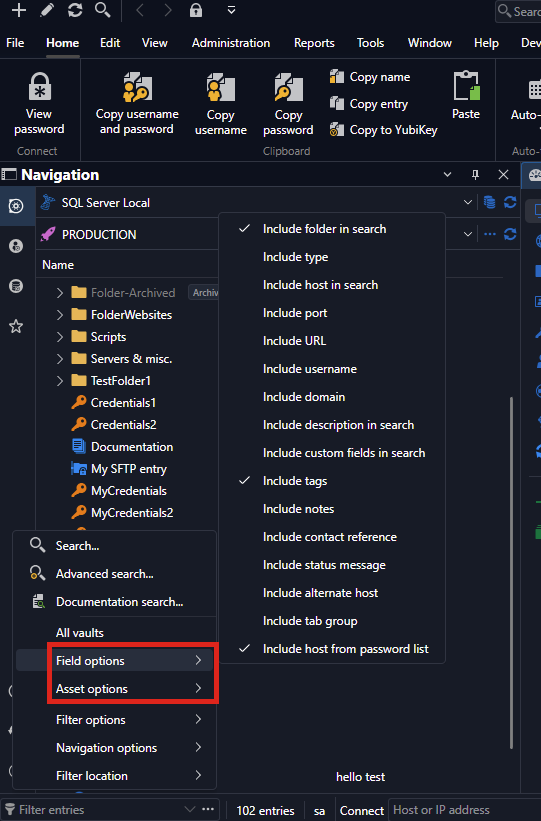
In your case it's possible that you have "Include type", so just writing "ssh" would show SSH terminal entries even if they don't have the tag "ssh". The same goes for "server", it may include some entries you would not be intending.
Regards,
Text in [] to Tags
Hello,
Could you validate which version of RDM you're using?
To make sure I understand what you want, you currently have tags in your description written like [TagA], [TagB], [TagC], and you would like to migrate them to the proper tag field, is this correct?
Regards,
Multi-keyword search across all vaults in Remote Desktop Manager (as already possible in the DVLS web interface)
Thank you for the additional information, I'll amend our ticket and ensure the DVLS team is also aware that the behavior is the same on the product.
Regards,
Filter Entries with Boolean
Perfect, I'm glad to hear it works!
Regards,
Filter Entries with Boolean
Hello,
It should be possible to use "||" and "&&" for OR and AND. Could you try it out and see if it works for you?
Regards,