POST LOGIN CHANGE
1 vote

So we have our normal ID we have entries setup with and a shortcut to open with another ID. The problem is with one ID we need to proform post login steps.
We setup the steps to look for the home directory of that ID. So when it sees that home dir it proforms the post steps.
However in our original version of rdm. This worked great. But in some past version it now does something like ctrl-c after it times out looking for that home dir. So you get on and start typing then the timeout happens and it breaks out and you have to start typing all over.
We are currently on 2026.2.16.0 if this was fixed at some point please let me know which version so I can push my company to allow it.
I would like either it to do nothing if no post steps are executed or be able to have post steps dependent on login ID. Even a general user post login section not entry specific. Or maybe a saved login specific post login steps saved under the login instead of entry.
All Comments (5)
Hello,
I would like to know a few additional things about your configuration. Screenshots might help here.
- How did you configure your post-login commands? Are you using an SSH entry with its "post login" section, or a different kind of entry in the "events" tab?
- If using the SSH post-login section, did you enter anything in the "Expected prompt" and "Timeout" fields?
It would also be interesting to know the version of RDM you used prior to this. Was it a much older version, or relatively recent? You could check in Help > About, there's a version history that lets you know what version you updated to and from. If your version is too old it's possible it won't be listed there, but it would be good to check.
I'm intrigued that you mention it worked beforehand. This means that there may be a bug and there could be no need to add a new feature here, but it's hard to tell without more information.
Regards,
Hubert Mireault
Hello,
I would like to know a few additional things about your configuration. Screenshots might help here.
- How did you configure your post-login commands? Are you using an SSH entry with its "post login" section, or a different kind of entry in the "events" tab?
- If using the SSH post-login section, did you enter anything in the "Expected prompt" and "Timeout" fields?
It would also be interesting to know the version of RDM you used prior to this. Was it a much older version, or relatively recent? You could check in Help > About, there's a version history that lets you know what version you updated to and from. If your version is too old it's possible it won't be listed there, but it would be good to check.
I'm intrigued that you mention it worked beforehand. This means that there may be a bug and there could be no need to add a new feature here, but it's hard to tell without more information.
Regards,
I know it was working as late as 2024.3.10.0
I think it happened either when we went to 2025.3.29.0 or 2026.1.23.0. But feel it was the 2025.3.29.0
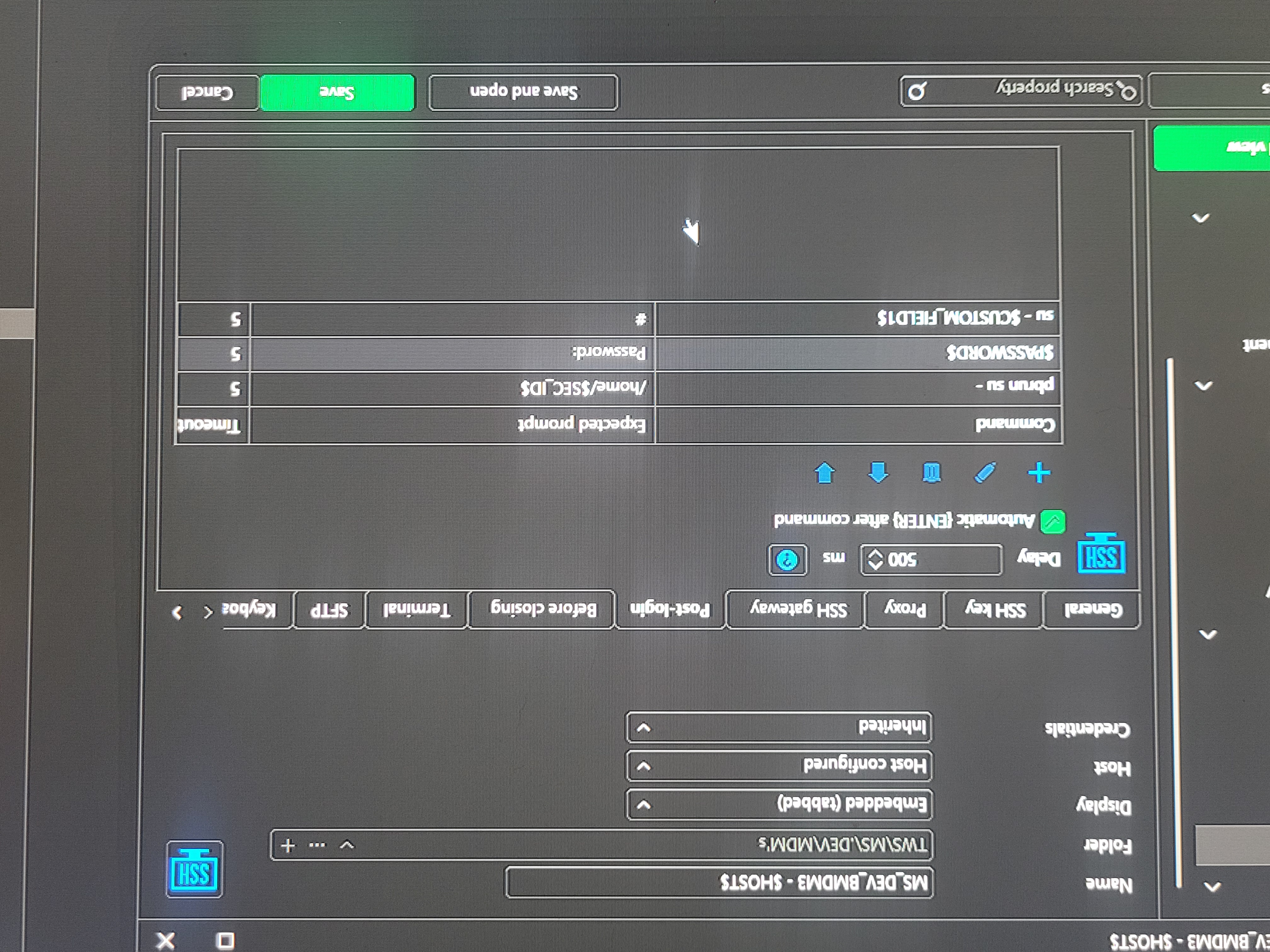
It is an ssh entry with post login. Expected prompt is the id's home directory. And timeout is 5.
So let's says user1 is the one that needs the post steps. So expected prompt is user 1 home dir. So we login it sees the home directory and runs a set of steps with the enter after command turned on. Works no problem
User2. It logs on doesn't see the home directory and times out after 5. So it does nothing as expected. However if your already in the middle of typing something. Before that 5 seconds or even if you do nothing it's like it breaks out maybe ctrl-c. So then you have to start typing your command again. If you type nothing you still see your prompt after 5 seconds it still goes to a new line like someone ctrl c out of it.
So my guess is either a bug was introduced between those versions or someone maybe said anytime there are issues with post login it should escape out of it.
It could also have been fixed in a newer version. But I have to wait for my company to approve them for use.
Sorry for low quality pic of setup it was easier than getting a screenshot added. If needed I can get a actual screenshot.
Perfect, this is really helpful.
I discussed with our terminal expert and this was indeed a change that was made between 2024 and now. At one point we changed our terminal implementation from C to C# and while we tried to make it a 1:1 recreation, some things were changed and this was among them. The reason for it is that if part of the post-login commands were sent, once the next prompt isn't found, we assumed that a user would want the ongoing action to be stopped. Obviously, from your feedback, this was not necessarily a good assumption.
I have opened a ticket and we will see about adding an option to change the behavior, and will reconsider the default behavior as well. We will post back here once we have an update.
Regards,
Hubert Mireault
Perfect, this is really helpful.
I discussed with our terminal expert and this was indeed a change that was made between 2024 and now. At one point we changed our terminal implementation from C to C# and while we tried to make it a 1:1 recreation, some things were changed and this was among them. The reason for it is that if part of the post-login commands were sent, once the next prompt isn't found, we assumed that a user would want the ongoing action to be stopped. Obviously, from your feedback, this was not necessarily a good assumption.
I have opened a ticket and we will see about adding an option to change the behavior, and will reconsider the default behavior as well. We will post back here once we have an update.
Regards,
Thanks, and as noted before it would be nice to be able to pick which logins run the post steps or being able to have diffrent post steps based on what login was used.
If we could say these post steps are for login X then it wouldn't even have to attempt them and fail for the other.
Hello,
I think it's an interesting idea but we would have to figure out the best way to include this without complexifying the settings too much. We'll keep this in mind for future improvements, but for now we'll focus on at least re-establishing a way to have the previous behavior to not send Ctrl-C when a command times out.
Regards,
Hubert Mireault