Slim Hidden Navigation Panel
1 vote

Hi.
In my opinion pining navigation panel should look different. Here's how I would see it. Slim and simple. Another thing is I think terminal window should always be resized to fit window insted being under navigation panel. (An option would be nice to choose either resize terminal window or stay under navigation panel).


All Comments (9)
Hello,
Thank you for your feedback and suggestions about the pinned navigation panel. We’d like to pass them on to our development team.
Unfortunately, the two screenshots you mentioned didn’t come through on our side. Could you please attach them again?
best regard
Carl Marien
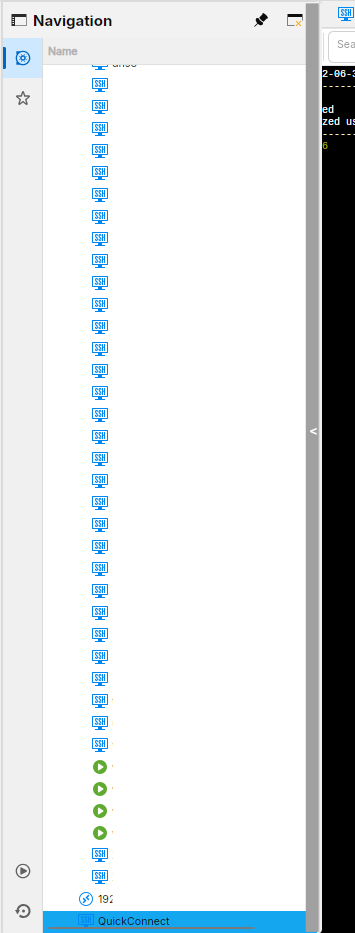
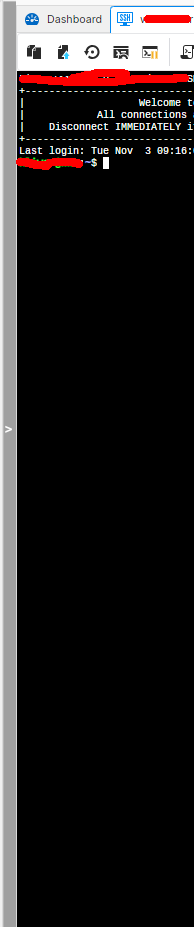
Here they are again
Hello,
Just to confirm with you, is what you're looking for here a more intuitive way to re-open the navigation pane? From what I understand at the moment it's a specific 'button-sized' zone you click to re-open it, and this would make this zone take the entire bar instead. So, easier to find and easier to click. Is this right?
If that's the case, we'll open a ticket and we'll see what we can do to improve the behavior.
Regards,
Hubert Mireault
Kinda, yes. Two requests:
1. I think when navigation panel is unpinned this bar with only "Navigation" button is too big and takes too much space.
2. An option would be nice to choose either resize terminal window or stay under navigation panel
Thank you for the clarification.
For the first point we could definitely improve this, we'll see what we can do. I have opened a ticket.
For the second, at the moment the behavior is like this:
- If the navigation pane is pinned, entries will be resized to fit its size
- If the navigation pane is not pinned, entries will take the "full" available size. Clicking the navigation pane to open it will not resize the opened entries, as long as you don't pin it
The space an opened entry can take is dependent on whether you pin the navigation pane or not. I'm not sure it would make sense to have entries "underneath" a pinned pane, otherwise the pane would get in the way. Maybe I don't quite understand the behavior you'd like here, so if you have an example of another application that has this behavior, I would be interested in seeing it so we can take inspiration from it.
Regards,
Hubert Mireault
Not entries. Termianal window.
Hello,
When I say "entries", I mean an opened tab of an SSH terminal, RDP, VNC, anything of that sort, as they all act the same with regards to the navigation pane's pinned state. As I said in my previous message, right now, what you mentioned in your second point should already behave this way according to whether you pin or unpin the navigation pane.
If you'd prefer a different behavior, we'd need more information to understand what you need and why what we currently do does not work for you.
Regards,
Hubert Mireault
So I guess what I would like would be this:
"<<<" = Unpin
">>>" = Pin
(something like show/hide sidebar on Claude)
We have a ticket opened to make a slimmer bar that's easier to use when unpinned, so it should cover this. I wasn't sure if you needed something else.
Regards,
Hubert Mireault