Central Setting in Devolutions Hub + Server to activate Windows Hello RDM lock
Central Setting in Devolutions Hub + Server to activate Windows Hello RDM lock
1 vote

I propose a setting that can be activated centrally in either Devolutions Hub or Devolutions Server to enable the Windows Hello Applock Feature for all users in a workspace. Currently you can only activate it per local RDM installation for that specific user or you have to use GPOs.
All Comments (4)
Hello,
This should already be available for Devolutions Server. In RDM, if you go in Administration > System Settings, under Application > Security, there's a setting to enforce Windows Hello when available:
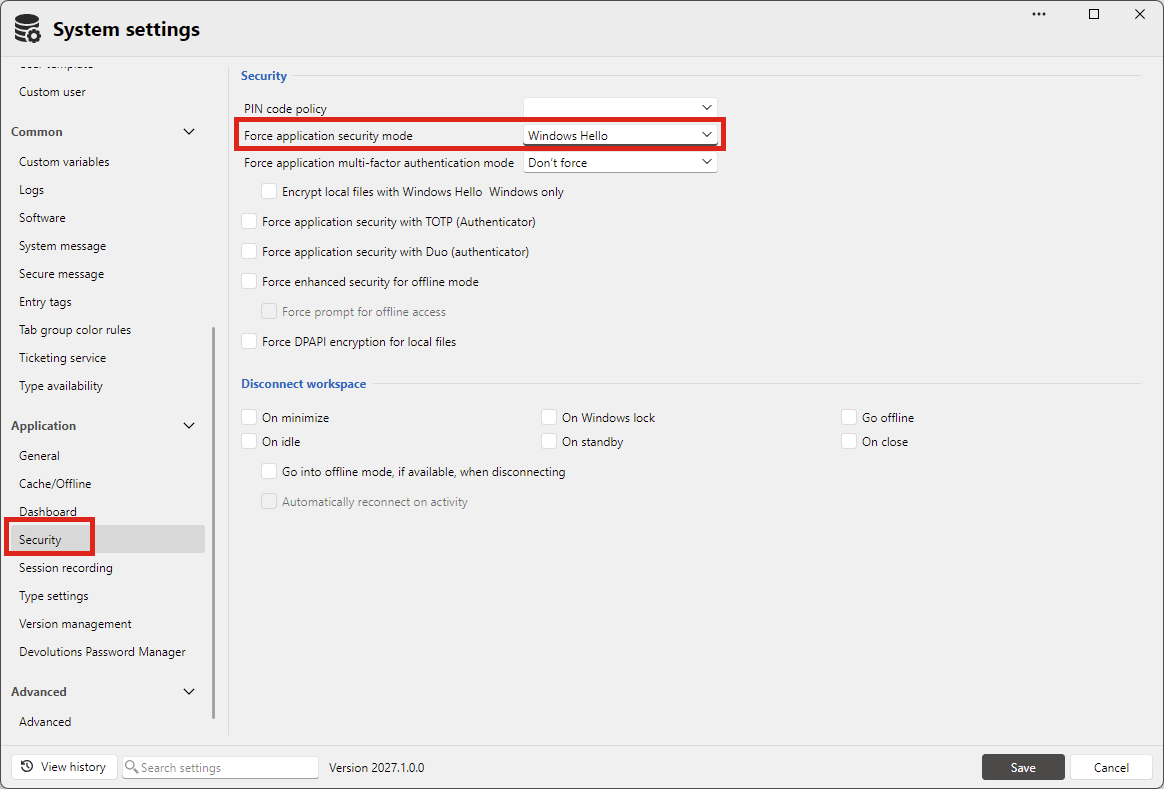
Are you using Server or Cloud? On Cloud I do notice it's not available.
Regards,
Hubert Mireault
Hello,
This should already be available for Devolutions Server. In RDM, if you go in Administration > System Settings, under Application > Security, there's a setting to enforce Windows Hello when available:
Are you using Server or Cloud? On Cloud I do notice it's not available.
Regards,
Hello,
we are using Devolutions Hub, I cannot find an option there.
best regards
Denis
Perfect, thank you for the clarification, we'll open a ticket to add support in Cloud for this setting.
Regards,
Hubert Mireault
Perfect, thank you for the clarification, we'll open a ticket to add support in Cloud for this setting.
Regards,
Thank you very much :)