
cyr0nk0r
auto accept SSH fingerprint keys ??
love it!
thanks!
auto accept SSH fingerprint keys ??
I remember asking for this back last July and being told it would be fixed in the next version
https://forum.devolutions.net/messages.aspx?TopicID=16273
Where do I go to get the ssh fingerprints to auto accept?
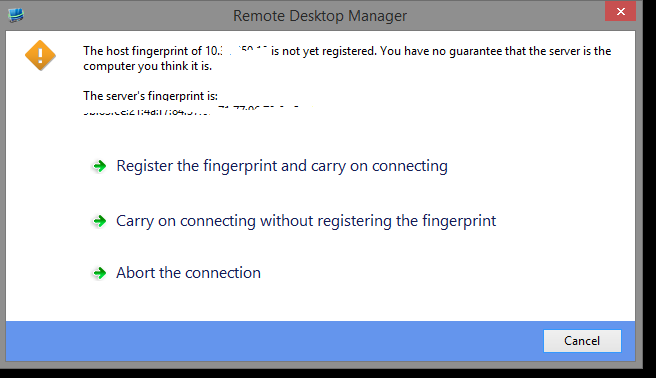
edited by cyr0nk0r on 3/3/2015
change RDP setting for all connections en masse
I fixed my RDP template, but I have over 100 connections that I want to uncheck a box on all of them.
Specifically, local resources -> local devices and resources -> 'hard drives' (uncheck)
Is there a way that I can uncheck this checkbox en masse for all of my RDP connections?
Running RDM version 9.2.10
auto register SSH fingerprint?
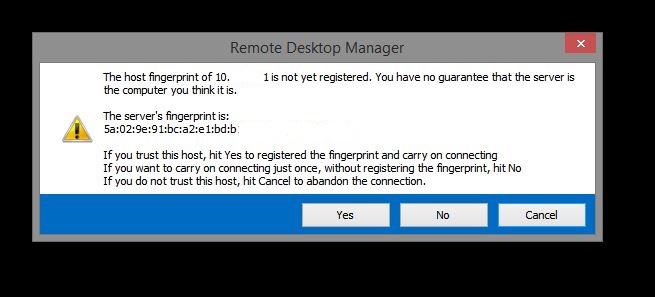
Is there a way I can set RDM to auto register the fingerprint when I SSH into a new switch.
We have over 1,000 switches and I don't want to always have to hit yes.
disable "full screen" button in title bar?
Any way to turn off the full screen button that is next to the minimize maximize close buttons in the title bar?
Running latest version.
turn OFF restore sessions dialog?
How do I turn off this awful and annoying "select the sessions you want to restore" dialog every single time I open RDM?
running latest 9.0.4 build.
GUI Bug with navigation panel and right click
Latest stable version 8.3 I think
If you right click in the navigation pane left clicking does not make the menu go away. the only way to get rid of the menu is to click an option within the menu.
Too Many Tabs = Protocol Error?
any update on the 64bit version?
vmware vsphere client not working
I'm not trying to do a remote console. I'm doing a "VMware Console"
What is the difference?
vmware vsphere client not working
[6/26/2013 10:11:24 AM]ERROR SILENT System.IO.FileNotFoundException: Could not load file or assembly 'VMware.Vim, Version=5.0.0.0, Culture=neutral, PublicKeyToken=10980b081e887e9f' or one of its dependencies. The system cannot find the file specified.
File name: 'VMware.Vim, Version=5.0.0.0, Culture=neutral, PublicKeyToken=10980b081e887e9f'
at Devolutions.RemoteDesktopManager.Managers.VMwareManager.GetHostSystem(String hostName, String username, String password)
at Devolutions.RemoteDesktopManager.Managers.ThreadManager.<>c__DisplayClass1a.<RefreshVMwareHostSystem>b__18()
WRN: Assembly binding logging is turned OFF.
To enable assembly bind failure logging, set the registry value [HKLM\Software\Microsoft\Fusion!EnableLog] (DWORD) to 1.
Note: There is some performance penalty associated with assembly bind failure logging.
To turn this feature off, remove the registry value [HKLM\Software\Microsoft\Fusion!EnableLog].
remote assistance prompt
It would be AWESOME if we could create a remote assistance session, but have the IP/hostname be blank. Then when opening the session RDM would prompt us for a hostname/ip. Currently the ip/hostname field is required to create the session for remote assistance. When our users call in we don't know their hostname or ip until they tell it to us.
By having RDM prompt we could create a single "session" in RDM and just change IP/hostnames on the fly.
vmware vsphere client not working
I am running Win7. Latest stable version of RDM.
I have vmware vsphere client 5.1 installed and RDM reports application ready.
If I load the vsphere client manually outside of RDM and connect to an esx server (either by hostname or IP) things work fine. I've even installed the self signed certificate so there are no warning prompts when connecting to the ESX server.
However when trying to do the same thing within RDM I open the session and the window shows zero VM's. If I click the refresh button at the top I get a "unable to connect to vmware host" message.
Any guidance?
how to remove/disable UI components
correct. Or at least the option to check a box and have it visible, not visible. I don't ever use the filter box and it would be nice to be able to disable it.
how to remove/disable UI components
Hi,
I will add a feature request to hide the navigation tabs
can you also add to hide #4 as well?
navigation pane auto hide delay
why?
Why can't the "navigation" button just be bigger or span the entire length of the vertical bar?
navigation pane auto hide delay
what about the best of both worlds
Have the hover vs onclick be a configurable setting.
And also change the area that activates the pop out to be the entire vertical bar rather than just the tiny little box at the top.
navigation pane auto hide delay
configurable?
Whatever the default is (say 300ms) could be the default value in the box, but users could change it from a value of say 100ms to 1000ms or something.
Although the ability to click anywhere on the navigation vertical bar to pop out of the pane would be much more useful in the near term.
navigation pane auto hide delay
Feature request to change the delay in ms when hovering mouse over hidden navigation pane and when the pane pops out.
EDIT:
It would also be nice if the navigation pane popped out if you click anywhere on the bar from vertical top to bottom instead of having to hover your mouse only on the button called "navigation"
edited by cyr0nk0r on 6/24/2013
how to remove/disable UI components
is it possible to hide the tab header now?
what about item 4 at the bottom of the navigation pane?
What about item 3?
EDIT: looks like I can remove the header tab now by doing Alt+Shift+F6
I did have to set it as a global hotkey though. No biggie.
edited by cyr0nk0r on 6/24/2013
right click on the menu registers as a left click
A confirm message for "logoff" would be AWESOME
(and do not **** off people who don't want a confirmation make it available to be turned on/off in the options menu.
"Display RDP logoff confirmation" (Yes/No)
I still think though that LogOff should not be right next to disconnect session.
The order should really be:
Focus Session
Close Session
Reconnect
LogOff
*However you should still fix the "right click registered as left click" issue while you're at it since this would technically be a GUI bug. A right click on a menu item like "focus session" shouldn't do anything, only a left click.
edited by cyr0nk0r on 4/3/2013
Too Many Tabs = Protocol Error?
I didn't mean microsoft. Has this been fixed in RDM? Your reply wasn't really an answer.
If a workaround is a 64bit version, then is the 64bit version complete?
right click on the menu registers as a left click
If I right click on a RDP host and then right click on say "log off" it registers this as a left click and logs the session off. This is a HUGE problem that hosed one of our servers because :
1: logoff is right next to disconnect (these should NOT be right next to each other)
2: accidentally right clicking on logoff during a windows update messed up one of our machines.
Too Many Tabs = Protocol Error?
can you provide a status if this protocol error issue has been resolved in a newer version?
RDM 8.0.15 - chews through memory
these settings have no effect.
without desktop composition
(start) : (end)
732mb : 865mb
without desktop, themes
737mb : 868mb
without desktop, themes, redirect x
739mb : 869mb
without desktop, themes, redirect x, redirect video
744mb : 875mb
close RDM, restart then connect (without all)
24mb : 173mb
close RDM, restart then connect (all)
23mb : 170mb
RDM 8.0.15 - chews through memory
This is a huge issue. It seems there is some kind of upper limit with the available ram for RDM.
It seems I can only have open 7 connections to 2012 servers. As soon as the RDM.exe gets above 1.1GB it doesn't seem to matter how much RAM my machine has left, I start to get the error that says there is not enough virtual memory available.