how to remove/disable UI components

Running latest beta 7.9.11.0
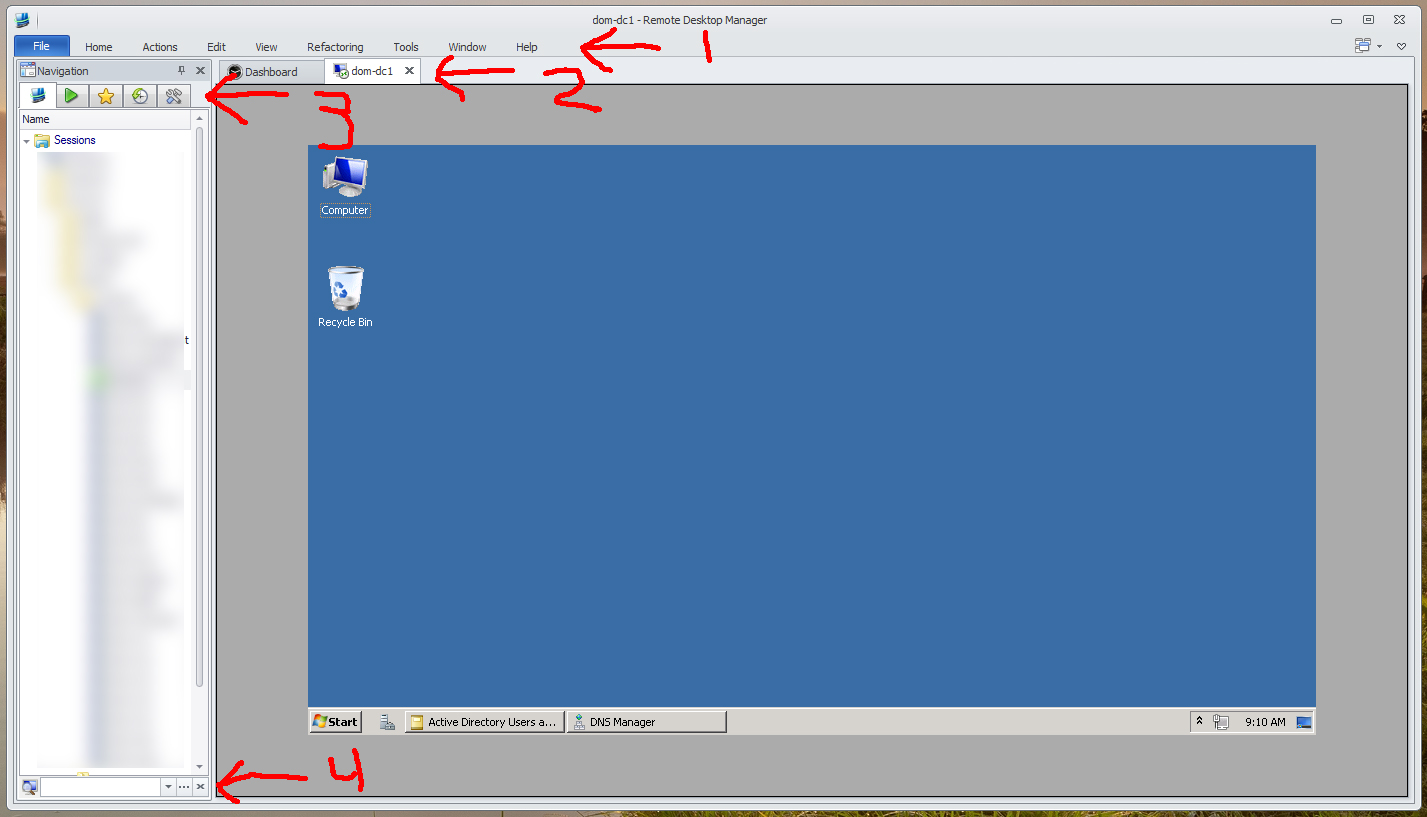
Wondering how to remove/disable UI components 1, 2, 3, 4
Have already gone to File -> Options -> "UI Options" -- "General" -> Disable Ribbon (ribbon is still there per screenshot)
Have already tried clicking the X button on the search box for item 4 but the box never closes
Can't figure out how to remove the tabs in the navigation menu. Right clicking on the tabs doesn't give any option to hide/disable them.
The dashboard tab can't ever be closed for some reason. Wouldn't care if there is a way to complete disable the tabs for connections per item 2.
edited by cyr0nk0r on 11/7/2012
screen.jpg
All Comments (18)
Hi,
I dont understand why your ribbon are not changed for a menu. Could you try to do a reset layout?
#2: it's not possible for now to hide the tab page. I will eventually see what I can do
#3: In the view menu, you can hide the navigation bar and use Ctrl+F toshow it
#4: this x is to clear the filter
David Hervieux
#1, have already tried a layout reset. same problem.
#2, why? You could hide it in v6. Why add something that users are unable to disable?
#3, I won't want to hide the entire navigation bar. I want all the tabs gone. They are useless. I just want the tree video of all my connections... thats it.
#4, so is this another thing that is impossible to disable?
After you disable the ribbon, you need to restart the application. You have to know that it's a complete design and we are now using another UI framework with some difference.
Sorry about that
David Hervieux
i get that it's a new UI which is fine.
But you haven't answered if the items are going to be able to be disabled.
You can hide the ribbon, but not the search box? You can hide the navigation but not the connection tabs?
These design decisions don't make any sense.
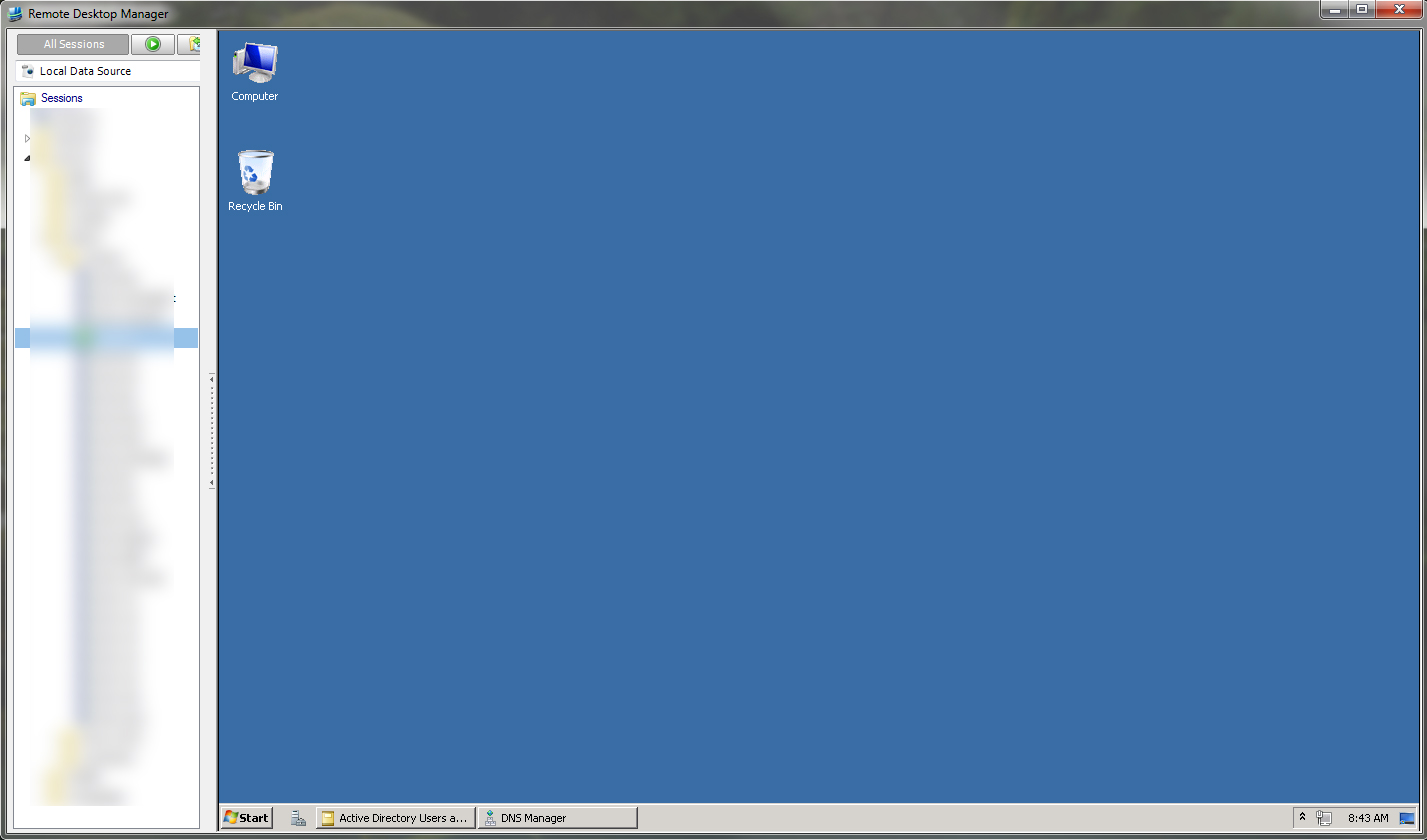
just as an FYI here is what I was able to accomplish with a minimalist UI from version 7.6.
Although the tabs and drop downs from the navigation area don't need to be there in the top left corner I could live with those because I was able to disable everything else.
scree.jpg
Have you tried the latest beta. It's now possible to hide the dashboard and the ribbon completly. The only thing missing is the tab header.
David Hervieux
is it possible to hide the tab header now?
what about item 4 at the bottom of the navigation pane?
What about item 3?
EDIT: looks like I can remove the header tab now by doing Alt+Shift+F6
I did have to set it as a global hotkey though. No biggie.
edited by cyr0nk0r on 6/24/2013
i would like to disable the number 3 to (the navigation tabs: openen sessions, favorites, most recently used and tools)
Hi,
I will add a feature request to hide the navigation tabs
David Hervieux
can you also add to hide #4 as well?
You want to remove the filter box?
David Hervieux
correct. Or at least the option to check a box and have it visible, not visible. I don't ever use the filter box and it would be nice to be able to disable it.
On my list
Thank you
David Hervieux
Just wondering about hiding #2 (tabs) now. I saw another post indicating that you can un-check View->Use Tabbed Headers, but I don't see that in the latest version, so I suspect it's an older post.
The tabs are incredibly annoying, and unnecessary, since there is a drop-down with all tabs listed. The changing size of the tab bar also re-connects RDP sessions unnecessarily due to the resize.
Eric
try Window -> Use Tabbed Header
regards
Markus
Kind Regards
Markus
======================
This worked perfectly! I didn't see this!
Thanks!
Eric
Well - maybe not - I thought it was going to eliminate the re-sizing and re-connecting of RDP sessions when moving between RDP sessions, but it re-connects every time, even though the size of the maximized RDP window is the same for each session. Basically, is there a way to avoid re-connects every time I move from session to session (clicking a different item in the Navigation pane)?
Eric
Hi Eric Miller,
Please have a look at this blog - http://blog.devolutions.net/2014/10/embedded-sessions-reconnecting-its-a-new-feature-of-the-rdp-activex.html
Best regards,
Jeff Dagenais