
Tom
Credentials with OTP for OpenVPN Connect
Ok, I found a solution for me.
I have configured an event before connection to the VPN.
I run a command line to delete the username entry from the registry. OpenVPN stores the username in HKCU\Software\OpenVPN-GUI\configs\...
"conhost.exe --headless reg.exe delete "HKCU\Software\OpenVPN-GUI\configs\MYPROFILENAME" /v "username-enc" /f"After this the username files is empty and RDM can fill this filed correctly with the username and after this the password + OTP.
Credentials with OTP for OpenVPN Connect
Hello Eduard,
I know it's a very late reply ...
I have installed now OpenVPN GUI instead of OpenVPN Connect but I have an issue with the username and password field.
When I try to establish a connection and OpenVPN GUI comes up username field is already filled with the username used the connection before. So the RDM starts typing username in the password field and that's why it fails.
I also tried to configure the entry without a username but this didn't work either.
How can I solve this problem?
Kind regards, Tom
What kind of account do you need for the MCP server connection?
Hi David,
I only have a subscription quota and do not use an API-Key.
Is there a chance to connect RDM to Claude CLI?
Credentials with OTP for OpenVPN Connect
Hello Team,
is there a way to automatically connect to a VPN with "OpenVPN Connect" using saved credentials in RDM?
I configured a "OpenVPN Connect" (Add-On is activated) and it's opening the correct profile but I still need to enter username + password + OTP. The credentials are already saved in RDM (including OTP).
Thanks!
What kind of account do you need for the MCP server connection?
Hello Team,
I have a running MCP connection from RDM to Claude Code (CLI) but RDM reports my the follwing when trying to use the AI Assistant:
Ein Fehler ist aufgetreten: Status Code: BadRequest {"type":"error","error":{"type":"invalid_request_error","message":"Your credit balance is too low to access the Anthropic API. Please go to Plans & Billing to upgrade or purchase credits."},"request_id":"req_011C2SDfXTVhPLoxyQoC2WG"}
I have a Claude Pro-Account.
What's the "username" in DUO MFA configuration?
Thank you. We have an appointment now.
Best regards, Tom
What's the "username" in DUO MFA configuration?
I'm using the latest version 2024.1.31.0.
What's the "username" in DUO MFA configuration?
Hello Etienne,
thank you for your reply I'm not able to configure till the end.
The last two errors ("Unable to connect..." and "The passcode is required") still remain.
What else I need to do?
What's the "username" in DUO MFA configuration?
Hello Team,
the configuration of DUO MFA is really not well documented for RDM (https://docs.devolutions.net/rdm/data-sources/multi-factor-authentication/duo/#settings).
Nowhere is it explained what the "username" field does!?
The configuration of an "Application" (Web SDK) doesn't offer a "username" in the DUO admin panel.
That's why I struggle -->
I can apply any "username" and the check will always success.

But when I press "Configure" I get an error:

And in the next dialog the Validation fails:

So please, what's about the username?
"Invalid certificate" error when updating RDM
Just to inform you. I also get this error with versions after 2023.2.34. I still have 2023.3.37 and receive the error.
Putty error - unkown option "-pwfile"
Hello Hubert,
I have an additional installation of RDM on one of my remote machines. There I have a lot of putty sessions saved and I also get the error message but I can't fix it be duplicating or re-saving the entries.
I have installed RDM 2023.2.27.0.
What else can I do? And what do you mean with "PLink"?
Putty error - unkown option "-pwfile"
Hello Hubert,
yes there are differences:
<CreationDateTime> ... </CreationDateTime> ... this is to be expected
<ID>...</ID> ... this is to be expected
<Name> ... </Name> ... this is to be expected
in line 21 in the duplicated entry I have a "<Verbose>true</Verbose>"
But I also have entries which work like expected (no need to duplicate them) and there is no <Verbose>true</Verbose> line inside.
Putty error - unkown option "-pwfile"
Something is still weird:
I still have connections throwing this error, however I also have connections where it works.
If I duplicate the faulty connections without any change, then these duplicated connections will work. There is something wrong in the RDM.
Putty error - unkown option "-pwfile"
Hello Hubert,
I wanted to ask if there is a solution in the meantime?
Putty error - unkown option "-pwfile"
You are right I was on a damn old version (0.73), but now with 0.78 I have another very similar error:
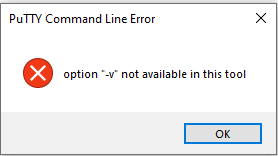
Putty error - unkown option "-pwfile"
Hello,
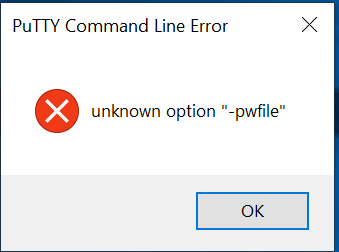
I updated today the RMD to the latest version but now all my saved putty connections do not work anymore. I get the following error:
Multiple YubiKey support
Hello David,
is there any progress in there?
To be sure that you can open the database, it would be good to be able to configure an additional second factor - as can be done with Application Security. So Yubikey, TOTP and/or DUO Security. Only one Yubikey good lead to a locked database when the Yubikey is lost.
Change all RDP-Connections to MSRDC in a batch-edit?
Perfect, I didn't know that I can change it in this way. Thank you!
Change all RDP-Connections to MSRDC in a batch-edit?
Hello Team,
is there a way to change all my existing RDP-connection to use the newer Remote Desktop App (MSRDC)? I know that I can do a batch-edit but this only works If I have only RDP-connections. But I have a lot different connection types and so I can not select all and change it to MSRDC.
How can this be done without selcting each single RDP-connection?
Best regards, Tom
Very annoying and not accessible update window in the background.
Thank you Hubert, I will try as soon as it's available.
Very annoying and not accessible update window in the background.
Today I had the same again on another machine (it happens on multiple machines). You see in ProcessExplorer two instances of RDM. I think one was the Update Window and the other the RDM itself.

I assume it mostly happens when the Update Reminder pops up and you close an RDP session to the machine where RDM is running. After that the Update Window disappears in the background and blocks completly the RDM.
Very annoying and not accessible update window in the background.
I am using the latest version and it has been happening for many versions before. I can't show you a screenshot because you wouldn't see something. Just a RDM which is unresponsive because the update window is in background.
Best regards, Tom
Very annoying and not accessible update window in the background.
Recently it happens again and again that the update window appears in the background of the RDM and is then no longer accessible. As a result, the RDM can no longer be used because the update window requires confirmation.
It would be nice if the update window did not block the whole RDM. When this happens I always have to kill the RDM completely via the task manager.
After latest Update 2020.3.20.0 my default view was reset resp. empty
Thank you. The old version solved the problem.
Have a nice weekend and stay healthy!
After latest Update 2020.3.20.0 my default view was reset resp. empty
I don`t find a link to the .19 release. Can you provide me a link please?