Putty error - unkown option "-pwfile"

Hello,
I updated today the RMD to the latest version but now all my saved putty connections do not work anymore. I get the following error: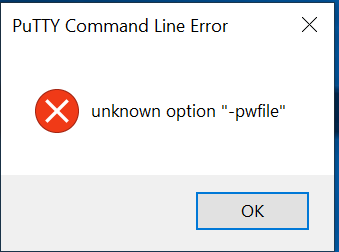
f6a9c1e1-18f0-4a5c-8a72-8c9b9800f7a5.png
All Comments (12)
Hello,
We will take a look at this issue and have opened a ticket.
Regards,
Hubert Mireault
Also, could you let us know the version of your PuTTY? It's possible the -pwfile argument might not be supported on older versions.
Regards,
Hubert Mireault
You are right I was on a damn old version (0.73), but now with 0.78 I have another very similar error: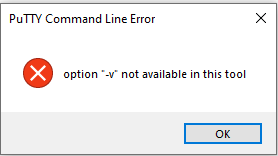
222cfc83-f135-416f-8fb9-0fcba34684dd.png
Hello Hubert,
I wanted to ask if there is a solution in the meantime?
Hello,
Can you update to RDM 2023.2.18.0? This version shouldn't have this issue anymore.
Regards,
Hubert Mireault
Problem in the first post "-pwfile" exists in Putty version 0.76 and RDM 2023.2.18.0 .
Could get rid of the problem with installation of the actual Putty version 0.78 and RDM 2023.2.18.0
I have used the 64 Bit windows installer MSI from https://www.chiark.greenend.org.uk/~sgtatham/putty/latest.html (first link on this page :)
confirmed on two systems which got the RDM update today.
Best
Alexander Meckelein
Something is still weird:
I still have connections throwing this error, however I also have connections where it works.
If I duplicate the faulty connections without any change, then these duplicated connections will work. There is something wrong in the RDM.
Hello,
Could you select a faulty entry and right click > clipboard > copy, and take the data contained in the "preview" tab and save it somewhere. Then, perform the same with the entry you duplicated. Then, compare both data, is there anything different between both? There should be a difference that explains what is going on.
On our end we weren't able to reproduce this issue after making the fix in 2023.2.18.0, so we would need a bit more information to help us fix this issue.
Regards,
Hubert Mireault
Hello Hubert,
yes there are differences:
- <CreationDateTime> ... </CreationDateTime> ... this is to be expected
- <ID>...</ID> ... this is to be expected
- <Name> ... </Name> ... this is to be expected
- in line 21 in the duplicated entry I have a "<Verbose>true</Verbose>"
But I also have entries which work like expected (no need to duplicate them) and there is no <Verbose>true</Verbose> line inside.
Hello,
If you re-save your entries that have the issue (just click properties > press OK), it should fix the issue.
The reason is that only PLink supports the verbose option now (PuTTY doesn't support it with its latest version). We will make an additional fix in 2023.2.23.0 to ignore the verbose switch if the application is not PLink, which should fix the issue without requiring you to re-save your entries.
Regards,
Hubert Mireault
Hello Hubert,
I have an additional installation of RDM on one of my remote machines. There I have a lot of putty sessions saved and I also get the error message but I can't fix it be duplicating or re-saving the entries.
I have installed RDM 2023.2.27.0.
What else can I do? And what do you mean with "PLink"?
Hello Tom,
For PLink, it's a supported application type you can configure in RDM: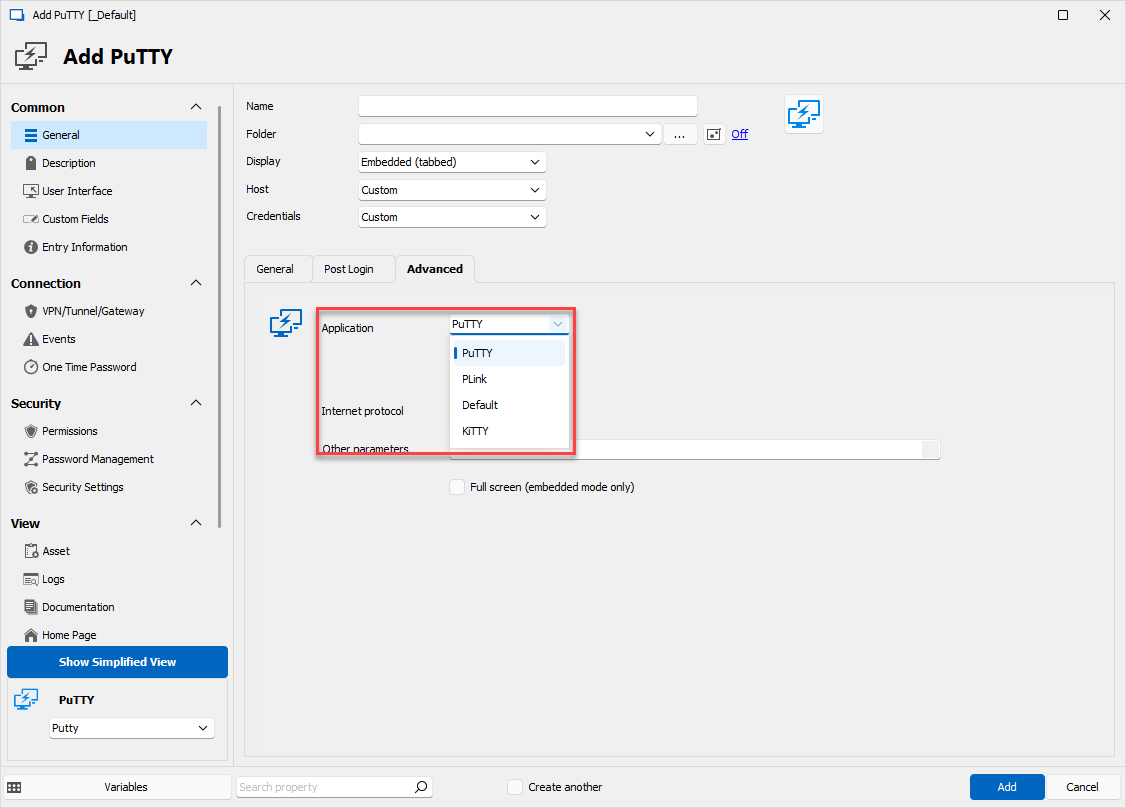
You can find more information about it here: https://the.earth.li/~sgtatham/putty/0.58/htmldoc/Chapter7.html#plink
For your ongoing issue, did you confirm that the "verbose" mode is properly disabled in your entry's settings? You can confirm by selecting one of your entries that has the issue, then doing right click > Clipboard > Copy, and looking in the "preview" tab. You should see the XML of the entry, which looks something like this: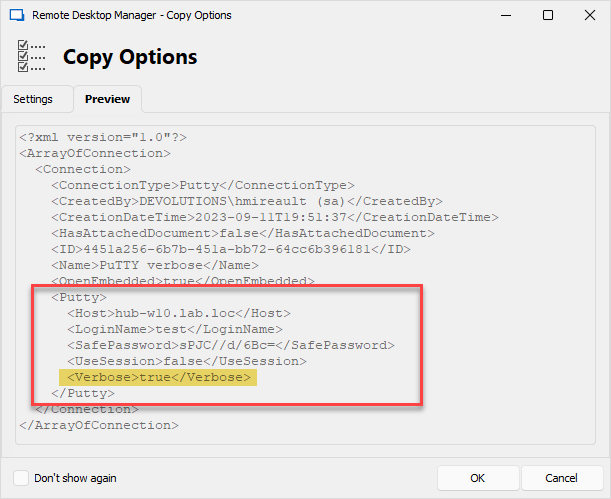
In my screenshot, there is a tag for Verbose, but in your case it should not be there.
Can you confirm what you see there?
Regards,
Hubert Mireault
32d72b10-0d6e-4b25-8a4d-2c694e1dfab5.png
da15050e-51a9-4e77-9976-d0ae3adaeaa5.png