
stephencourtney1
MS SQL Server Remote Management Session Type not working as expected
Hi Paul,
I'm guessing this won't make it into the 2016.1 release, given that the Beta is already out, - any chance of it being in 2026.2?
Thanks!
AWS Console using AWS SSO
I know this isn't going to be implemented in 2026.1 (unless it's a late addition!), but are you able to give any indication of where it may be on the roadmap?
Thanks again for a great product (and the excellent support!)
Have the RDM Tools use the gateway where applicable
Is there any update on adding Gateway support to the updated tools? Also, are there plans to make the new tools accessible from the context-menu for hosts, alongside (or replacing) the existing ones?
Macros/scripts/tools via Devolutions Gateway
I just noticed this - Have the RDM Tools use the gateway where applicable - though it doesn't look like it's implemented in the current version (2025.3.30)?
Macros/scripts/tools via Devolutions Gateway
Our only method for accessing our systems from RDM is via Devolutions Gateway, which I believe means we will be unable to make use of any of the functions available in the "Macros/scripts/tools" menu for hosts?
Assuming that is the case, is there any workaround that would help us avoid having to log on to hosts just to check services etc.?
MS SQL Server Remote Management Session Type not working as expected
We've got the same issue (with our users working remotely on non-domain machines, connecting via Devolutions Gateway to our SQL servers). I know we could create SQL accounts for each user in each SQL instance, but that would be a bit of maintenance nightmare, so having domain user credentials working would be great!
Connecting to MSSQL Server Remote Management via Gateway, with Integrated Security
It looks like we have the same issue as discussed in MS SQL Server Remote Management Session Type not working as expected - so hopefully when that is sorted, we'll be good too.
Connecting to MSSQL Server Remote Management via Gateway, with Integrated Security
I'm attempting to set up entries to connect to our MS SQL servers using the in-built entry type in RDM (verrsion 2025.3.39.0), going via our Devolutions Gateway (version 25.3.3).
Currently the setup is as follows:
Entry is set up to use a Gateway Tunnel
Entry has a hostname of 127.0.0.1 with the port that the tunnel is using
Entry is configured with "Integrated security (Active Directory)" as the "Login mode"
Credentials are set to "Inherited" (at the top level of the vault credentials are linked to a user's own AD username and password which are stored in their User Vault)
When I attempt to connect, the tunnel connects, but the SQL connection failed with "The target principal name is incorrect. Cannot generate SSPI context".
Our end-users are not logged onto their laptops with domain accounts.
Is the issue something to do with the double-hop that we're attempting? (I.e. from RDM to the Gateway, then from the Gateway to the SQL server?)
Active Directory Synchroniser via Devolutions Gateway Tunnel
I'm having trouble getting an Active Directory Synchroniser to connect over our Gateway Tunnel. I know the Gateway Tunnel itself works, as, once it's established, I am able to use other LDAP tools on my local machine to connect to it and access the Active Directory LDAP structure.
In the sync config I have the following settings:
Mode: Custom
Domain machine: <IP-of-Domain-Controller> (also tried with the FQDN)
OU/Container DN: OU=Servers, DC=My, DC=Domain
Use LDAP over SSL: Yes
LDAP over SSL port: 57141 (obtained from looking at the Gateway Tunnel details)
I've also tried with the Tunnel set to non-SSL (i.e. forwarding to port 389) and unticking the "LDAP over SSL" option, but the "Testing connection" button always times-out, giving me "Could not connect to the domain controller". Telling the entry to "Synchronise" results in the Gateway Tunnel being opened, a progress bar saying "Synchronising", but does not result in any entries being created.
We're using RDM 2025.3.29, DVLS 2025.3.14.0 and Gateway 2025.3.3.
@stephencourtney1
I realised my mistake - I was using the IP of the actual domain controller, rather than the localhost for the tunnel - all working now :)
Active Directory Synchroniser via Devolutions Gateway Tunnel
I'm having trouble getting an Active Directory Synchroniser to connect over our Gateway Tunnel. I know the Gateway Tunnel itself works, as, once it's established, I am able to use other LDAP tools on my local machine to connect to it and access the Active Directory LDAP structure.
In the sync config I have the following settings:
Mode: Custom
Domain machine: <IP-of-Domain-Controller> (also tried with the FQDN)
OU/Container DN: OU=Servers, DC=My, DC=Domain
Use LDAP over SSL: Yes
LDAP over SSL port: 57141 (obtained from looking at the Gateway Tunnel details)
I've also tried with the Tunnel set to non-SSL (i.e. forwarding to port 389) and unticking the "LDAP over SSL" option, but the "Testing connection" button always times-out, giving me "Could not connect to the domain controller". Telling the entry to "Synchronise" results in the Gateway Tunnel being opened, a progress bar saying "Synchronising", but does not result in any entries being created.
We're using RDM 2025.3.29, DVLS 2025.3.14.0 and Gateway 2025.3.3.
Scan doesn't return any users
We've trialling the PAM system at the moment, and I'm having problems with the scans - they don't seem to return any users at all. The following are in place:
A provider setup (for our Active Directory) and the connection test passes
A scan configuration, for an OU in that directory that contains users
If I run the scan (or wait for it to run as scheduled) I don't get any results.
Use Devolutions Password Manager with Devolution Server thru Azure Application Proxy
Hi Erica,
Is it still the case that Workspace won't support access via Azure app proxy (with or without pre-authentication)?
Kind regards,
Stephen
RDM accessing DVLS via Azure App Proxy fails to connect
Figured it out - I had added the FQDN in the HTTPS binding in IIS - once I removed that, everything worked fine. Not entirely sure why it didn't work with that in there, but I'll take it!
RDM accessing DVLS via Azure App Proxy fails to connect
Could it be to do with the fact that the DVLS Server Console requires me to have the URI ending in /dvls - but in Entra I have to have it ending /dvls/ ?
RDM accessing DVLS via Azure App Proxy fails to connect
Hi Michel,
The full URL (with domain obscured) on the 404 page is: https://dvls.<my-public-domain>.com/dvls/login-success
I get the same issue when opening https://dvls.<my-public-domain>.com/dvls/ in a browser as well, - after authenticating with my Entra ID at https://dvls.<my-public-domain>.com/dvls/, I get sent to the same URL with a 404 error
The access URI in the Devolutions Server Console is: https://devolsv01.<my-internal-domain>.int/dvls - I've added https://dvls.<my-public-domain>.com/dvls/ as well (and also without the trailing slash) and restarted the instance, but it's made no difference
It does indeed:
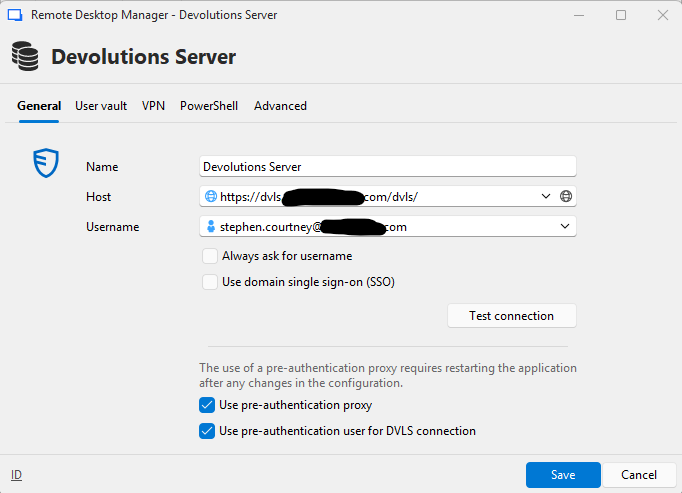
RDM accessing DVLS via Azure App Proxy fails to connect
Currently trialling Devolutions products, and have run into problems getting RDM to talk to DVLS via an Azure App Proxy. After following the guide, RDM now brings up the Azure/Entra login page, but after entering credentials just gives a 404 error "HTTP Error 404. The requested resource is not found.".
This is with the latest version (2025.3.29) of RDM, along with DVLS 2025.3.14.
Additional Active Directory user attributes in main edit dialog
Hi Paul,
Is there any update on if (when :p) this will be added to the product?
Thanks!
AWS Console using AWS SSO
I'm not sure if this is exactly the same request, but our AWS access is linked to an external identity provider for SSO, - so at present we're not able to use RDM's AWS dashboard session type as we don't have native AWS IAM users.
Additional Active Directory user attributes in main edit dialog
It would be great if we could add other attributes to the main "Edit user" dialog for Active Directory users (in our case being able to edit the Job Title and phone number). If there was some way to specify which attributes should be visible to be edited (without the end-user having to negotiate the Attributes tab, which isn't exactly the most user-friendly way to do it) that would be great.